O. James Samson - November 20, 2007
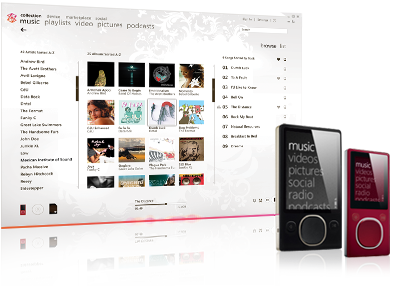 If you want Microsoft’s answer to the iTunes platform, then you only have to look as far as the Microsoft Zune platform. This absolutely blows iTunes out of the water when you consider the organization features that it has as well as a number of the different abilities it has to allow you to store and transfer files. You can label files, create playlists and do a number of different things with Microsoft Zune 2.1 that you can not do with iTunes or alternatively that would take you a lot longer to do with iTunes. MS Zune is also freeware and therefore quite easy to download and set up. If you want Microsoft’s answer to the iTunes platform, then you only have to look as far as the Microsoft Zune platform. This absolutely blows iTunes out of the water when you consider the organization features that it has as well as a number of the different abilities it has to allow you to store and transfer files. You can label files, create playlists and do a number of different things with Microsoft Zune 2.1 that you can not do with iTunes or alternatively that would take you a lot longer to do with iTunes. MS Zune is also freeware and therefore quite easy to download and set up.
2.1 is the latest version of MS Zune and it was released on November 19th. It is a piece of software that has been growing its fan base through each successive version being released and this version promises more of the same that fans have come to expect from the teams constantly working to correct any bugs and errors that might crop up in Microsoft Zune 2.1. This version primarily addresses issues of ergonomics and appearance and does a lot to streamline the code involved in the software and in doing so make the software run a lot faster. This will be welcome news to fans of Microsoft Zune 2.1 as any faster speed is usually good news!
For more information about Microsoft Zune 2.1, you can visit its website directly at http://www.zune.net/en-us/products/zunesoftware.
Rating:  Loading... No Comments »
O. James Samson - November 19, 2007
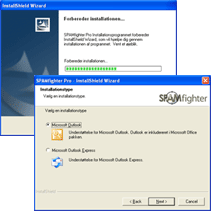 This is worth checking out- SPAMfighter Exchange Server Module (SEM). This is worth checking out- SPAMfighter Exchange Server Module (SEM).
SPAMfighter Exchange Server Module (SEM) is the easy to use Exchange server module for small and medium businesses.
What’s the big deal with this application?
- The fact that it is powered by the SPAMfighter Server, which is updated by the SPAMfighter community of more than 400,000 users from 160 countries gives it a special edge.
- The fact that it also delivers instant spam protection with no configuration or maintenance to help the small and medium businesses that often operate with little to no IT staff is an added advantage.
- Its seamless integration with Microsoft Exchange Server which makes the solution very fast is priceless.
In the latest version just recently released, these changes were effected:
- New features added
- Better support for Outlook Web Access Toolbar
- Improved statistical reporting
- Small bug fixes
Sounds interesting, doesn’t it? For more info and download, go to http://www.spamfighter.com/product_sem.asp?
Rating: Loading... 1 Comment »
O. James Samson - November 19, 2007
 If you’ve been searching for a good multi-function time and date calculator but the ones you have been coming across just don’t cut it, then this might be just the thing for you, it’s called TimeCalcPro. If you’ve been searching for a good multi-function time and date calculator but the ones you have been coming across just don’t cut it, then this might be just the thing for you, it’s called TimeCalcPro.
So what does TimeCalcPro do?
TimeCalcPro is a multi-function time and date calculator. Its features include addition, subtraction, multiplication and division of units of time. That’s not all, it adds and subtracts AM/PM times, finds the difference between dates and times, lets you add and subtract from a starting date, and has a spreadsheet for calculating timecard totals and overtime.
What I love about this cool tool is that its five calculator interfaces are simple to use, and offer many options. For example, you can choose to receive answers in days, hours, minutes, seconds or any combination that you desire.
The only hitch with this software is the price, shelling out $30 for a multi-function time and date calculator doesn’t seem like my idea of a great deal but I guess it all depends on how badly you need it and the trial version is available for those of us who are not willing to cough up the dough.
Want to see if it will work for you? Go to http://www.spudcity.com/timecalcpro/
Rating: Loading... No Comments »
O. James Samson - November 16, 2007
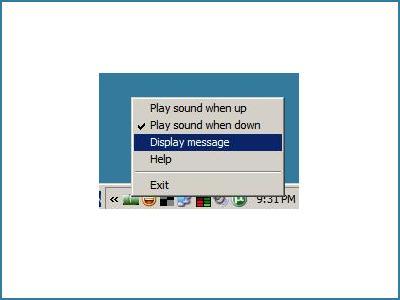 I’ve always loved simple tools, to have a tool doing one thing and doing it well is one thing I really love. That is why I like Am I Online!? I’ve always loved simple tools, to have a tool doing one thing and doing it well is one thing I really love. That is why I like Am I Online!?
Am I Online!? is a simple piece of software that will alert you when you lose Internet access and most importantly will also alert you when the connection comes back online. This way you will not have to constantly try to access a web page, or keep an eye in a “ping” window. It will alert you instantly with a message box and a sound when your connection comes back online.
Want to try out this simple tool? I know you may be thinking, doesn’t windows do that on its own, tell you when you online or not? Well the truth is, this does it faster and it’s sort of cooler.
The only thing I have against this tool though is that it would have had much success as a freeware getting donations than as the shareware it currently is, don’t know many people who will pay $10 for something they can get for free elsewhere.
But all in all the final decision , to buy or not to buy is up to you, go try it out the free edition first.
Go to http://www.easytousetools.com/am_i_online
Rating: Loading... No Comments »
O. James Samson - November 16, 2007
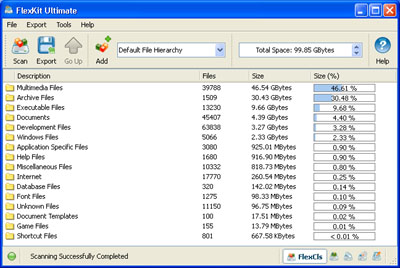 Here is a really cool tool that could come in handy. It is called FlexKit. Here is a really cool tool that could come in handy. It is called FlexKit.
FlexKit is an integrated file management toolkit, the cool thing about this software is that it allows you to classify and categorize files, analyze disk utilization patterns and identify storage consumption hot-spots But that is not all with FlexKit you also get to eliminate duplicate files and free-up storage space.
If you don’t want to make a financial commitment yet, you could try out the freeware version, FlexKit Express. FlexKit Express is completely free and may be used for any personal and commercial purposed.
If you want a more powerful and flexible version, FlexKit Professional will be your ideal choice. It is especially designed for professionals and power users. In addition to more powerful capabilities, FlexKit Professional provides command line utilities for all available file management tools.
Want to give it a try? Go to http://www.flexense.com/flexkit
Rating: Loading... 4 Comments »
Ciaran Moore - November 15, 2007
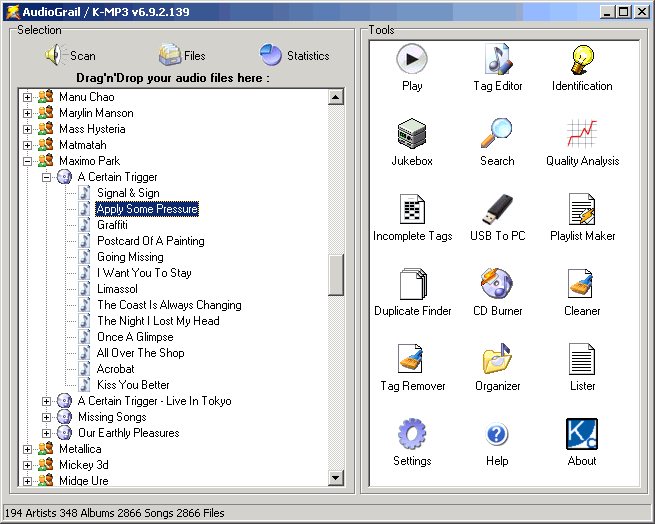 While there is many programs available that do various things with MP3s, this one tries to roll them all into one package. It lets you do just about every little thing with your mp3 collection. While there is many programs available that do various things with MP3s, this one tries to roll them all into one package. It lets you do just about every little thing with your mp3 collection.
Some of these features are identifying,removing and editing of tags ( supports ID3Tag V1 and V2 tags, Vorbis (Ogg) comments and APEv2 tags) Powered by FreeDB. (This works by downloading the tags from the internet based on the filenames).
It also has a duplicate file finder, quality analyzer, playlist generator,file organizer and player and it even supports burning.
If you are into your mp3 collection in an obsessive,detailed way, then you might wanna check out Audiograil.
It’s available in a (somewhat limited) freeware and a paid version so check out the website here for more details.
Rating: Loading... No Comments »
Ciaran Moore - November 15, 2007
 Are you a budding artist, but you can’t be bothered finding and installing an art program, maybe even having to purchase it? Maybe you’ve fooled around with microsoft paint but it isn’t enough? Then you might wanna check out this cool web-based application. Are you a budding artist, but you can’t be bothered finding and installing an art program, maybe even having to purchase it? Maybe you’ve fooled around with microsoft paint but it isn’t enough? Then you might wanna check out this cool web-based application.
It’s basically a blank canvas which you can paint on. You can then choose to save it online (it creates a link) or email it to yourself or a friend.
The interface is very nice with a realistic looking paint brush, complete with shadow. I like how it allows multiple undo in case you change your mind half way through about how your masterpiece is developing! You can also adjust brush size, opacity and add text.
It has a cool “replay” function too, this lets you to replay your creation step by step!
Try it out for yourself right now by visiting the site here.
Rating: Loading... 1 Comment »
Tilgore Kraut - November 15, 2007
 Most of us desire to record audios to have them stored in our computers or share it with friends. Sound Recorder Pro 2.0 software would help you do this in a convenient way. You can have the digital recordings done with the help of this software. The software can let you record almost all type of audios from the CD, microphone, etc. The professional user is certainly going to be thrilled by this utility and the normal user too would be benefited by it. Most of us desire to record audios to have them stored in our computers or share it with friends. Sound Recorder Pro 2.0 software would help you do this in a convenient way. You can have the digital recordings done with the help of this software. The software can let you record almost all type of audios from the CD, microphone, etc. The professional user is certainly going to be thrilled by this utility and the normal user too would be benefited by it.
Just download, install and get started with the recoding of the audios. The appearance of the software is attractive in a simple manner. The color of the screen catches the eye of the user. You have the volume control and the options for the recording placed on the screen. When you’re ready to do the recording you need to start the recording after that you can play or copy the recording to a destination. It shows the information on the top of the recording status bar. Make the selection for the audio recording to be microphone, phone line, CD player, Stereo mix, etc. For making the recoding task more personalized and according to your requirements. You can set the recording options and enable the file to be saved as Mp3 or Wav file. Enable or disable the noise reduction and even set the bitrate, sample rate selected. Make the selection of the mode to be stereo, dual channel or mono. If you do not want any changes then you can have the default settings activated and also have the file operation dialog box opened after the recording. The software lacks as the help file for the program is available online only. Users not having the internet access cannot have any further information instantly.
Even though it has one drawback but that also is not going to hurt much as the benefits overwhelm it.
{More info and download}
Rating: Loading... No Comments »
Tilgore Kraut - November 13, 2007
 Having a Zune player but you cannot have all the songs and videos into the format supported by it. Searching for a solution then Convexsoft Video Zune Converter 1.4 software might prove to be a good one for you. Now you can have various formats files converted to the Zune-compatible format and also you can extract the audios from the video files. It’s multipurpose as it can be used by normal and even professional users both. Having a Zune player but you cannot have all the songs and videos into the format supported by it. Searching for a solution then Convexsoft Video Zune Converter 1.4 software might prove to be a good one for you. Now you can have various formats files converted to the Zune-compatible format and also you can extract the audios from the video files. It’s multipurpose as it can be used by normal and even professional users both.
To begin with just get the software downloaded and installed at your system. The program opens with the list space set at the left side and the right side has the device picture set there that shows the playing option below it. It easy to make the selection as you can make the individual file selection or even select the folder. If you have chosen the wrong file select and remove it and even if you have chosen the wrong folder then you can clear all. When you’re done with the selection of files then you just need to have the output file format selected. Make the separate destination folder and, browse and direct the files to it or you can choose an existing destination. Not just converting the video files if you want to have the audio from any audio-visual file you can perform the work of extraction also. The screen of the program also gives a pleasing look to the user so that it does not create monotony while working. When you’re converting the videos you need not to have the process taking place one by one for each file as the program also supports the batch conversion process. The ‘Help’ file can be accessed through the ‘Help’ option on the menu bar.
The features are easy to learn and software is also fun to work with.
{More info and download}
Rating: Loading... No Comments »
Tilgore Kraut - November 13, 2007
 When you’re viewing the videos in your PC, don’t you often feel like having those on your phone or any other device? Even sometimes it happens that you can want to have a particular music, etc but the problem arises that it is not a single file rather it is a video file. ABest RM RMVB Video Converter 3.74 software is the one that would help you to solve the problem as it has all the required function to perform the work. When you’re viewing the videos in your PC, don’t you often feel like having those on your phone or any other device? Even sometimes it happens that you can want to have a particular music, etc but the problem arises that it is not a single file rather it is a video file. ABest RM RMVB Video Converter 3.74 software is the one that would help you to solve the problem as it has all the required function to perform the work.
For converting the video to various different formats and having the music files extracted you just need to get the software downloaded from the site and get it installed at your system. When you’re done with the installing and the launch the program; a decent deep colored appears in front of the user. The software shows the function that can be operated and understood well by even a normal user. You just need to make the selection of the files that you want to convert to the other format. The program supports the conversion from different formats to various other ones. It supports video conversion from RM, RMVB files to the AVI, Xvid, MPEG, WMV, Flash SWF, MP3, MP2 Audio, ands so many more. Along with all this you can have the audio files extracted from the audio-visual files. Make the selection of format in which you want the file to be converted from the mid bar containing the format labels. You can have the file played for making the confirmation about the selected file. You can get the different details about the files selected like the source video, frame size, status, etc. The ‘Help’ option is there for providing the details relating to the program so that it is easy for you to work on it.
The software with its capability to function at the best has reached the ratings of 4 points. Go get the software and let the music create ripples of enjoyment and fun flow all around you.
{More info and Download}
Rating: Loading... 2 Comments »
|
|
|



 (2 votes, average: 4.50 out of 5)

