O. James Samson - November 20, 2006
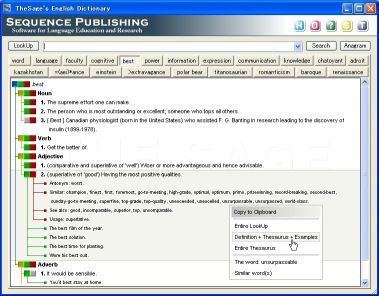 The thing with dictionaries is that it’s not enough to have them you must know how to use them. But the truth is this; there are so many dictionaries that are well stocked with words and their meanings but not easy to use. If you’ve had this problem with dictionaries, you might consider using TheSage. The thing with dictionaries is that it’s not enough to have them you must know how to use them. But the truth is this; there are so many dictionaries that are well stocked with words and their meanings but not easy to use. If you’ve had this problem with dictionaries, you might consider using TheSage.
The Sage’s English Dictionary and Thesaurus is a complete dictionary and a multifaceted thesaurus of the English language. The fact that it runs locally without an Internet connection makes it a must-have.
In case you are still wondering, “How does TheSage differ from any other traditional dictionary?” You might want to check the following features it possesses:
- A Comprehensive Dictionary with over 145,000 references with multiple detailed definitions (over 200,000)
- Tabbed interface, which allows multiple definitions and searches to be readily available
- A Complete Thesaurus with nearly 1,200,000 relationships between definitions (synonyms, antonyms, hypernyms, hyponyms, meronyms, holonyms…)
- A large collection of “Example Sentences” that already includes approximately 35,000 examples of usage
- Quick cross-referencing
- Standard and advanced wildcard search functionality
- Anagram search- only valid English words are returned
- History and session record keeping
- Options that allow customization of the appearance of TheSage
And so much more!
What really makes this particular one, my dictionary of choice is the fact that it can look up words directly from almost any program (IE, Word, Firefox, Outlook, Thunderbird, etc ) and is 100% portable [you can run it, fully functional, from portable devices such as a USB]
Want to check it out?
Click here for more info and download
[Silly Me! I forgot to mention, it’s totally FREE!]
Rating:  Loading... No Comments »
O. James Samson - November 20, 2006
 Needing to stay in tune with up to date information, I’ve always had to check my favorite websites manually but then I discovered WebMonit and things took an automatic turn for the better. Needing to stay in tune with up to date information, I’ve always had to check my favorite websites manually but then I discovered WebMonit and things took an automatic turn for the better.
WebMonit keeps you up to date and saves you time doing it. WebMonit is a powerful and easy to use web pages monitor tool. It can monitor web pages changes automatically. Monitor content could be the whole webpage or a part of webpage or just a field. A user-defined event could be triggered when change occurs.
So if you need to watch the Stock Market, get the latest news, watch for software updates, latest movies releases and so on. This is for you.
I quite agree with the publisher that this piece of software “saves you time”, “keeps you up to date” and “gives you peace of mind” all at the same time. If you need to watch a large volume of information, it can be overwhelming to do it manually. With WebMonit you can let the computer check the websites regularly and contact you as soon as soon as it detects a change.
or more info and free download, CLICK HERE!
Rating: Loading... No Comments »
O. James Samson - November 20, 2006
Have you ever had crazy and wild thoughts like trading places with Benjamin Franklin on the 100-dollar bill? Making your dog the president? Your baby an astronaut? Etc. Well this might just be your opportunity to make your wild dreams come true. Funphotor is just what you need.
ZeallSoft FunPhotor is fun and easy to use photo blending software, a fun-filled Windows application that lets you blend your family portraits with well-known artwork to create comical images. With a few short steps, you can add your face to the carved granite US Presidents on Mount Rushmore, put your portrait on a $100 bill, or create all sorts of gag gifts for your friends.
Call me unserious but the fact that it is great for practical jokes is why I really love this software. You can make crazily funny greeting cards with it and have a whole lot of fun having laughs on people. It’s really a fun-software.
Some of its key features include:
- Supports Video Cameras to take your picture
- Only 4 steps to create fun photo
- Support Multi-Languages: English, French, German, Italian, Spanish
- Create & share your own surprise templates
- Over 200 cool templates to make editing easier
Etc.
Want to check it out? Click HERE!
Rating: Loading... No Comments »
O. James Samson - November 20, 2006
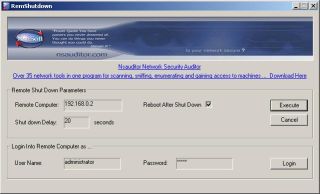 In need of a free tool that you can use to shut down or restart network computers? You might want to try this freeware I just discovered! RemShutdown. In need of a free tool that you can use to shut down or restart network computers? You might want to try this freeware I just discovered! RemShutdown.
It is a very simple freeware, designed with a user-friendly interface that allows remote shutdown or restart of network computers. It enables you to specify a delay during which a specified message can be displayed and applications running on the remote computer at the time of the shut down can be closed. The simplicity of its design makes it very easy to use.
It is worthy of note though, that it works best with Windows 2000 and above, any OS lower than 2000 will not work well with it. The file size is just 518 KB so having a free disk space of 1MB and at least 32MB RAM should give you a quick download.
DO you need it? CHECK IT OUT!
Rating: Loading... No Comments »
Ciaran Moore - November 20, 2006
 Ever wondered if your Internet connection speed even comes close to what you pay for each month? I do! So i was happy when i found Speedtest.net, a cool looking site where you can choose from a selection of servers around the world and check your upload and download speed. Ever wondered if your Internet connection speed even comes close to what you pay for each month? I do! So i was happy when i found Speedtest.net, a cool looking site where you can choose from a selection of servers around the world and check your upload and download speed.
I kinda felt like i was planning for nuclear war with the flashy graphics, luckily for us all, i wasn’t!
It’s a cool site to go to if you wanna check just how fast your connection is going. See if it’s as fast as your provider claims, although results can vary at different times due to internet conditions.
It’s also a handy and useful tool for anyone who does things such as internet gaming,where having a fast speed is necessary for some games.
Speed on over to the site to check it out.
Rating: Loading... No Comments »
Ciaran Moore - November 19, 2006
 If you every have to give a webpage address to someone, its pretty easy to just copy and paste it, right? What if you had to write it down and it was long and complicated or worse, had to give it over the phone? If you every have to give a webpage address to someone, its pretty easy to just copy and paste it, right? What if you had to write it down and it was long and complicated or worse, had to give it over the phone?
Now imagine if it was this one: ‘http://local.google.com/maps?f=q&hl=en&q=white+house&sll=37.0625,-95.677068&sspn=26.991659,68.994141&ie=UTF8&om=1&z=16&ll=38.89763,-77.033515&spn=0.012909,0.033689’ …
Well, good luck!
Or how about you could just change that into this? http://stickythis.com/thewhitehouse
That’s where Stickythis comes in. It changes any URL into ‘http://stickythis.com (whatever you want it to be)’
You can go check it out here and add it to your collection of useful bookmarks!
Rating: Loading... No Comments »
O. James Samson - November 19, 2006
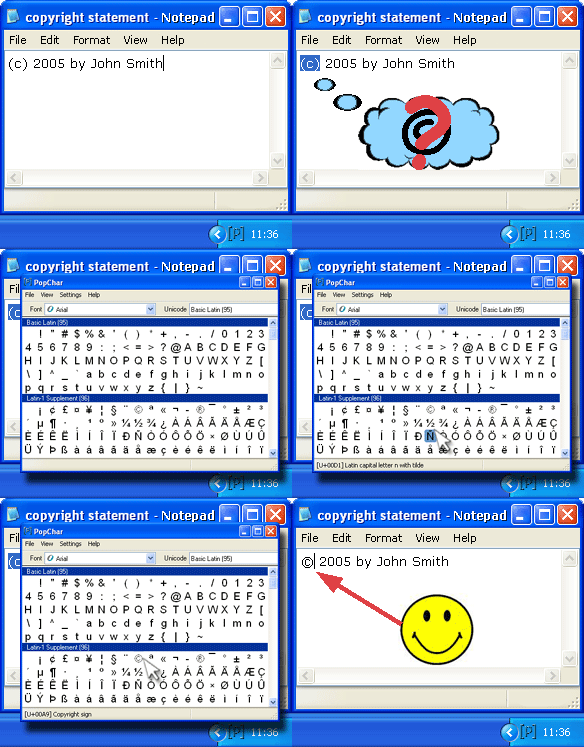 Trying to type names with special characters at times may seem to be a daunting task. If you have friends with names that have characters not in the 26 alphabets you would have noticed that trying to type their names correctly slows down your typing as you have to seek out the character map on your PC and search for the appropriate characters. Maybe you’ve even decided that no matter how they feel about it you would rather type “Bergström” as “Bergrstrom”, than go through the stress of looking for special characters like “ö”. No need to get yourself all worked up or cross your friends over special characters, PopChar can help you maintain peace with your friends. Trying to type names with special characters at times may seem to be a daunting task. If you have friends with names that have characters not in the 26 alphabets you would have noticed that trying to type their names correctly slows down your typing as you have to seek out the character map on your PC and search for the appropriate characters. Maybe you’ve even decided that no matter how they feel about it you would rather type “Bergström” as “Bergrstrom”, than go through the stress of looking for special characters like “ö”. No need to get yourself all worked up or cross your friends over special characters, PopChar can help you maintain peace with your friends.
PopChar is a user-friendly character map that unlike the conventional character map is easy to use and even easier to access. WHY? Because this character map sits quietly in your user tray. Whenever you need a special character, it is there – no matter what application you’re currently using.
PopChar is a utility that lets you insert special characters, accented and foreign letters, etc. from all installed fonts into your documents. You never need to search for and remember keystrokes any longer. Just pop up the window, click the desired character, and the character appears in your current document. PopChar is also a better option than the normal character map if you need to insert Hebrew characters, Arabic characters, HTML characters, Unicode characters and more.
Don’t take my word for it! Try it out your self!
You need to note this though; the free version contains limited characters, so if you download it and some characters appear dim and inaccessible, it’s not because something is wrong with your system. It’s because you are expected to order the full version to get access to the full features. But you can check out the trial version first and even learn more about its features HERE!
Rating: Loading... No Comments »
Tilgore Kraut - November 19, 2006
 Software maker Adobe may sue Microsoft if it is not satisfied with the European Union’s steps to ensure Microsoft’s new operating system does not shut out rivals, Adobe’s chief executive said. Software maker Adobe may sue Microsoft if it is not satisfied with the European Union’s steps to ensure Microsoft’s new operating system does not shut out rivals, Adobe’s chief executive said.
Bruce Chizen told Germany’s Euro am Sonntag newspaper there were two options: to sue Microsoft directly or to work with the authorities and provide them with the necessary information.
“We’re doing the latter. Then we’ll see,” Chizen said in an interview released on Saturday ahead of publication on Sunday.
Microsoft’s new Vista software, due to be released early next year, contains a version of fixed document formats which would compete with Adobe’s PDF format. Microsoft has pledged to make changes to its version.
Chizen added that Adobe, known for its popular Acrobat document reader, was considering offering some of its more sophisticated software for photo and video editing over the Internet, financed by advertising.
“It would be a shame if we could not fit this into our business model,” Chizen said.
via Reuters
Rating: Loading... No Comments »
Tilgore Kraut - November 18, 2006
 Microsoft being so generous lately. What do I mean? Well, guys at Neowin.net got an info that everyone who took part in the Windows Vista beta test (and that’s about 20,000) company have provided a complimentary copy of Windows Vista Business or Ultimate. But there’s a little catch – really not all of 20,000 testers got new & hot software but only those who submitted at least 1 bug report. Microsoft being so generous lately. What do I mean? Well, guys at Neowin.net got an info that everyone who took part in the Windows Vista beta test (and that’s about 20,000) company have provided a complimentary copy of Windows Vista Business or Ultimate. But there’s a little catch – really not all of 20,000 testers got new & hot software but only those who submitted at least 1 bug report.
Microsoft sent out a mail to those testers just a few minutes ago which specified that it is being offered as a download only. No media will be mailed, and only currently active, invited members of the Windows Vista technical beta program who filed at least one bug are receiving this offer.
Well, can you say now Long Live Micrisoft or still not?
via Neowin
Rating: Loading... 1 Comment »
O. James Samson - November 17, 2006
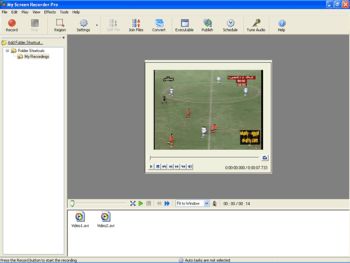 If for any reason at all, you are in need of a good screen recording software that allows you to record your desktop screen activity effectively for later playback, you might want to consider this cool one, My Screen Recorder Pro. If for any reason at all, you are in need of a good screen recording software that allows you to record your desktop screen activity effectively for later playback, you might want to consider this cool one, My Screen Recorder Pro.
This advanced screen-capturing tool can capture anything you see on the computer screen, including the entire desktop, windows, menus, cursors, and even video with sound. You can also use it to record to AVI, Windows Media or Flash files. And if you are thinking about creating demos, I mean developing videos to demonstrate features of a Website, software product, creating movies used in user training or any other task that requires capturing desktop activity, this is the software for you.
One thing I really dig about it is that you can speak into the microphone while recording is in progress to include audio with the recorded video. That means you can create your own audio narration to go with the recording. It’s really cool!
As cool as the software is, I still think it’s kind of expensive but you can check out the free trial version and see if it is exactly what you need.
Rating: Loading... No Comments »
|
|
|





