Phil South - October 27, 2006
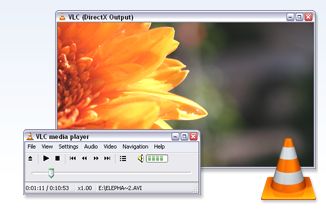 VLC is the best cross platform media player for both PC and Mac. It’s special because not only does it play a fair few different types of media, but it also allows you for the most part to circumvent region coding on DVDs. Yes it true, on the Mac version if you have any DVDs which are region 1 and your drive is hard coded to region 2 you can actually play it. VLC is the best cross platform media player for both PC and Mac. It’s special because not only does it play a fair few different types of media, but it also allows you for the most part to circumvent region coding on DVDs. Yes it true, on the Mac version if you have any DVDs which are region 1 and your drive is hard coded to region 2 you can actually play it.
Okay so sometimes the DVD menus don’t work properly, but they do mostly work, which is more than you can say for other media players and region coded DVDs. Hmm.
The program is very useful for playing files which won’t play elsewhere, it is VERY forgiving, and even plays subtitle formats which makes viewing divx movies in foreign languages all the more doable.
VLCis available for many platforms (some you will be aware of and some you may never have heard of) and is obtainable over at http://www.videolan.org/vlc/. Respect due.
Rating:  Loading... No Comments »
Ciaran Moore - October 27, 2006
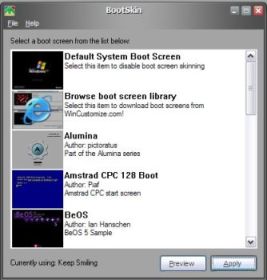 If you want a change from watching the same old “Microsoft Windows XP” standard bootscreen that comes with windows, it used to be a tough procedure to replace it with anything else (I should know, i tried one time back when i had Windows 98 and nearly locked up my windows from even loading!) If you want a change from watching the same old “Microsoft Windows XP” standard bootscreen that comes with windows, it used to be a tough procedure to replace it with anything else (I should know, i tried one time back when i had Windows 98 and nearly locked up my windows from even loading!)
Thankfully this little program does it for you, easily, safely and free! So, for example,whether your feeling nostalgic for the good old days of your commodore 64,or you want something a little more hi tech,theres lots of free bootscreens of various styles to choose from here to get you started.The program can be downloaded for free from here. ………(and here‘s one of my personal favorites ; )
Rating: Loading... 2 Comments »
Phil South - October 26, 2006
 Openoffice.org is both a web site and a free suite of office productivity programs. You could say it’s the open-source equivalent of Microsoft Office, but Openoffice.org aren’t allowed to. The six components of the suite are Writer, Impress, Math, Draw, Calc and Base. Openoffice.org is both a web site and a free suite of office productivity programs. You could say it’s the open-source equivalent of Microsoft Office, but Openoffice.org aren’t allowed to. The six components of the suite are Writer, Impress, Math, Draw, Calc and Base.
Writer is a word-processor and all you really need to know about it is that it is full featured all the things you would expect, but it opens and writes Word files. Impress is a presentation program, which speaks fluent Powerpoint. Do you see a theme developing here? Okay, so the one reason for existence for Openoffice is NOT to be a MS Office clone, but it’s helpful that it has compatible file types. Why? Because that means it is actually useful in an office context. Read the rest of this entry »
Rating: Loading... No Comments »
Ciaran Moore - October 26, 2006
 If you’re looking for a decent free antivirus program with a nice looking user interface, you could do a lot worse than to check out Avast antivirus. As well as the regular on-demand and on-access scanner, it protects most email clients and p2p programs against viruses, also has a web shield and network shield and it’s also skinnable! If you’re looking for a decent free antivirus program with a nice looking user interface, you could do a lot worse than to check out Avast antivirus. As well as the regular on-demand and on-access scanner, it protects most email clients and p2p programs against viruses, also has a web shield and network shield and it’s also skinnable!
This is my free standalone antivirus program of choice, as it’s easy to use, looks good, has regular updates, and has a very good reputation when it comes to catching and eliminating viruses. It regularly recieves 100% in the “virus bulletin” test, a very good sign it protects good , see https://www.virusbtn.com for more info. (Requires free sign up).
On a side note its worth checking out this site to get the latest ratings of how good various antivirus software is at doing their job, they throw a ton of “in the wild” viruses (virii?) at them and see how they deal with it. (This program has scored 100% every month in the last 2 years). After all what good are its looks and features if it ignores all the nasty stuff!
Speaking of which, its also got very good eye and ear candy, because as well as a nicely designed and skinnable interface, it announces with a voice when virus database has been updated or when it detects a virus! So if you like that kinda thing (and what computer geek doesn’t! oh come on, admit it!) it’s well worth checking out as it does its job great and with style!
More info and the free download here http://www.avast.com/.
Rating: Loading... 7 Comments »
Mark Rollins - October 26, 2006
 I have a confession to make. I hate cats. I can’t stand the way they have this degree of cuteness that only masks their rebellious, independent nature. I also hate the way they climb things with their claws and become demons in the presence of yarn. This is why I avoided downloading Neko, a game where you play a kitten who climbs things and plays with yarn. I have a confession to make. I hate cats. I can’t stand the way they have this degree of cuteness that only masks their rebellious, independent nature. I also hate the way they climb things with their claws and become demons in the presence of yarn. This is why I avoided downloading Neko, a game where you play a kitten who climbs things and plays with yarn.
However, Neko has made a cat-lover out of me. This game has everything you would want out of a Mario-style game: cuteness, action, and lots of special moves. When I say cuteness, I mean little kitten cuteness. The cuteness that dies when a kitten becomes a self-loathing, self-loving cat. I am assuming that the game is named after the main character, so let’s call him Neko. Your job is to take Neko through these worlds and help save his caged cat friends. On the way, you encouner snakes, hedgehogs, and other non-cute animals who will try and stop you. You can stop them with yarn balls. (That’s right, yarn balls, and I’ll explain more later.) You also collect little bottles of milk which are kind of like the “coins” of this game. You can also collect the yarn balls that are used to beat your enemies, and they serve other purposes too. Read the rest of this entry »
Rating: Loading... 1 Comment »
Mark Rollins - October 25, 2006
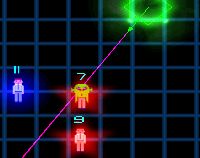 Sentinella is a game that is so poor it wouldn’t have worked on the old-school Atari 2600. The premise is interesting, though. You play this robotic tank entity who is programmed to defend a group of humans. These humans do nothing but wander around in this black field all day, but there are aliens amongst them! These aliens have infected the humans as well. Sentinella is a game that is so poor it wouldn’t have worked on the old-school Atari 2600. The premise is interesting, though. You play this robotic tank entity who is programmed to defend a group of humans. These humans do nothing but wander around in this black field all day, but there are aliens amongst them! These aliens have infected the humans as well.
The humans normally give off a blue aura, but if a human and an infected human are within close proximity of each other, they will both glow red. That’s your cue that one is an alien. But which one? Which one? That’s the tricky part. To make it even more tricky, if two infected aliens are close to each other, they will give off a blue aura. So the trick of the game is figuring out who’s human and who’s alien with process-of-elimination tactics, kind of like Minesweeper but in motion. Read the rest of this entry »
Rating: Loading... No Comments »
Ciaran Moore - October 25, 2006
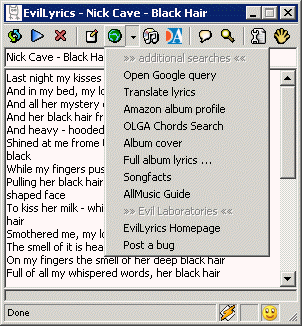 Have you ever wanted to find out what the hell are those rock bands are singing about? And of course wanna make it quick? Well, you can search for your favorites band lyrics on the web or take a look at this WinAmp plugin… Have you ever wanted to find out what the hell are those rock bands are singing about? And of course wanna make it quick? Well, you can search for your favorites band lyrics on the web or take a look at this WinAmp plugin…
EvilLyrics… Don’t be afraid of a scary title it’s not that spooky at all. All you have to do is listen to the song and the words each time you wanna look them up would just pop up automatically in a little window (just like one on the picture). Hold on, that’s not all! It’s also compatible with the excellent visualization that comes with WinAmp known as “milkdrop”. So when you’ve got sick and tired of those nasty documents on your monitor screen you can just turn it on visualization screen and see not only “milkdrops” but songs lyrics also. Very cool indeed! And with a combined database of over 15 million songs, you are almost sure to find whatever you’re listening to. I highly recommend this to all music fans, now you can finally know what they were singing about and find out it wasn’t at all what you had thought it was!
Ps: EvilLyrics also works with Windows Media Player, MusicMatch, Foobar, Quintessential Player, iTunes, Realplayer/Realone and MusikCube!
More info and free download here.
Rating: Loading... 3 Comments »
Ciaran Moore - October 25, 2006
 If you ever tried to partition your hard drive, you know that it can be a very complicated process, best done when you are installing or reinstalling your operating system. But with partition magic there’s no need to worry because you can do it on your existing operating system without a complicated procedure. If you ever tried to partition your hard drive, you know that it can be a very complicated process, best done when you are installing or reinstalling your operating system. But with partition magic there’s no need to worry because you can do it on your existing operating system without a complicated procedure.
It can be very useful to have at least one other partition, which the system then treats as a second drive, that way if for any reason you have to reinstall Windows, you only loose what’s on the “first drive”. Everything on the “second drive” (let it be drive D) stays untouched even after you reformat the main drive (drive C). Your computer treats it as two separate disks (even though in reality its still one, don’t worry, its not the old sawing someone in half trick gone wrong!.. after all this is partition “magic”!) So having a second partition for back up purposes alone is well worth while.
The other reason is you may want to be able to “dual boot” that is, to have a second operating system on the “second drive” with lets say, Windows 98 for games that don’t work on XP, or with Linux installed maybe. Partition magic allows you to do these things, and just about anything partition related you could ever need, such as merging, resizing, etc safely and effectively!
More information can be found here.
Rating: Loading... No Comments »
Ciaran Moore - October 24, 2006
Your hard drive needs to be defragmented regularly to keep your pc running in optimum condition, or else your computer begins to slow up after a while due to files and parts of files being stored in scattered places all over the hard drive. Therefore it’s essential you defragment it from time to time. A lot of people probably don’t even bother or don’t know they have to, and if they do, it can be a slow or almost impossible process, as it can keep getting interrupted by screensavers, virus scanners accessing the drive, etc.
Leading to you going crazy and maybe even giving up on defraging altogether! That’s where diskeeper comes in, with its simple to understand, “set it and forget it” settings, it’s fully automated very regular defragmentation and some advanced options much better than what the built in windows defragmentation is capable of, such as defragging the MFT (master file table) and most times you won’t even notice it when its doing its thing and can continue using your computer as if nothings happening, it can’t even be interrupted by those other things i mentioned! So once you “set it and forget it” (yeah, it’s really what the settings called, i didn’t just make that up!) nothing can go wrong and you can rest assured your hard drive and files are being kept in top condition! Although in my opinion it could be a tad cheaper.
Go here to grab the trial version http://www.diskeeper.com/downloads/menu.aspx
Rating: Loading... 1 Comment »
Phil South - October 24, 2006
 Adusoft Photo DVD Slideshow is a simple program which has some very powerful features. You can assemble your photos into a slide show using simple point and click tools, and choose from 190 transitions, some professioanlly produced menu designs, and then burn the slideshow right onto DVD. It couldn’t be easier. Adusoft Photo DVD Slideshow is a simple program which has some very powerful features. You can assemble your photos into a slide show using simple point and click tools, and choose from 190 transitions, some professioanlly produced menu designs, and then burn the slideshow right onto DVD. It couldn’t be easier.
It’s a snap, just click on your photos and choose the transitions between them, maybe a little music to go with it. It’s really very simple and pretty much trouble free. Obviouslyyou may have issues with certain DVD recorders/burners, but that’s the way of things. DVD standards are a good idea, which is why there are sadly so many of them!
That joke aside, the tests with our DVD recorder were fine, so no problems here. Registering the program costs just $39.95, and at that price it’s a bargain. Click here to visit Freedownloadscenter or go to Adusoft’s web site
Rating: Loading... No Comments »
|
|
|


 (2 votes, average: 4.50 out of 5)



