O. James Samson - May 11, 2013
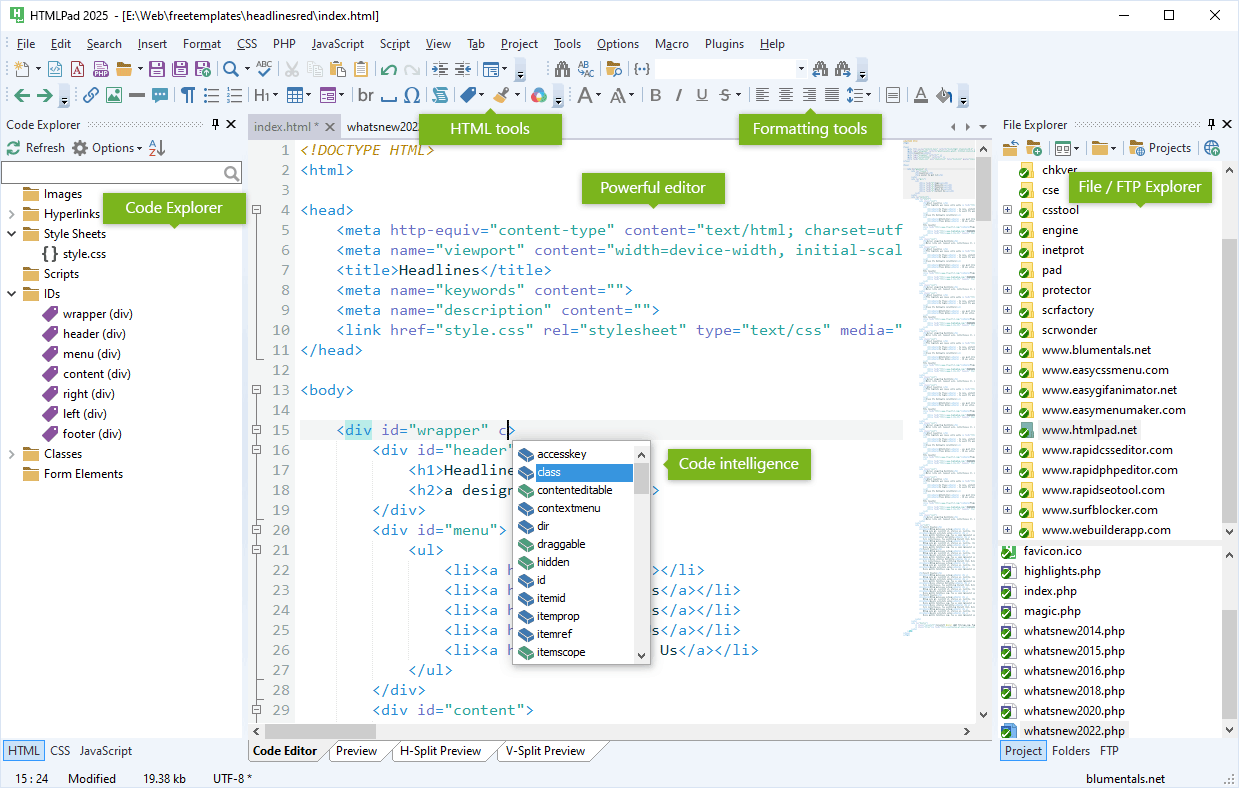 If you’re searching for an application that helps you to create and edit your CSS, HTML, XHTML and Java script codes quickly and easily, then you better check out HTMLPad. If you’re searching for an application that helps you to create and edit your CSS, HTML, XHTML and Java script codes quickly and easily, then you better check out HTMLPad.
What is HTMLPad?
HTMLPad is a intelligent all-in-one HTML, CSS and JavaScript editor that enables you to create, edit, validate, reuse, navigate and deploy your HTML, CSS and JavaScript code faster and easier than ever. It makes the coding process a whole lot faster thus saving you time. Its user interface is easy to use both for the beginner and advanced user.
The program has special features for HTML, CSS, JavaScript, VBScript, PHP, SSI, ASP, and Perl which includes: advanced and fully customizable text editor, UTF-8 Unicode support, Syntax Highlighting for HTML, CSS, JavaScript, VBScript, PHP, ASP, Perl and XML, auto complete for HTML, CSS and Java script, HTML and CSS validation, different types of HTML, XHTML and CSS standards compliance, CSS and HTML code inspectors, instant preview for HTML and CSS, FTP connectivity, spell checker and a lot of other robust features.
Blumentals Software, the author of this program, has added some changes to this version. They are: Improved custom screen font size support, Improved Code Explorer filter usability, Fixed bug with CSS preview file drop-down, Fixed a few rare A/V bugs, Support for F5 and F2 short cut keys in File Explorer sidebar, Fixed some CSS syntax highlighting bugs as well as Fixed bug with opening multiple files.
Downsides?
It has a 50-day time out. Its easy to sue with very cool features.
To find out about this amazing application, please go to Htmlpad.net.
Rating:  Loading... No Comments »
O. James Samson - May 11, 2013
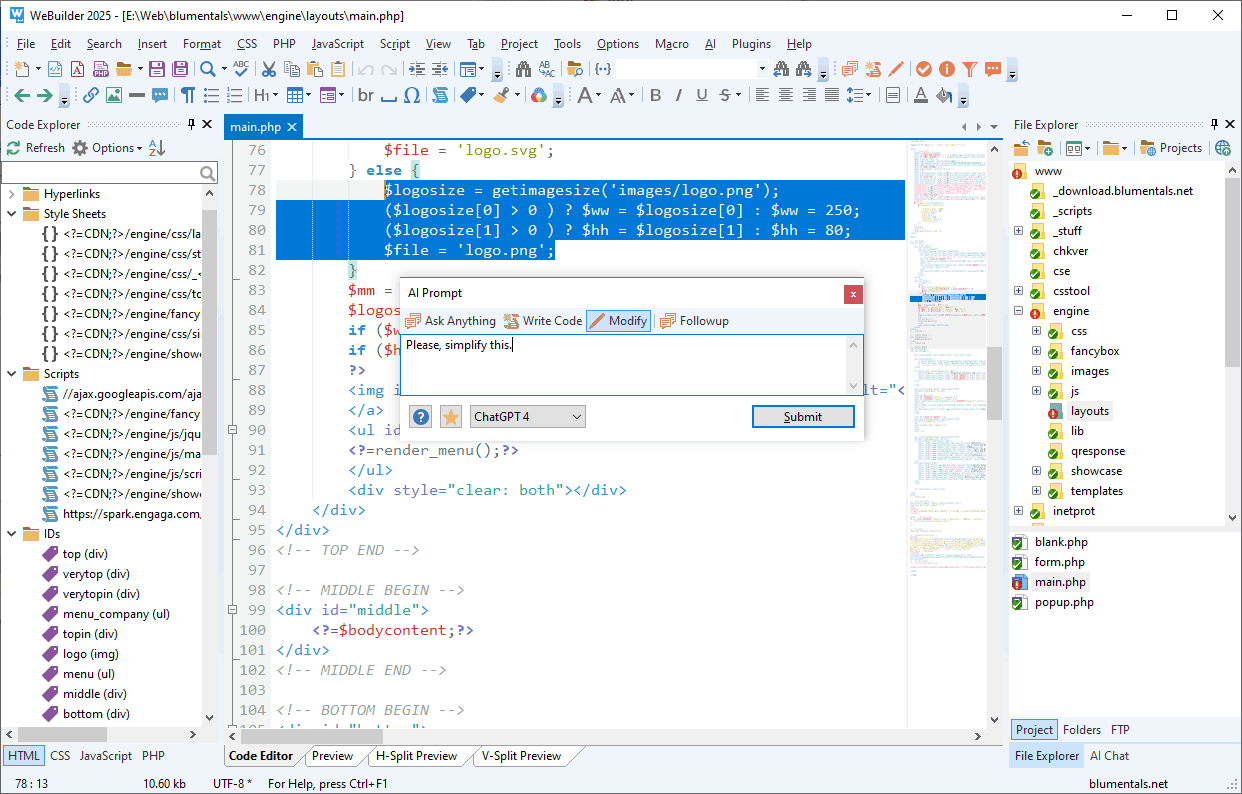 Need a web code editor for your programming needs? WeBuilder is what you need. Need a web code editor for your programming needs? WeBuilder is what you need.
What is WeBuilder?
This is a complete web code editor for all your web programming needs. Whether you’re an expert or a sheer programming enthusiast, this application is easy to use and helps you get the work done faster, save your time and increase productivity. The interface of the application is user-friendly; you can easily start projects while working with the Code Explorer (e.g. images, hyperlinks, style sheets, classes, form elements) and File Explorer.
Clean and convenient interface, quick startup, true flexibility and powerful features allow you to create and edit HTML, XHTML, CSS, JavaScript, VBScript, PHP, ASP, ASP.Net, SSI, Perl, Ruby, WML code faster and easier than ever, while integrated tools enable you to validate, reuse, navigate and deploy your code in an efficient and sophisticated manner.
In the main working environment you can edit code, preview the design, or split these two panes horizontally or vertically. You can also open files from the web or via FTP, upload projects via FTP, set bookmarks, insert script files, as well as add PHP, CSS or JavaScript elements from the menu bar, instead of writing code parts.
Some of the main features of this program include: syntax highlighting for HTML, CSS, JavaScript, PHP, ASP, ASP.Net, WML, XML, Perl, Ruby, SQL, script function hints, auto complete, bracket highlighting, code collapse, built-in File and FTP/SFTP Explorer, project management, built-in Web browser, PHP debugger, SQL explorer, integration with Web server, code explorer, find and replace in files, multi-item clipboard, UTF-8 Unicode support.
Other features of WeBuilder let you manage multiple projects, use a W3C or CSE HTML validator, record and run macros, manage plugins, switch to full screen mode, install WeBuilder to a USB flash drive as a portable application, as well as import and export settings, just to name some of the few dozens of options.
Downsides?
It has some minor disturbing bugs. Apart from this it is quite a good utility.
To know more, visit WeBuilderApp.
Rating: Loading... No Comments »
O. James Samson - May 8, 2013
 Want an application that enables you to quickly defrag just files without having to defrag the whole disk? Check out WinContig. Want an application that enables you to quickly defrag just files without having to defrag the whole disk? Check out WinContig.
What is WinContig?
It is an easy-to-use stand-alone defragmentation tool that doesn’t create any installation directories or Registry entries on your computer. It is specifically designed for quick defrag of files without the need to defrag the whole disk. Its defragmentation and analysis engine is based on the standard Microsoft defragmentation API. Also, it allows you to group files into profiles, and also it accepts a number of optional command-line switches that you can use to control how the program operates.
WinContig is a standalone executable, and it doesn’t require any installation process or additional DLLs. In order to start using it, just extract the contents of the ZIP archive to any folder you like, and run it. WinContig is released as freeware for personal and commercial use. It is designed for the following operating system: Windows 2000, Windows XP, Windows Vista, Windows 7 operating systems.
It allows you to group files into profiles and it accepts quite a number of command-line switches that allows you control how the program operates. It supports two defrag methods: the Quick method which searches for the first free space large enough for the defrag and uses it; the Smart method seeks for the best free space that suits a file and uses it. So the choice is yours.
Downsides?
A nice piece of defrag tool. Its uniqueness lies in the fact that you can use it to defrag any directory you want instead of the whole partition.
To find out more please go to http://wincontig.mdtzone.it/en/index.htm
Rating: Loading... No Comments »
O. James Samson - May 7, 2013
 Got a nice collection of digital photos that you would want to use to create easy to use, animated photo slideshows? Then it is time to check out Album Me. Got a nice collection of digital photos that you would want to use to create easy to use, animated photo slideshows? Then it is time to check out Album Me.
What is the big deal about this program?
This software allows you to create photo slideshows from your digital photos, complete with ready-to-use animated templates, stunning transition effect, text captions, music etc. You can then embed your favorite published slideshow into your blog, MySpace, or other web pages for your friends and fans to see.
Some of the key features of this program are: it has 70+ animated templates with preloader, photo frames, control buttons, select from 70+ transition effects to make your flash slideshow look stunning, Add up to 500+ images in one photo album, import segments of video, beautify your slide show with Text effects, Clip art, Funny Sound, it provides support for wav, .mp3, .wma format audio as a background music, Publish as Flash movie, EXE, screensaver and video files, Share your photo album or slideshow online and Publish HTML5 video slideshow.
Thundersoft, the publisher of this program, has added a few changes to this version: Add BGM config when playing videos and Optimized html5 output.
Downsides?
It has a nag screen.
To find out more about this software, go to Flash-Photo-Album
Rating: Loading... No Comments »
O. James Samson - May 7, 2013
 Seeking for powerful and yet easy-to-use query tool for your Oracle database? Look no further as Universal SQL Editor helps you achieve that and more. Seeking for powerful and yet easy-to-use query tool for your Oracle database? Look no further as Universal SQL Editor helps you achieve that and more.
What is Universal SQL Editor?
This powerful and yet very easy to use utility allows you to connect any ODBC supported databases like Oracle, DB2, SQL Server, Sybase, etc., and edit SQL queries and scripts with code completion, syntax highlighting, SQL formatting. It also includes several other useful features that allow you to work more efficiently. Its query report supports grouping, filtering, searching, and can also be exported to Excel spreadsheet or as a set of SQL statements.
Here are some of the key features of this program: its flexible connectivity allows support for ODBC compliant databases, such as Oracle, DB2, SQL Server, etc, its easy database makes for database object manipulation such as supports scripting database objects, long script execution, powerful SQL editor, support SQL formatting, line revision marks, split view, full screen edit, drag-and-drop edit, column selection, multiple levels of undo and redo, Unicode and DOS/UNIX/MAC formatted files
It is very light on system memory, conveniently view information on dependencies between database objects and its additional features can be implemented as plug-in DLLs.
Downsides?
None that I’ve encountered. It is a cool utility with great features.
To know more about this application, please do visit
MingSoftware
Rating: Loading... No Comments »
O. James Samson - May 7, 2013
 You maybe very busy as a businessman and you have quite a lot of tasks to carry out, meetings to attend, projects and employees to manage that it can be quite overwhelming and confusing. Not to worry. With Leadertask Personal Organizer, you can have a handle of all these and more. You maybe very busy as a businessman and you have quite a lot of tasks to carry out, meetings to attend, projects and employees to manage that it can be quite overwhelming and confusing. Not to worry. With Leadertask Personal Organizer, you can have a handle of all these and more.
What is LeaderTask Personal Organizer?
It is a business organizer that enables you to plan your tasks, meetings, manage projects and employees and process your email messages. It helps you plan your work improves your efficiency. It helps you arrange and manage your tasks, LeaderTask allows you to conveniently plan your appointments, meetings, briefings, etc. by placing them within the “calendar Grid”. It also enables you to efficiently organize your work on real projects, its reminder will help you remember important, upcoming events: birthdays, meetings, tasks, etc. With this application, you no longer need paper notes for your shopping list or “to do” list. It has powerful encryption that securely protects your data.
Some of the key features of this program are: Displaying tasks in the form of a tree, displaying tasks in a calendar, Priorities. It is possible to assign priority (importance) to every task. It is possible to define your own set of priorities, Reminders. It is possible to set reminders about some events, tasks, Comfortable navigation. LeaderTask allows you to store absolutely any information in its database: documents, images, diagrams, texts, all kinds of data. Moreover, you can store both links to files and files themselves.
Time management, the author of this program, has added some changes to this version.
New in version: Reset button in Projects/Categories/Contacts/Tag libraries (added); In contact properties tabs “Personal” and “Work” combined in one tab, Improved: Speed up of work of LeaderTask in general and Property “Save mail in backup” moved to the Mail tab (updated).
Downsides?
It’s a pretty powerful task manager.
To know more, please visit LeaderTask.
Rating: Loading... No Comments »
O. James Samson - May 5, 2013
 How would you like to have your personal, real-time Windows desktop weather station? How about a quick access to current weather conditions right off the Windows system tray of your computer? Well this and more is what Weather Watcher Live helps you achieve. How would you like to have your personal, real-time Windows desktop weather station? How about a quick access to current weather conditions right off the Windows system tray of your computer? Well this and more is what Weather Watcher Live helps you achieve.
What is the big deal about this program?
This application allows you to view real-time weather conditions in your neighborhood from NWS, WeatherBug and Weather Underground weather stations, automatically retrieve the current conditions, hourly forecast, daily forecast, severe weather alerts from NWS (US only), and weather maps for thousands of cities world-wide. You can access the current conditions quickly by holding your mouse pointer over the Weather Watcher Live system tray icon.
This program also gives you an idea of what the weather would likely be later in the day as it offers you hourly and daily weather updates. This helps you know how to dress and whether or not you would need an umbrella.
With this program you could quickly access your favorite weather maps, keep a record of your observed weather condition. Its user interface is very friendly, you can import additional maps, view world weather statistics (e.g. current conditions and winds, sunshine, satellite), and uses system resources moderately.
Some of the main features of this application are: forecasts are available for thousands of cities around the world, daily and hourly weather updates, severe weather alerts, easy and quick access to weather news, cameras and photos, locally export and log weather data, skinned interface/forecasts and so on.
The publishers of this program have added some changes to this version. They are: When using a Weather Underground weather station, the real-time weather will update more often if the selected weather station is updating frequently, FIXED: When using a Weather Underground weather station, the current conditions were sometimes being pulled from a nearby weather station when multiple weather stations are very close together.
In this version several bugs were fixed:
- When installing Weather Watcher Live for the first time, the slider in the “NOW” views at the bottom of the main Weather Watcher Live window was not toggling through the daily/hourly/moon views on click.
- Tray icon color was sometimes not displaying the correct below/above freezing background color.
- Various display issues in the splendid skin.
Downsides?
Well I’m just wondering why I would want to have a weather monitor on my PC. Good application though.
If you want to familiarize yourself with this program, go to
Singerscreations.
Rating: Loading... No Comments »
Tilgore Kraut - May 3, 2013
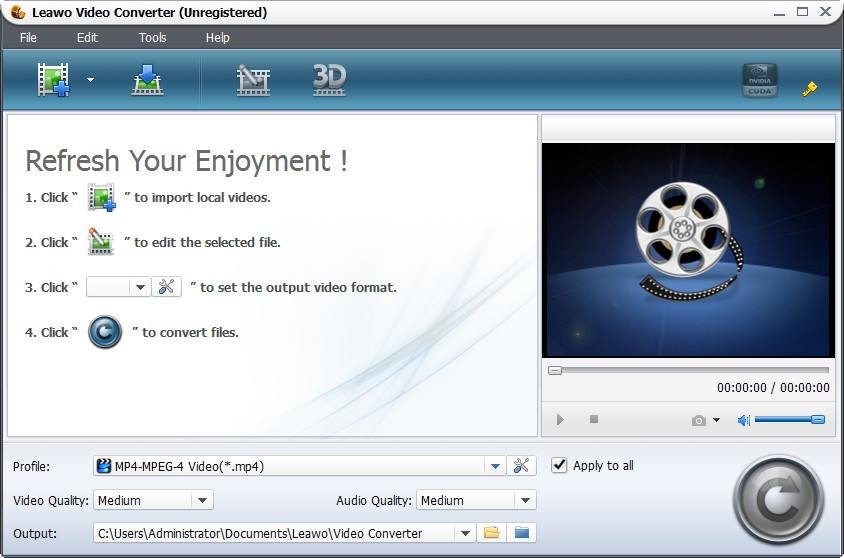 The user normally converts formats as he has problems with certain players and gadgets that do not support certain formats. This forces him to convert the format of the file to the required one. In order to do so he has to use certain software applications. Converting formats can be a pain in the neck as it employs a host of tasks and steps the user has to go through in order to complete the job. This can be nerve wracking as well as time consuming. This can be avoided if the user utilizes Leawo WMV to MPEG Converter 5.3.0.0. This software application allows the user to convert WMV format to MPEG for smooth playback on most of the players and gadgets. The user normally converts formats as he has problems with certain players and gadgets that do not support certain formats. This forces him to convert the format of the file to the required one. In order to do so he has to use certain software applications. Converting formats can be a pain in the neck as it employs a host of tasks and steps the user has to go through in order to complete the job. This can be nerve wracking as well as time consuming. This can be avoided if the user utilizes Leawo WMV to MPEG Converter 5.3.0.0. This software application allows the user to convert WMV format to MPEG for smooth playback on most of the players and gadgets.
Packed to the brim with many functions and features, Leawo WMV to MPEG Converter 5.3.0.0 is equipped to handle any kind of problem related to converting. Each of these features has their own unique qualities that help the user to convert the files quickly and easily without coming across too many roadblocks. The user can convert WMV format to MPEG format for better playback. He can also convert WMV to several other audio formats like MP3, WMV and others. Certain segments of the movie can be trimmed according to the user’s wishes. The video can also be cropped to remove irritating black margins. Video and audio effects can be adjusted and set as per the user’s wishes. The user can also convert batches of files in one single go which saves him from tackling individual files. Some video files can be merged too. The interface is easy to handle and understand making it a piece of pie to convert files.
The user will have no difficulty at all while converting formats from WMV to MPEG as he would have Leawo WMV to MPEG Converter 5.3.0.0 by his side.
{More Info and Download}
Rating: Loading... No Comments »
O. James Samson - May 1, 2013
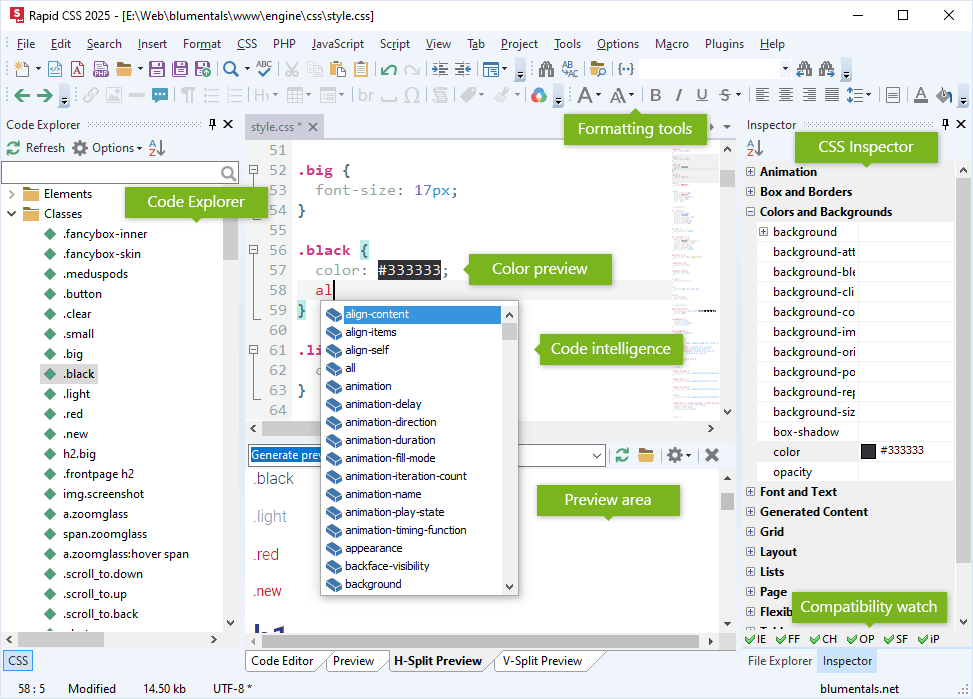 Looking for an easy way to create, design and edit style sheets irrespective of the size or complexity? Then check out Rapid CSS. Looking for an easy way to create, design and edit style sheets irrespective of the size or complexity? Then check out Rapid CSS.
What is Rapid CSS?
It has several helpful features that make it easy for you to quickly create, edit and deploy CSS based websites. You can either write the CSS code manually or let the program do it for you. Some of these features include: including CSS validator, CSS formatter, auto complete and code inspector, and CSS checker and instant built-in multi-browser preview. This program helps to save you time and significantly improves your efficiency.
With this application, you can set up configuration parameters with the help of a wizard. Rapid CSS 2014 supports plenty of other file types aside from CSS and HTML, such as PHP, XML and JS, Unicode and, of course, the latest HTML5 and CSS3 standards. It has a beautiful and intuitive interface and has multi tabs so you can work on several files at the same time. In addition to the Code Editor workspace, you can preview the output files, or split the Code Editor and Preview sections horizontally and vertically, as well as toggle the File Explorer pane between Project, Folders and FTP.
Some of the main features of this program are: advanced, fully customizable text editor, HTML and XHTML editing features, syntax highlighting, CSS checker and validator, CSS code explorer, code auto complete for CSS and HTML, project and site management and FTP publishing among several other quality features.
Blumentals Software, the publisher of this program, has added a few changes to this version. They are: improved custom screen font size support, improved code explorer filter usability, fixed bug with CSS preview profile dropdown, fixed some CSS syntax highlighting and some other changes.
Downsides?
This program is not meant for beginners. A very useful tool for CSS and HTML editing.
To learn more, visit RapidcssEditor.
Rating: Loading... No Comments »
O. James Samson - April 28, 2013
 Having an internet connection that is unstable or unreliable can be very frustrating sometimes if you are the type that enjoys regular downloads. That is why most people these days would rather install download managers that have pause and resume capabilities. One of such applications or download managers is EagleGet. Having an internet connection that is unstable or unreliable can be very frustrating sometimes if you are the type that enjoys regular downloads. That is why most people these days would rather install download managers that have pause and resume capabilities. One of such applications or download managers is EagleGet.
What’s EagleGet?
EagleGet is a free download manager that makes it easy to grab web videos and other contents online. EagleGet integrates easily with Internet Explorer, Firefox, and Chrome; intercepting all the regular download links you click on. The application can also help you download videos from major sites including YouTube, Facebook, Dailymotion, Vimeo, and many more.
EagleGet 1.0.5.0 Beta has a couple of new changes such as; addition of download scheduler feature, addition of function to skip, addition of download dialog when URL is clicked, addition of the function to hibernate or sleep computer after completing all transfers, addition of a countdown timer for automatic shutdown/hibernate/sleep, and improved silent mode function.
This version also features an improved keyboard operation for task list, task monitor bar now displays the overall progress of all active tasks, as well as a couple of minor changes and fixes introduced by the publisher.
Any downsides?
EagleGet is still in Beta version, and is still not stable. However, the program seems to have all it takes to help a newbie understand its features without stress.
Want to check it out? Visit Eagleget.
Rating: Loading... No Comments »
|
|
|





