Author Archive
Friday, November 16th, 2012
 If you are the type who could do with some extra space on your PC, then Foxit Reader is one of those programs that won’t take up a lot of space on your system. The application is one of the lightest PDF program available today. If you are the type who could do with some extra space on your PC, then Foxit Reader is one of those programs that won’t take up a lot of space on your system. The application is one of the lightest PDF program available today.
What is Foxit Reader all about?
Foxit Reader is a small, fast, and feature rich PDF viewer that lets you open, view, and print any PDF file. Unlike other free PDF readers, this very light application also includes easy to use collaboration features like the ability to add annotations to PDF, fill out PDF forms, and share information with social networks.
Foxit Reader has a small footprint that starts up instantly, renders PDF files quickly and uses very little memory, which is especially important with today’s mobile devices. The PDF reader is also packed full of convenient and easy to use viewing, commenting and printing features that make document collaboration simple. Foxit Reader’s PDF secure platform insures worry free operation against malicious virus and provides a secure and reliable digital signature verification platform for PDF documents without putting the user at risk from falsified documents.
Foxit Reader is an application that shows that performance is not in size, but in features. The program sure has a lot to offer, and the fact that it competes well with other heavy PDF readers makes it something to watch out for.
Downsides
Over the years, the program seems to have become a bit heavy than what it used to be when it was first released.
Want to check it out? Visit FoxitSoftware.
Posted in Main | No Comments »
Thursday, November 15th, 2012
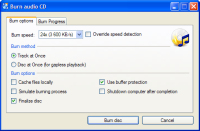 Are you looking for a CD burner that won’t put a hole in your pocket or slow down your system? Well, the truth is there are a few of them with lots of key features to help get your job done. However, a few of them also have features that you may not like, which make it important to stick with a couple of shareware programs. One program that won’t cost you a dime is CDBurnerXP. Are you looking for a CD burner that won’t put a hole in your pocket or slow down your system? Well, the truth is there are a few of them with lots of key features to help get your job done. However, a few of them also have features that you may not like, which make it important to stick with a couple of shareware programs. One program that won’t cost you a dime is CDBurnerXP.
What is CDBurnerXP?
CDBurnerXP is a free application to burn CDs and DVDs, including Blu-Ray and HD-DVDs. It also includes the feature to burn and create ISOs, as well as a multilanguage interface. Everyone, even companies, can use it for free. It does not include adware or similar malicious components.
CDBurnerXP is packed with easy to use features that can be used both by professional and amateur users. Some of these features include the following; burn any data on n CD-R/CD-RW/DVD+R/DVD-R/DVD+RW/DVD-RW/DVD-RAM/BD/HD-DVD, including double layer mediums, use either the internal browser to add your files or the intuitive Drop-Box to drag and drop files directly from any Windows Explorer window, create Audio-CDs from the following formats: MP3, WAV, OGG, FLAC, WMA, APE, MPC, WV (WavPack), burn ISO files to CD, supports most IDE, USB, Firewire and SCSI drives, etc.
Any downsides?
There used to be a few complaints about bugs in the past; but the publisher seems to have taken care of that in this version.
Want to check it out? Visit CDBurnerXP.
Posted in Main | No Comments »
Thursday, November 15th, 2012
 QuickTime 7 is Apple’s cutting-edge digital media software for both Mac and Windows-based computers that delivers unparalleled quality for creating, playing and streaming audio and video content over the Internet. QuickTime 7 is Apple’s cutting-edge digital media software for both Mac and Windows-based computers that delivers unparalleled quality for creating, playing and streaming audio and video content over the Internet.
Besides playing MPEG-4 and MP3 content, QuickTime also supports timecode tracks as well as MIDI standards such as the Roland Sound Canvas and GS format extensions. The program also supports key standards for web streaming, including HTTP, RTP and RTSP. Plus, it supports every major file format for images, including JPEG, BMP, PICT, PNG and GIF. QuickTime 7 features an ultra efficient new H.264 video codec delivering stunning quality at remarkably low data rates from 3G to iChat AV to HD.
QuickTime offers you a lot of features that include the following: a multimedia platform that enables you move videos from your digital camera or mobile phone, makes everything you watch even more enjoyable, lets you do more with your digital media. With QuickTime 7 Pro, you can convert your files to different formats and record and edit your work, advanced video compression technology called H.264 to deliver brilliant, crisp HD video using less bandwidth and storage, and many more.
A host of security fixes regarding some of its files have been made to this version.
Downsides
Not too feature loaded but the fact that it is freeware makes it worth checking out.
Want to check it out? Visit Quicktime.
Posted in Main | No Comments »
Thursday, November 15th, 2012
 A lot of internet users have had to complain a lot of times about invasion of privacy in stealing of personal information while surfing the web. This led to release of all kinds of ant theft programs as well as internet history erasers to help improve the situation. However, the best way to reduce or eliminate vulnerability issues these days is through proxy programs that enable you to surf privately. ASProxyWing is one of several programs to help make the internet safe. A lot of internet users have had to complain a lot of times about invasion of privacy in stealing of personal information while surfing the web. This led to release of all kinds of ant theft programs as well as internet history erasers to help improve the situation. However, the best way to reduce or eliminate vulnerability issues these days is through proxy programs that enable you to surf privately. ASProxyWing is one of several programs to help make the internet safe.
ASProxyWing is a free application which allows the user to surf the net anonymously. When using ASProxyWing, not only is your identity hidden but you will be able to escape filters and firewalls from an internet connection. The purpose of ASProxyWing is spreading freedom on the net, but this proxy can be used for any purposes.
Proxy servers are built specifically to help you surf anonymously thereby protecting you against spyware and popups. Though, ASProxyWing is a freeware program, it has some unique features that allow you surf the internet with ease. Your identity is hidden each time you visit a suspicious site or a site where you have been banned before.
Downsides
It is an open source program, so it may not have all the features needed to guarantee complete privacy while surfing the internet.
Want to check it out? Visit Asproxywing.
Posted in Main | No Comments »
Monday, November 12th, 2012
 VirtualDub has developed into a general utility that can trim and clean up video before exporting to tape or processing with another program. This makes it one of those programs that you can’t do without on your system. VirtualDub has developed into a general utility that can trim and clean up video before exporting to tape or processing with another program. This makes it one of those programs that you can’t do without on your system.
What is VirtualDub?
VirtualDub is a video capture / processing utility for 32-bit Windows platforms, licensed under the GNU General Public License (GPL). It lacks the editing power of a general-purpose editor such as Adobe Premiere, but is streamlined for fast linear operations over video. It has batch-processing capabilities for processing large numbers of files and can be extended with third-party video filters. It is mainly geared toward processing AVI files, although it can read MPEG-1 and also handle sets of BMP images.
VirtualDub has lot of benefits or features that make it one of the most amazing programs available. Users won’t find it too difficult to get used to its features, which is one other reason to give it a try. VirtualDub has also been updated and improved over and over again since it was first introduced. This better version is also enjoying massive ratings despite still being in beta stage.
Any downsides?
VirtualDub does not have the editing power of a couple of powerful and advanced programs; but it is nonetheless a great program.
Want to check it out? Visit VirtualDub.
Posted in Main | No Comments »
Thursday, November 8th, 2012
N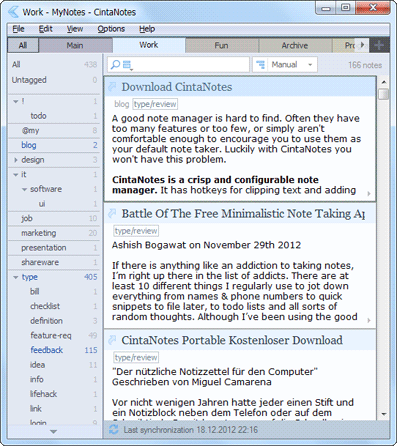 eed an application to organize seemingly chaotic life? CintaNotes might just be all you need. This note-taking freeware is created to help you get organized, save you time which you can invest in doing other worthwhile. With this software, you can easily and readily save notes, Web addresses and snippets, articles, images, and anything else that exists online that you’d like remember, take note of, and tag for retrieval. eed an application to organize seemingly chaotic life? CintaNotes might just be all you need. This note-taking freeware is created to help you get organized, save you time which you can invest in doing other worthwhile. With this software, you can easily and readily save notes, Web addresses and snippets, articles, images, and anything else that exists online that you’d like remember, take note of, and tag for retrieval.
It has a simple and easy to use interface with a plain field for creating, displaying, and sorting notes and a minimal control set that consists only of a search tool and a drop-down list for sorting notes. It is very portable- you can carry it on a flash drive and run it directly from anywhere. This means you can always carry your notes with you anywhere you are. This utility makes creating new notes and retrieving existing ones. It is light weight taking up only minimal system resources.
Some of the key features of this program include: the ability to capture text from almost any application, auto URL population for webpage captures, Ctrl+F12 quick capture hot key, note retreival simply by typing a word or phrase, exporting to Unicode Text and XML.
The publishers, Cinta Software, have added the following new features to this version: New menu option “Options/Editor/Initial Focus” Enhancement, small export dialog enhancement and so on.
Any downsides?
This is a nice piece of software. Kudos to the publishers.
To learn more about this program, visit CintaNotes.
Posted in Main | No Comments »
Thursday, November 8th, 2012
 Are you searching for a video surveillance and live webcam software to meet your security needs? ContaCam is probably what you need. Are you searching for a video surveillance and live webcam software to meet your security needs? ContaCam is probably what you need.
What is it about ContaCam that makes it special?
This freeware is extremely light on your system resources. It is very fast and diversified to meet all your security needs. It is user friendly even for a newbie and runs very well even the most moderate systems.
To use this program, simply determine what you want to use it for- security surveillance, live snapshot webcam or manual records / snapshots. Enter a friendly camera name; choose the web appearance & language and finally Configure how long to keep the files on your hard disk.
Some of the features of this program include: it provides support for all versions of Windows from Windows 95 to Windows 8, it is available in several languages, CCTV Security Surveillance with motion detection and 24 hours digital video recording. It can present motion detection events as thumbnails in a web browser. Its live web cam also has the ability of history tracking. It also has unlimited parallel cameras set up, Integrated web server with password protection (internet or intranet) and so much more.
The publishers, Contaware.com, have added these new features to this version: fixed possible time zone problem’s by getting browser’s time zone and setting it in PHP, Device auto start is now not cleared when camera is unreachable (auto start can be removed in popping-up error message box) and Motion detection emails include now the camera name.
Any downsides?
This is one nice piece of app, yet to find a downside!
To learn more about this program, please visit ContaWare.
Posted in Main | No Comments »
Thursday, November 8th, 2012
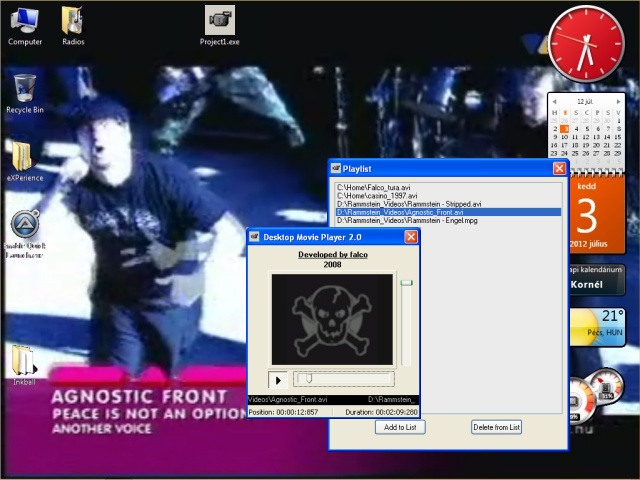 Need an application to play movies on your desktop? Desktop Movie is just what you need. Need an application to play movies on your desktop? Desktop Movie is just what you need.
With this freeware, you can play your movies right on your desktop background. It simply opens the video file and plays it on your desktop temporarily replacing your desktop background. This application is based on directshow which means any movie you can play with a directshow player can be played on the Desktop Movie player also.
When it starts, you’ll have to select the preferred movie file. The program runs in the system tray while the movie is played, allowing you to load another file or control the play process. It has a playlist functionality: simply load all the movie files you want to play and it plays it in the pre-set order.
In this version of the program the publishers, Falcosoft, have added the following new features: playlist implemented: you can add and remove files and reorder the playlist. You can see the name and path of the actual video, the real playing position and video duration on its playing control form. This version also has improved file open dialog and an improved volume control algorithm. You can also choose several movie files right from the beginning.
To learn more about this program visit Falcosoft.
Posted in Main | No Comments »
Wednesday, November 7th, 2012
 Do you run a hotel or restaurant and you’re searching for an application that will help you better manage your inventory and invoicing? Get iMagicInventory! Do you run a hotel or restaurant and you’re searching for an application that will help you better manage your inventory and invoicing? Get iMagicInventory!
What is the big deal about this program?
With this software, you can take full charge of your inventory and invoicing needs. It helps you to save time, manage customers more effective and puts you several steps ahead of your competition. What can this program do for you? You can create invoices within minutes. Its intelligent reordering system allows you to order for new items way ahead of time.
Its reporting feature helps you to analyze your invoices and track your sales. Using this program, you can manage tables and create bookings in a matter of seconds, view arriving customers and update status of booking. You can create databases for your customers, track all your inventories in several locations and manage your stocks better and more effectively. It offers full barcode support for many barcode scanners. Its other features are automatic generations of reorder items which help to create repeat customers, strong security access, support multiple users and interactive reporting.
The makers of this software, iMagic Software, have added the following new features to this version: new barcode options, inventory management, updated reports and invoicing. You can also print out multiple invoices and combined picking list.
Any downsides?
This is one application every one that requires inventories and invoicing needs to acquire. Great application.
To learn more about this amazing program, please go to ImagicSoftware.
Posted in Main | No Comments »
Wednesday, November 7th, 2012
 Do you need an application that allows you to import tons of photos? Then get Porttarit+. Just with a single click you can import huge amounts of photos. It can retouch your portraits very quickly and automatically giving it the desired effects. It can handle several batch processing and exporting in a couple of minutes. Do you need an application that allows you to import tons of photos? Then get Porttarit+. Just with a single click you can import huge amounts of photos. It can retouch your portraits very quickly and automatically giving it the desired effects. It can handle several batch processing and exporting in a couple of minutes.
What is the big deal with Portarait+?
This application is able to detect about 20 faces in a single picture. It can accurately pinpoint facial features like the nose, mouth, ears, eyes and eyebrows. It has up to 20 ‘cleanse’ and ‘make up’ styles with which you can use to edit your looks. So you can apply several styles to a single picture. You can apply several styles to more than one photo at once and then export all of them.
Its visual comparison interface allows you to view photos instantly, choose the best option and remove the options you don’t like. For portraits, it has an Auto Retoucher that helps you to batch process several photos in a few minutes. You can get amazing results with this software in just a few clicks. It does not require any trainings and it saves you time and money.
To learn more about this software, please visit ArcSoft.
Posted in Main | No Comments »
|
|
|




