Author Archive
Tuesday, May 8th, 2012
 Super Flexible File Synchronizer is a program that allows you to back up data and to synchronize PCs, servers, and notebooks. Two interface modes are available for users to choose from: Wizard Mode or Advanced Mode. It has support for FTP and secure FTP servers as well as ZIP compression, data encryption and email notifications. You can also set the program to automatically backup your files. Super Flexible File Synchronizer is a program that allows you to back up data and to synchronize PCs, servers, and notebooks. Two interface modes are available for users to choose from: Wizard Mode or Advanced Mode. It has support for FTP and secure FTP servers as well as ZIP compression, data encryption and email notifications. You can also set the program to automatically backup your files.
Some of the key features of this application are: backs up and synchronizes files and entire folders irrespective of the file size or the number of files, the synchronized files are saved as profiles and you can run several of such profiles with a single click and schedule the synchronization of your files at any time you consider convenient. This program also supports various internet protocols, you can use the recycle bin to retrieve files that are overwritten or deleted. This helps to recover older versions of the files. During synchronization, you can copy only the changed parts of the files. This helps to speed up the synchronization process. It possesses several ways to choose file and folders. Also you can choose specific folders where obsolete files can be moved to. You can only move files into these folders and cannot copy files out. This saves time that might have been spent copying all the files in the obsolete folders. .
To find out more about this program, please visit SuperFlexible.
Posted in Main | No Comments »
Monday, May 7th, 2012
 Plex is a powerful media-sharing and streaming server solution that works across your local network and the wider internet. The program bridges the gap between your computer and your home theatre, doing so with a visually appealing user interface that provides instant access to your media. Plex Media Server can play a wide range of video, audio and photo formats without having to install any third party video plugins and can stream online audio and video content served by Plex Media Server. Plex is a decent program that also has a mobile version; and comes as a freeware for all users. Plex is a powerful media-sharing and streaming server solution that works across your local network and the wider internet. The program bridges the gap between your computer and your home theatre, doing so with a visually appealing user interface that provides instant access to your media. Plex Media Server can play a wide range of video, audio and photo formats without having to install any third party video plugins and can stream online audio and video content served by Plex Media Server. Plex is a decent program that also has a mobile version; and comes as a freeware for all users.
Plex Media Server seamlessly connects your Plex clients with all of your local and online media. The combination of centralized library management, streaming of online content, and powerful transcoding functionality provides an unrivalled level of flexibility and ease of use. The program runs on your Mac, PC, or compatible NAS device and serves your media to all of your Plex clients including Plex-enabled mobile devices and 2011 LG Smart TVs. Some of the benefits of Plex Media Server include the following; effortlessly organize your media into a versatile library, native Cocoa and web-based versions provide local and network access to management features, automatically retrieve metadata from the Internet, complete customization of your library with a few clicks, and automatic updates when new local content is added.
Want to check it out? Visit Plexapp.
Posted in Main | No Comments »
Sunday, May 6th, 2012
 KaPiGraf is a program that shows your data as a chart easily and quickly. The application also offers possibilities which you miss in MS Excel. And what is more, KaPiGraf will never bother you with unnecessary questions. After you open your file, you will see the preview of your data. Here you will choose each column which stands for the axxis X and Y. After clicking “The create graph”, the graph is automatically drawn. This graph can be used in many ways: moving, zooming, changing parameters, exporting into MS Excel, printing, saving, transfering units and many others. Data are created with common text files (made e.g. by a notepad or by KaPiGraf) where each column is divided by tab or space or semicolon. KaPiGraf works without the limits of 32000 data rows of a graph on the contrary to MS Excel KaPiGraf is a program that shows your data as a chart easily and quickly. The application also offers possibilities which you miss in MS Excel. And what is more, KaPiGraf will never bother you with unnecessary questions. After you open your file, you will see the preview of your data. Here you will choose each column which stands for the axxis X and Y. After clicking “The create graph”, the graph is automatically drawn. This graph can be used in many ways: moving, zooming, changing parameters, exporting into MS Excel, printing, saving, transfering units and many others. Data are created with common text files (made e.g. by a notepad or by KaPiGraf) where each column is divided by tab or space or semicolon. KaPiGraf works without the limits of 32000 data rows of a graph on the contrary to MS Excel
KaPiGraf is a freeware program open to all users; and is also available to those who would want to contribute to its further development. However, KaPiGraf is not or built for designed of MS Excel. The program developed to run on the following Windows programs; Windows 7, Windows 2000, Windows Vista, and Windows XP.
Want to check it out? Visit: Kapizone.cz.
Posted in Main | No Comments »
Friday, May 4th, 2012
Super Flexible File Synchronizer is used to back up data and to synchronize PCs, servers, and notebooks. With this application, you have the option to choose the user interface that suits them best (Wizard Mode or Advanced Mode) The settings are stored in multiple profiles, and the software comes with support for FTP and secure FTP servers, ZIP compression, data encryption, and a scheduler for automated backups. On Windows NT/2000/XP, or 2003 Server, the scheduler can run as a service without users having to log on. This version in review has a few fixes that include a few Google Docs related issues.
Super Flexible File Synchronizer features the ability to freely select files and folders across the whole folder hierarchy in a tree view, and it has support for e-mail notification, profile categories, and various filters. The publisher has done a lot of work on this application to get it to the level where it is today; it has vastly improved, and that is why it remains one of the best backup programs available. Regardless of how much it costs; Super Flexible File Synchronizer is a wonderful program that also comes with a 30 day trial period.
Want to check it out? Visit SuperFlexible.
Posted in Main | No Comments »
Friday, May 4th, 2012
 Ammyy Admin is a reliable and friendly tool for remote computer access that allows you to provide remote assistance, remote administration or remote teaching for your clients or employees regardless of their location. The application connects remote computers within seconds without any installation or configuration. With Ammyy Admin, you can view or control (using your keyboard and mouse) any applications running on the remote computers and transfer files and folders to or from a remote computer. There is no need for installation or any specific settings to get it working; within a couple of minutes, you can start using it. The program is available for non-commercial use, and comes with some unique benefits. Ammyy Admin is a reliable and friendly tool for remote computer access that allows you to provide remote assistance, remote administration or remote teaching for your clients or employees regardless of their location. The application connects remote computers within seconds without any installation or configuration. With Ammyy Admin, you can view or control (using your keyboard and mouse) any applications running on the remote computers and transfer files and folders to or from a remote computer. There is no need for installation or any specific settings to get it working; within a couple of minutes, you can start using it. The program is available for non-commercial use, and comes with some unique benefits.
Some of the benefits of Ammyy Admin include the following; can be used for remote PC and server control without human presence on the client side, transparent for Firewalls, you don’t have to make additional adjustments on the Firewall or VPN connection settings, exposing local PCs or remote computer networks to the risk of security bug, provides the file manager feature so you can copy files and folders between local and remote computer desktops up to 140 Tb in size with the ability to resume interrupted downloads without information loss, supports HTTPs proxy, and a lot more.
Want to check it out? Visit Ammyy.
Posted in Main | No Comments »
Thursday, May 3rd, 2012
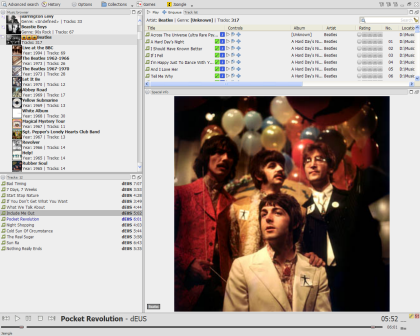 Jaangle (formerly Teen Spirit) is a free music player and organizer program that categorizes your mp3, ogg, wma, avi etc collection and displays it in easy to browse, user interface. It has a quality audio – video player and also an integrated tag editor. The software is very easy to use because all you need to do is add a folder that contains your music files (mp3, wma, avi, mpg etc). Jaangle scans and reads the available tag info. The artists appear in the tree like control; and each time you click on an artist all his tracks can be seen in the list pane. Artist biography and image are automatically downloaded from the internet and displayed in the information pane. By double clicking a track in the list you hear the music playing. More info may appear (if available) in the info pane like lyrics or comments. Jaangle (formerly Teen Spirit) is a free music player and organizer program that categorizes your mp3, ogg, wma, avi etc collection and displays it in easy to browse, user interface. It has a quality audio – video player and also an integrated tag editor. The software is very easy to use because all you need to do is add a folder that contains your music files (mp3, wma, avi, mpg etc). Jaangle scans and reads the available tag info. The artists appear in the tree like control; and each time you click on an artist all his tracks can be seen in the list pane. Artist biography and image are automatically downloaded from the internet and displayed in the information pane. By double clicking a track in the list you hear the music playing. More info may appear (if available) in the info pane like lyrics or comments.
Jaangle is easy to use, and also comes with features that you can easily get used to within a very short time. Some of its key features include the following; native Last FM Scrobbling support, player (Audio, video, equalizer, crossfading), quick web linking for extra info, MSN Messenger (Now Playing) support, renamer (Mass Renamer), and many more.
Want to check it out? Visit Jaangle.com.
Posted in Main | No Comments »
Thursday, May 3rd, 2012
 DEKSI USB Security is a utility that allows you to prevent unauthorized USB devices from any computer or from your whole network. It prevents unauthorized USB devices from getting connected to your computer, blocks unauthorized USB devices such as memory card readers and USB flash drives, removable storage and USB hard disks while allowing devices such as keyboards, mice and printers to be used as they would normally be. DEKSI USB Security is a utility that allows you to prevent unauthorized USB devices from any computer or from your whole network. It prevents unauthorized USB devices from getting connected to your computer, blocks unauthorized USB devices such as memory card readers and USB flash drives, removable storage and USB hard disks while allowing devices such as keyboards, mice and printers to be used as they would normally be.
This program is very effective both in small offices and in corporations with very large networks. It offers centralized deployment and management, is helpful in enforcing security policies on removable storage devices, and it manages file transfers as well as prevents infections from viruses that can harm your computer or network.
DEKSI USB Security can be used to white-list devices such as printers, keyboards, scanners, mice and others that are considered safe while it can be used to block unauthorized USB devices access to your computer or network. You can assign specific passwords to removable storage devices in order to allow access to such removable devices. Such devices can then be accessed if the right password is correctly entered.
One very interesting thing about this program is that it runs entirely in the background, completely undetectable by the users. While in operation, there are no pop-up windows or windows unless you so desire it. While running completely undetected in the background, it is able to log all attempts to gain access to your USB devices, so that the system administrators can perform audits.
To find out more about this program, please visit Deksoftware.
Posted in Main | No Comments »
Wednesday, May 2nd, 2012
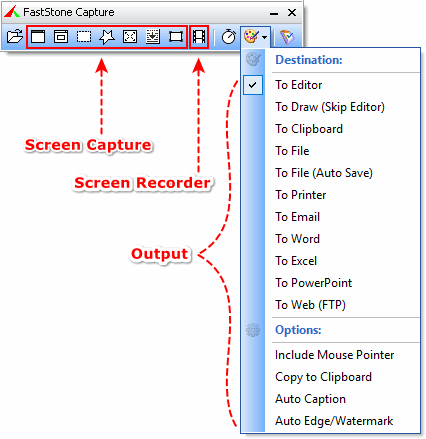 FastStone Capture is a robust and very flexible screen capture program. It allows you to capture anything on the screen such as windows, objects, full screen, rectangle regions, freehand-selected regions and scrolling windows/web-pages. It has powerful features such as floating Capture Panel, hotkeys, resizing, cropping, text annotation, printing, emailing and many more. FastStone Capture is a robust and very flexible screen capture program. It allows you to capture anything on the screen such as windows, objects, full screen, rectangle regions, freehand-selected regions and scrolling windows/web-pages. It has powerful features such as floating Capture Panel, hotkeys, resizing, cropping, text annotation, printing, emailing and many more.
If you want to, you can send the screen captures to editor, printer or upload them to your website. Its powerful editing tools such as resizing, cropping, sharpening, watermarking etc can be used to give your screen captures better effects. You could also record your screen activities and save them as videos. FastStone Capture saves files in BMP, GIF, JPEG, PCX, PNG, TGA, TIFF and PDF formats.
Some of the key features of this program includes: a capture panel that allows you to access its capture tools and output options easily, global hotkeys to setup instant screen capturing, apply text effects, resize, crop, sharpen or brighten colors and several more.
In FastStone Capture version 7.1, the publishers have added a few features to the older versions of this program. This new features includes: enhanced the in-built screen recorder, pause/resume support, enhanced the print dialog, enhanced capture scrolling window tool and improved compatibility with customer preview version of windows 8.
To find out more about this program, please visit Faststone.org.
Posted in Main | No Comments »
Wednesday, May 2nd, 2012
 WinToFlash starts is a wizard that will help pull over the contents of a windows installation CD or DVD and prep the USB drive to become a bootable replacement for the optical drive. It can also do this with your LiveCD; and that means you don’t have to worry about scratches on the disc or misplacing your original media discs once you transfer their contents to the flash drive. The optical drive is quickly becoming a thing of the past, especially in office environments, as media is shifted to the cloud. WinToFlash will easily and quickly install the program you need and in no time; and you will find yourself writing essays on Windows and using your USB. WinToFlash starts is a wizard that will help pull over the contents of a windows installation CD or DVD and prep the USB drive to become a bootable replacement for the optical drive. It can also do this with your LiveCD; and that means you don’t have to worry about scratches on the disc or misplacing your original media discs once you transfer their contents to the flash drive. The optical drive is quickly becoming a thing of the past, especially in office environments, as media is shifted to the cloud. WinToFlash will easily and quickly install the program you need and in no time; and you will find yourself writing essays on Windows and using your USB.
WinToFlash can transfer your live CD or DVD to USB card, for example, BartPE. After all you can erase your USB media and format it with Windows for everyday use. Some of its other features and benefits include the following; support all editions of Windows – Home, Professional, Media Center, Ultimate, transfer a Recovery CD or a tiny OS (BartPE based on Windows XP/2003, WinPE based on Windows Vista/2008/7/8) to a USB drive, wipe a USB media (destroy all data on it), and many more.
Want to check it out? Visit WintoFlash.
Posted in Main | No Comments »
Wednesday, May 2nd, 2012
 IcoFX is a program that allows you to easily create, extract and edit icons. With an array of powerful tools and over 40 effects at your disposal, you can now you can readily convert your favorite images into icons or change your icons to images. IcoFx helps you to create limitless icons, create favicons for your websites or blogs, create icon libraries or edit icons inside exe files. You can also change your Mac icons to Windows or Windows icons to Mac icons. Using its batch processing capability, you can easily work with several files simultaneously. IcoFX is a program that allows you to easily create, extract and edit icons. With an array of powerful tools and over 40 effects at your disposal, you can now you can readily convert your favorite images into icons or change your icons to images. IcoFx helps you to create limitless icons, create favicons for your websites or blogs, create icon libraries or edit icons inside exe files. You can also change your Mac icons to Windows or Windows icons to Mac icons. Using its batch processing capability, you can easily work with several files simultaneously.
Some of the key features of this program include the following: batch processing functionality allows you to work with many files, support for static and animated cursors, its array of collection correction tools allows you to refine color, saturation and brilliance and adjust for color contrast. Using this program, you can create icon libraries and cursor libraries inside exe files, you can use the QuickMask to refine your image selection, convert your favorite images into icons, and vice versa into various formats and convert your favorite.
This program works well with the following system requirement: Windows XP, Windows Vista, Windows 7 and Macintosh icons supporting transparency. It allows you to create Windows icons up to 256×256 for Windows Vista/7 and Macintosh icons up to 1024×1024 for Macintosh OSX 10.7 Lion.
If you want to find out more, please visit Icofx.
Posted in Main | No Comments »
|
|
|




