Author Archive
Tuesday, November 22nd, 2011
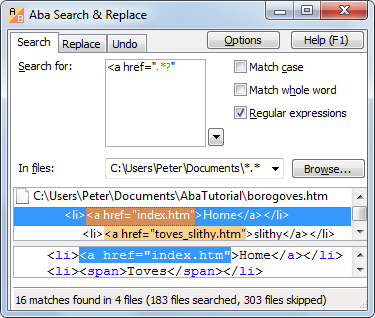 Aba Search & Replace is a tool for replacing text in multiple files. The program provides you excellent opportunities to quickly correct errors on your web pages, replace banners and copyright notices, change method names, and perform other text-processing tasks. Aba Search & Replace has a lot of key features that include the following; a search as you type user-interface, multi-line search and replace, support for regular expressions, preview the results in context before starting the replacement, fast and easy-to-use search, replace Unicode files (UTF-8, UTF-16), addition of search history and favorites (new feature), addition of Undo for any replacement (new feature), addition of Syntax highlight for regular expressions, HTML, CSS, JS, and PHP files (new feature), integration with Windows Explorer and Total Commander, and context-sensitive help references and tutorial included. Aba Search & Replace is a tool for replacing text in multiple files. The program provides you excellent opportunities to quickly correct errors on your web pages, replace banners and copyright notices, change method names, and perform other text-processing tasks. Aba Search & Replace has a lot of key features that include the following; a search as you type user-interface, multi-line search and replace, support for regular expressions, preview the results in context before starting the replacement, fast and easy-to-use search, replace Unicode files (UTF-8, UTF-16), addition of search history and favorites (new feature), addition of Undo for any replacement (new feature), addition of Syntax highlight for regular expressions, HTML, CSS, JS, and PHP files (new feature), integration with Windows Explorer and Total Commander, and context-sensitive help references and tutorial included.
Aba Search & Replace is designed both for web designers and programmers. Web designers can use the program for styling their buttons tables, cells, and many more. Programmers on the other hand, can also use Aba Search & Replace to insert headers with the author name, copyrights, and a couple of others. Aba Search & Replace is easy to use, and is well-written; and every user can easily understand its features after a couple of hours.
Want to check it out? Visit Abareplace.
Posted in Main | No Comments »
Monday, November 21st, 2011
 TestDisk for Windows is a free data recovery program that is primarily designed to help recover lost partitions and/or make non-booting disks bootable again when these symptoms are caused by faulty software, certain types of viruses or human error (such as accidentally deleting your Partition Table). TestDisk enables you to carry out a lot of activities that include the following; fix partition table, recover deleted partition, recover FAT32 boot sector from its backup, rebuild FAT12/FAT16/FAT32 boot sector, fix FAT tables, rebuild NTFS boot sector, recover NTFS boot sector from its backup, fix MFT using MFT mirror, locate ext2/ext3/ext4 backup superblock, undelete files from FAT, exFAT, NTFS and ext2 file system, copy files from deleted FAT, exFAT, NTFS and ext2/ext3/ext3/ext4 partitions. TestDisk for Windows is a free data recovery program that is primarily designed to help recover lost partitions and/or make non-booting disks bootable again when these symptoms are caused by faulty software, certain types of viruses or human error (such as accidentally deleting your Partition Table). TestDisk enables you to carry out a lot of activities that include the following; fix partition table, recover deleted partition, recover FAT32 boot sector from its backup, rebuild FAT12/FAT16/FAT32 boot sector, fix FAT tables, rebuild NTFS boot sector, recover NTFS boot sector from its backup, fix MFT using MFT mirror, locate ext2/ext3/ext4 backup superblock, undelete files from FAT, exFAT, NTFS and ext2 file system, copy files from deleted FAT, exFAT, NTFS and ext2/ext3/ext3/ext4 partitions.
TestDisk also has a lot of features for both novices and experts. For those who know little or nothing about data recovery techniques, the software can be used to collect detailed information about a non-booting drive which can then be sent to a tech for further analysis. For the experienced user, TestDisk is a handy tool that can be used to perform onsite recovery. The program can be used to find lost partition for a lot of file systems including the following; Linux btrfs, Linux ext2, ext3, and ext4, Windows exFAT, and a lot more.
Want to check it out? Visit TestDisk.
Posted in Main | No Comments »
Monday, November 21st, 2011
 DIRECTV nomad gives you the freedom to watch your recorded shows and movies anywhere. The innovative DIRECTV nomad allows you to sync your HD DVR with your cell phone, laptop, or tablet and take your recorded programs with you wherever you go. No Internet connection required to watch, so you can enjoy your favorites anywhere, anytime, without worrying about getting disconnected. Some of the features or things you can use this program for include the following; watch your recorded shows and movies from your HD DVR on your cell phone, laptop or tablet, it is compatible with PC, iPhone, and iPod touch and soon will be compatible with Mac, iPad, as well as Android, nomad can also be set to automatically prepare new episodes to watch on your cell phone, laptop, or tablet as soon as your HD DVR records it. DIRECTV nomad gives you the freedom to watch your recorded shows and movies anywhere. The innovative DIRECTV nomad allows you to sync your HD DVR with your cell phone, laptop, or tablet and take your recorded programs with you wherever you go. No Internet connection required to watch, so you can enjoy your favorites anywhere, anytime, without worrying about getting disconnected. Some of the features or things you can use this program for include the following; watch your recorded shows and movies from your HD DVR on your cell phone, laptop or tablet, it is compatible with PC, iPhone, and iPod touch and soon will be compatible with Mac, iPad, as well as Android, nomad can also be set to automatically prepare new episodes to watch on your cell phone, laptop, or tablet as soon as your HD DVR records it.
To use DIRECTV nomad program, you download and install it on your cell phone, laptop, or tablet to watch your recorded shows and movies from your HD DVRs, and select recorded shows and movies from your HD DVR HD to watch on your cell phone, laptop, or tablet. However, you must be within your home network to use DIRECTV nomad software.
Want to check it out? Visit DTVAPP.
Posted in Main | No Comments »
Sunday, November 20th, 2011
 Rohos Mini Drive is a program that creates hidden and encrypted partition on a USB flash drive memory. You work with the files on the hidden partition without opening a special program. The program is great for those who have megabytes of sensitive files on the USB drive and seriously concerned with a data security, cannot imagine their USB stick without the hidden volume that is created using this tool. This version includes a new feature that lets you to hide encrypt and protect Google Chrome profile: history, favorites, form data, credit card number, saved passwords, and cookies. Rohos Mini Drive is a program that creates hidden and encrypted partition on a USB flash drive memory. You work with the files on the hidden partition without opening a special program. The program is great for those who have megabytes of sensitive files on the USB drive and seriously concerned with a data security, cannot imagine their USB stick without the hidden volume that is created using this tool. This version includes a new feature that lets you to hide encrypt and protect Google Chrome profile: history, favorites, form data, credit card number, saved passwords, and cookies.
Rohos Mini Drive is an easy to use, and comes with an intuitive USB flash drive Setup Wizard that automatically detects your USB flash drive and setup encrypted partition properties. All you need is to provide a protection password. One click – and you can save your first file into protected volume. Encryption is automatic and on-the-fly. Some other features include the following; allows you to access your secret volume by entering a right password, disk-on notifications help you to know when secured partition gets connected or disconnected, allows to work with a password protected partition on any PC, and many more.
Want to check it out? Visit Rohos.
Posted in Main | No Comments »
Saturday, November 19th, 2011
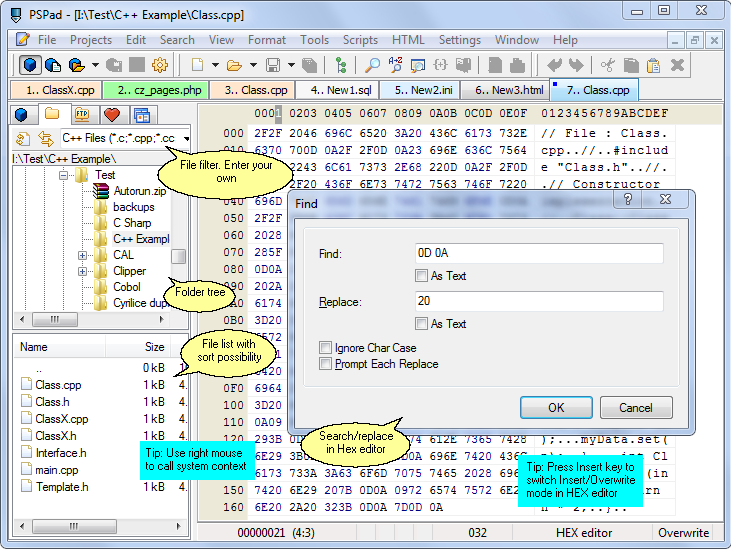 PSPad is one the most effective universal freeware editor that requires no complex install process. PSPad editor is ready to work immediately as soon as installation is complete, without requiring customization. It supports many file types and languages, with syntax highlighting. There are macros, clip files and templates to automate repetitive activities. An integrated HEX Editor, Project support, FTP Client, Macro Recorder, File Search/Replace, Code Explorer, code page conversion, are just some of the many possibilities that PSPad can offer you. PSPad is one the most effective universal freeware editor that requires no complex install process. PSPad editor is ready to work immediately as soon as installation is complete, without requiring customization. It supports many file types and languages, with syntax highlighting. There are macros, clip files and templates to automate repetitive activities. An integrated HEX Editor, Project support, FTP Client, Macro Recorder, File Search/Replace, Code Explorer, code page conversion, are just some of the many possibilities that PSPad can offer you.
This latest version of PSPad editor includes a couple of updates such as the following; backup/restore PSPad configuration in program settings/backup, addition of user highlighter for DART, modified file change and detection. This version is also a remarkable improvement over previous ones; and the best part is that it is still available for both personal and commercial use.
PSPad editor is specifically targeted at users who work with plain text because it has a wealth of formatting functions, including a spell checker, users who want to create web pages, and a couple of others. The program is available in a couple of other language versions that include the following; Slovensky, Dutch, French, Italian, Russian, English, as well as Spanish.
Want to check it out? Visit PSPad.
Posted in Main | No Comments »
Saturday, November 19th, 2011
 Tweaking.com Windows Repair is an all-in-one repair tool to help fix a large majority of known Windows problems. Some of the problems that can be fixed with Tweaking.com tool include the following; registry errors and file permissions as well as issues with Internet Explorer, Windows Update, Windows Firewall and more. Malware and installed programs can modify your default settings; but with Tweaking.com – Windows Repair tool, you can have your Windows original settings restored and back to normal. The program is a freeware, and has a lot of features that can be used as long as installations are followed. Tweaking.com Windows Repair is an all-in-one repair tool to help fix a large majority of known Windows problems. Some of the problems that can be fixed with Tweaking.com tool include the following; registry errors and file permissions as well as issues with Internet Explorer, Windows Update, Windows Firewall and more. Malware and installed programs can modify your default settings; but with Tweaking.com – Windows Repair tool, you can have your Windows original settings restored and back to normal. The program is a freeware, and has a lot of features that can be used as long as installations are followed.
Tweaking.com-Windows Repair can be used for the following; reset file permissions, reset registry permissions, register system files, repair WMI, repair Internet Explorer, repair Windows Firewall, repair MDAC & MS Jet, repair Hosts File, remove policies Set by Infections, repair icons, repair Winsock & DNS Cache, remove Temp Files, repair Proxy Settings, Unhide Non System Files, repair Windows Updates, repair CD/DVD Missing/Not Working, and many more.
Using this program requires a bit of understanding on the part of users; and it is very important that all users exercise a bit of caution. Tweaking.com-Windows Repair requires four different steps, which will be shown once installation is completed by you. Each of these steps is very important in order to avoid any problem after installation.
Want to check it out? Visit Tweaking.
Posted in Main | No Comments »
Saturday, November 19th, 2011
 PNotes puts you in charge when t comes to managing your day-to-day life. Basically, a lot of us have a lot of issues to worry about each passing day; and the need to have things well planned out can’t be overemphasized. PNotes (Pinned Notes or Portable Notes, use what you prefer) is written entirely in C and Windows API; which makes it is fast and light-weight. The program does not require any installation; simply unpack the downloaded archive to any location and run PNotes.exe. PNotes is also portable, and can be started from any drive (fixed or flash) and leaves no traces on host computer after finishing. PNotes puts you in charge when t comes to managing your day-to-day life. Basically, a lot of us have a lot of issues to worry about each passing day; and the need to have things well planned out can’t be overemphasized. PNotes (Pinned Notes or Portable Notes, use what you prefer) is written entirely in C and Windows API; which makes it is fast and light-weight. The program does not require any installation; simply unpack the downloaded archive to any location and run PNotes.exe. PNotes is also portable, and can be started from any drive (fixed or flash) and leaves no traces on host computer after finishing.
PNotes is an open source application and has a host of key features including the following; use various schedule types to be reminded about significant events by many different ways. Using this feature you may just hide notes and don’t worry, you’ll be notified in time, instead of sound files you may force the notes to speak with you reading their text aloud, keep in touch with your colleagues and friends, add any number of predefined tags to each note for further searching and sorting, prevents unauthorized access to program, protect your notes even more strongly, and many more.
Want to check t out? Visit PNotes.
Posted in Main | No Comments »
Friday, November 18th, 2011
 Giada is a free, minimal, hardcore audio tool for djs and live performers. Users can load up to 32 samples, and also choose to play them in single mode (drum machine) or loop mode (sequencer) and start the show with your computer keyboard as a controller. Giada is also designed to be a compact and portable virtual device for Linux, Mac OS X for production use and live sets. Giada is a program built with easy to use interface, and features to enable all categories (experienced and inexperienced users) to use without having any major issues. Giada is a free, minimal, hardcore audio tool for djs and live performers. Users can load up to 32 samples, and also choose to play them in single mode (drum machine) or loop mode (sequencer) and start the show with your computer keyboard as a controller. Giada is also designed to be a compact and portable virtual device for Linux, Mac OS X for production use and live sets. Giada is a program built with easy to use interface, and features to enable all categories (experienced and inexperienced users) to use without having any major issues.
Giada for Windows has a lot of key and easy to use features that include the following; the application is very light and consumes less space on your system, it is designed to be a fast and reliable audio tool (especially on productivity), multi-thread/multicore support, 32 bit floating point audio engine, up to 32 audio channels controlled via the computer keyboard, different playback modes and combinations, BPM and beat sync with sample-accurate loop engine, live quantizer, action recorder, and patch-based system.
Giada is an open source program, and can be freely distributed without any limitations. This version is designed for Windows 7, 2000, 2003, Vista, and XP.
Want to check it out? Visit Monocasual.com.
Posted in Main | No Comments »
Friday, November 18th, 2011
 Snarl is a notification application system that is inspired by Growl. The program is designed to allow applications display a nice alpha-blended message on the screen. Snarl does not hijack the current focused window, nor does it force the taskbar to be visible. Notifications can either be cancelled by clicking on them, or left to disappear automatically if ignored for a period of time. The application can display many message at any one time; new messages are simply displayed beneath existing ones. The application displaying the message can also update the content at any time, remove the message, or specify an icon to be displayed. Snarl is a notification application system that is inspired by Growl. The program is designed to allow applications display a nice alpha-blended message on the screen. Snarl does not hijack the current focused window, nor does it force the taskbar to be visible. Notifications can either be cancelled by clicking on them, or left to disappear automatically if ignored for a period of time. The application can display many message at any one time; new messages are simply displayed beneath existing ones. The application displaying the message can also update the content at any time, remove the message, or specify an icon to be displayed.
Snarl is basically all about displaying notifications. The notifications may be displayed on-screen in a variety of shapes, colors and sizes. The notifications may be spoken out loud; and they may even be forwarded to a web-based notification environment, your mobile phone, PDA, or another computer. The program does this by simply acting as an intermediary between the application creating the notification and the end user and, because Snarl provides a standard API for the sending application and a standard user interface to the end user, it makes it an incredibly powerful tool.
Want to check it out? Visit Snarlapp.
Posted in Main | 1 Comment »
Friday, November 18th, 2011
 Light Image Resizer (formerly VSO Image Resizer) is a free image resizer application to help you resize and convert images in batch with bulk editing. Directly integrated into the shell context, right click and create copies or work on original HQ pictures, then share photos online. The software seems to be easy to use; and takes even a shorter time to get used to. The program is free only for personal use. Light Image Resizer (formerly VSO Image Resizer) is a free image resizer application to help you resize and convert images in batch with bulk editing. Directly integrated into the shell context, right click and create copies or work on original HQ pictures, then share photos online. The software seems to be easy to use; and takes even a shorter time to get used to. The program is free only for personal use.
Light Image Resizer is available as windows shell extension. All you need to do is to right click and you can easily create copies or you can work on the original HQ photos. Right after then you can start sharing your resized photos online with friends.
Light Image Resizer has a lot of key features that include the following; resize photos, fast batch image resizer, high quality results with ultra fast multicore picture technology, high quality image resizer filters, create and email friendly images or use them for web publishing, rename, sort or add a watermark to protect your pictures, protect all your photos by adding a watermark (logo or text), use profiles library (iPad, iPhone, forum, HQ), addition of “create custom PDF pages”, and convert JPEG to PDF.
Want to check it out? Visit Obviousidea.com.
Posted in Main | No Comments »
|
|
|




