Author Archive
Tuesday, August 23rd, 2011
.gif) Process Monitor is an advanced monitoring tool for Windows that shows real-time file system, Registry and process/thread activity. The program combines the features of two legacy Sysinternals utilities which include; Filemon and Regmon, and adds an extensive list of enhancements including rich and non-destructive filtering, comprehensive event properties such session IDs and user names, reliable process information. Besides, Process Monitor also features full thread stacks with integrated symbol support for each operation, simultaneous logging to a file, and a host of others. Process Monitor has some unique and powerful features that will make it a core utility in your system troubleshooting and malware hunting toolkit. Process Monitor is an advanced monitoring tool for Windows that shows real-time file system, Registry and process/thread activity. The program combines the features of two legacy Sysinternals utilities which include; Filemon and Regmon, and adds an extensive list of enhancements including rich and non-destructive filtering, comprehensive event properties such session IDs and user names, reliable process information. Besides, Process Monitor also features full thread stacks with integrated symbol support for each operation, simultaneous logging to a file, and a host of others. Process Monitor has some unique and powerful features that will make it a core utility in your system troubleshooting and malware hunting toolkit.
Process Monitor is basically created or designed for experience users who can handle its advanced features. The program features some powerful monitoring capabilities such as; more data captured for operation input and output parameters, filters can be set for any data field, including fields not configured as columns, native log format preserves all data for loading in a different Process Monitor instance, detail tooltip allows convenient access to formatted data that doesn’t fit in the column, boot time logging of all operations, cancel able search, advanced logging architecture scales to tens of millions of captured events and gigabytes of log data, and a host of others.
Want to check it out? Visit Technet.microsoft.
Posted in Main | No Comments »
Tuesday, August 23rd, 2011
 Cloud Turtle can multi-task operations such as upload, download and delete. The program has a simple, dynamic user interface that can be changed to your preferred layout. Cloud Turtle throttles bandwidth, contains a complete history log, has auto retry of failed tasks, and can pause and resume uploads and downloads. Cloud Turtle is super fast, super easy, feature rich and completely free. Cloud Turtle can multi-task operations such as upload, download and delete. The program has a simple, dynamic user interface that can be changed to your preferred layout. Cloud Turtle throttles bandwidth, contains a complete history log, has auto retry of failed tasks, and can pause and resume uploads and downloads. Cloud Turtle is super fast, super easy, feature rich and completely free.
Cloud Turtle is an easy to use application that has a host of quality features that include the following; multi-task operations such as upload, download, and delete, multi-threaded download and upload (super fast), ability to pause and resume upload and download, Cloud Turtle can be set to auto retry failed tasks in event of a failed connection, simple, and dynamic user interface that can be changed to suit your taste or proffered lay out, Cloud Turtle can also throttle bandwidth usage, the program saves layout and tasks foe next time, complete history log, and a few others.
Cloud Turtle is definitely one program you can do with; especially with some of its key features; and of course, you can install and use it for free. It basically runs on Windows 7, Windows Vista, and Windows XP.
Want to check it out? Visit TimelineCloud.
Posted in Main | No Comments »
Friday, August 19th, 2011
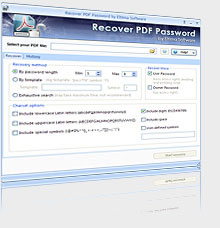 Eltima Recover PDF Password is an advanced tool that recovers owner and user passwords of PDF documents if they were accidentally lost. It guarantees the recovery of complicated and long passwords of PDF files created with all versions of Adobe Acrobat. Users now have the added advantage of enjoying some newly improved features and fixes, which include the following; addition dictionary search for password, addition of possibility to check for updates automatically, fixed erroneous saving of decrypted PDF files in Adobe Reader no matter whether changes were made or not after the file opening, improved multiprocessor system support for even higher speed of password search, improved decryption for PDF files created by third-party software, and updating of file attachment are now saved during decryption. Eltima Recover PDF Password is an advanced tool that recovers owner and user passwords of PDF documents if they were accidentally lost. It guarantees the recovery of complicated and long passwords of PDF files created with all versions of Adobe Acrobat. Users now have the added advantage of enjoying some newly improved features and fixes, which include the following; addition dictionary search for password, addition of possibility to check for updates automatically, fixed erroneous saving of decrypted PDF files in Adobe Reader no matter whether changes were made or not after the file opening, improved multiprocessor system support for even higher speed of password search, improved decryption for PDF files created by third-party software, and updating of file attachment are now saved during decryption.
Whether a PDF file is protected using user password or owner password, Eltima Recover PDF Password helps you remember any of them in a very simple way. In case your PDF document is protected with “owner” password and you don’t want to go through the stress of spending time to recollect or searching for it, Eltima Recover PDF Password application easily helps you to easily decrypt your file in no time.
Eltima Recover PDF Password is a shareware and can be downloaded for $39.95. That sounds like a fair deal for a program that saves you a lot of stress.
Want to check it out? Visit Eltima.
Posted in Main | No Comments »
Friday, August 19th, 2011
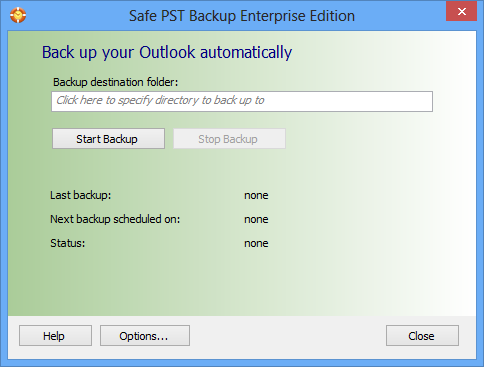 Safe PST Backup is an easy to use application to back up and archive email automatically. This freeware tool enables you to create backup of all or selected Contacts, Calendar, Tasks and other Microsoft Outlook folders with a few clicks. The backup will be done in the background regardless of whether Microsoft Outlook is running or not. Safe PST Backup uses incremental backup model to back up and transfer only changes made to Outlook items. Save selected Outlook PST and OST files to restore them at any moment. Safe PST Backup is an easy to use application to back up and archive email automatically. This freeware tool enables you to create backup of all or selected Contacts, Calendar, Tasks and other Microsoft Outlook folders with a few clicks. The backup will be done in the background regardless of whether Microsoft Outlook is running or not. Safe PST Backup uses incremental backup model to back up and transfer only changes made to Outlook items. Save selected Outlook PST and OST files to restore them at any moment.
Safe PST Backup has a lot of very useful features that include the following; use sophisticated technology to access Outlook items directly and backs up the latest changes even if Outlook is open and you are working on it, back up only changes made to your Outlook items to reduce the backup size, transfer time and network traffic load (Email archiving has never been easier), starts and will run automatically without interfering with your work even if Outlook is open, automatically back up a .pst file to a network, local, external drive, or memory device, schedule PST backup or start Microsoft Outlook backup manually on Windows PCs, select the folders you specifically need to back up from every Outlook storage (PST) file (this feature is only available in the enterprise version).
Want to check it out? Visit SafepstBackup.
Posted in Main | No Comments »
Friday, August 19th, 2011
 Duplicate Killer is powerful duplicate management application with lots of features that include; Outlook duplicate remover add-in for Microsoft Outlook, find and remove duplicate contacts, emails, calendar items (all day events, appointments, meetings), journal items, tasks and notes automatically, remove Outlook duplicates. Duplicate Killer also enables you to compare, edit and merge selected Outlook contacts and other items manually without copy-paste. Remove duplicates in distribution and mailing lists. Duplicate Killer is powerful duplicate management application with lots of features that include; Outlook duplicate remover add-in for Microsoft Outlook, find and remove duplicate contacts, emails, calendar items (all day events, appointments, meetings), journal items, tasks and notes automatically, remove Outlook duplicates. Duplicate Killer also enables you to compare, edit and merge selected Outlook contacts and other items manually without copy-paste. Remove duplicates in distribution and mailing lists.
Duplicate Killer 3.30.0640 version gives you more option that previous editions. You can now hide the items you don’t want to appear in the duplicates report, if they are not considered as duplicates for some reason. Duplicate Killer enables you to overcome the usual problem associated with multiple duplicates in Microsoft Outlook. Some of its key features will help you save valuable time removing all duplicates in just few clicks.
Duplicate Killer is not too difficult to understand for new users because it has some features that automatically scan your inbox for incoming mail duplicates and remove them automatically without prompting. Now you can save a lot of precious time and keep your inbox free from duplicates. You can also run the quick wizard to also delete identical items automatically or choose Advanced Wizard to select comparison options manually.
Want to check it out? Visit DuplicateKiller.
Posted in Main | No Comments »
Friday, August 19th, 2011
 ShareCalendar is a tool that will share MS Outlook calendar folders without any server. The program is also designed to share different calendar folders with different group of people, share Microsoft Outlook calendars with your own custom forms and imported items, work offline or online, help you to synchronize shared Outlook items with your PDA or Palm device, synchronize Outlook calendar data between your desktop PC and laptop, and many more. ShareCalendar is a tool that will share MS Outlook calendar folders without any server. The program is also designed to share different calendar folders with different group of people, share Microsoft Outlook calendars with your own custom forms and imported items, work offline or online, help you to synchronize shared Outlook items with your PDA or Palm device, synchronize Outlook calendar data between your desktop PC and laptop, and many more.
ShareCalendar has a lot of features, but the key ones include the following; share Microsoft Outlook calendar folders without a server, synchronize your personal or group (public) Calendar folders with your second desktop or laptop allow, schedule all your meetings and appointments, always know your co-workers’ and friends’ free/busy time without disclosing the subject and private details, create shared calendar folders and share them between different groups of people, internal Company network Calendar, Office Calendar, Free/Busy Time Calendar, family group calendar, enjoy easy sharing, synchronizing and distributing of custom Outlook forms of appointments and meetings between computers, and a host of others.
Running ShareCalendar is also very easy; simply install it by running Microsoft Outlook 2000/2002/2003/2007/2010 and on computers of your preferred teammates, and after a few clicks their calendar folders information will be synchronized each time you update the shared folder on your system.
Want to check it out? Visit ShareCalendar.
Posted in Main | 1 Comment »
Friday, August 19th, 2011
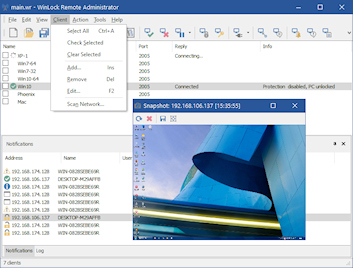 WinLock Remote Administrator makes networks safer and administrators’ life easier. The program provides remote (IP-based) configuration of Crystal Office WinLock as well as WinLock Professional clients by means of a comfortable and easy-to-use interface. As a client-server application, WinLock Remote Administrator enables the administrator to control the network installations of WinLock without leaving the computer. By means of a fast and secure communication technology, administrators can manage WinLock settings, enable or disable each copy of WinLock separately, and a host of others. WinLock Remote Administrator makes networks safer and administrators’ life easier. The program provides remote (IP-based) configuration of Crystal Office WinLock as well as WinLock Professional clients by means of a comfortable and easy-to-use interface. As a client-server application, WinLock Remote Administrator enables the administrator to control the network installations of WinLock without leaving the computer. By means of a fast and secure communication technology, administrators can manage WinLock settings, enable or disable each copy of WinLock separately, and a host of others.
WinLock Remote Administrator has some key features that include the following; append command, send key command, one year free upgrades, and free online technical and customer support. For $65.00, you can access all these features, including unlimited access to number of remote hosts. WinLock Remote Administrator also features an easy-to-use graphical user interface that provides consistent information about remote clients, remote management, and security restrictions. New hosts can be added to the list on-the-fly, and be controlled remotely, with extreme ease. Version 2.16 is fully compatible with 5.25.
WinLock Remote Administrator runs on the following Windows operating systems; Windows 2000, 2003, 9x, and Windows XP. WinLock Remote Administrator goes for $65.00 per download, and that appears to be a fair deal.
Want to check it out? Visit CrystalOffice.
Posted in Main | No Comments »
Thursday, August 18th, 2011
 MobaLiveCD is a freeware that will run your Linux LiveCD on Windows; and this is all thanks to the excellent emulator called “Qemu”. MobaLiveCD allows you to test your LiveCD with a single click. All you need to do after downloading the ISO image file of your favorite LiveCD is to start it in MobaLiveCD after then you are on; and there is no need to burn a CD-Rom or to reboot your computer. This version comes with a few changes that include the following; addition of USB boot support, you can now test your bootable USB drive (made with grub4dos, syslinux or other bootloaders) through emulation, and updated Qemu to the latest version for a better support of all new Linux distribution and Windows versions. MobaLiveCD is a freeware that will run your Linux LiveCD on Windows; and this is all thanks to the excellent emulator called “Qemu”. MobaLiveCD allows you to test your LiveCD with a single click. All you need to do after downloading the ISO image file of your favorite LiveCD is to start it in MobaLiveCD after then you are on; and there is no need to burn a CD-Rom or to reboot your computer. This version comes with a few changes that include the following; addition of USB boot support, you can now test your bootable USB drive (made with grub4dos, syslinux or other bootloaders) through emulation, and updated Qemu to the latest version for a better support of all new Linux distribution and Windows versions.
MobaLiveCD has the following key features; no need to burn the CD-Rom anymore, you can use the right-click menu for an easy and fast start, program without installation that you can start from your USB stick, clear and easy to use interface, light and portable application, and packaged in a single executable of 1.6MB only. MobaLiveCD is a freeware application, and is compatible with the following Windows operating systems; Windows 2000, Windows 2003, 2008, Windows XP, and Windows Vista.
Want to check it out? Visit Mobatek.
Posted in Main | No Comments »
Thursday, August 18th, 2011
 WinOrganizer is a full-scale personal information manager, designed to help you in organizing, tracking, and planning your business and private life. This shareware program works as a planner, notebook, and address book all in one. Computer version of the organizer comprises all features of its paper prototype in a more comfortable way, which makes working with it quicker and easier. WinOrganizer has an intuitive interface that combines all your notes, bookmark lists, holidays, reminders, appointments, task lists, and contacts into a coherent tree outline form that can be customized according to your requirements. WinOrganizer is a full-scale personal information manager, designed to help you in organizing, tracking, and planning your business and private life. This shareware program works as a planner, notebook, and address book all in one. Computer version of the organizer comprises all features of its paper prototype in a more comfortable way, which makes working with it quicker and easier. WinOrganizer has an intuitive interface that combines all your notes, bookmark lists, holidays, reminders, appointments, task lists, and contacts into a coherent tree outline form that can be customized according to your requirements.
WinOrganizer has changed over the years with the publishers introducing a lot of changes; thereby giving users opportunities to enjoy more features than before. Actually, past versions of WinOrganizer didn’t impress users that much in terms of features, and price. WinOrganizer is now equipped with flexible sorting and filtering options, HTML-printing, automatic phone dialing, as well as integration with the installed e-mail client and Web browser. Users can even enjoy additions that include; all traditional holidays dialing, and opportunity that allows you add your own vital dates.
For $55.00 per download, you can have WinOrganizer on your computer and start enjoying some of its features.
Want to check it out? Visit Tgslabs.
Posted in Main | No Comments »
Wednesday, August 17th, 2011
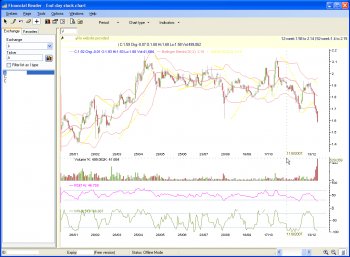 N Financial Reader is an integrated end-day financial application with a lot of features and it also comes with many financial functions like charting, (fast) stock scanning, indicator builder, financial updates. N Financial Reader also allows you access to unlimited import of folders (exchanges), free built-in technical indicators, like SAR, MACD, RSI, etc, support for chart profiling, chart above 30 years of data, and a host of others. This version of N Financial Reader comes with additional features and updates that include the following; allow selection of install folder (implies where local data will be stored), ENH ticker view (allows disable start-up ticker view loading in settings/view), and a lot more. N Financial Reader is an integrated end-day financial application with a lot of features and it also comes with many financial functions like charting, (fast) stock scanning, indicator builder, financial updates. N Financial Reader also allows you access to unlimited import of folders (exchanges), free built-in technical indicators, like SAR, MACD, RSI, etc, support for chart profiling, chart above 30 years of data, and a host of others. This version of N Financial Reader comes with additional features and updates that include the following; allow selection of install folder (implies where local data will be stored), ENH ticker view (allows disable start-up ticker view loading in settings/view), and a lot more.
Though, this version is a freeware, the publisher has nonetheless being able to create a program that provides you a lot of great features that enable you to professionally carry out stock investment in a way that will assist you to better manage your day-to-day investment activities. Some of these day-to-day activities include; market risks, stock charting, analysis, tracking, profiling and many others, leading to investment profitability.
Users who wish to download and install N Financial Reader on their systems must have Microsoft .NET framework pre-installed on their systems. It is a nice piece of tool that you will find very useful if you have the time to get familiar with its features.
Want to check it out? Visit Gi-services.
Posted in Main | No Comments »
|
|
|




