Author Archive
Saturday, March 12th, 2011
 PHP is a widely-used general-purpose scripting language that is especially suited for Web development and can be embedded into HTML. Virtually every of its syntax is borrowed from C, Java and Perl with a couple of unique PHP-specific features thrown in as well. The whole idea behind the language is to allow web developers write dynamically generated pages quickly. The publishers have done a really good job on this version; and already there are a couple of noticeable fixes. These fixes include; resolving a critical issue reported as PHP bug#53632 and CVE-2010-4645, where conversions from string to double might cause the PHP interpreter to hang on systems using x87 FPU registers, fixed crash in zip extract method, fixed a possible double free in map extension, fixed NULL pointer dereference in ZipArchive, and many more. PHP is a widely-used general-purpose scripting language that is especially suited for Web development and can be embedded into HTML. Virtually every of its syntax is borrowed from C, Java and Perl with a couple of unique PHP-specific features thrown in as well. The whole idea behind the language is to allow web developers write dynamically generated pages quickly. The publishers have done a really good job on this version; and already there are a couple of noticeable fixes. These fixes include; resolving a critical issue reported as PHP bug#53632 and CVE-2010-4645, where conversions from string to double might cause the PHP interpreter to hang on systems using x87 FPU registers, fixed crash in zip extract method, fixed a possible double free in map extension, fixed NULL pointer dereference in ZipArchive, and many more.
Of course, the publishers have also included a couple of other wonderful features that include the following; multiple improvements to the FPM SAPI, addition of follow_location (enabled by default) option for the http stream support, added start support for zip stream, addition of 3rd parameter to get_html_translation_table, implementation of FR #52348, added new constant ZEND_MULTIBYTE to detect zend multibyte at runtime, and a few others. For a freeware program to have lots of wonderful features; then it is definitely one of the best around.
Want to check it out? Visit PHP.net.
Posted in Main | No Comments »
Thursday, March 3rd, 2011
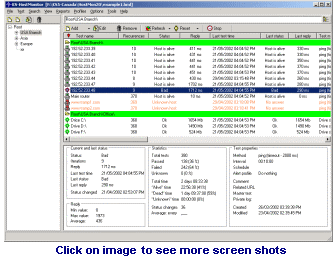 Advanced HostMonitor is a network monitor application designed to help you create a list of jobs and tests in advance on a ‘set and forget’ basis. Advanced HostMonitor can be used to check the following; monitor any TCP service, ping a host, retrieve an URL, check the available disk space, and a few others. It checks network servers at regular intervals and takes predefined actions if a device does not respond. Advanced HostMonitor is capable of providing visual and sound warning, send an Email message to another mailbox or pager or mobile phone, execute another program, and a host of others; the purpose of all this is to allow you respond to a problem before your users start to complain. Advanced HostMonitor is a network monitor application designed to help you create a list of jobs and tests in advance on a ‘set and forget’ basis. Advanced HostMonitor can be used to check the following; monitor any TCP service, ping a host, retrieve an URL, check the available disk space, and a few others. It checks network servers at regular intervals and takes predefined actions if a device does not respond. Advanced HostMonitor is capable of providing visual and sound warning, send an Email message to another mailbox or pager or mobile phone, execute another program, and a host of others; the purpose of all this is to allow you respond to a problem before your users start to complain.
Advanced HostMonitor is one of the best monitoring programs available; and as a matter of fact, the publishers have been able to make a lot of mark over the years. The publishers have been able to improve on various complaints reported in the past; and this has really impacted positively on version after version.
Advanced HostMonitor is a shareware, but can be downloaded and installed for a limited trial period of thirty (30) days. This program can help you monitor servers availability and performance.
Want to check it out? Visit Ks-Soft.net.
Posted in Main | No Comments »
Tuesday, March 1st, 2011
 Digital Recall is a freeware application for the online control of a network of screens at multiple locations. Digital Recall makes use of LAN or Internet, and you can use your own equipment as well. Use any size screens. The program can be controlled from one or multiple locations online. Digital Recall is a freeware application for the online control of a network of screens at multiple locations. Digital Recall makes use of LAN or Internet, and you can use your own equipment as well. Use any size screens. The program can be controlled from one or multiple locations online.
In this version, a couple of changes and updates have been added by the publishers. These include the following: up to 24 loops per day can now be scheduled; check for updates virtually every five minutes (with new minimum frequency); zone layout to portrait or landscape and zone grid-size Finel and Regular; integration of weather and time widgets (weather widget also available in English, Spanish or Italian); Tickertape and RSS feeds now properly coordinate with Loops and Schedules; custom ticker height/ticker font size can now be set up in Manager; ability to display Arabic and Hebrew RSS feeds with new left to right scrolling option and reverse text option; remove quick time text check from DR Manager and player; fixing of reboot previously download; parameters can now be added on advert files; and many more.
To download install this program on your system, you may be required to download and register a download manager.
Want to check it out? Visit Digitalrecall.
Posted in Main | No Comments »
Tuesday, March 1st, 2011
 LinkAssistant Enterprise is a search engine optimization (SEO) software created specifically for link building and management. It is one of those must-have search engine optimization (SEO) tools for web-masters and professional SEOs who want to catapult their websites ahead of the competition in search results. The competition on the Internet is becoming stiffer by the day; and only a tool like this is capable of opening up your online business to many wonderful opportunities. LinkAssistant Enterprise is a search engine optimization (SEO) software created specifically for link building and management. It is one of those must-have search engine optimization (SEO) tools for web-masters and professional SEOs who want to catapult their websites ahead of the competition in search results. The competition on the Internet is becoming stiffer by the day; and only a tool like this is capable of opening up your online business to many wonderful opportunities.
LinkAssistant Enterprise was developed specifically alongside other search engine optimization community. This makes it one of the few relevant search engine applications with potentials of meeting the needs of most Internet users. This version has been upgraded to include the following additions and features: version 3.14.2 now supports seven link exchange scripts (including LinkeX PRO); uninstaller; and anti-spam CAPTCHA in submission forms of link directories added. LinkAssistant Enterprise requires Java Runtime Environment 1.4 before installation.
A few of the advanced features that keep giving this program a lot of high rating among users include: promotion of many pages of the same website; six methods of link partner search reinforced with relevance and quality filters; email client specially tuned for link exchange; and many more.
LinkAssistant Enterprise is a shareware program, with a download price put at $249.75.
Want to check it out? Visit Link-Assistant.
Posted in Main | No Comments »
Monday, February 28th, 2011
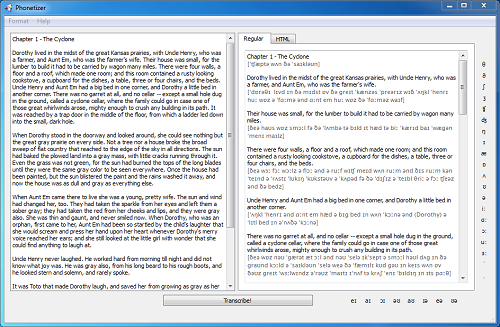 Phonetizer is a program that is capable of automatically adding International Phonetic Alphabet (IPA) transcription to any English texts, edit the resulting text, and copy it to an external program for additional editing or printing. Phonetizer also automatically recognizes inflections of English verbs, nouns and adds transcription to whole texts instead of single words using a database of over 45,000 words’ transcription. Version 2.0 is still a commercial demo, but it is looking like users are in for a great time with Phonetizer when it is fully released. The most noticeable change Phoentizer 2.0 is the addition of American English Phonetic Transcription. Phonetizer is a program that is capable of automatically adding International Phonetic Alphabet (IPA) transcription to any English texts, edit the resulting text, and copy it to an external program for additional editing or printing. Phonetizer also automatically recognizes inflections of English verbs, nouns and adds transcription to whole texts instead of single words using a database of over 45,000 words’ transcription. Version 2.0 is still a commercial demo, but it is looking like users are in for a great time with Phonetizer when it is fully released. The most noticeable change Phoentizer 2.0 is the addition of American English Phonetic Transcription.
With Phonetizer 2.0, you can easily and quickly add phonetic British or American English transcription to any English text on a Mac or PC. Also, if you are an ESL or EFL teacher, Phonetizer can help you cut your preparation time for classes and further ensure that your students read your assignments correctly, and without any stress.
An overview of some of its features and uses include the following: easy edit transcription using the transcription symbols panel; print the resulting text with transcription; format the resulting text; and automatically add IPA transcription to any English texts.
Want to check it out? Visit Vinidiktov.
Posted in Main | No Comments »
Monday, February 28th, 2011
 GE3KTV is free Internet television software that is built to receive more 90 online channels of live broadcasts from around the world. With GE3K TV software, there is no need for a PC TV card. As a matter of fact, the television channels are streamed through the user’s internet connection. Once you have an Internet connection; the rest is no problem because you can easily configure the program to work with your computer system. Though, users may require a .NET Framework in order to install it on a system; GE3 KTV may not pose much difficulty in terms of installation. However, some of the acclaimed television channels are not working; and this is contrary to expectations. GE3KTV is free Internet television software that is built to receive more 90 online channels of live broadcasts from around the world. With GE3K TV software, there is no need for a PC TV card. As a matter of fact, the television channels are streamed through the user’s internet connection. Once you have an Internet connection; the rest is no problem because you can easily configure the program to work with your computer system. Though, users may require a .NET Framework in order to install it on a system; GE3 KTV may not pose much difficulty in terms of installation. However, some of the acclaimed television channels are not working; and this is contrary to expectations.
Some of the features of this freeware program include the following; it is completely free without any limitation or trial period, the video streaming capability is a bit fast (though, this could be improved upon by the publishers), the user-interface is quite easy to get familiar with, the program works on Windows XP, Windows Vista, and Windows 7, no additional equipment (like a TV card) required for installation, more than 90 different television channels to watch, and a few others.
Users may encounter a few challenges when using this program because it is still in its Beta stage. However, it is not bad program after all!
Want to check it out? Visit Ge3ktv.
Posted in Main | No Comments »
Monday, February 28th, 2011
 TopStyle is an easy-to-use application that helps you create cross-browser style sheets by simply alerting you of any problem as you work. TopStyle also contains style checker that validates against multiple CSS implementations, alerting you not only to invalid entries in your style sheets, but also to bugs in popular browsers that may affect their display. This program contains powerful tools for building standards-compliant websites. This version has some powerful tools that include the following: preview CSS while you write it; easily create pleasant color schemes for your website; style upgrade quickly replaces all outdated HTML codes with equivalent CSS styling; and use site reports to see at a glance where CSS styles are being used in your website. TopStyle is an easy-to-use application that helps you create cross-browser style sheets by simply alerting you of any problem as you work. TopStyle also contains style checker that validates against multiple CSS implementations, alerting you not only to invalid entries in your style sheets, but also to bugs in popular browsers that may affect their display. This program contains powerful tools for building standards-compliant websites. This version has some powerful tools that include the following: preview CSS while you write it; easily create pleasant color schemes for your website; style upgrade quickly replaces all outdated HTML codes with equivalent CSS styling; and use site reports to see at a glance where CSS styles are being used in your website.
Version 4.0.0.85 of this program has been upgraded, and now includes the following features for better performance: improved integration with HTML Tidy and CSE HTML Validator; support for the latest browsers such as Mozilla FireFox, Apple Safari, Opera, and Google Chrome; Live spelling (it is capable of identifying spelling errors as you type with wavy red underlines and allows you to act upon each identified problem with a new context menu); improved inline style; script insight; Live FTP editing Unicode; and many more.
TopStyle 4.0.0.85 witnessed significant improvements over previous versions; and this is just an indication that the publishers are not doing badly.
Want to check it out? Visit TopStyle4.com.
Posted in Main | 1 Comment »
Friday, February 25th, 2011
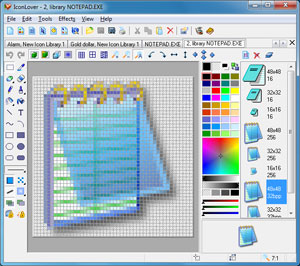 The idea of creating IconLover is specifically to help users scan files, folders, or all local hard disks for icon images. The function also include, but not restricted to the following; extract icon images from ICO, CUR, ANI, DLL, EXE, ICL, IL, NIL, OCX , SCR, CPL, BPL, and other files. Furthermore, this program can be used to create and manage ICL icon libraries, save found icons in own, ICC icon collection format for better and more efficient icon storage, delete identical icons in collections, sort icons inside collections, export icons to ICO and BMP files, and customize Windows Desktop and folder icons. As a matter of fact, IconLover comes with a lot of features that may take a few days to understand. The Icon database in this version has been updated in the Icon editor. The idea of creating IconLover is specifically to help users scan files, folders, or all local hard disks for icon images. The function also include, but not restricted to the following; extract icon images from ICO, CUR, ANI, DLL, EXE, ICL, IL, NIL, OCX , SCR, CPL, BPL, and other files. Furthermore, this program can be used to create and manage ICL icon libraries, save found icons in own, ICC icon collection format for better and more efficient icon storage, delete identical icons in collections, sort icons inside collections, export icons to ICO and BMP files, and customize Windows Desktop and folder icons. As a matter of fact, IconLover comes with a lot of features that may take a few days to understand. The Icon database in this version has been updated in the Icon editor.
IconLover 5.17 supports the compressed PNG format recommended for 256×256 icons in Windows Vista as well as Windows 7. The application also reduces the overall size of the file without sacrificing the quality of the image, and also preserving alpha channel transparency.
You can also manage icons, static and animated cursors, icon and cursor libraries and image lists. The features are just too numerous to be listed in this reviews; however, that is not an indication that the program does not have a few challenges. The price for instance, is a bit on the high side.
Want to check it out? Visit Aha-Soft.
Posted in Main | No Comments »
Friday, February 25th, 2011
 mfNotePad is a utility tool designed to replace the yellow post-it notes around your monitor. The application appears as a thin line on the edge of the screen; however, each file has its own color that a user can set. It allows you to add up to twenty files, and can also used as a program launcher. All you need is to left click and hold on, and a color opens the text editor temporarily; the right click makes it stay open. You can even configure a windows hot-key to open the last file edited. mfNotePad is a utility tool designed to replace the yellow post-it notes around your monitor. The application appears as a thin line on the edge of the screen; however, each file has its own color that a user can set. It allows you to add up to twenty files, and can also used as a program launcher. All you need is to left click and hold on, and a color opens the text editor temporarily; the right click makes it stay open. You can even configure a windows hot-key to open the last file edited.
The Rich text format support (RTF fonts, sizes, colors, lists, bold etc.) Users can also search through all of the files as well as set bookmarks. mfNotepad is also capable of encrypting your text files with a password, so no-one else can read them. (With an option to auto encrypt if computer is idle.) You can click on the F1 button to access more information. Version 0.0.217 has been modified to accommodate a few changes and a few bug fixes as well. This version also requires the Richtx32.ocx to be in the same folder or in Windows system folder.
The basic requirement to install this version on your system includes a Visual Basic 6 runtime file; and this can be downloaded straight from Microsoft.
Want to check it out, Visit 8887.eu
Posted in Main | No Comments »
Friday, February 25th, 2011
 Pegasus Mail is an e-mail client or program that interacts directly with the user. It is designed to allow mail to be sent, read, filed, printed and otherwise manipulated through a graphical interface. Pegasus Mail is a small and fast that can be left running permanently on the workstation. The program has great features that include some powerful tools to notify the user when new mail arrives. It can run on single Windows computers, or local area networks. Pegasus Mail has support for Novell NetWare LANs that allow it to operate intuitively and with almost no maintenance; however, Pegasus Mail also supports multiple users on a single computer. It can also act as a complete internal mail system on its own without a need for further servers or components. It can also be used to send and receive Internet mail on its own, using standard protocols (SMTP, IMAP and POP3). Pegasus Mail is an e-mail client or program that interacts directly with the user. It is designed to allow mail to be sent, read, filed, printed and otherwise manipulated through a graphical interface. Pegasus Mail is a small and fast that can be left running permanently on the workstation. The program has great features that include some powerful tools to notify the user when new mail arrives. It can run on single Windows computers, or local area networks. Pegasus Mail has support for Novell NetWare LANs that allow it to operate intuitively and with almost no maintenance; however, Pegasus Mail also supports multiple users on a single computer. It can also act as a complete internal mail system on its own without a need for further servers or components. It can also be used to send and receive Internet mail on its own, using standard protocols (SMTP, IMAP and POP3).
In terms of flexibility and ease of use; Pegasus Mail is far ahead of other email clients. In terms of its ability to organize your emails; this application makes your task a lot easier than a few other programs out there. The publisher of this program deserves a lot commendation because of the great work done on it.
Want to check it out? Visit Pmail.
Posted in Main | No Comments »
|
|
|




