Author Archive
Monday, December 13th, 2010
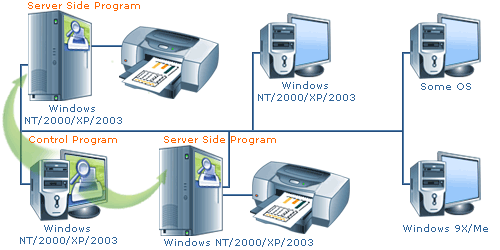 O&K Print Watch is a print manager to control and audit printing costs in an organization. It assists you when it comes to learning about the true cost of printing in your company by monitoring all print jobs regardless of whether they are submitted onto a local or networked printer. O&K Print Watch supports multiple printing devices, as well as unique printing pricing combined with per-user quotas and audit of all print jobs that makes it possible to cut down on your printing costs. O&K Print Watch is a print manager to control and audit printing costs in an organization. It assists you when it comes to learning about the true cost of printing in your company by monitoring all print jobs regardless of whether they are submitted onto a local or networked printer. O&K Print Watch supports multiple printing devices, as well as unique printing pricing combined with per-user quotas and audit of all print jobs that makes it possible to cut down on your printing costs.
You can use this application to keep track on your printing jobs and paper usage for all local and even network printers. O&K Print Watch also monitors records of those who used a particular printing device, and what and when a printing was done or carried out. In case of a managerial view; O&K Print Watch can track dates and time, name (precise user), and provide information on exact number of pages, as well as the number of pages printed and the printing parameters for each of the printing job.
Not actually a bad auditing application for those who want to keep tracking their printing task. I know a lot of users may frown at paying that much for a program just to keep track of their printing jobs; I think this is one of the best ways to cut down on cost, especially in the office.
Want to check it out? Visit Prnwatch.com.
Posted in Main | No Comments »
Monday, December 13th, 2010
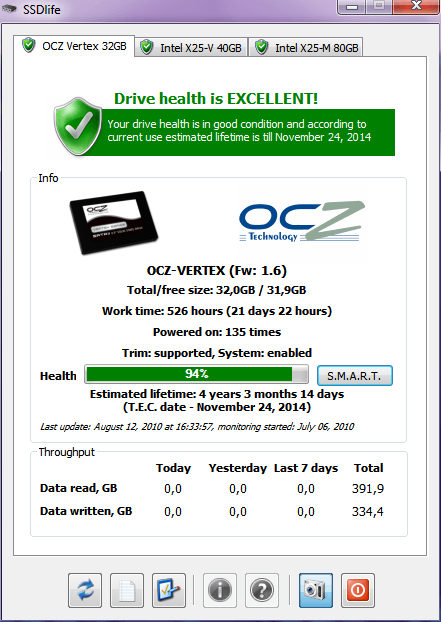 SSDlife Freeware is a small SSD diagnostic application that helps you to obtain detailed information about your SSD drives, and automatically acts on behalf of your system if any problem is discovered. This indispensable tool collects the details about all available SSD drives and displays them on corresponding tabs. The program is built in such a way that each of the tabs displays the name and logo of the drive manufacturer, size of the drive and the amount of free disk space. You can also see the total time the drive has been working in the system, the number of device starts, its total throughput, and other drive-related information. The beauty of this freeware program can also be appreciated when you see a health bar that visually represents the state of the SSD drive and its calculated lifetime. SSDlife Freeware is a small SSD diagnostic application that helps you to obtain detailed information about your SSD drives, and automatically acts on behalf of your system if any problem is discovered. This indispensable tool collects the details about all available SSD drives and displays them on corresponding tabs. The program is built in such a way that each of the tabs displays the name and logo of the drive manufacturer, size of the drive and the amount of free disk space. You can also see the total time the drive has been working in the system, the number of device starts, its total throughput, and other drive-related information. The beauty of this freeware program can also be appreciated when you see a health bar that visually represents the state of the SSD drive and its calculated lifetime.
Instead of spending a lot of money replacing the conventional hard drive in your desktop or laptop; you can use this freeware program to carry out regular checks on the health of your system. The fact that SSDlife is a freeware tool does not take anything away from its performance; except you want a more advanced commercial program like the pro version of this program or other commercial versions.
Want to check it out? Visit SSD-Life.com.
Posted in Main | No Comments »
Monday, December 13th, 2010
 LAN-Secure Security Center Lite is a network security program for real-time intrusion detection IDS and prevention IPS. The basic aim of this program is to help protect networks from potential intruders, unauthorized connections and malicious activities. LAN-Secure Security Center Lite can be connected to any network hubs network without the need for remote agents or special network configuration. LAN-Secure Security Center Lite is a network security program for real-time intrusion detection IDS and prevention IPS. The basic aim of this program is to help protect networks from potential intruders, unauthorized connections and malicious activities. LAN-Secure Security Center Lite can be connected to any network hubs network without the need for remote agents or special network configuration.
The program’s unique monitoring engine provides real-time threats and vulnerability discovery. LAN-Secure Security Center has a built-in manual and automatic protection rules that allows it to easily enforce any network security policy with a proactive blocking of network nodes that violated the security protection rules. Lite version can be used in distributed environment using any number of remote viewers for controlling the network security and operation status.
Some of the recently recorded attacks on most companies’ security system come from damages caused by intruders using network access from within the organization. This is definitely one of the more compact programs that can help prevent some of these network attacks. Actually, the pro version has more features; this Lite version of LAN-Secure Security Center program also has some nice features. Some of these features include; graphic hyperbolic mapping of network topology including mapping, selectable detecting and monitoring engines including vulnerability, and many more.
The price for this software may be a bit on the high side ($99.00); it is no doubt one of the programs you need to have. LAN-Secure Security Center Lite supports up to ten network nodes. Users can try it for thirty days before actual purchase is made; however, one wonders if the trial period is sufficient enough to try it out.
Want to check it out? Visit Lan-Secure.
Posted in Main | No Comments »
Monday, December 13th, 2010
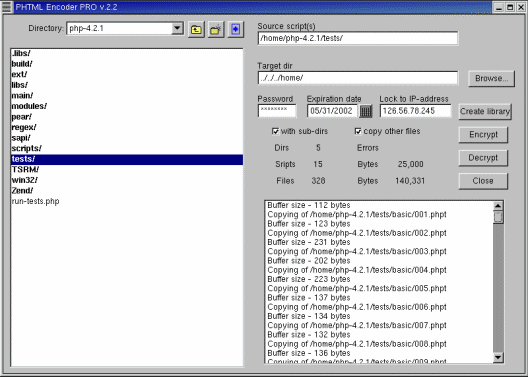 PHTML Encoder for Windows is basically a program that allows you to encode the PHP scripts before distributing them. The program has a built-in converter for encryption/decryption of your scripts; and you can also use wildcards for easy conversion of projects, you can also combine both protected and unprotected scripts in a single site. PHTML Encoder for Windows is basically a program that allows you to encode the PHP scripts before distributing them. The program has a built-in converter for encryption/decryption of your scripts; and you can also use wildcards for easy conversion of projects, you can also combine both protected and unprotected scripts in a single site.
The script code logic is preserved while using cryptography to hide your logic from privacy invaders. You can also lock encoded scripts to predefined machine (web server) via machine ID in order for your scripts to work only this machine. Once installed on your computer system, you can also self-decoded scripts, which may not require any changes to your PHP installation.
PHTML Encoder for Windows will work on virtually all computers and server platforms which supports PHP because it is cross-platform product. The program includes console and GUI versions of converter for encryption/decryption of your scripts, and use wildcards to easily convert a complete project.
The latest changes made to this version include; lock encoded scripts to predefined machine, available for Windows, Linux x86, Linux x86_64, FREEBSD x86, FREEBSD x86_64, improved performance for improved performance, and a few others.
Want to check it out? Visit Rssoftlab.
Posted in Main | No Comments »
Monday, December 13th, 2010
 WinAVI Video Converter is a video burning program that supports the conversion of the following files: AVI to DVD, AVI to VCD, AVI to MPEG, AVI to MPG, AVI to WMV to WMV, DVD to AVI, MOV; and convert all video formats to AVI/WMV/RM and burning VCD/SVCD/DVD. The program also has built-in video compression engine that converts the whole AVI to DVD under two minutes. WinAVI Video Converter is a video burning program that supports the conversion of the following files: AVI to DVD, AVI to VCD, AVI to MPEG, AVI to MPG, AVI to WMV to WMV, DVD to AVI, MOV; and convert all video formats to AVI/WMV/RM and burning VCD/SVCD/DVD. The program also has built-in video compression engine that converts the whole AVI to DVD under two minutes.
WinAVI Video Converter remains one of the fastest video burning or converting software around. It comes with the following features that make it easier for users to burn their various video files to different formats: high speed which saves you a lot of time; support for virtually all popular file formats; friendly user-interface that enables you to easily operate it; high and quick conversion rate, which does not affect the quality; and ability to convert movies that comes out as almost as good as the original.
One very fascinating thing about this program is its low price. For a program that can convert a lot of file format at such great speed and quality; the publishers have really put together a nice piece of work.
Users can try it out before going for the unlimited version, which costs $29.95 per download.
Want to check it out? Visit Video-converter.
Posted in Main | No Comments »
Wednesday, December 8th, 2010
 fre:ac is a free a free audio converter and CD ripper that supports MP3, MP4/M4A, Ogg Vorbis, FLAC, AAC and Bonk files. The publishers have added some few features that make it quite easier for users to convert their favorite audio CDs to MP3 or WMA files that can be used in their system hardware player or even with their favourite audio software. fre:ac also supports CDDB/freedb online CD database and CDText and also writes song information to ID3VD or Vorbis comment tags. This version in review comes with additional updates and features such as; addition of integrated video downloader, support for opening cue sheets, and addition of support for extracting audio from video files, and also comes with an uninstaller. fre:ac is a free a free audio converter and CD ripper that supports MP3, MP4/M4A, Ogg Vorbis, FLAC, AAC and Bonk files. The publishers have added some few features that make it quite easier for users to convert their favorite audio CDs to MP3 or WMA files that can be used in their system hardware player or even with their favourite audio software. fre:ac also supports CDDB/freedb online CD database and CDText and also writes song information to ID3VD or Vorbis comment tags. This version in review comes with additional updates and features such as; addition of integrated video downloader, support for opening cue sheets, and addition of support for extracting audio from video files, and also comes with an uninstaller.
fre:ac also has the following features that include: converter for mp3, mp4/m4a, WMA, Ogg Vorbis; integrated CD ripper with CDDB/freedb title database support; multilingual user interface available in 37 different languages; full Unicode support for tags and file names; free open source for the use of all; and many more.
I like the fact that it is free and open source program with a lot of quality features. It is also good to find some new additions that will keep this program even more fascinating.
Want to check it out? Visit Freac.org.
Posted in Main | No Comments »
Wednesday, December 8th, 2010
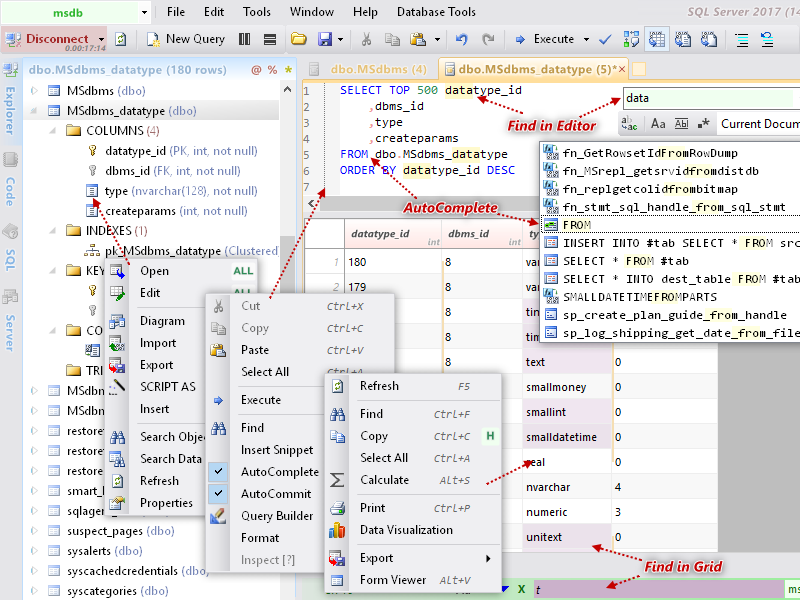 Database.NET is a simple and intuitive database management application for multiple databases; making the task of local remote and remote database administration very easy. Users who install Database.NET on their systems can create databases, design tables, edit data, export data, generate scripts and run SQL queries. Some of the features include: a table editor; syntax highlighting; data editor; create/shrink/protect database; service manager; code manager; multiple query tabs; export to CSV/XML/TXT/XSL/SQL; print query results; and a host of other features. Database.NET is based on the .NET Framework 3.5; and supports MS Access 97-2003/MS Access 2007-2010/MS Excel 2007-2010/dbase IV/Firebird/MySQL/SQL Server/SQL Azure/SQL Server CE/SQLite/PostgreSQL/Oracle/OleDB/ODBC. Database.NET is a simple and intuitive database management application for multiple databases; making the task of local remote and remote database administration very easy. Users who install Database.NET on their systems can create databases, design tables, edit data, export data, generate scripts and run SQL queries. Some of the features include: a table editor; syntax highlighting; data editor; create/shrink/protect database; service manager; code manager; multiple query tabs; export to CSV/XML/TXT/XSL/SQL; print query results; and a host of other features. Database.NET is based on the .NET Framework 3.5; and supports MS Access 97-2003/MS Access 2007-2010/MS Excel 2007-2010/dbase IV/Firebird/MySQL/SQL Server/SQL Azure/SQL Server CE/SQLite/PostgreSQL/Oracle/OleDB/ODBC.
Database .NET is a freeware tool that is packed with a lot of features; even as a freeware program. It is a program good for a lot of people; especially those with a bit of experience when it comes remote administrations. With features that puts you almost in charge of creating databases, design tables, edit and export data, as well as generate scripts and run SQL queries. May take a bit of time before someone without a technical understanding of how a program like this works to get used to it. For a freeware program; this is not actually a bad idea from the publishers.
Want to check it out? Visit FishCodeLib.
Posted in Main | No Comments »
Wednesday, December 8th, 2010
 C-Organizer is an information manager that combines a day planner, an address book with photo, and an alarm. C-Organizer Professional has an intuitive user-interface that helps users to act on meetings, task lists and notes. Users can also get notification about upcoming events such as; appointments, birthdays, and track your everyday task or schedule. The application also comes with a built-in alarm that enables you to run other applications and play sounds at selected or set time. C-Organizer is an information manager that combines a day planner, an address book with photo, and an alarm. C-Organizer Professional has an intuitive user-interface that helps users to act on meetings, task lists and notes. Users can also get notification about upcoming events such as; appointments, birthdays, and track your everyday task or schedule. The application also comes with a built-in alarm that enables you to run other applications and play sounds at selected or set time.
This commercial application also contains the following; a password and bookmark managers, a notepad, and a calendar of events. The publishers of this software also included a tree-like database structure that displays information in a more convenient and easy to navigate manner. That means you and your aid or assistant can share a calendar simultaneously.
C-Organizer Professional 4.0.4 has a number of new additions to enhance its performance. These new additions include: addition of a new user-interface, it now supports different interfaces types and colors; the calendar section now supports day, work week, week, month and year views in each mode; addition of category support, users can now assign a category to any entry and then filter their information category; supports attachment; fully customizable view; and others.
C-Organizer has a 30 days trial period; while the full version goes for $49.95 per download.
Want to check it out? Visit C-OrganizerPro.
Posted in Main | No Comments »
Wednesday, December 8th, 2010
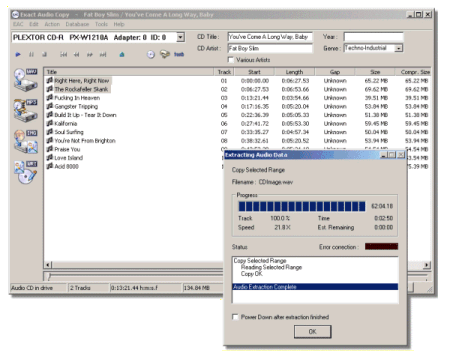 Exact Audio Copy is a program that allows you copy your favorite audio tracks exactly from a CD and save them directly to your hard drive. The program is built on the Windows ASPI Interface; with support for SCSI and ATAPI CD-ROM drives. Exact Audio Copy also supports hidden sector synchronization and a secure, fast and burst extraction method selectable. Exact Audio Copy is a program that allows you copy your favorite audio tracks exactly from a CD and save them directly to your hard drive. The program is built on the Windows ASPI Interface; with support for SCSI and ATAPI CD-ROM drives. Exact Audio Copy also supports hidden sector synchronization and a secure, fast and burst extraction method selectable.
Exact Audio Copy supports the following features: burst mode, which grabs the audio data without any synchronization; it allows users to output of time positions of all non-exact corrections and listen to these positions; copy of ranges of music data (not tracks alone); automatic speed reduction on errors and fall-back afterwards, which enables music to sound just the way you want it to; use of Windows Audio Compression Manager for direct compression to MP3 or WAV; supports external MP3, VQF, RA, and AAC encoders for automatic compression after extraction; file name editing is even made easier with local remote CDDB database and CDPLAYER.INI support; ID3 tagging; and many more.
Exact Audio Copy uses some of the best features and technology like multi-reading to verify and accurately rip your audios; even the ones that have been badly scratched. This is a major problem with some of the audio ripping programs out on the internet.
Exact Audio Copy is a freeware, and can be downloaded and used at home.
Want to check it out? Visit ExactAudioCopy.
Posted in Main | No Comments »
Wednesday, December 8th, 2010
 System Nucleus is a freeware application that can be used for viewing, editing and managing resources and settings. It has a conditioning functionality that usually requires a lot of tools into just one interface designed to make these tasks easier than before. The publishers have also carefully placed some emphasis on batch processing, filtering, and easy visual identification of items using distinctive icons. System Nucleus is a freeware application that can be used for viewing, editing and managing resources and settings. It has a conditioning functionality that usually requires a lot of tools into just one interface designed to make these tasks easier than before. The publishers have also carefully placed some emphasis on batch processing, filtering, and easy visual identification of items using distinctive icons.
System Nucleus 2.3.2 comes with an uninstaller and a number of newly added features, which include the following: addition of WMI checkpoints and repair options if needed at startup; addition of shortcuts to over 3o additional Windows applications in Windows 7; mouse over log message in status bar now shows ToolTip containing complete message text; addition of more languages; addition of functionality to create a new service; and others.
System Nucleus is useful for people who want to stop two processes at once, and uninstall five applications at once. You can also view process information for running service, generate a detailed audit of a machine’s hardware, software and settings, optimize network performance, and disable those annoying programs that run or start at login. System Nucleus also automatically displays up-to-date status and info for services and drivers with optional auto refresh.
A great job, and for the fact that it is a freeware program makes it a fine piece of work from the publishers.
Want to check it out? Visit SpencerBerus.
Posted in Main | No Comments »
|
|
|




