Author Archive
Monday, October 25th, 2010
 Language Tutor is a foreign language vocabulary learning software good for anyone who wants to learn either French or English vocabulary. The software will help you practice with 6.500 words and short expressions to translate from your mother language to any language of your choice and backward. There are two different stages of progression; these are the lesson stage to assess your actual level of knowledge, and the repetition stage to exercise your memory using the proven spaced repetition algorithm. Language Tutor is a foreign language vocabulary learning software good for anyone who wants to learn either French or English vocabulary. The software will help you practice with 6.500 words and short expressions to translate from your mother language to any language of your choice and backward. There are two different stages of progression; these are the lesson stage to assess your actual level of knowledge, and the repetition stage to exercise your memory using the proven spaced repetition algorithm.
Language Tutor has features that include the following: the combination of English.Spanish, French.English, Spanish.French; inclusion of two databases for reverse learning; nine categories/54 lessons/6500 questions; two stages, lesson and repetition; spaced repetition method; two levels of difficulties; three users can log on alternatively; words and expressions delivered in context when needed; integrated help and FAQ pages; visual and audio aids to track progress; last question and answers are kept on screens; four lessons selected at any time; learning of number and gender of nouns; learning of nearly 10,000 words in total; time-saving procedure for articles in English; a comfortable screen size and a no distraction screen option; and many more.
Language Tutor EN+FR 1.2.6 has a trial limitation period that last for ten days for those who would like to try it out.
Want to check it out? Visit Morevocabulary.
Posted in Main | No Comments »
Monday, October 25th, 2010
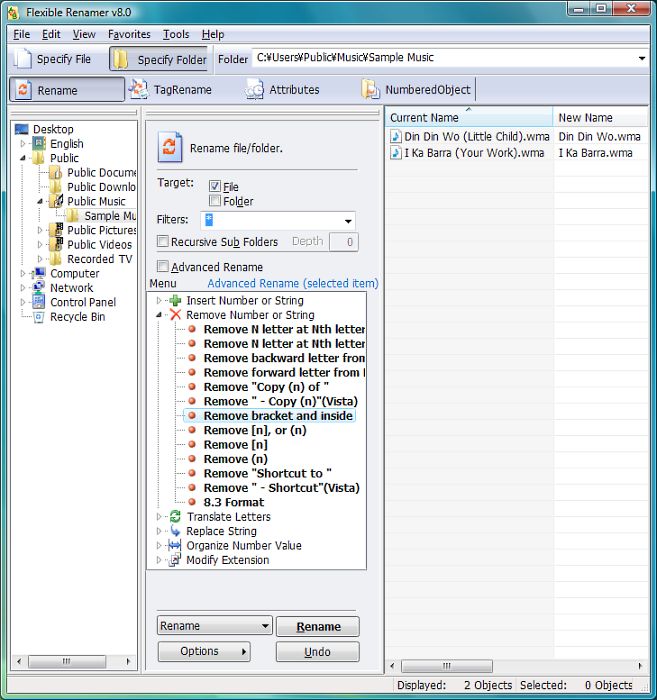 Flexible Renamer is a file/folder renaming application that can use Wildcard or Regular-Expression and Tag-information (MP3, EXIF). Version 8.3 comes with additional changes and fixes that include the following: Windows 7 taskbar progress; Windows 7 taskbar list; fixed, “won’t launch after closing it in case of minimizing”; Nega-Colour arrangement; fixed, “property is not retrieved in case of the extension is upper-cased letter; and initialize the rename setting when terminating abnormally last time (deal with a problem of terminating abnormally even while reactivating and terminating abnormally). Flexible Renamer is a file/folder renaming application that can use Wildcard or Regular-Expression and Tag-information (MP3, EXIF). Version 8.3 comes with additional changes and fixes that include the following: Windows 7 taskbar progress; Windows 7 taskbar list; fixed, “won’t launch after closing it in case of minimizing”; Nega-Colour arrangement; fixed, “property is not retrieved in case of the extension is upper-cased letter; and initialize the rename setting when terminating abnormally last time (deal with a problem of terminating abnormally even while reactivating and terminating abnormally).
Some of the recent language translation include; English/Japanese, Italian, French, Traditional Chinese, Simplified Chinese, Portuguese, Deutsch.
Many new users are still going to find it difficult to find their ways around some of the features of this program. I have seen some few programs out there that have easy to understand user interfaces, and easy to understand features. Flexible Renamer is actually a freeware, and has wonderful features; especially if users can get to understand how they work in quick time. At least this is a good program for anyone who does not feel like grabbing a shareware in order to carry out his renaming assignments.
Flexible Renamer 8.3 runs on Windows 7, Windows 2000, Windows Vista, Windows XP, and Windows Server 2008.
Want to check it out? Visit hp.vector.co.jp.
Posted in Main | No Comments »
Monday, October 25th, 2010
 TeraCopy is a program designed to help copy and move files at faster speed; and also built with a lot of features. The program uses dynamically adjusted buffers to reduce seek times. Asynchronous copy speeds up file transfer between two physical hard drives; and in an even of any copy error, it will try as many times as possible before skipping the file, and actually terminating the whole transfer. It ca n also replace Explorer copy and move functions, allowing users to work with files as usual. TeraCopy is a program designed to help copy and move files at faster speed; and also built with a lot of features. The program uses dynamically adjusted buffers to reduce seek times. Asynchronous copy speeds up file transfer between two physical hard drives; and in an even of any copy error, it will try as many times as possible before skipping the file, and actually terminating the whole transfer. It ca n also replace Explorer copy and move functions, allowing users to work with files as usual.
TeraCopy 2.2 comes with an uninstaller, and a few fixes that include: addition of new language strings; fixing of crash when testing md5 files; fixing of always test target folder and request admin privileges if needed; addition of option ‘ForcesameDriveMode’ to ini file; addition of CardReader to ini file; and addition of better USB devices ejection. This freeware program also comes with full support for Unicode, as well as support for Windows 7 x64.
TeraCopy 2.2 is free for home use only, but users can also go for the pro version, which comes with more added features and uses like; removing selected files from the copy queue, free updates and priority support, and copy/move to favorite folder.
Want to check it out? Visit Codesector.com.
Posted in Main | No Comments »
Monday, October 25th, 2010
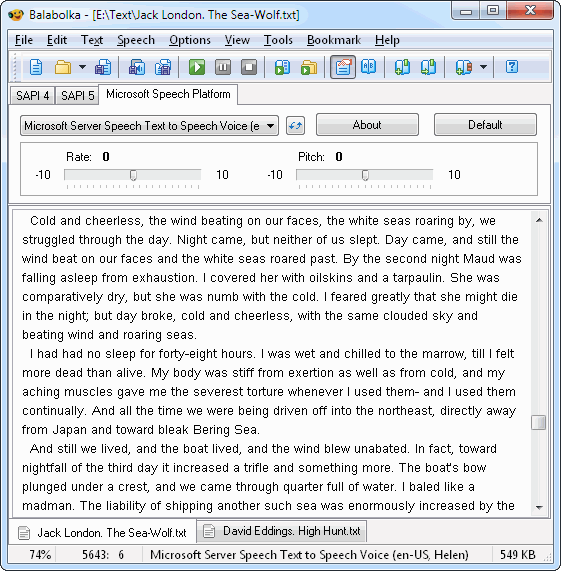 Balabolka is a TTS (Text-To-Speech) program. All computer related voices installed on your computer are available to Balabolka. The on-screen text can be saved as a WAV, MP3, WMA, MP4 or OGG file. Balabolka is capable of reading; the clipboard content, view the text from PDF, DOC, FB2, RTF, EPUB, HTML, and ODT files, customize font and background colors, control reading from the system tray or by the global hotkeys. Users can alter a voice’s parameter, which include rate and pitch, apply a special substitution list to improve the quality of the voice’s articulation. A feature like this is useful when a user wants to change the spelling word. When an audio file is played with installed players on your system or maybe on a modern digital audio player, the text is displayed synchronously. Balabolka is a TTS (Text-To-Speech) program. All computer related voices installed on your computer are available to Balabolka. The on-screen text can be saved as a WAV, MP3, WMA, MP4 or OGG file. Balabolka is capable of reading; the clipboard content, view the text from PDF, DOC, FB2, RTF, EPUB, HTML, and ODT files, customize font and background colors, control reading from the system tray or by the global hotkeys. Users can alter a voice’s parameter, which include rate and pitch, apply a special substitution list to improve the quality of the voice’s articulation. A feature like this is useful when a user wants to change the spelling word. When an audio file is played with installed players on your system or maybe on a modern digital audio player, the text is displayed synchronously.
Balabolka 2.0.0.480 Beta is available in these languages; English, Bulgarian, French, Dutch, German, Russian, Romanian, Ukrainian, Spanish, Korean, Polish, Italian, Czech, Portuguese (Brazil) and Portuguese (Portugal). The program also supports skins that allow you to customize the appearance of your Windows to suit your choice.
Users may have to check for a commercial Text-To-Speech program if they are not impressed with this program since it is a freeware.
Want to check it out? Visit Balabolka.
Posted in Main | No Comments »
Monday, October 25th, 2010
 With millions of people getting connected through Facebook these days, Easy Photo Uploader for Facebook 0.9.0.6 Beta will help you resize and send photos to Facebook album from the shell explorer. All you have to do is right click on any photo (including raw files, NEF, CR2, and many more), and the program will send by batch the pictures in any new or from files already existing on your Facebook photo albums. Photo resizing can also be done with this application, and the picture quality still comes out as best as ever. The memory issue complained about by users in previous version has also been resolved by the publishers. With millions of people getting connected through Facebook these days, Easy Photo Uploader for Facebook 0.9.0.6 Beta will help you resize and send photos to Facebook album from the shell explorer. All you have to do is right click on any photo (including raw files, NEF, CR2, and many more), and the program will send by batch the pictures in any new or from files already existing on your Facebook photo albums. Photo resizing can also be done with this application, and the picture quality still comes out as best as ever. The memory issue complained about by users in previous version has also been resolved by the publishers.
The publishers couldn’t have chosen a better time than this to introduce an application like this. It has support for many image types, and comes with its own uninstaller. Though still in its developmental stage, Easy Photo Uploader for Facebook 0.9.0.6 Beta is already catching up with most Facebook members, and users are thrilled by the fact that they have a program that supports many formats.
It is a fine program for people who post lots of pictures to their Facebook albums because it is going to save them a lot of time, and perhaps save more time than some other applications used by people to upload pictures.
Want to check it out? Visit Facebook.
Posted in Main | 3 Comments »
Friday, October 22nd, 2010
 This is jumbo priced automation software for business & IT processes. Automation Anywhere Premier is designed to allow you visually create, execute and manage your automation without much effort on your part. You can automate and schedule very difficult tasks within a few minutes without any programming, record keyboard and mouse or create automation scripts with drag and drop actions. This is jumbo priced automation software for business & IT processes. Automation Anywhere Premier is designed to allow you visually create, execute and manage your automation without much effort on your part. You can automate and schedule very difficult tasks within a few minutes without any programming, record keyboard and mouse or create automation scripts with drag and drop actions.
Here are a few other things you can use Automation Anywhere Premier to do on your system: web automation; network automation (LAN/WAN); excel automation; IT automation; application integration; job scheduling; batch processing; web data extraction; business process automation; database automation; screen scraping; automated testing; ERP automation; and data integration/data automation.
Automation Any where Premier is non-programming required, intuitive and intelligent software used by a lot of people; including non-IT professionals. The program has built-in features that include; SMART Windows recorder, job scheduling, 380+ actions, drag and drop task editor, SMART Web recorder, web data extraction tools, data transfer wizard, and a host of others.
This software provides your company the means of staying competitive by automating simple and complex tasks across applications. It helps to save a lot of time and cost, thereby increasing business and IT process reliability and speed while also reducing human error.
Automation Anywhere is a program used by many reputable organizations, and can be downloaded and installed at $2495.00. Users also have the opportunities to download a free trial before going for the full version.
Want to check it out? Visit Automationanywhere.
Posted in Main | No Comments »
Tuesday, October 19th, 2010
.png) Sysinternals Troubleshooting Utilities have been rolled up into a single Suite of tools. This file contains the individual troubleshooting tools and help files. However, it does not contain non-troubleshooting tools like the BSOD Screen Saver. Sysinternals Troubleshooting Utilities have been rolled up into a single Suite of tools. This file contains the individual troubleshooting tools and help files. However, it does not contain non-troubleshooting tools like the BSOD Screen Saver.
It is a useful set of tools for Windows which anyone should consider having in his toolbox. With a suit like this on any machine, your set up will understand that you can not do without them, though it takes a while to understand its separate utilities and one big do-it-all program; but once you do you would be glad you did, and maybe wonder why you did not find a tool like this before now.
SysInternals Suite suffers from fragmentation and for this a GUI-toolbox that would allow you to drop-in/snap-in the tools; possibly add a comment/Tip to the tool description line would make it much easier to access infrequently used SysUtilities. Despite this shortcoming, it still remains one of the best.
Sysinternals Suite Build is a freeware program that can be downloaded at no cost, and without any limitation. Not a bad program after all; it is worth having on your system because of all the amazing features it comes with.
Want to check it out? Visit Microsoft.com.
Posted in Main | No Comments »
Tuesday, October 19th, 2010
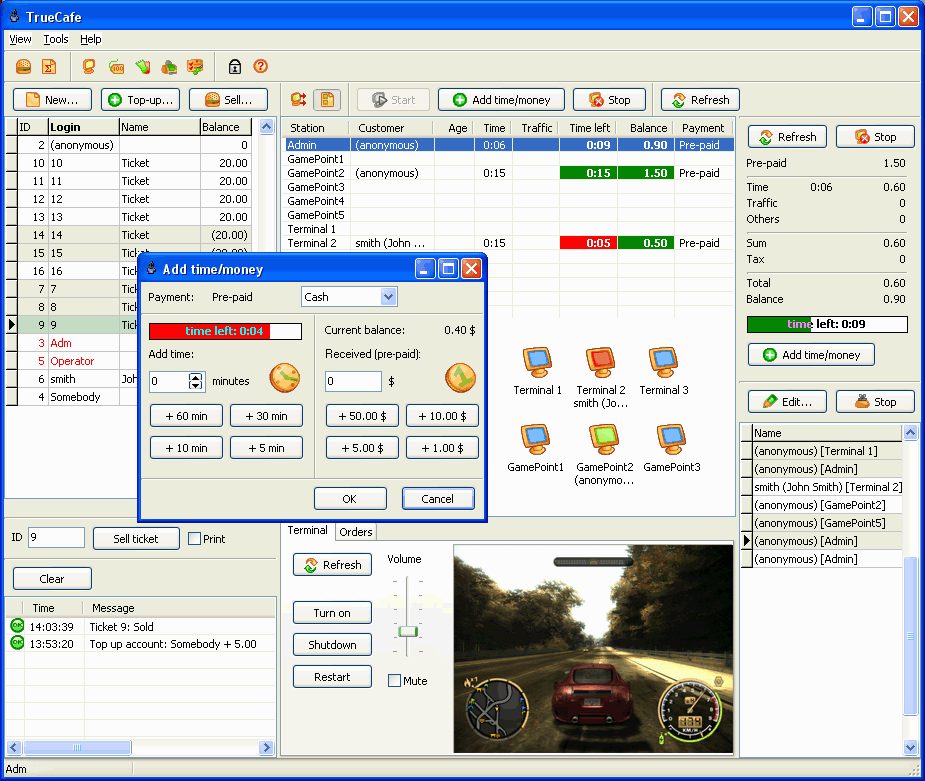 TrueCafe cyber café software provides solution for all automation of cyber café management activity. The publisher’s aims at providing cyber café software is to simplify an operator’s job, increase the range of Internet café resource control and assist cyber café administrators and owners with financial analysis software tools. TrueCafe cyber café software provides solution for all automation of cyber café management activity. The publisher’s aims at providing cyber café software is to simplify an operator’s job, increase the range of Internet café resource control and assist cyber café administrators and owners with financial analysis software tools.
The features of this software include: providing license key management which helps you cut down your game licensing expenses; wireless billing, which enables you to charge your customers when they use your Wi-Fi access point to browse the web from their wireless laptops; PDAs or any other mobile device; friendly cyber café software with modern user interface; great number of features and outstanding customer support; it also helps you to save power in you cyber café by shutting down an idle terminal automatically after a few minutes of inactivity; helps you to keep track of the Internet websites and pages which a customer opens on your cyber café terminal; analyze your business data in your web browser and get access to your cyber cafe activity information outside the cafe from the Internet; helps you to lock your cyber cafe terminals. Protect it from logging in via Ctrl-Alt-Del; display a customer session time/money left after login, and a few others.
TrueCafe 4.5 is not freeware software, but users can get it for as low as $119.90.
Visit Truecafe.net
Posted in Main | No Comments »
Monday, October 18th, 2010
.jpg) Disk2vhd 1.62 helps to create Virtual Hard Disk-Microsoft’s Virtual Machine disk format (VHD) versions of physical disks for use in Microsoft Virtual PC or Microsoft Hyper-V virtual machines (VMS). Users can also use this program to create the VHDs on local volumes; including the ones being converted. It uses the Windows Volume Snapshot capability, which was introduced in Windows XP to create consistent point-in-time snapshots of the volumes any use wants to add in a conversion. Disk2vhd 1.62 helps to create Virtual Hard Disk-Microsoft’s Virtual Machine disk format (VHD) versions of physical disks for use in Microsoft Virtual PC or Microsoft Hyper-V virtual machines (VMS). Users can also use this program to create the VHDs on local volumes; including the ones being converted. It uses the Windows Volume Snapshot capability, which was introduced in Windows XP to create consistent point-in-time snapshots of the volumes any use wants to add in a conversion.
Disk2vhd 1.63 runs on Windows XP, SP2 and higher, and runs on Windows server 2003 or higher. One of the great features of this program is that can create one VHD for each disk on which selected volumes reside. It also preserves the partitioning of information of the disk, but copies the data contents for volumes on the disk that are selected; enabling you to capture just system volumes and exclude data volumes.
Disk2vhd also includes command-line options that enable a user to script creation of VHDs. Simply specify the volumes of your choice in a snapshot by drive letter or use the “*” to add all volumes.
Disk2vhd 1.63 is a freeware program and requires no activation charges to download or run it on your system.
Want to check it out? Visit Microsoft.com
Posted in Main | No Comments »
Monday, October 18th, 2010
 GIF Construction Set Pro comes up with state of the art in GIF animation software. It helps you assemble your original animations without stress through its Animation Wizard; squeeze them to almost nothing as possible with its Super compressor. It also creates an eye catching banners and animated transition; add transparency to existing graphics; manage your GIF files and a lot more. GIF Construction Set Pro comes up with state of the art in GIF animation software. It helps you assemble your original animations without stress through its Animation Wizard; squeeze them to almost nothing as possible with its Super compressor. It also creates an eye catching banners and animated transition; add transparency to existing graphics; manage your GIF files and a lot more.
GIF Construction Set Professionals provides documentation and tutorials, which could get you up to speed in record time; giving you access to extensive library of Alchemy Mindworks animation. If you need a cool graphic element for your web pages and your artistic skills end at advanced paperclip sculpture, GIF Construction Set Professionals is what you should go for, because it could turn you into a professional designer with a little more effort than a few mouse clicks.
Users may also enjoy features like; Exporting animated GIF files to MNG; Generate text and animations with soft shadows; create sophisticated animated transitions between still images; rotate, crop, color-adjust and resize all or part of an animation sequence, and many more.
GIF Construction Set Pro 4.0 is not a freeware program, but users can get it for $24.99. Not a high price to pay for a program that has a lot of features like the ones above.
Want to check it out? Visit MindWorkshop
Posted in Main | No Comments »
|
|
|




