Author Archive
Monday, July 19th, 2010
 Replay Telecorder is an application that is used to record all kinds of Skype conversation in digital quality. The application is easy to use and with just one click, a user can start recording all video and audio conversations. Some of the features of this program include; ability to save pictures in five different ways (picture-in-picture, side-by-side, local webcam only, remote webcam only or as two separate video files). Replay Telecorder is an application that is used to record all kinds of Skype conversation in digital quality. The application is easy to use and with just one click, a user can start recording all video and audio conversations. Some of the features of this program include; ability to save pictures in five different ways (picture-in-picture, side-by-side, local webcam only, remote webcam only or as two separate video files).
Replay Telecorder 1.1 is a digital recorder that has means of recording files perfectly, and also makes a perfect reproduction of every call initiated by you. This is quite different from other analogue style recorders. Users can also record every conversation and have them saved on their computers. In addition, users can record conversations such as; phone calls, conference calls, video calls, and any other Skype conversations.
Replay Telecorder 1.1 application is a shareware, but users can try it absolutely free for a limited time-period. For $29.95, users who are interested in this Skype recorder can go ahead and download it. As for the price, I think it’s a bit fair, but some users may be a bit skeptical in the first place. At least users are guaranteed of its ability to record any Skype conversation, which is contrary to most of the other solutions I have seen before now.
You can check it out right here.
Posted in Main | No Comments »
Monday, July 19th, 2010
 Rising PC Doctor 6.0.2.2 is a professional security application made by a well-known security publisher; Rising Lion Strong Security. The application has seven essential features that are central to its performance. The features include; immunization of USB storage devices, ability to repair Microsoft Internet Explorer and Windows, Trojan Behavior Detector and Blocker, Protection against Malicious websites, Internet protection and Trojan Download blocker, and automatic malware analysis. Rising PC Doctor 6.0.2.2 is a professional security application made by a well-known security publisher; Rising Lion Strong Security. The application has seven essential features that are central to its performance. The features include; immunization of USB storage devices, ability to repair Microsoft Internet Explorer and Windows, Trojan Behavior Detector and Blocker, Protection against Malicious websites, Internet protection and Trojan Download blocker, and automatic malware analysis.
This is one application that has earned a lot of accolades for itself over the years; it is essentially built to protect users’ online activities. Rising PC Doctor 6.0.2.2 is a freeware, but there are other paid versions which offer limited 30 day trail version that can be downloaded for use by users who feel like. During this trial period, users can enjoy all the benefits of this vastly improved program before making up their minds whether to buy or not.
Rising PC Doctor 6.0.2.2 is one of the most effective freeware security programs on the internet. It does not slow down your computer, and as a matter of fact, this application has the potential to compete with some paid or shareware programs. I personally prefer paid security programs, but this version of Rising PC Doctor 6.0.2.2 is good enough to win my heart.
Want to check it out? Visit Rising-Global
Posted in Main | No Comments »
Monday, July 19th, 2010
 This program is an automatic password field login application. Sticky Password 4.1.0.188 automatically fills login and password fields in web forms and usual dialog Windows. Its unique feature is named Sticky Button, it appears on any window that has password saved for. It also features a careful backup that keeps all your passwords safely stored until you when the need arises for them to be used. Also, users can have multiple logins and passwords for a single account among other great features. This program is an automatic password field login application. Sticky Password 4.1.0.188 automatically fills login and password fields in web forms and usual dialog Windows. Its unique feature is named Sticky Button, it appears on any window that has password saved for. It also features a careful backup that keeps all your passwords safely stored until you when the need arises for them to be used. Also, users can have multiple logins and passwords for a single account among other great features.
Some of its recent changes includes: improved error reporting, and processing of unhandled exceptions; improved support system; improved license key handling; improved installation and shutdown flow; introduction of support for the Google Chrome browser, and many more.
I have seen quite a number of password managers, but this one ranks among the best. Sticky Password 4.1.0.188 is not a freeware, but the publishers allow a 30 day trial period, which is more than enough for any user to become familiar with the program. The application is sold for $24.95 after trial period expires. Keypass is no doubt another good password manager, but this one will definitely go places.
Some other benefits of using this program over other applications include; protection from phishing and key loggers, automatic form filling, protects your personal data among others.
Want to check it out? Visit: StickyPassword
Posted in Main | No Comments »
Wednesday, July 14th, 2010
 Movie Label 2011 is a tool that helps users to organize their movie collections. With this tool, a user can add movies by typing title, barcode or scanning their hard drive for Divx and so on. Many of the information (plus cover art) is downloaded automatically with requiring typing. Movie Label 2011 is a tool that helps users to organize their movie collections. With this tool, a user can add movies by typing title, barcode or scanning their hard drive for Divx and so on. Many of the information (plus cover art) is downloaded automatically with requiring typing.
All kinds of video media (Blu-Ray, DVD, Divx, and so on) can be added with ease. Movie Label 2011 works so effectively that it can even allow users keep track of loans and future purchases and it comes with various kinds of languages and fully supports Unicode.
The following is the type of information that can be downloaded when available with the use of Movie Label 2011: Title, Original Title, Plot, Tagline, Studio, Release Date, and Certification. Media Label can equally download Cover Art and Trailer Link.
Some of its main features include: organize all movies in no time; can find “golden oldies” with the powerful yet easy-to-use search engine; capacity to get the full picture of collection with statistics and reports; can export movie collection and save it on mobile device for users to carry along at all times; it exports to a variety of formats; and helps to save money as users no longer have to purchase duplicate movies.
Want to check it out? Visit Codeaero
Posted in Main | 1 Comment »
Tuesday, July 13th, 2010
 Joomla is a program that is a powerful Open Source Content Management System, and is been used the world over for everything from simple websites to complex corporate applications. Joomla is very easy to install and uninstall, quite simple to manage, and very reliable. Joomla is a program that is a powerful Open Source Content Management System, and is been used the world over for everything from simple websites to complex corporate applications. Joomla is very easy to install and uninstall, quite simple to manage, and very reliable.
Joomla is obviously an award-winning content management system (CMS) that enables users to build Web sites and powerful online applications with ease. A lot aspect, which includes its ease-of-use and extensibility have made Joomla the most widely used Web site software available.
Joomla is one tool that is highly extensible and customized to meet user’s needs. This tool is comes free of charge and allows developers to write their own extensions. It is translated into several languages to ease up the usage for everyone.
Joomla has extensive documentation resources that are constantly being expanded and updated to meet users demand. There are so many useful sections on just about every imaginable.
Some of the key functions of Joomla include but not limited to the following: corporate web sites or portals; corporate intranets and extranets; online magazines, publications and newspapers; community-based portals; school and church web sites; Non-profit and organizational web sites; Government applications; and personal and family homepages.
Want to check it out? Visit Joomla
Posted in Main | No Comments »
Tuesday, July 13th, 2010
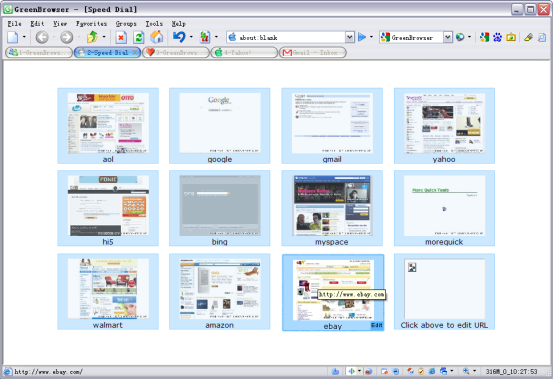 GreenBrowser is designed as a multiple window web browser that is not only flexible but equally powerful. It is fast, lightweight and user-friendly. Users can customize GreenBrowser search bar, drag and drop text into the search button to search directly, search by drag and drop quick menu. GreenBrowser is designed as a multiple window web browser that is not only flexible but equally powerful. It is fast, lightweight and user-friendly. Users can customize GreenBrowser search bar, drag and drop text into the search button to search directly, search by drag and drop quick menu.
With the use of GreenBrowser, users can actually move mouse with right mouse button pressed, perform some operations by different track, and view tips of mouse gesture in the status bar.
GreenBrowser have powerful ad filter like filter popup ad window, filter duplicate window, filter embedded ad content, filter floating ad.
GreenBrowser is an outstanding web browser that comes with features like Maxthon and Slim Browser in many ways. For instance, it provides tabbed browsing, a lot of security features as well as many configuration options.
Its main features are: ad filter; mouse drag; mouse gesture; auto scroll; auto fill form; auto save; auto refresh; auto hide; search bar Identity; auto submit form; general form; send key to page; external toolbar; collector; page manager; download manager; group; Plugin; Skin; Proxy; URL alias; start mode; quick Key; and much more.
If you are in search of tabbed browser then GreenBrowser is obviously something you should try.
Want to check it out? Visit MoreQuick
Posted in Main | 1 Comment »
Monday, July 12th, 2010
 BurnAware is freeware that available for Windows which allows users to easily create and perform the most common disc burning tasks such as: write to all CD/DVD media types, including Blue-Ray; burn disc images; Audio and MP3 CD; write Audio CDs and DVD-Video files; ISO and Cue Image; CD or DVD to ISO image; create write multi-session discs and much more; and, erase or format rewritable disc. BurnAware is freeware that available for Windows which allows users to easily create and perform the most common disc burning tasks such as: write to all CD/DVD media types, including Blue-Ray; burn disc images; Audio and MP3 CD; write Audio CDs and DVD-Video files; ISO and Cue Image; CD or DVD to ISO image; create write multi-session discs and much more; and, erase or format rewritable disc.
The interface is better, very basic and simply program without a folder tree. It works very well and has a drag-and-drop destination particularly for creating Audio-CD’s.
BurnAware has unique features which include: burn Data, bootable and multisession discs; burn Audio, Video and MP3 discs; create and burn ISO/CUE/BIN images; copy discs to ISO images; erase rewritable discs; and it is user-friendly.
BurnAware is supports the following: all media types including Double Layer; all current hardware interfaces including AHCI; UDF/ISO9660/Joliet file systems; on-the-fly writing; verification of written files; multisession DVD-RW/DVD+RW; unicode CD-Text (tracks and disc); and Windows NT/2000/XP/Vista/7.
Be that as it may, since the tool is designed for drag-and-drop it would have been helpful to provide users with an option to the system remember Window size and location that was last used.
Want to check it out? Visit BurnAware
Posted in Main | No Comments »
Monday, July 12th, 2010
 GeniusConnect is a tool that works by turning Windows Outlook into a more powerful information management tool through database connectivity. GeniusConnect can easily be used with any of the most popularly used database systems. It simply will synchronize Outlook data with any relational database that supports ODBC (mySOL, MS Access, Oraclem, MS SQL Server, etc). GeniusConnect is a tool that works by turning Windows Outlook into a more powerful information management tool through database connectivity. GeniusConnect can easily be used with any of the most popularly used database systems. It simply will synchronize Outlook data with any relational database that supports ODBC (mySOL, MS Access, Oraclem, MS SQL Server, etc).
If you have ever been frustrated by the mere fact that you have not been able to use view or use the vital information in your database while working with Outlook or Exchange, then look no farther than GeniusConnect.
This is so because you can use your own table structure and define conversions for columns with data type’s that are not usually compatible with an Outlook field. It is now possible to use it on multiple Outlook or Exchange folders and multiple databases.
GeniusConnect comes with key features like: improved efficiency while working in Outlook through immediate access to current database information; has the capacity to create tasks in Outlook based on events in user database; provides easy access to contact, calendar and customer information, stored in database; ability to quickly update and back-up information; 2-way sync and attachment support; and provides complete flexibility by allow connectivity to any standard SQL Database.
Want to check it out? Visit Geniusconnect
Posted in Main | No Comments »
Monday, July 12th, 2010
 System Explorer gives users detailed information about Processes, IE, Addons, Uninstallers, Startups, Explorer, Windows, Services, Drivers, Opened files and Connections. It also allows “Action History” for monitoring processes activities. System Explorer gives users detailed information about Processes, IE, Addons, Uninstallers, Startups, Explorer, Windows, Services, Drivers, Opened files and Connections. It also allows “Action History” for monitoring processes activities.
System Explorer offers Making of Registry and Files snapshots to users for easy comparing of system changes. It can be used for analyzing product installers/uninstallers (example is Total Uninstall), performance graphs for monitoring usage of system resources in time, easy check of suspicious files via Virus Total, Easy search details about file/process via online databases and easy access to System Utilities among others.
System Explorer supports Windows XP, Windows Vista and Windows 7. Its main features are as follows: it provides detailed information about tasks, processes, modules, startups, IE, Windows, services, drivers, connections, uninstallers and opened files; launcher with integrated auto-search and auto-completion; easy check of suspicious files via Jotti or Virus-Total service; easy search details about files/process via online database; action history for monitoring; system report builds rich text report containing major information about the system; Multilanguage and plugins support; security features with online file reviews; and brand new tray hint with detailed system and battery status and so on.
System Explorer is also free both for private and commercial use.
Want to check it out? Visit Systemexplorer
Posted in Main | No Comments »
Monday, July 12th, 2010
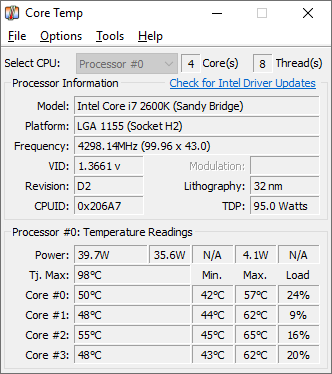 Core Temp can be defined as a compact, no fuss, and small footprint program to monitor a computer CPU temperature. One unique aspect of Core Temp is the fact that it actually shows the temperature of each individual core in each processor in computer system. Users have the opportunity of seeing in real time how the CPU temperature varies when a user load his CPU. Core Temp can be defined as a compact, no fuss, and small footprint program to monitor a computer CPU temperature. One unique aspect of Core Temp is the fact that it actually shows the temperature of each individual core in each processor in computer system. Users have the opportunity of seeing in real time how the CPU temperature varies when a user load his CPU.
Core Temp is designed in such a way that it has a logging feature which allow a user to easily record the temperature of his processor(s) over any period of time, then the data can be easily transferred into an excel datasheet for easy graphing.
Core Temp supports Windows XP Service Pack 2, 2003 Server, Vista and Windows 7 (both 32bit and 64bit versions). It has a digitally signed Core Temp driver which on all the Window programs that it supports.
The new feature in Core Temp the plug in that allows any programmer with an idea of its new feature\extension to create one, add it to Core Temp and the plug in becomes a part of it. It also has a DTS (Digital Thermal Sensor) which provides higher accuracy and more relevant temperature reading than the standard Thermal diode sensors do.
Want to check it out? Visit Alcpu
Posted in Main | 1 Comment »
|
|
|




