Author Archive
Monday, July 12th, 2010
 SCars is a kind of program that is designed to provide aid to users in performing their regular PC maintenance tasks which should be done to keep their PC working very well. Some the tasks that SCars that can be performed includes updating Windows and security software, and cleaning temporary files which are important to a PC’s health. SCars can equally be used to remind users of whatever they have chosen as it comes with the capability for users to create custom reminders. SCars is a kind of program that is designed to provide aid to users in performing their regular PC maintenance tasks which should be done to keep their PC working very well. Some the tasks that SCars that can be performed includes updating Windows and security software, and cleaning temporary files which are important to a PC’s health. SCars can equally be used to remind users of whatever they have chosen as it comes with the capability for users to create custom reminders.
SCars comes with several unique features which include: built computer security and maintenance reminders-all customizable; automatic or manual updating; custom reminders for any purpose; full help and support available to users; back-up reminders simply by using “export” function; and multiple languages support.
SCars can be regarded as among the better programs that have been introduced to help people clean up their PC. Users can set reminders to run clean-up programs once a week and once it is that time of the week it automatically remind users.
Another good thing about SCars is the fact that it can be used to update itself. This can be done by selecting the automatic update section so that whenever there is any update and automatically update itself.
Want to check it out? Visit Scars.SecurityCadets
Posted in Main | No Comments »
Monday, July 12th, 2010
 Advanced SystemCare (formerly known as Advanced WindowsCare) can be described as a comprehensive computer care utility that requires a one-click approach to help protect, repair and optimize user’s computer. Advanced SystemCare offers an all-in-one and highly super convenient solution for computer maintenance and protection and it is available free of charge. Advanced SystemCare (formerly known as Advanced WindowsCare) can be described as a comprehensive computer care utility that requires a one-click approach to help protect, repair and optimize user’s computer. Advanced SystemCare offers an all-in-one and highly super convenient solution for computer maintenance and protection and it is available free of charge.
With this tool, users will no longer have to waste money when you can make use of Advanced SystemCare. It is 100% safe with no adware, viruses and spyware. It is computer maintenance program that is very easy to use.
Advanced SystemCare features are as follows: it is extremely easy to use; it fixes multiple system errors; speed-up computer performance and internet access; next-generation free Windows XP/Vista/7 registry cleaner and system optimization; quick and extensive system clean-up; power hard drive defragmentation; defends computer security with extra protection; and it is safe and free.
Advanced SystemCare comes in various languages like Albanian, Brazil, Czech, Dutch, English, Finnish, French, German, Hebrew, Hungarian, Japanese, Korean, Persian, Polish, Romanian, Russian, Spanish, Srpski, Svenska, Swedish, and Turkish and so on.
Whatever version of Windows users are running, this tool allows them to enjoy that “good as new” speed that is usually experienced on a brand new computer.
Want to check it out? Visit Iobit
Posted in Main | No Comments »
Friday, July 9th, 2010
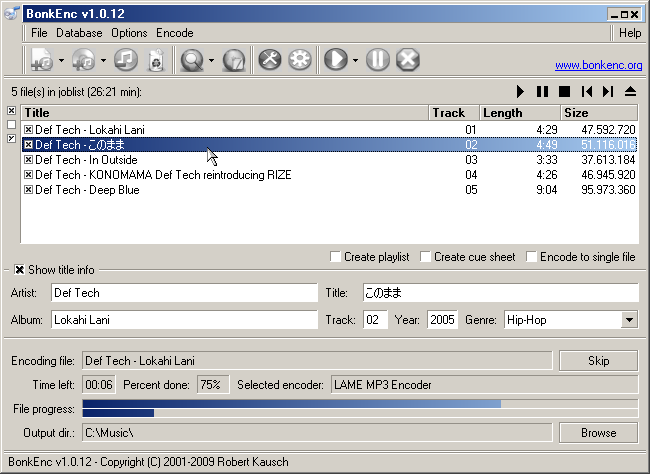 BonkEnc can at best be described as CD ripper, audio encoder and converter that can be used for various formats. BonkEnc can be used to produce MP3, MP4/M4A, Vorbis, AAC, Ogg, Bonk and FLAC files. So many more formats are available through plug-ins. BonkEnc can at best be described as CD ripper, audio encoder and converter that can be used for various formats. BonkEnc can be used to produce MP3, MP4/M4A, Vorbis, AAC, Ogg, Bonk and FLAC files. So many more formats are available through plug-ins.
BonkEnc also makes it quite easy for users to convert their audio CDs to MP3 or Ogg Vorbis files which users can use in their hardware player or with their favorite audio software. The program supports the CDDB/freedb online CD database and CDText and can automatically writes song information to ID3V2 or Vorbis comment tags.
BonkEnc actually makes it easy for users who want to convert CD’s to whatever format of their choice and it is available for free. This version is very much a stable one than the previous ones. It has bugs and clear Total Time Computation for users benefit.
This version is much more stable than 1013, though it does still have bugs, even a glaring one in the interface involving the Total Time computation.
The disadvantage of this software is the fact that most of the MP3 files that used to make BonkEnc choke and crash have been taken care of. The Decoder to a version though has been fixed. It is also not keyboard friendly in the main “Job List” interface.
Want to check it out? Visit Bonkenc
Posted in Main | No Comments »
Friday, July 9th, 2010
 Parted Magic Operating System employs main programs of GParted and Parted to handle partitioning tasks with relative ease, while also featuring other useful programs. The featured programs it has are: Partimage; TestDisk; Clonezilla; Truecrypt; G4L; ddrescue; SuperGrubDisk, and much more. Parted Magic also comes with an excellent set of documentation to benefit every user. Parted Magic Operating System employs main programs of GParted and Parted to handle partitioning tasks with relative ease, while also featuring other useful programs. The featured programs it has are: Partimage; TestDisk; Clonezilla; Truecrypt; G4L; ddrescue; SuperGrubDisk, and much more. Parted Magic also comes with an excellent set of documentation to benefit every user.
Parted Magic has an extensive collection of file system tools as it supports the following: ext2, ext3, ext4, fat16, fat32, jfs, hfs, hfs+, ntfs, Linux-swap, reiserfs, reiser4, and xfs. Its basic requirement is at least i586 processor and 256MB of RAM to operate or 128MB in “Live” mode.
Parted Magic has its uniqueness in the its features which are the capability to: format internal and external hard drives; move, create, copy, delete, expand, and shrink hard drive partitions; clone hard drive to create a full backup; test memory for bad sectors; test hard drives for impending failure; benchmark computer for a performance rating; securely erase entire hard drive to wipe it clean from all data; gives access to non-booting systems thereby allowing users to rescue important data; and runs from the CD without requiring installation.
Parted magic is user-friendly and equally supports various languages like German, Italian, Brazilian, French, Norwegian and Russian.
Want to check it out? Visit Partedmagic
Posted in Main | No Comments »
Thursday, July 8th, 2010
 Adobe Reader is free software that creates the opportunity that enables vast majority of business professionals and home users to reliably share information using intelligent PDF files. With this tool, you can benefit from features like; print, search PDF files using a variety of platforms, and other devices. It is obviously the only PDF file viewer that can open and interact with all PDF documents. Adobe Reader is free software that creates the opportunity that enables vast majority of business professionals and home users to reliably share information using intelligent PDF files. With this tool, you can benefit from features like; print, search PDF files using a variety of platforms, and other devices. It is obviously the only PDF file viewer that can open and interact with all PDF documents.
The Adobe Reader for Windows 9.3.3 is a tool that also features like; digitally signing, searching, printing, verifying and collaborating with electronic documents. Users now have the chance to access CAD features like dimensions, or map features like longitude and latitude, for effective collaboration and interaction.
Adobe Reader user interface enables users to choose the reading mode that will fit more content on their screen or the two-up mode to view page spreads with little space in the middle.

Adobe Reader can be distributed internally by on an intranet site or a local network by government agencies, multi-national corporations, schools, and educational institutions. This will help colleagues, clients, and partners get on the same page at the same time with the ability to co-navigate documents.
Adobe Reader provides by far the best PDF reading and creation experience for the majority of businesses that work with PDF workflow on any serious level.
Want to check it out? Visit Adobe
Posted in Main | No Comments »
Thursday, July 8th, 2010
 mIRC can best be defined as a full featured Internet Relay Chat client for Windows, which can be used to share, communicate, play or work with others on IRC networks the world over. This can be done either in multi-user group conferences or in one-to-one private discussions. mIRC can best be defined as a full featured Internet Relay Chat client for Windows, which can be used to share, communicate, play or work with others on IRC networks the world over. This can be done either in multi-user group conferences or in one-to-one private discussions.
mIRC is clean and practical interface. Because it is clean and practical means that it is very configurable and also supports numerous features such as buddy lists, file transfer, multi-server connections, proxy support, SSL encryption, customizable sounds, UTF-8 display, tray notifications, spoken messages, message logging, and so much more.
mIRC is designed with a highly efficient powerful scripting language that can be used to automate it and also create applications that perform a wide range of functions from network communications to playing games.
mIRC has been in development for several years now and it is constantly being improved and updated with new technologies. The constant development and improvement of mIRC is obviously what stands it out from other programs in its category.
Time after time, mIRC has continued to impress a lot of people with various versions. The latest version supports Unicode. Unfortunately, this version does not understand what version 6 clients are saying in other languages other than English.
Want to check it out? Visit mIRC
Posted in Internet, Main, Social Software | No Comments »
Thursday, July 8th, 2010
 PDF-XChange Viewer is a tool which allows users to view PDF files on their PC or online like other PDF readers. The unique thing about PDF-XChange is that it has “Typewriter Mode” that enables users to type directly on any PDF page. With this tool, users can now fill out forms and add text to PDF documents that they would normally have to print out before they could write on them. PDF-XChange Viewer is a tool which allows users to view PDF files on their PC or online like other PDF readers. The unique thing about PDF-XChange is that it has “Typewriter Mode” that enables users to type directly on any PDF page. With this tool, users can now fill out forms and add text to PDF documents that they would normally have to print out before they could write on them.
Anyone who wishes to view, modify or perform editing of PDF files on their Windows computer, then there is no better alternative to this tool. It very small, unique, faster and comes with much more features than other free PDF Readers.
Some of PDF-XChange Viewer main features include: Mark-up pages with text and objects; allows users to add and apply Custom Stamps from any image or PDF file and even your Windows Clip board; users can now add Comments and Annotations to any PDF file; type directly on any PDF page; Export PDF pages or entire files to any one of the supported Image formats including BMP, JPEG, TIFF, PNG and much more.
Users also have the opportunity of trying the extended functionality offered by the PDF-XChange Viewer “PRO” in evaluation mode – for free.
Want to check it out? Visit PDF-Xchange-Viewer
Posted in Main | No Comments »
Wednesday, July 7th, 2010
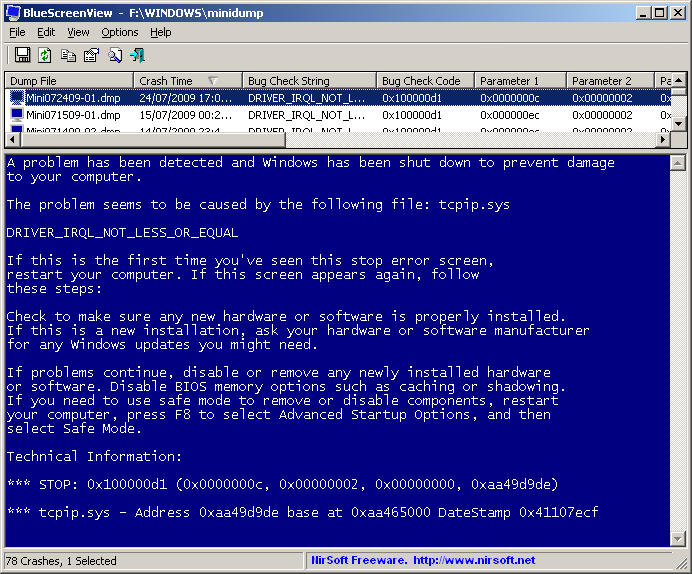 BlueScreenView can best be described as software that works by scanning minidump files created during “Blue Screen of Death” crashes, and display the information about all crashes in one table. For each crash, BlueScreenView can display basic information about each crash. The information that will be displayed includes the date/time of the crash, the basic crash information displayed in the blue screen, and the details of the driver or module that possibly caused the crash. BlueScreenView can best be described as software that works by scanning minidump files created during “Blue Screen of Death” crashes, and display the information about all crashes in one table. For each crash, BlueScreenView can display basic information about each crash. The information that will be displayed includes the date/time of the crash, the basic crash information displayed in the blue screen, and the details of the driver or module that possibly caused the crash.
The major system requirements for any user wishing to make use of BlueScreenView are: Windows XP; Windows server 2003, Windows server 2008, Windows Vista, Windows 7. Windows must be configured to save minidump files during BSOD crashes. It can read the minidump files of 32-bit and X64 system.
BlueScreenView does not require any installation process. All that is needed is for the user to run the executable file executable file and it will automatically scan minidump folders and display all crash details in the upper pane.
BlueScreenView comes with other features like: users can view a blue screen which is very similar to the one that Windows displayed during the crash; enumerates the memory addresses inside the stack of the crash; users can work with another instance of Windows, simply by choosing the right minidump folder; and so on.
Want to check it out? Visit Nirsoft.net
Posted in Main | No Comments »
Wednesday, July 7th, 2010
 Website-Watcher is built with a new function that is able to Re-Create database from cache folder. Website-Watcher works by checking an unlimited number of web-sites for updates and changes with a minimum of time and online costs. Immediately changes in the websites are detected, Website-Watcher saves the last two versions of the computer hard disk and highlights all changes in the text. Website-Watcher is built with a new function that is able to Re-Create database from cache folder. Website-Watcher works by checking an unlimited number of web-sites for updates and changes with a minimum of time and online costs. Immediately changes in the websites are detected, Website-Watcher saves the last two versions of the computer hard disk and highlights all changes in the text.
Assuming the database has physical damages and the user does not have a working backup file and the function “Repair database” fails, he can now fully recreate a database from files that are stored in the cache folder.
Website-Watcher offers users the opportunity of spending fewer hours checking websites for updates by doing it automatically. Also, with this tool, a user can easily know when a new software version or driver update is released.
The major features of Website-Watcher that stands it out from others are: its capacity to monitor web pages, password protected pages, forums for new postings and replies; it monitors RSS feeds, Newsgroups and local files; highlight changes in a page; and a powerful filter system to ignore unwanted content.
The disadvantage of Website-Watcher is the fact that it actually requires the installation of another program like Firefox in order to function properly.
Want to check it out? Visit Aignes
Posted in Main | No Comments »
Friday, July 2nd, 2010
 Maxthon is a web browser that comes with a highly customizable interface for users. Maxthon’s design is based on the Internet Explorer engine and what this means is that whatever works in IE, works the same in Maxthon but with a lot more additional efficient features. The additional features includes: Tabbed Browsing Interface; Privacy Protection; Mouse Gestures; Super Drag and Drop; Google Bar Support; AD Hunter; External Utility Bar; and Skinning. Maxthon is a web browser that comes with a highly customizable interface for users. Maxthon’s design is based on the Internet Explorer engine and what this means is that whatever works in IE, works the same in Maxthon but with a lot more additional efficient features. The additional features includes: Tabbed Browsing Interface; Privacy Protection; Mouse Gestures; Super Drag and Drop; Google Bar Support; AD Hunter; External Utility Bar; and Skinning.
Maxthon extends isolator protection to page crashes; it beats Microsoft to the punch creating barrier to zero-day attacks; partners with Yandex (Russia’s largest search engine).
Maxthon is a dual display search engine that makes users surfing of the internet much swifter and offers them a better compatibility. It drag and drop users most visited sites into quick access and can be easily customized by making it web portal.
Maxthon is a multi-search developer tool that is designed with Anti-Phishing. With this tool, search engines and Mouse Gestures can be configured now. It is very much stable and has good rendering time.
The disadvantage of this tool is the fact that it requires mouse gestures and ad-filter customizations before I can switch back full time, and some of its browser shells are not needed.
Want to check it out? Visit Maxthon
Posted in Main | No Comments »
|
|
|




