Author Archive
Wednesday, April 14th, 2010
 Send To Toys 2.6 is still in Beta stage, but nothing stop users from using it to personalize the send to system menu for drives, folders, and programs. Send To Toys is also built to copy names of files to the clipboard, helping users also to open a DOS console window, setting the current directory to a particularly selected folder. Send To Toys 2.6 is still in Beta stage, but nothing stop users from using it to personalize the send to system menu for drives, folders, and programs. Send To Toys is also built to copy names of files to the clipboard, helping users also to open a DOS console window, setting the current directory to a particularly selected folder.
Newly introduced features and updates include as follows: rewritten send to folder and clipboard as shell extension handlers; improved control panel; added support for network resources among others. Some other features you can easily get yourself familiar with include the following: send to quick launch which adds a shortcut to the quick launch toolbar; send to recycle bin which sends files to recycle bin and send to run which sends files to the run command log.
Send To Toys 2.6 Beta is a freeware and, yet offers much more than what most of us would imagine it to offer. I personally think that we are yet to see the best of this program.
Want to check it out? Visit Gabrieleponti
Posted in Main | No Comments »
Tuesday, April 13th, 2010
 Here comes an application that enables you to organize all your pictures, graphics, music and audio videos with personalized descriptions. Konvertor is a picture viewer, browser, graphic, audio and video as well as a text converter. The way it works is such as it gives users the opportunity when it comes to professionally handle their images. Here comes an application that enables you to organize all your pictures, graphics, music and audio videos with personalized descriptions. Konvertor is a picture viewer, browser, graphic, audio and video as well as a text converter. The way it works is such as it gives users the opportunity when it comes to professionally handle their images.
Konvertor 4.01 Build 2 gives you an intuitive professional and high standard imaging tools to help you view, organize, enhance and print all your images as quickly as possible. The user interface also looks cool and flexible when it comes to use, users can get fast operations alongside quality display of images while they use the program.
Users can import their pictures, texts, videos without any difficulty when they have a program like this. Konvertor has a fifteen days limitation for those who download and use this evaluation copy; as a matter of fact, it stops working at the expiration of the fifteen days evaluation period.
Want to check it out? Visit Konvertor
Posted in Main | No Comments »
Tuesday, April 13th, 2010
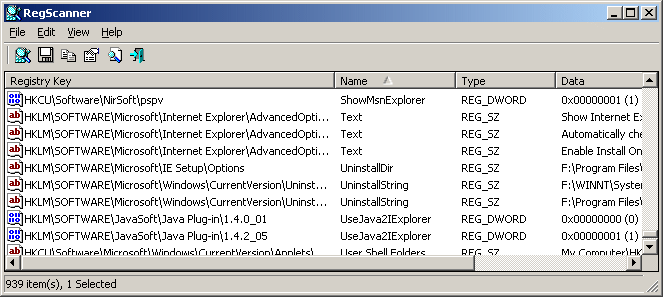 Perhaps one of the major things the publishers need to have a lot at is adding an uninstaller to this program. RegScanner has been around for quite a while, and there is really nothing wrong in making it have an uninstaller. Apart from not having an uninstaller which is not much of a problem personally for me, users can still have a feel of the other good sides of this program. Perhaps one of the major things the publishers need to have a lot at is adding an uninstaller to this program. RegScanner has been around for quite a while, and there is really nothing wrong in making it have an uninstaller. Apart from not having an uninstaller which is not much of a problem personally for me, users can still have a feel of the other good sides of this program.
RegScanner is a program that users can use to scan their system registry, find desired registry values that match to specified search criteria, and have them all displayed in a single list. Users can jump straight to the right value by simply having to double-click the desired Registry system.
RegScanner is not for sale, and it means that users who are interested in having it installed on their system can do that without having to pay a dime for it. Users can also use this program to clean registry entries and files on their computers, view registered dll/ocx/exe files on their systems and even delete unwanted registrations.
Want to check it out? Visit Nirsoft
Posted in Main | No Comments »
Tuesday, April 13th, 2010
 When you want to make unprotected copy of any music files, you can turn to Tunebite. You can record them while they are being played on your system; convert every protected WMA files to MP3 format without any difficulty. Also, Tunebite 7.2.39161.1600 lets you play copy-protected WMA and MP4 music files in the Windows Media player as you are already used to. When you want to make unprotected copy of any music files, you can turn to Tunebite. You can record them while they are being played on your system; convert every protected WMA files to MP3 format without any difficulty. Also, Tunebite 7.2.39161.1600 lets you play copy-protected WMA and MP4 music files in the Windows Media player as you are already used to.
Tunebite uses High Speed Digital Dubbing, recording them at high speed without interrupting you as you listen to your music. When a new music is recorded by this application, it goes ahead to save it in your hard drive unprotected MP3, OGG and WMA files.
Tunebite is not free, but can be tried for free before purchase if you are really satisfied with it. The price per download is $24.90 at the publisher’s site. It is really a cool program and I don’t think the price is going to be too challenging for anyone when you consider the benefits to be derived from it.
Want to check it out? Visit Tunebite
Posted in Main | No Comments »
Monday, April 12th, 2010
 Just as like the name of this application, QT Lite 3.2.0 Beta is a lightweight program that does not contain any extra bug. It contains only features needed by users to do what they want with it. Users can find this program very useful when it comes to playing QuickTime videos in the browser of their choice. Just as like the name of this application, QT Lite 3.2.0 Beta is a lightweight program that does not contain any extra bug. It contains only features needed by users to do what they want with it. Users can find this program very useful when it comes to playing QuickTime videos in the browser of their choice.
One amazing thing about this program is the fact that it does not cost a single dime to download and use. Imagine the new features and updates the publishers have chosen to add in this version, yet all for free and at no cost to the user. Some of these features include: quick and easy installation; no background process; small size; no unwanted stuffs and bugs; ability to make an unattended installation among others.
The publishers should just keep up the good work already started with this version. I personally feel that QT Lite 3.2.0 though still in Beta stage, has a very bright future ahead of it. It does most of the things the publishers claim it does.
In case you want to check it out, visit QT Lite
Posted in Main | No Comments »
Monday, April 12th, 2010
 VIDEOzilla 3.0 is a video conversion tool for video files like AVI RM, MPEG, MOV, WMV, FLV and MPEG-4. When you want to start using this program, just go ahead and click on. It gives you a simple solution that is so easy to understand and void of any confusing technicalities when it comes to having a clean solution to converting video files. VIDEOzilla 3.0 is a video conversion tool for video files like AVI RM, MPEG, MOV, WMV, FLV and MPEG-4. When you want to start using this program, just go ahead and click on. It gives you a simple solution that is so easy to understand and void of any confusing technicalities when it comes to having a clean solution to converting video files.
Users can set different options provided by this program when it has to do with the start and end points of any video. Users also have additional option of setting video width, height, audio and video quality, as well as numerous codecs to choose from. Videozilla can also be used to perform audio extraction from a video and still save them as audio MP3 or even WAV.
At $29.95, I think it is a bit high, but for the features highlighted above, it should be affordable for most people. In fact, users also have the option of trying it out for 9 days before buying it. This in my opinion is not long enough to enable a user decide if he should or should not buy this program.
Videozilla now supports the following new features and updates: H.264 high quality video compression; support MOV video format as output; 3GP video format now supports AMR audio among others.
Want to check it out? Videozilla
Posted in Main | 2 Comments »
Thursday, April 8th, 2010
 No doubt, one of the very few good audio player that is without any limitations in terms of download and usage. The publishers have made this program free to download for anyone who is interested in having it. Spider 2.4.1 is a free and feature-rich program that is quite easy to understand and use even by an amateur. It supports the use of Unicode and has powerful tag editors for various types of files, music ripping support, CD text extractor, easy to use song lyrics editor and CD-text support among others. No doubt, one of the very few good audio player that is without any limitations in terms of download and usage. The publishers have made this program free to download for anyone who is interested in having it. Spider 2.4.1 is a free and feature-rich program that is quite easy to understand and use even by an amateur. It supports the use of Unicode and has powerful tag editors for various types of files, music ripping support, CD text extractor, easy to use song lyrics editor and CD-text support among others.
Some of the very latest changes that users can find in this edition include the following: updates of all sounds and other components; support for little-endian AIFF files; new update for Wavpack 4.60.1 and LAME MP3 encoder updated to the very latest and stable version.
The benefits of using this program does not just stop with the newly introduced updates, users also get to enjoy its lightweight and speed.
Want to check it out? Please visit Spider-player
Posted in Main | No Comments »
Thursday, April 8th, 2010
 McAfee is not just proving that they have a name that has brought smiles to faces of people who use the internet over the years, but that they can even go a step better with Avert Stinger. Not that the McAfee Avert Stinger is new to internet users, but the fact that it has that extra ability to act proactively on behalf of your system. McAfee is not just proving that they have a name that has brought smiles to faces of people who use the internet over the years, but that they can even go a step better with Avert Stinger. Not that the McAfee Avert Stinger is new to internet users, but the fact that it has that extra ability to act proactively on behalf of your system.
This program is designed to help detect some malicious programs that your antivirus programs may not be able to detect easily. It can detect and eliminate rootkits running in your computer, without causing you any problem in the process. The problem I foresee people who use this program having is none other than technical. McAfee Avert Stinger 10.1.0.819 is only meant for people who have a deep knowledge of how a program like this works, and not just for anyone. I wonder the reason for making it so hard to be adjusted to for anyone; McAfee should have done better than this. Users are advised not to use this program If they do not have any form of knowledge about how it works, this is for the interest and safety of their computer.
McAfee Avert Stinger 10.1.0.819 is a freeware program and can be downloaded and installed with no string attached to it. However, users should also know that this program does not replace the normal antivirus program.
Want to check it out? Visit Stinger
Posted in Main | No Comments »
Thursday, April 8th, 2010
 AbiWord for Windows is open for download and can be installed and used without any limitation. It is almost similar to Microsoft Word, and users can find it useful when it comes to typing letters, memos, reports and other office works. AbiWord is effectively built to work and integrate easily with the Windows operating system. AbiWord for Windows is open for download and can be installed and used without any limitation. It is almost similar to Microsoft Word, and users can find it useful when it comes to typing letters, memos, reports and other office works. AbiWord is effectively built to work and integrate easily with the Windows operating system.
AbiWord 2.8.3 includes strong capabilities that allow multiple users to work on a particular document at the same time. Users can also store their documents online, share documents easily with their online friends, and even perform format conversions while on the move.
One thing I noticed about this new version is that it does not check for new updates and I wonder why this should be so? The publishers should have this checked and possibly do something about it to enable users enjoy the program more. However, it is an opensource; nothing stops them from giving us something to cheer about than they already have.
Want to check it out? Visit Abisource
Posted in Main | No Comments »
Thursday, April 8th, 2010
 This program was trying to do all it could to catch up with Dreamweaver, but the more it tried, the more it seems to get closer. The publishers have done one or two things to make it an improved application useful for many people. This program was trying to do all it could to catch up with Dreamweaver, but the more it tried, the more it seems to get closer. The publishers have done one or two things to make it an improved application useful for many people.
Microsoft Expression Web enables you to produce the kinds of quality and high standard websites of your dream. Some of the features you can use this program for include: sophisticated CSS design capabilities; visual diagnostic tools; built-in-support for today’s web standards among others.
The best part of Microsoft Expression Web 3.0.3816.0 SP2 is that it makes it quite easier and faster to create CSS, JavaScript, ASP.NET, PHP, HTML/XHTML among others. When I also tried using it with ASP.NET Ajax, I did not encounter any problem in the process. This new version contains general improvements to the application, unlike in the past editions where people made a lot of complain.
Want to check it out? Visit Expression Web
Posted in Main | No Comments »
|
|
|




