Author Archive
Wednesday, March 3rd, 2010
 Working online does not have to be a boring experience for people. One thing I have come to discover is that a lot of people want to reach out these days; people want to talk and share their feelings with one another. This is why you keep seeing more and more of programs like TeamSpeak Client for Windows 3.0.0 Beta 18. Working online does not have to be a boring experience for people. One thing I have come to discover is that a lot of people want to reach out these days; people want to talk and share their feelings with one another. This is why you keep seeing more and more of programs like TeamSpeak Client for Windows 3.0.0 Beta 18.
The first time I used this program was around 2008 and I didn’t find much to complain about it then, and now, it is still not doing badly. The voice quality is fine and for those who use modems, bandwidth usage is configurable. This is one of the best online gaming communication programs available for use.
A lot of people who play games online have come to regard this program as very good. The fact that TeamSpeak Client is free for download and use makes it very popular among so many people. It is certainly free and the publishers have not held much back from users because of that.
Want to check it out? Visit Teamspeak
Posted in Main | No Comments »
Wednesday, March 3rd, 2010
 There are so many open source programs on the internet these days, with almost all of them providing something better than this one. Even if it uses the award winning MPlayer as its engine, SMPlayer has not really done much to win my heart. The publishers need to work more on this program. There are so many open source programs on the internet these days, with almost all of them providing something better than this one. Even if it uses the award winning MPlayer as its engine, SMPlayer has not really done much to win my heart. The publishers need to work more on this program.
It is not all that knocks for SMPlayer for Windows 0.6.9 because users can still find some useful features packed into it. For instance, SMPlayer can be used to play some popular audio and video formats without really requiring the use of external codec like: MKV; AVI; MPEG; 3GP; WMV; MP3 and others. Users can also use it for streaming on the internet.
Some of the features of SMPlayer include the following: translation in over twenty different languages; possibilities to search automatically; audio and subtitles delay adjustments; play lists that allows users to queue several files to be played one after the other; audio track switching and many more.
Want to check it out? Visit Smplayer
Posted in Main | No Comments »
Monday, March 1st, 2010
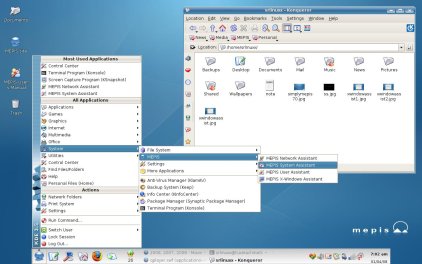 This program enables you to run it directly from your CD Drive without having to go through any installation process. ProMEPIS Linux 8.5 (8.4.97) Beta is not yet is still in beta test stage but it is showing some promises of a program that will do fine. This program features a 100% point and click installation, automatic detection of not only normal computer hardware, but most popular webcams. This program enables you to run it directly from your CD Drive without having to go through any installation process. ProMEPIS Linux 8.5 (8.4.97) Beta is not yet is still in beta test stage but it is showing some promises of a program that will do fine. This program features a 100% point and click installation, automatic detection of not only normal computer hardware, but most popular webcams.
Some of the features included in this version include the following: ability to detect hardware and superior configuration; excellent community support; network assistant to test and configure a wireless network; user assistant to create a live USB thumbdrive and repair a partition among others. SimplyMEPIS Beta 5 is a freeware program and is available for free download.
It is a good program considering the great amount of things you can do with it and the ease of use. It could as well have passed for a shareware program, but not a bad idea from the publishers to make it a freeware.
Want to check it out? Visit Mepis
Posted in Main | No Comments »
Friday, February 26th, 2010
 RaidenFTPD is one program that has been around for a while, and doing fine each time a new version comes out. It has features that enables you to do a lot of great things with it and does not really cost much in my opinion. Users can get it for $19.95 per download. RaidenFTPD is one program that has been around for a while, and doing fine each time a new version comes out. It has features that enables you to do a lot of great things with it and does not really cost much in my opinion. Users can get it for $19.95 per download.
RaidenFTPD 2.4.3780 allows you to set up your personal FTP Server, and supports the following features: high security; over 100 megabit per seconds in output; ease of use and flexible configuration among others.
Apart from the features mentioned above, RaindenFTPD is a handy tool that enables users to share files with their online friends, provide file download services to customers or even setup their personal home network FTP Server. This program is one of the most feature rich in its category, also boasting of various advanced features such as SSL/TLS, NAT Traversal and so much more.
Want to check it out? Please visit Raidenftpd
Posted in Main | No Comments »
Wednesday, February 24th, 2010
 What is new in PasteCopy? The publishers have added some extra features to this version that makes it much better than previous one. Some of these additions and updates are: Close to system tray icon; addition of snap to corners functionality; get more languages button; improved graphical interface; fixing of bugs that involves auto update which was an issue in previous version; bug fixed on mouse-over preview in settings among others. What is new in PasteCopy? The publishers have added some extra features to this version that makes it much better than previous one. Some of these additions and updates are: Close to system tray icon; addition of snap to corners functionality; get more languages button; improved graphical interface; fixing of bugs that involves auto update which was an issue in previous version; bug fixed on mouse-over preview in settings among others.
The publishers really did a lot of fixes and tweaking with this version. The last version gave them so much work to do and users did make a lot of complains about bugs and other issues they did not like. Being a free program does not mean users have to accept a program even if it is not well packaged.
PasteCopy.Net is a free portable Windows Clipboard Manager with support for many languages. It is completely automated and resizable. It works by enlarging Windows’ Clipboard and lets users organize CSV otherwise known as Comma Separated Values, HTML, and Unicode-Text.
Want to check it out? Visit Pastecopy
Posted in Main | No Comments »
Wednesday, February 24th, 2010
 This program is an audio and video codec package for Windows 7. As soon as you want to install it, the inbuilt installer removes other popular codec releases from your computer automatically before installation. Win7codecs 2.2.8 does not require any adjustments or tweaks to enable you begin to enjoy your media immediately after installation. This program is an audio and video codec package for Windows 7. As soon as you want to install it, the inbuilt installer removes other popular codec releases from your computer automatically before installation. Win7codecs 2.2.8 does not require any adjustments or tweaks to enable you begin to enjoy your media immediately after installation.
Version 2.2.8 does not contain a media player nor does it associate file-types. Win7codecs 2.2.8 gives you opportunity to use any media player of your choice, support for videos of any formats in most popular web browsers, ability to choose where to install and what is installed with the use of public redistributable among other great features.
I still wonder how a fine program like Win7codecs 2.2.8 manages to be a freeware program with all its great features. Most freeware programs I have seen do not even have close to what it has. Version 2.2.8 has some minor updates. These are: update of FDD show 3202; addition of merit adjustment for H264 and DXVA for FDD show.
In case you want to check it out? Visit Win7codecs
Posted in Main | No Comments »
Wednesday, February 24th, 2010
 When you want complete technical information about both video and audio files on your system, this program has the capacity to meet it. Files such as the following can be provided by this application: date added; duration; title of the album; author; title and so many other details. When you want complete technical information about both video and audio files on your system, this program has the capacity to meet it. Files such as the following can be provided by this application: date added; duration; title of the album; author; title and so many other details.
In case you also want some audio file information, MediaInfo 0.7.28 provides some basic information too. You can get audio information such as: aspect; codec; bitrate and likes of it. The information you get from this application can be further exported as text, CSV or even HTML.
MediaInfo 0.7.28 is an open source program, and anyone can get to download it for free at the website of the publishers. It is no doubt a modest program and users are going to find it very useful, and being free does not even take anything away from it.
Want to check it out? Visit Mediainfo
Posted in Main | No Comments »
Tuesday, February 23rd, 2010
 Cobian Backup is a multi-threaded program that assists users to backup all their files and directories right from their original location to other location. Cobian Backup is fast and easy to understand for all classes of users. You can use it to backup your library of pictures, documents and music excellently. Cobian Backup is a multi-threaded program that assists users to backup all their files and directories right from their original location to other location. Cobian Backup is fast and easy to understand for all classes of users. You can use it to backup your library of pictures, documents and music excellently.
If you do not want to run the risk of losing your valuable files, you need a program like this too give you the rest of mind you deserve. It is one of those install and forget program because it sits on your tray and gets your job done easily. I can almost count the number of shareware program that can do similar things like this one.
Some of the new features in this version include the following: FTP backup; copying of folders and files in original versions; download and upload among others. These are just few of the many features users can get to enjoy.
To check it out, please visit CobianBackup
Posted in Main | No Comments »
Monday, February 22nd, 2010
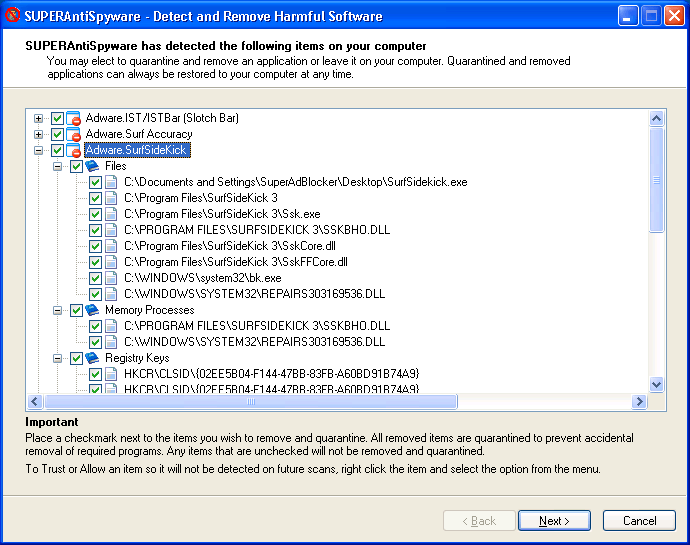 If your antivirus fails to detect some unwanted programs, SuperAntiSpyware will most likely meet up with the challenge of doing so. It is not as if this program works like magic, but it has some features that users cannot afford to ignore. As a matter of fact, it is free of charge and does not come with any limitation. If your antivirus fails to detect some unwanted programs, SuperAntiSpyware will most likely meet up with the challenge of doing so. It is not as if this program works like magic, but it has some features that users cannot afford to ignore. As a matter of fact, it is free of charge and does not come with any limitation.
SuperAntiSpyware free Edition 4.34.1000 is a multi-dimensional scanner that integrates properly with your system to detect unwanted programs. It has the capacity to easily detect and remove spyware and other infection that find their way into your computer. As a matter of fact, I used it to restore my broken internet connection, edit my registry and fixed my desktop among other things.
For a program to be tagged a freeware does not mean one cannot enjoy all the great features people enjoy when they pay for a free one? SuperAntiSpyware is a bit slow in spite of the great features it carries. With a little bit of speed, this program sure has a great future ahead of it.
Want to check it out? Visit SuperAntiSpyware
Posted in Main | No Comments »
Monday, February 22nd, 2010
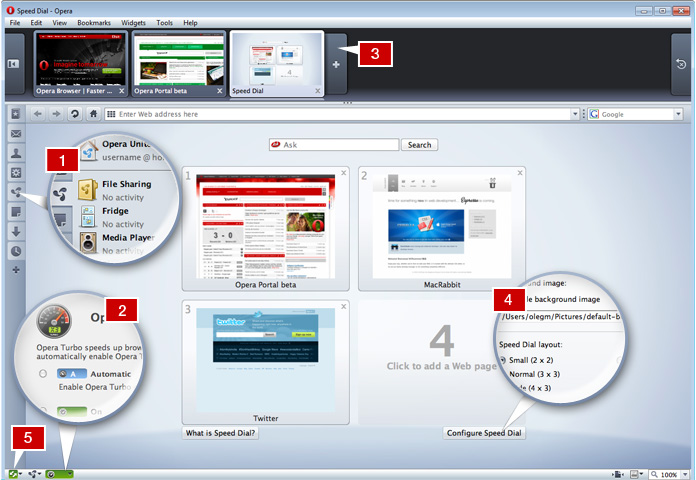 Opera has a name too big to be ignored, so is their reputation for producing useful browsers for internet users all over the world. Opera (v10.5) for Windows 10.50 Build 3260 Beta is out, and one can only hope that it gets better. The number of users keeps growing because of the uniqueness of the browser. Though it may not be as widely used as the Internet Explorer, never the less, it is still a good browser. Opera has a name too big to be ignored, so is their reputation for producing useful browsers for internet users all over the world. Opera (v10.5) for Windows 10.50 Build 3260 Beta is out, and one can only hope that it gets better. The number of users keeps growing because of the uniqueness of the browser. Though it may not be as widely used as the Internet Explorer, never the less, it is still a good browser.
Some of the features of the version in review are not too different from the ones we have known in the past. Some of these features include: speed dial; trash can; search shortcuts and other features. Opera already has over 20 million users world over and the number keeps increasing by the day.
When compared to the 10.5 Alfa, Opera 10.50 Build is much better and faster, and offers users opportunity to surf the internet at lightning speed. As usual, this browser is free for use and can be downloaded to work perfectly with the Windows Operating system.
Want to check it out? Please visit Opera
Posted in Main | No Comments »
|
|
|




