Author Archive
Tuesday, February 17th, 2009
 Every business needs to have an efficient customer relations management (CRM) tool. An effective CRM will help businesses have more data for their customers while managing the business towards improvement. Although small businesses could use simpler tools such as writing them on paper, electronic records have become more efficient, time saving and financially sound. Every business needs to have an efficient customer relations management (CRM) tool. An effective CRM will help businesses have more data for their customers while managing the business towards improvement. Although small businesses could use simpler tools such as writing them on paper, electronic records have become more efficient, time saving and financially sound.
But small businesses are often discouraged to have a good CRM tool. Popular CRMs are very expensive.
SprinxCRM is also one of the most expensive CRM tools in the industry today. Because of the efficiency of their tool, they are able to charge a lot more compared to their competition. Their powerful integration with popular communication tools such as email and outlook, the application is set to boost business relations with their customer. Campaign management and support for database management tools is also available in this version.
But small businesses don’t have to deal with spending hundreds of dollars for a CRM tool. SprinxCRM offers a free edition for small businesses to try the application. The application is only good for a single user and single installation. But even with this limitation, the application is good enough for small businesses to use. The free version has a very powerful tool in accounting and reporting which will give users an update regarding their customers. Another powerful feature of the free version of the application is the online interface. The customer’s data could be stored online which will be very useful if the business opts to upgrade their version to more users and more features.
For more info and download, you can check out http://www.sprinx.com/
Posted in Main | No Comments »
Monday, February 16th, 2009
 The browser named Chrome maybe a new browser in the industry. But even with its relatively new experience in the industry, the browser was immediately acknowledged as one of the major browsers in the world. The browser after all was developed by internet giant Google. Since one of the browsers ability is to optimize Google-related functions, users who have been using Google’s services never hesitated to download and use the browser. Boosting the popularity of the browser is the almost open source licensing of the browser. The source code of Chrome browser is available for download and could be built upon so that developers could build variation of the browser. The browser named Chrome maybe a new browser in the industry. But even with its relatively new experience in the industry, the browser was immediately acknowledged as one of the major browsers in the world. The browser after all was developed by internet giant Google. Since one of the browsers ability is to optimize Google-related functions, users who have been using Google’s services never hesitated to download and use the browser. Boosting the popularity of the browser is the almost open source licensing of the browser. The source code of Chrome browser is available for download and could be built upon so that developers could build variation of the browser.
Sure enough, an open source browser came out based on Chrome. Aptly named Chromium, this browser was developed specifically for those who wanted to have the best of Google’s browser with no strings attached. Chromium has all the basic features of Chrome browser – the highly regarded Omnibar which eases navigation and the smart task manager in Chromium is also found in this browser. But what made this browser different from its popular version is the lack of “strings” in using the browser. Chrome will constantly monitor the user’s internet activity and Chrome will constantly connect to Google for updates which could easily drag your computer.
Of course, there is a downside of least recognized browsers. Chromium might not automatically connect to Google for updates because it cannot be updated. There is also the security risk in using the browser since there are no updates. But overall, Chromium is a decent browser that could provide basic browser functions while optimizing Google related services.
http://free-chrome.net/
Posted in Main | No Comments »
Monday, February 16th, 2009
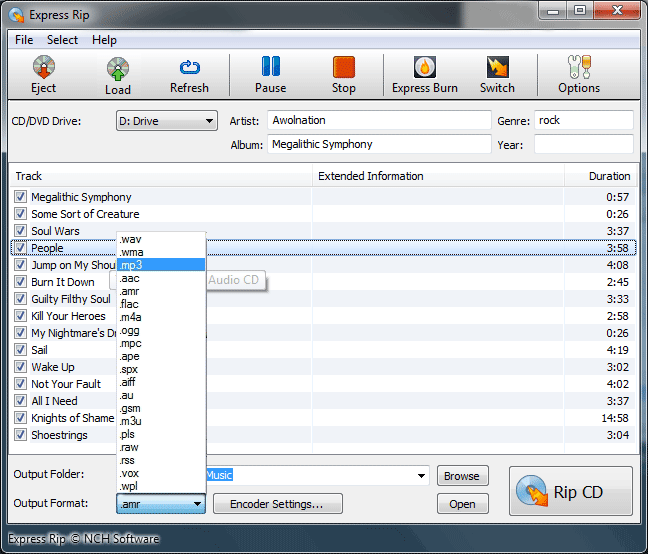 There are many audio rippers in the market and most of them are free to use. However, most of this type of application has the same functions on Windows Media Player. That means you don’t have to download additional application just to rip the music from your Audio CD. Some of the rippers might even pose some security risks because unknown rippers might have some spyware or malware. There are many audio rippers in the market and most of them are free to use. However, most of this type of application has the same functions on Windows Media Player. That means you don’t have to download additional application just to rip the music from your Audio CD. Some of the rippers might even pose some security risks because unknown rippers might have some spyware or malware.
But Express Rip is a different software for audio ripping. It has the basic functions in ripping music from audio CD. But what makes it different is the output and additional information added for the extracted audio files. The files could either be extracted as Mp3 file or .WAV. Although both formats are friendly to most Mp3 players, .WAV format is highly advisable for audio editing. Information about the album could also be extracted online especially the album cover for easier identification. The data that comes with the audio is also ripped. Additional functions such as control over encoding and audio bitrate is available in Express Rip.
A “Plus” version of the software is also available for an additional fee. With the upgraded version, more audio formats could be extracted. AAC and M4A are only some of the formats that could be extracted through Express Rip Plus. The upgraded version also has the ability to integrate its functions to other audio applications found in the local gadget.
When it comes to security of the application, the application was developed by NCH Software which is one of the highly recognized companies when it comes to audio related applications.
Interested? Check out http://www.nch.com.au/rip/screenshots.html
Posted in Main | No Comments »
Monday, February 16th, 2009
 One of the many reasons why a person purchases a computer is to enjoy playing games on it. Although there are business reasons for purchasing a computer, some see the addition of games in their computers as essential since games will make them relax or just have fun. One of the many reasons why a person purchases a computer is to enjoy playing games on it. Although there are business reasons for purchasing a computer, some see the addition of games in their computers as essential since games will make them relax or just have fun.
But games have a dark side. The graphics and the processes related to launch a game could easily slow down the computer. Most of the games today require powerful processors or else they might not run after all. Oftentimes, running a game while having other programs running is not recommended since running a game needs most of the processing power. If you are currently running an application, you have to close down the application before you can switch to a game.
This is where the application named GameMode would come handy. In using the application, users will no longer need to close down different running programs before they can play their resource intensive game. The application will save the state of the running application and closing them so that no other resources will be used. Other non-essential background application will also be suspended when the user switches to game mode. With the GameMode on, you can use the maximum resources in your gadget.
The basic limitation of this application is based on the fact that it will be making some changes on your running application. It will also require .Net framework before it could be launched which will also eat up resources for your game.
Check out Addaxsoft for more info
Posted in Main | No Comments »
Friday, February 13th, 2009
 sFont is one of the few applications made for very specific users. This application is geared towards users who have too many fonts to choose. There are thousands of fonts that could be downloaded for free online and they could be easily integrated in document creation and editing applications. Using the regular document editing application in choosing the right font could be time consuming. It will even take more time if fonts are selected in complicated page creating application which requires actual knowledge of the font. sFont is one of the few applications made for very specific users. This application is geared towards users who have too many fonts to choose. There are thousands of fonts that could be downloaded for free online and they could be easily integrated in document creation and editing applications. Using the regular document editing application in choosing the right font could be time consuming. It will even take more time if fonts are selected in complicated page creating application which requires actual knowledge of the font.
But that concern could be easily addressed by sFont. In gist, this application automatically lists down all fonts in your local gadget. Once every font in your gadget is loaded in sFont, you can view the fonts on the application – taking note of the ones that you would be using in your actual application. The fonts will be displayed in alphabetical order and the fonts will be demonstrated through alphabet and letters.
The good thing about sFont is that you should have the ability to run the application while working on your regular document. The application will not require a lot of resources so it should be good to run in the background.
But the software is too specific to be recommended to everyone. If you don’t have hundreds of fonts installed in your computer, it’s better to stick to your regular document editor. On the other hand, this software is highly useful for individuals who wanted to have all the possible options in making their document look good or unique.
Check it out at http://apps.leviathonsoftware.co.cc/index.html
Posted in Main | No Comments »
Thursday, February 12th, 2009
 Good audio editing applications are a little bit rare nowadays considering the quality of downloaded music today. The availability of Audacity (a powerful open source audio editing tool) has also made other free tools almost useless. Good audio editing applications are a little bit rare nowadays considering the quality of downloaded music today. The availability of Audacity (a powerful open source audio editing tool) has also made other free tools almost useless.
But if you’re looking for a good alternative to Audacity, consider the application called Free Audio Editor. The name sounds a like a cliché for an application but the name of the application does tell you what it could do. Free audio editor could modify sounds in different audio formats (WMA, OGG, WAV and MP3) with a slew of tools such as noise cancellation and sound compression.
What makes this tool entirely different compared to other sound editing tools is in its simplicity. Instead of complicating things with multi-track tools, loading different types of sounds and editing them is very easy through one track editing. This may also be the bad part of the application since you can’t mix different sounds with different tracks. But then again, you can just cut and paste sounds and mix them according to your need.
The Free Audio Editor on the other hand, has a catch. Although the application is free, exporting the sound that you have just mixed is only limited to WAV format. If you want to expand to MP3 or OGG, you have to shell out $30 for the “Deluxe Edition.” But you don’t have to push yourself to the extra dollars. There are free applications online that have the ability to convert files from WAV to any audio format you prefer.
More info and download available at http://www.free-audio-editor.com
Posted in Main | No Comments »
Thursday, February 12th, 2009
 Microblogging (blogging in 140 characters or less) is a fast rising blogging format adopted by most popular bloggers as well as for personal reasons. The format is very simple: just write down small stuff on your account for others to follow you. This type of blogging is useful in live events wherein there’s a play-by-play update. It’s also used by popular bloggers to share small ideas as they remember them. Some of the popular websites for microblogging are Twitter, Pownce, Friendfeed and Jaiku. Microblogging (blogging in 140 characters or less) is a fast rising blogging format adopted by most popular bloggers as well as for personal reasons. The format is very simple: just write down small stuff on your account for others to follow you. This type of blogging is useful in live events wherein there’s a play-by-play update. It’s also used by popular bloggers to share small ideas as they remember them. Some of the popular websites for microblogging are Twitter, Pownce, Friendfeed and Jaiku.
Since it’s a powerful means of communication, a client or software that would enable microblogging has been developed. One of the most popular clients for microblogging is Twhirl which is a free application for posting in different microblogging sites. Through Twirl, users can update their microblogging sites such as Friendfeed and Twitter. Users will also have the ability to post photos in a microblogging specific photo sharing site TwitPic.
But aside from posting your thoughts in two popular microblogging websites, you can also use Twhirl to monitor other accounts. Aside from the Twitter and Friendfeed, accounts from Jaiku and Pownce could be monitored through Twhirl. Advanced controls such as search and filter are also provider in Twhirl.
There is a catch to this application though: Twhirl is a very powerful client that requires no less than the powerful devices. The application requires Adobe AIR client so that it could actively monitor other accounts and properly search data from other accounts. Adobe AIR requires a powerful local gadget. If you’re computer has less than 1G of RAM with the latest processor, the client might drag your computer.
Check it out at http://twhirl.org/docs
Posted in Main | No Comments »
Wednesday, February 11th, 2009
 The little folder “My Pictures” in your computer probably stores thousands of photos from different events in your office and your personal life. Each folder has been carefully tagged to tell you what was the event and when did that happen. But even with the neatness in organization, viewing these photos could sometimes be a drag. The feeling of a photo album is just not there. The little folder “My Pictures” in your computer probably stores thousands of photos from different events in your office and your personal life. Each folder has been carefully tagged to tell you what was the event and when did that happen. But even with the neatness in organization, viewing these photos could sometimes be a drag. The feeling of a photo album is just not there.
That longing for a photo album like functionality could be quenched with a free application called FlipAlbum. The standard edition is a free application that will let you create different photo albums. Flip through different photos with page-like interface and like your regular photo album, you can create an atmosphere while browsing through different themes. Inserting photos in the album is also a possibility. Best of all, full-screen functionality is there so your screen is automatically transformed into an electronic photo album.
Aside from photos, other multi-media files such as videos and audio files could be part of the photo album. Although the video and audio format is a little bit limited, the formats available for usage in FlipAlbum Standard are the popular ones so conversion is likely not needed. You can even use the audio to be the background music while you flip through your album.
The FlipAlbum Standard is only available for XP users and below. For Vista and Mac, a fee is required to use the application. The option in online sharing photos in FlipAlbum is also disabled in the Standard version. Other versions are Suite and Pro recommended for business purposes as the version comes with online cart photo software.
Check it out at http://www.flipalbum.com
Posted in Main | No Comments »
Wednesday, February 11th, 2009
 Most audio transcription applications will require a separate hardware – a pedal to stop, forward, rewind, play and pause the audio. All computers and laptops do not have pedals which means you need to purchase this additional gadget if you want to get serious in your transcription. Most audio transcription applications will require a separate hardware – a pedal to stop, forward, rewind, play and pause the audio. All computers and laptops do not have pedals which means you need to purchase this additional gadget if you want to get serious in your transcription.
But you don’t have to force yourself in purchasing the pedal if you want to slowly start in transcription. An application called EF Talk Scriber will provide you the functions found in pedal right in your keyboard. Instead of using the pedal, the audio controls are in your hands. You don’t have to learn the pedal which will take some time getting used to.
EF Talk Scriber is not just an audio controller. The application is also bundled with a document editor so that can transcribe the audio with the help of a single application. The interface of the document creator and editor is like most document editors. The only difference is the tab for audio controls which is used for controlling the audio files.
The biggest advantage of EF talk Scriber is the customization. The audio controls could be fully customized according to your specifications. Other controls for text editing are still the same but the audio could be configured so that you can easily work with the application. Instead of awkward audio control through your feet, your hands will do all the work.
EF Talk Scriber also providers support for different languages. Most audio formats (even FLAC) are also playable in the software. It’s a highly simplified transcriber that could get you started in minutes.
Chek it out at efsoftware
Posted in Main | No Comments »
Friday, February 6th, 2009
 Soft191 is a software development company that offers a wide variety of applications both licensed and freeware. One of their well known freeware applications is their MP3 player. It’s a tool with a very interactive interface which could help any user play most of the music formats from the local source fast. It also comes with a variety of options after the application has been launched. The application could be maintained playing in the desktop with the entire interface showing or the user could hide the application and play in the background. The application will just reside in the system tray and could be controlled by mouse. Additional controls such as equalizer and control of play list is also available. Soft191 is a software development company that offers a wide variety of applications both licensed and freeware. One of their well known freeware applications is their MP3 player. It’s a tool with a very interactive interface which could help any user play most of the music formats from the local source fast. It also comes with a variety of options after the application has been launched. The application could be maintained playing in the desktop with the entire interface showing or the user could hide the application and play in the background. The application will just reside in the system tray and could be controlled by mouse. Additional controls such as equalizer and control of play list is also available.
But Soft191 MP3 Player has its limitations not on its interface but on its appeal to users. Soft191 requires more than just simple knowledge of the computer to make it work according to expectations. With too many options to consider, the user might not be able to achieve the functionality he or she was looking for. For example, the system tray form of the application has to be configured and source files have to be targeted. The fact that the file explorer is added in the interface could even drag down the computer as it will still scan for media compatible files. File compatibility might not be extensive as well since they only indicate WMA and MP3 compatibility. Other audio formats such as .wav or .m4a may not be supported.
Soft191 MP3 Player is a decent MP3 player that provides a lot of playback options for users. But this software requires advanced familiarity with the software and could lack support to other form of audio files.
For more info and download check out – http://www.soft191.com
Posted in Main | Comments Off on Soft191 MP3 Player
|
|
|




