Author Archive
Wednesday, May 28th, 2014
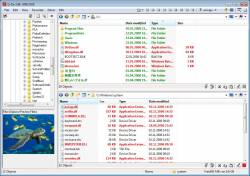 Do you want a program that can help you arrange and manage your files without stress? That program is Q-Dir because it has a lot of nice features that can save you a lot of time and even energy that can used on other things. Do you want a program that can help you arrange and manage your files without stress? That program is Q-Dir because it has a lot of nice features that can save you a lot of time and even energy that can used on other things.
What is the big deal about Q-Dir?
Q-Dir makes your files and folder easy to manage. Fast and easy access, with an amazing Quadro-View technique. You don’t have to renounce the usual, Drag and Drop, all Views, and other functions of your system. No! Q-Dir gives you other nice functions that make you happy. One can save many hand moves and also time.
Q-Dir (the Quad Explorer) makes your files and folder easy to manage, as an installed or portable Windows program. Fast and easy access to your hard disks, network folders, USB-Stiks, floppy disks and other storage devices.
The program is quite easy to use, and does not even take more than a few minutes for a newbie to get used to. The program runs smoothly on your system without even stressing the memory. One of the great things about Q-Dir is that it can also work very well on older systems.
Want to check it out? Visit Softwareok.com.
Posted in Main | No Comments »
Tuesday, May 27th, 2014
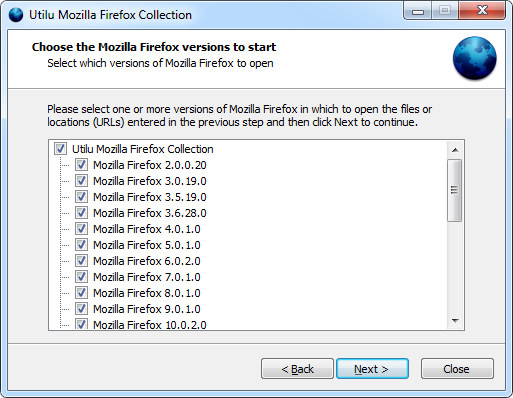 Have you ever heard of a collection of multiple versions of the Firefox browser? Well Utilu Mozilla Firefox Collection is designed for web designers and developers that want you check the way a website is rendered in a different Mozilla Firefox edition. Have you ever heard of a collection of multiple versions of the Firefox browser? Well Utilu Mozilla Firefox Collection is designed for web designers and developers that want you check the way a website is rendered in a different Mozilla Firefox edition.
What is Utilu Mozilla Firefox Collection?
Utilu Mozilla Firefox Collection contains multiple versions of the free web browser Mozilla Firefox, which are standalone so they can be used at the same time. In Utilu Mozilla Firefox Collection you can quickly see how your websites look when rendered using different versions of the Gecko render engine. You can specify the filenames or locations (URLs) to open in all installed versions of Mozilla Firefox.
Users can try to install all these versions individually but it can take a lot of time to download and to run each installer. Additionally, all versions come with preinstalled web development tools that allow users to analyse the webpage. Adding these plug-ins to every installation takes a lot of time that can be saved by using this collection.
The installer of the program allows you to select the versions that you need to install. You can use them separately or even at the same time without any issues. Utilu Mozilla Firefox Collection provides you with an automatic tool that opens a certain URL with all the installed versions inorder to compare the result. This version has a lot of updates including update of Firebug from 2.0.0 beta 5 to 2.0.0 beta 6 and other minor changes.
Want to check it out? Visit Utilu.com.
Posted in Main | No Comments »
Tuesday, May 27th, 2014
 Are you looking for a video surveillance solution for both Windows and Linux-based systems and Macintosh computers that supports a variety of digital video cameras? Have you heard of Xeoma? Are you looking for a video surveillance solution for both Windows and Linux-based systems and Macintosh computers that supports a variety of digital video cameras? Have you heard of Xeoma?
What is the big deal about Xeoma?
Xeoma is a complete video surveillance solution for both Windows and Linux-based systems and Macintosh computers. It supports an extremely wide variety of digital video cameras including wireless cameras, regular USB web cameras and IP cameras. It is a unique solution in that it provides one of the most user-friendly and intuitive ways of configuring a complete video surveillance system in either the home or the work place.
Xeoma is built with a lot of advanced features that secure your home and business with digital cameras that include wireless and regular USB web cameras. Some of its features include the following: provides you safety for both your family and business; enables you to monitor your staff’s activities both in the work place and on the computer; continuously record data from cameras, schedule or when triggered by motion either in MPJPEG or MPEG-4; watch over your kids and pet left at home alone; remotely control cameras watch real time videos with your mobile; and a few others.
Want to check it out? Visit FelenaSoft.com.
Posted in Main | No Comments »
Tuesday, May 27th, 2014
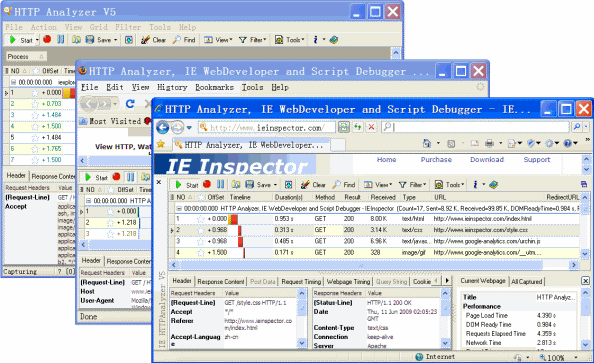 Do you want to analyse or capture HTTP/HTTPS traffic and find out a variety of HTTP related information, Header, Content, Cookies, Query Strings, and Post form Values directly in the browser window? Then what you need is HTTP Analyzer plug-in for Internet Explorer. Do you want to analyse or capture HTTP/HTTPS traffic and find out a variety of HTTP related information, Header, Content, Cookies, Query Strings, and Post form Values directly in the browser window? Then what you need is HTTP Analyzer plug-in for Internet Explorer.
What is the big deal about HTTP Analyzer?
HTTP Analyzer is a plug-in for Microsoft Internet Explorer that allows you to capture HTTP/HTTPS traffic and show a wide range of HTTP related information, Header, Content, Cookies, Query Strings, and Post form Values directly in the browser window.
The plug-in has a few updates that include the following: new Windows8.1 32bit and 64bit Support; utilizing high performance proxy-less netfilter solution, compatible with antiviruses/firewalls/other network filters; IE 11 Support; and fixing of a command-line parser bug.
HTTP Analyzer also retains most of its main features that include the following: HTTP Analyzer Shows HTTP/HTTPS traffic and web page in the same window; shows you unencrypted data sent over HTTPS / SSL connections as the same level of detail as HTTP; users can tamper with HTTP requests, view and modify GET query parameters, HTTP/HTTPS headers and POST parameters from Internet Explorer 5+ and Firefox 3+ by using IE/Firefox tamper tool; and a host of others.
Don’t forget that the program has a 3o day trial limitation. Full version would cost you $169 (for commercial use) or $119 (non-commercial).
Want to check it out? Visit IEinspector.com.
Posted in Main | No Comments »
Tuesday, May 27th, 2014
 Are you a die-hard lover of cross-platform real-time strategy game of ancient warfare? How much time are you willing to spear sitting behind your system to play a game as interesting as 0 A.D? Are you a die-hard lover of cross-platform real-time strategy game of ancient warfare? How much time are you willing to spear sitting behind your system to play a game as interesting as 0 A.D?
What is 0 A.D Alpha?
0 A.D. (pronounced “zero ey-dee”) is a free, open-source, cross-platform real-time strategy (RTS) game of ancient warfare. In short, it is a historically-based war/economy game that allows players to relive or rewrite the history of Western civilizations, focusing on the years between 500 B.C. and 500 A.D. The project is highly ambitious, involving state-of-the-art 3D graphics, detailed artwork, sound, and a flexible and powerful custom-built game engine.
The developers of 0 A.D. have been working on it for a long time and have managed to build a superb real-time strategy that is completely free and that comes with some pretty amazing gameplay.
The enthusiasm from the developers notwithstanding, progress made on the game has been slow contrary to expectations, and that is when we just take a look at the version number. This is a stable title nonetheless, but its makers want to have many more features in place before daring to raise it to the 1.0 status.
Want to check it out? Visit WildFireGames.com.
Posted in Main | No Comments »
Thursday, May 22nd, 2014
 Are you a Delphi developer looking for way to create applications with direct access to MySQL DB without BDE and ODBC? Have you heard of DAC for MySQL which allows you to do all that plus more? You can read all about the program here. Are you a Delphi developer looking for way to create applications with direct access to MySQL DB without BDE and ODBC? Have you heard of DAC for MySQL which allows you to do all that plus more? You can read all about the program here.
What is DAC for MySQL?
DAC for MySQL allows the Delphi developer to create applications with direct access to MySQL DB without BDE and ODBC. But user’s interface is the same as BDE. So, you can migrate your old BDE/ODBC-based projects to native links technology easier.
There are so many reasons why this software attracts the attention of a lot of users. Among some of these reasons include the following: no MySQL libraries (libmysql.dll) are required on a client workstation; 100% native Delphi code; only 300-400 Kb are added to your .exe file; support ofMySQL™ 3.xx/4.x/5.x/6.x; full support of stored procedures (with IN, OUT and INOUT parameters); full compatibility with all the existing data-aware controls and report designers; full support of the BLOB fields; TDBImageEx component for JPEG images support included in the package for free (with sources); TNT Unicode Controls Wrappers package for Unicode applications for free (with sources); detailed help system and a lot of various demo applications; etc.
Want to find out more about the program? Visit: Microolap.com.
Posted in Main | No Comments »
Wednesday, May 21st, 2014
 Are you looking for an advanced and reliable multimedia viewer, manager, and converter? ThenXnViewMP might just be what you want. Are you looking for an advanced and reliable multimedia viewer, manager, and converter? ThenXnViewMP might just be what you want.
What is XnViewMP?
XnViewMP is a group of utilities that features viewing, converting, screen capture, slideshow, and Twain support. These utilities support viewing more than 400 graphic formats and can create 52.
XnViewMP offers similar stylish and easy to use interface that makes it almost fun to rate, sort and catalogue files while still being practical. The files are displayed in the central area of the main window and you are able to choose the type of view you want for them.
The surroundings of that central browser can be fitted with a bunch of other tools. You can dock and rearrange the windows for the folder browser, document info and file preview. This comes in very handy when you want to create your own layout and speed up your workflow.
XnViewMP also provides a variety of ways to view files. You can change the size of the preview thumbnails, compare images and even edit them. Double clicking a picture automatically opens it in the editor. Here, you are able to analyse its histogram, resize and crop it, as well as apply various enhancement filters.
Want to check it out? Visit XnViewMP.
Posted in Main | No Comments »
Tuesday, May 20th, 2014
 As technology continues to advance, the need to be up to speed with how to fix issues or problems that may arise from them has become inevitable. A program like Complete Internet Repair is one application designed for the purpose of fixing some of your internet problems. As technology continues to advance, the need to be up to speed with how to fix issues or problems that may arise from them has become inevitable. A program like Complete Internet Repair is one application designed for the purpose of fixing some of your internet problems.
What is Complete Internet Repair?
Complete Internet Repair does exactly what it says. The program works by attempting to repair everything internet related, including networking problems. With any repair utility, you will need to remember only two golden rules. Firstly; don’t try and repair something that is not broken, you might break it. Secondly; the utility can’t repair it all, we are not like the all-seeing and all-knowing Oracle, we cannot anticipate each and every situation, but this all said, this utility should be able to help with most situations.
Complete Internet Repair is basically a combination of Internet Recovery KIT and Winsock Repair. The program enables you to do a lot of things including the following: reset your internet protocol; repair winsock; clear Windows update history; reset Windows firewall configuration; repair workgroup computer view; renew internet connection; flush DNS resolver cache; repair SSL/HTTPS/Cryptography, and many more.
Want to check it out? Visit RizoneSoft.com.
Posted in Main | No Comments »
Tuesday, May 20th, 2014
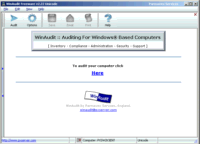 A lot of things go on behind the scene on our computers that we should take note of. These things need to be adequately audited in order to avoid a total system crash now or in the future, and the good thing is that there are some programs that can be used for that. A program like WinAudit helps you to perform an extensive audit of your system including hardware, software, etc. A lot of things go on behind the scene on our computers that we should take note of. These things need to be adequately audited in order to avoid a total system crash now or in the future, and the good thing is that there are some programs that can be used for that. A program like WinAudit helps you to perform an extensive audit of your system including hardware, software, etc.
What is WinAudit?
WinAudit performs an exhaustive audit of the hardware and software configuration of your computer. The audit report contains details on installed software, license information, peripherals, memory usage, processor model, network settings, etc. You can view the audit report on screen as well as save it in web page, text, and spreadsheet formats.
WinAudit is free program that requires no installation or configuration making it ideal for those who need to perform an audit in a few seconds with the simple click of a button.
Does WinAudit have any downsides?
WinAudit is in fact a program that does what it says in detailed way. You will be amazed at how much work this software can do behind the scene for your system.
Want to check it out? Visit WinAudit.
Posted in Main | No Comments »
Monday, May 19th, 2014
 Do you want to improve both audio and video playback in Windows Media Player or the included free Media Player Classic? Then what you need is K-Lite Codec Pack. Do you want to improve both audio and video playback in Windows Media Player or the included free Media Player Classic? Then what you need is K-Lite Codec Pack.
What is K-Lite Codec Pack?
K-Lite Codec Pack is a collection of components needed for audio and video playback in DirectShow players such as Windows Media Player, Media Centre, and Media Player Classic. It contains everything you need to play all common audio and video file formats. It also provides additional functionality such a thumbnail generation in Explorer. The pack has a very advanced installer which is highly flexible and has unique problem solving capabilities.
Basic is a small but powerful pack that contains only the most essential things. It allows you to play all common video file formats in your favourite player.
Codecs and DirectShow filters are needed for encoding and decoding audio and video formats. The Pack is designed as a user-friendly solution for playing all your audio and movie files. With the K-Lite Codec Pack you should be able to play all the popular audio and video formats and even several less common formats. The Pack is user-friendly and very easy to use, and contains virtually everything needed to play your favourite movies and music.
Does it have any downside?
It is important to de-select some unwanted add-ons when installing the program.
Want to check it out? Visit CodecGuide.com.
Posted in Main | No Comments »
|
|
|




