Author Archive
Sunday, November 24th, 2013
 Sometimes the difference between prolonging the lifespan of your computer and spending a lot of money to fix or buy another one could just be knowing what is going on inside of it. With CPU-Z, you can know or find out a lot of things on your CPU including processor name and vendor, core stepping and process, processor package, etc. Sometimes the difference between prolonging the lifespan of your computer and spending a lot of money to fix or buy another one could just be knowing what is going on inside of it. With CPU-Z, you can know or find out a lot of things on your CPU including processor name and vendor, core stepping and process, processor package, etc.
What’s CPU-Z?
CPU-Z is a diagnostic tool that provides information on your CPU, including: processor name and vendor, core stepping and process, processor package, internal and external clocks, clock multiplier, partial overclock detection, processor features, supported instructions sets, L1 and L2 cache information, location, size, speed, and technology. This version already includes a couple of updates including improved support of Intel Silvermont (Bay Trail), and new validation.
Every time you launch CPU-Z, it automatically scans your computer for changes and displays all the information within a single, tab-based window. This way, users can easily read data regarding the CPU, mainboard, memory or graphics in a matter of seconds and few mouse clicks. Another advantage of this automatic scanning is the fact that one can replace various components, and analyze the way their PC works, thereby coming up with the best configuration.
Any downside?
Users might need to beware of the toolbar installation.
Want to check it out? Visit Cpuid.com.
Posted in Main | No Comments »
Thursday, November 21st, 2013
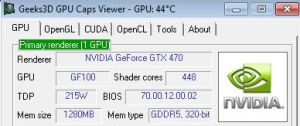 Are you looking for a tool that enables you to monitor the activity of your graphics card? Are you a hardcore gamer or a web developer who uses resource demanding applications when it comes to graphics? Then this software can be of some great help to you. Are you looking for a tool that enables you to monitor the activity of your graphics card? Are you a hardcore gamer or a web developer who uses resource demanding applications when it comes to graphics? Then this software can be of some great help to you.
What’s GPU Caps Viewer?
GPU Caps Viewer is a graphics card utility that allows to quickly see the capabilities of your graphics card / GPU, displays the GPU temperature, offers a convenient OpenGL extensions database and OpenGL API support, provides a GPU-burner facility as well as an online validation.
GPU Caps Viewer’s user interface is very plain. It enables you to view information about your GPU, including shader cores, BIOS, device ID, subdevice ID, GPU temperature, current and maximum clock, GPU load, driver, OpenGL, OpenCL, CUDA, PhysX and multi-GPU. You can also start an OpenGL or OpenCL demo, view the OpenGL version and its extensions list, the number of CUDA devices, core data (name, compute capability, shader clock, multi processors, warp and grid size etc) and memory data (e.g. total memory, shared memory, total constant).
Some of its key features include the following: quick view of the graphics configuration (graphics card / GPU type, amount of video memory, drivers version); display of the main OpenGL capabilities (OpenGL version, texture size, number of texture units, etc.); full report in text and XML format; etc.
Any downside?
A couple of complaints have been made about this application; but that should no longer be problems with a couple of updates have been added already.
Want to check it out? Visit Ozone3D.net.
Posted in Main | No Comments »
Wednesday, November 20th, 2013
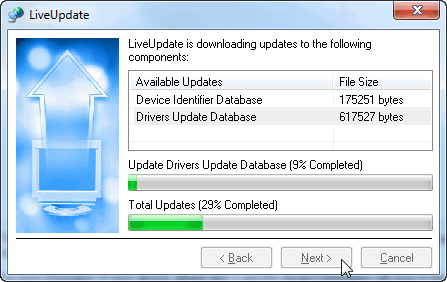 One of the problems or challenges being faced by people whenever they reload or format their systems is reinstalling their old drivers. That is why most people prefer to install applications or programs that will enable them backup their drivers so they can easily reinstall them later. That is one of the major reasons a program like Driver Magician is worth checking out. One of the problems or challenges being faced by people whenever they reload or format their systems is reinstalling their old drivers. That is why most people prefer to install applications or programs that will enable them backup their drivers so they can easily reinstall them later. That is one of the major reasons a program like Driver Magician is worth checking out.
What’s this software all about?
Driver Magician Lite identifies all the hardware in the system, extracts their associated drivers from the hard disk and backs them up to a location of your choice. Then when you format and reinstall/upgrade your operating system, you can restore all the “saved” drivers just as if you had the original driver diskettes in your hands.
This freeware contains some only very limited features unlike the main or paid version. The lite version of Driver Magician only includes; support for Support Windows 98/SE/ME/2000/XP/2003/Vista/7/8/8.1, and Device drivers backup. Maybe the publishers should have added more features; but I am sure you still find this very useful.
Any downside?
Driver Magician lite does not have a lot of features unlike the other version that has a lot of nice features. However, having this program on your computer is not a bad idea.
Want to check it out? Visit DriverMagician.com.
Posted in Main | No Comments »
Wednesday, November 20th, 2013
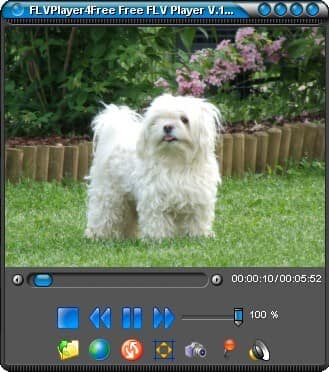 Do you want an application that enables you easily play your favourite FLV files in the hard disk or from the internet? Do you also want an application that does not require Flash authoring tool? Then what you need is FlvPlayer4Free. Do you want an application that enables you easily play your favourite FLV files in the hard disk or from the internet? Do you also want an application that does not require Flash authoring tool? Then what you need is FlvPlayer4Free.
What’s FlvPlayer4Free?
FlvPlayer4Free allows even the most demanding users to easily play their favourite FLV files in the hard disk or from Internet. It does not require the Flash authoring tool and it offers attractive and useful functions. FlvPlayer4Free uses a low amount of system resources and allows you to select your preferred language, as well as change the interface appearance.
You can use basic commands, such as “Play”, “Stop”, “Previous Track”, and “Rewind” and volume adjustment. You can also create playlists, toggle repeat mode, switch to full screen mode and open an FLV web address. You can also capture an image (in the JPG, BMP or PNG format), preserve the aspect ratio, enable smoothing, allow multiple instances and configure video options (e.g. auto play on start-up, remember player position or audio, start from latest played video file, auto save changes).
Any downside?
FlvPlayer4Free offers to download or install software or components (Toolbars/adware), which the program does not require to fully function.
Want to check it out? Flvplayer4free.com.
Posted in Main | No Comments »
Wednesday, November 20th, 2013
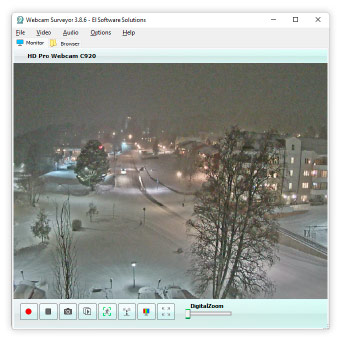 Using a webcam can sometimes expose your system to all kinds of malicious programs that may harm our files. That is why you need to do everything necessary to keep your system safe; and that is what Webcam Surveyor is all about. Using a webcam can sometimes expose your system to all kinds of malicious programs that may harm our files. That is why you need to do everything necessary to keep your system safe; and that is what Webcam Surveyor is all about.
What’s the big deal about this program?
Webcam Surveyor is an all-in one web cam program solution that includes: video surveillance, capture, video broadcasting and monitoring tools. With it you can record video from your webcam, take snapshots or record a sequence of snapshots into a video file, broadcast live video and audio streams over Internet and local network.
Webcam Surveyor will also help to track safety and will inform you if something happen. With stealth mode you can hide Webcam Surveyor on your computer. It’s allows to record video at the presence of undesirable people or to find out what happens with your PC in your absence. The built-in browser allows to easily organizing captured images and video clips.
A couple of minor improvements have been made to this version including the following: improved video capture; added support for 3ivx codecs; added support for Windows blocked and sleep mode (now the application can resume all activities after exiting from the sleep mode), and some minor bugs fixes.
Any downside?
Webcam Surveyor doesn’t have any downside, and with the new version seems to be more stable.
Want to check it out? WebCamSurveyor.
Posted in Main | No Comments »
Tuesday, November 19th, 2013
 Do you want a program that enables or help you enjoy free download for the best DVD decrypter and Blu-ray decrypter? Well you can stop searching for one because DVDFab Virtual Drive emulates maximum 18 drives and works with DVD/Blu-ray images created by DVDFab and other programs. Do you want a program that enables or help you enjoy free download for the best DVD decrypter and Blu-ray decrypter? Well you can stop searching for one because DVDFab Virtual Drive emulates maximum 18 drives and works with DVD/Blu-ray images created by DVDFab and other programs.
What’s the big deal about DVDFab Virtual Drive?
DVDFab Virtual Drive is a virtual DVD/Blu-ray emulator. It emulates maximum 18 drives and works with DVD/Blu-ray images created by DVDFab and other programs. For example, to play a Blu-ray backup on PC with Power DVD 8 and above, you need use DVDFab to backup the Blu-ray to an ISO image file, and use DVDFab Virtual Drive to mount it, and then Power DVD will play it. DVDFab Virtual Drive is freeware, no cost at all.
Users can select one language for DVDFab Virtual Drive from nearly 20 available languages. Users can also choose whether or not to run DVDFab Virtual Drive automatically when windows start up. Users can also let DVDFab Virtual Drive mount the last image automatically, and unmount all drives when exists. Users can freely set the number of drives from 0 to 18.
Changes in current version include the following: fix freeze when click browser button when Make .miniso Image; a couple of minor changes and improvements, add “Other DVDFab Products” menu item, and add Default language when select UI language.
Any downside?
This program is not a bad one, especially as the publisher has been able to make a couple of changes i the new version.
Want to check it out? Visit: DVDFab.
Posted in Main | No Comments »
Monday, November 18th, 2013
 Are you looking for a an email program that has a lot of very useful features including support for POP3 accounts, and Hotmail accounts? Then you should read this review about Foxmail. Are you looking for a an email program that has a lot of very useful features including support for POP3 accounts, and Hotmail accounts? Then you should read this review about Foxmail.
What’s Foxmail?
Foxmail is a compact, yet very powerful email program with many useful features and a pleasant interface. It supports POP3 accounts as well as Hotmail accounts and offers support for HTML email, multiple accounts, mailbox encryption and more. It also comes with a WYSIWIG tool to compose nice looking HTML emails from templates or scratch.
Foxmail also offers filter options, allowing you to act upon incoming mail that meets certain criteria – you can delete messages, forward them, auto-respond to them and more based on keywords appearing in the subject, address text etc.
The Express Send feature enables you to send mail directly to the recipient, using the built in SMTP server, thereby bypassing your ISP. It includes many other features, including a remote mail viewer to manage mail on the server, as well as a small scroll ticker that displays message subjects as they arrive in your inbox.
Any downside?
FoxMail won’t even start unless you have created an account, and there is no offline installer or a way to setup an account offline.
Want to check it out? Visit http://foxmail.com.cn/
Posted in Main | No Comments »
Thursday, November 7th, 2013
 There are several applications that provide us useful information about things that happen in your environment as well as on earth generally. One application that has a reputation for consistently doing that over the years is Google Earth. You can read more about what Google Earth is all about by reading the review below. There are several applications that provide us useful information about things that happen in your environment as well as on earth generally. One application that has a reputation for consistently doing that over the years is Google Earth. You can read more about what Google Earth is all about by reading the review below.
What’s the big deal about Google Earth?
Google Earth combines satellite imagery, maps and the power of Google Search to put the world’s geographic information at your fingertips. Fly from space to your neighborhood. Type in an address and zoom right in. Search for schools, parks, restaurants, and hotels. Get driving directions. Tilt and rotate the view to see 3D terrain and buildings. Save and share your searches and favorites. Even add your own annotations.
Google Earth can be explored in three unique ways including; Desktop, mobile, and web. The Desktop version includes the Google Earth, Google Earth Pro and Google Earth Enterprise. The Mobile version enables you to explore the world from the palm of your hand, at home or on the go. While the Web version has a plug-in that enables you to enjoy 3D views of the globe on sites across the web or try Earth view in Google Maps.
Want to check it out? Visit Google.com/earth.
Posted in Main | No Comments »
Thursday, November 7th, 2013
 Some applications provide you with a lot more ways to have fun even if they are a bit weird. Well, you should stop reading this review because I just used the word weird; I suggest you go ahead if you truly want to have fun because that is what you get when you install TempleOS on your system. Some applications provide you with a lot more ways to have fun even if they are a bit weird. Well, you should stop reading this review because I just used the word weird; I suggest you go ahead if you truly want to have fun because that is what you get when you install TempleOS on your system.
What’s TempleOS?
TempleOS is an x86_64, multi-tasking, multi-cored, public domain, open source, ring-0-only, single-address-map (identity-mapped), non-networked, PC operating system for recreational programming. It sticks to common, 64-bit hardware instead of distinct drivers because you must shoot-the-moon. Also, redundancy and varied capabilities are unpleasant compared to everybody-has-the-same-thing.
It is a highly interesting way to have some fun on your computer; and there is never a dull moment since it requires quite a level of intelligence on your part or the part of the user.
TempleOS is one of the most talented piece of work I have seen especially as an open source. However, as a user, it is important to have some experience when it comes to using this program. Newbie may require some time to get used to it; but not a bad program all the same.
Any downside?
TempleOS is very interesting, but also too steep a learning curve.
Want to check it out? Visit Templeos.org.
Posted in Main | No Comments »
Wednesday, November 6th, 2013
 We have several uninstallers coming on these days with lots of unique and interesting features. As a matter of fact, the more uninstaller there are, the more options available to all users when it comes to removing unwanted applications from their systems. We have several uninstallers coming on these days with lots of unique and interesting features. As a matter of fact, the more uninstaller there are, the more options available to all users when it comes to removing unwanted applications from their systems.
Some applications are so stubborn that one may require an advanced uninstaller to remove them; and that is why you need to find out if the one you are installing has all the necessary features to help you achieve that. It does look like GeekUninstaller has a couple of features that might be of great help to a lot of users.
What’s GeekUninstaller?
GeekUninstaller is an uninstaller that performs deep and fast scanning afterwards and removes all leftovers. Keep your PC clean! Use Force Removal for stubborn and broken programs. In this version in review, the publisher has worked on the crash reporting, and there is now a significant improvement.
GeekUninstaller is very easy to use, and even a newbie won’t have a problem using it the first time. Some of its features include the following: it performs deep and fast scanning afterwards and removes all leftovers; instant start-up, minimalistic, simple but efficient user interfaces; no installation is required; etc.
All in all it is a nice program; and it does what the publisher says it does.
Want to check it out? Visit GeekUninstaller.com.
Posted in Main | No Comments »
|
|
|





