Author Archive
Monday, October 28th, 2013
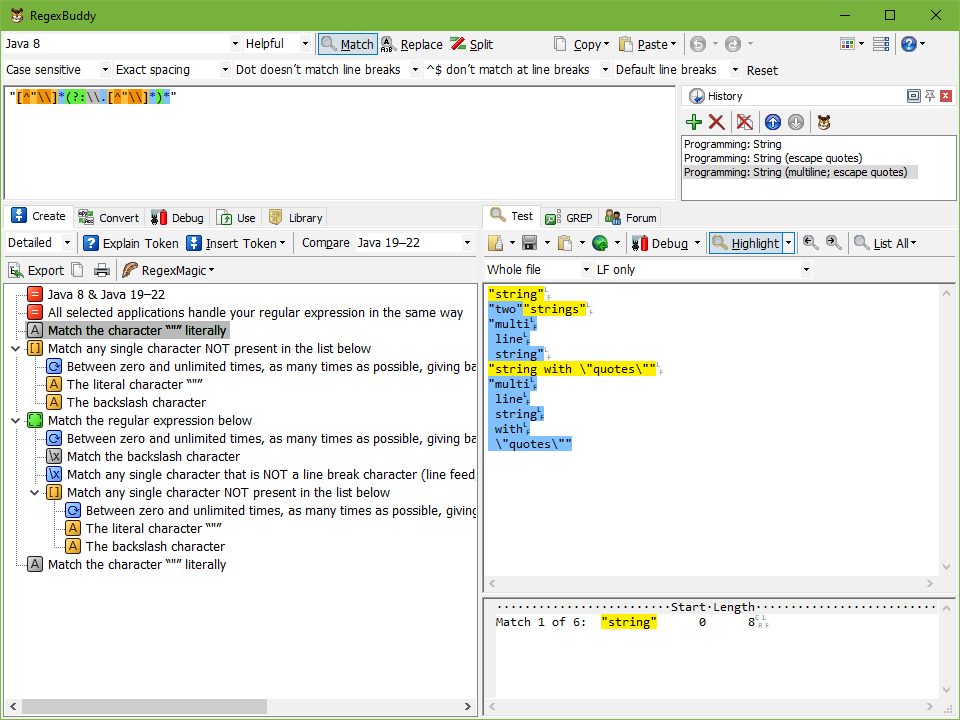 RegexBuddy is your perfect companion for working with regular expressions. Easily create regular expressions that match exactly what you want. Clearly understand complex regexes written by others. Use plain English building blocks instead of, or in addition to, the standard regex syntax. RegexBuddy is your perfect companion for working with regular expressions. Easily create regular expressions that match exactly what you want. Clearly understand complex regexes written by others. Use plain English building blocks instead of, or in addition to, the standard regex syntax.
RegexBuddy has a lot of features including the following: Quickly test any regex on sample strings and files, preventing mistakes on actual data; Debug without guesswork by stepping through the actual matching process; use the regex with source code snippets automatically adjusted to the particulars of your programming language; Collect and document libraries of regular expressions for future reuse. GREP (search-and-replace) through files and folders; integrate RegexBuddy with your favorite searching and editing tools for instant access.
The program has a very good documentation, and is miles ahead of several other programs out there in the market. With RegexBuddy, you can also learn how to automate tedious tasks with regular expressions, discover how the program makes the regex syntax crystal clear enabling you to regular expressions with the greatest ease ever, and watch self-running demonstrations in your web browser and see what RegexBuddy can do for you.
Please note that the free trial period of the software is only 7 days. Full version would cost you $39.95 for a single user license.
Want to check it out? Visit: RegexBuddy.
Posted in Main | No Comments »
Monday, October 28th, 2013
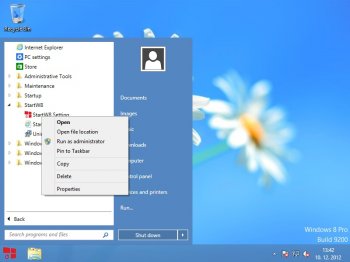 Are you looking for a powerful application that changes the looks of your computer desktop? Well, StartW8 might just be the application or tool you need to get Start menu back in your Windows 8. Are you looking for a powerful application that changes the looks of your computer desktop? Well, StartW8 might just be the application or tool you need to get Start menu back in your Windows 8.
What’s StartW8?
StartW8 is a free but powerful tool for Windows 8 users. Do you prefer desktop to modern UI? Would you like to logon directly to desktop? Do you want to use Start menu for running your apps? Then it’s right for you. Get Start menu back in Windows 8!
Start menu had been an essential feature of Microsoft Windows for almost two decades, used by countless users all over the world. But Windows 8 and Windows Server 2012 are shipped without it.
A couple of fixes have been made to this version of the program, and they include the following; solved the problem with inability to uninstall older version StartW8 after updating from Windows 8.0 to Windows 8.1, and fixed bug with DPI resolution.
StartW8 also retains some of its old features including the following: fully supported Windows 8.1; respects the Windows 8.1 OS configuration for “boot to desktop”; overrides the start button on Windows 8.1; added option to customizing the user image to the start menu; and improved method of calculating position of the start menu.
StartW8 is more stable now since a lot of fixes have been made to this version in review.
Want to check it out? Visit AreaGuard.
Posted in Main | No Comments »
Monday, October 28th, 2013
 Are you finding it too difficult to search for the right keywords to take your business to the next level on the internet? Online success is mostly about not just attracting the right traffic; but also attracting the right kinds of traffic. With Rank Tracker, you can even track how good your search engine tracking is doing. Are you finding it too difficult to search for the right keywords to take your business to the next level on the internet? Online success is mostly about not just attracting the right traffic; but also attracting the right kinds of traffic. With Rank Tracker, you can even track how good your search engine tracking is doing.
What’s Rank Tracker?
Rank Tracker is an SEO tool that can check major search engines for all your keywords at once. Moreover, it allows you to track the progress of your search engine rankings over time.
Rank Tracker allows you to spend only few minutes of your time online on things that are important because it helps you to do a lot of things. Some of the features in this SEO program include the following: automatically checks your search engine rankings; display the ranking difference so you can easily see if your site has moved up, or if it has slipped for whatever reason; suggests a wide-range of a powerful “Suggest Keywords” feature that allows you to grab traffic-generating keywords using Wordtracker, Google Suggest, your competitor’s websites, and many other methods; multiple language support; tips you how many times a keyword has been actually searched by real people over the last month, plus how stiff the competition for this keyword is; and many more.
Want to check it out? Visit Link-Assistant.com.
Posted in Main | No Comments »
Friday, October 25th, 2013
 There are some applications that may appear only meant or designed for professionals alone; but it is not actually the case when you start using it. At first glance, you will be fooled into believing that this is a tool designed for experts, but the Belarc Advisor is actually aimed at beginners and professional users alike. There are some applications that may appear only meant or designed for professionals alone; but it is not actually the case when you start using it. At first glance, you will be fooled into believing that this is a tool designed for experts, but the Belarc Advisor is actually aimed at beginners and professional users alike.
What’s Belarc Advisor?
Belarc Advisor is a full-featured system information application that scans your computer and displays in a web-based interface a comprehensive report on the software and hardware components. Belarc Advisor doesn’t rack up space on your hardware resources at all. You won’t see much activity unless you reopen the application, as it scans the machine every time it loads.
Belarc Advisor is certainly one of the most easy to use system information tools. More so, since the interaction is minimal and the results are displays in a mater of moments, users with little or no experience will get along just fine with it.
Belarc Advisor does not only display everything about your computer, but also comes with some extra amazing features. It scans the operating system and displays the installed updates and hotfixes, with a direct link to the official Microsoft page, where you can find support and documentation.
Want to check it out? Visit Belarc.com.
Posted in Main | No Comments »
Friday, October 25th, 2013
 Do you want an installation builder that is packed with loads of key features to make your task easier? Are you looking for a program that supports disk spanning, complete uninstall capabilities, customizable setup types, integrated file compression, and much more? Maybe you should read this review to find out more about Inno Setup. Do you want an installation builder that is packed with loads of key features to make your task easier? Are you looking for a program that supports disk spanning, complete uninstall capabilities, customizable setup types, integrated file compression, and much more? Maybe you should read this review to find out more about Inno Setup.
What’s Inno Setup?
Inno Setup is a feature-packed installation builder. Features include a wizard interface, creation of a single EXE for easy online distribution, support for disk spanning, full uninstall capabilities, customizable setup types, integrated file compression, support for installing shared files and OCX’s, and creation of Start Menu icons, INI entries, and registry entries.
Among its key features are the following: supports creation of a single EX to install your program for easy online distribution; standard Windows 2000/XP-style wizard interface; extensive support for installation of 64-bit applications on the 64-bit editions of Windows. Both the x64 and Itanium architectures are supported; integrated pre-processor option for advanced compile-time customization; integrated Pascal scripting engine option for advanced run-time install and uninstall customization; full source code is available (Borland Delphi 2.0-5.0 and 2009); creation of shortcuts anywhere, including in the Start Menu and on the desktop; running other programs before, during or after install; and a host of others.
Any downside?
Inno Setup is a great program that gives you nothing to worry about.
Want to check it out? Visit JrSoftware.org.
Posted in Main | No Comments »
Thursday, October 24th, 2013
 Looking for musical software that works both for amateurs and professional people? Do you love music, but don’t want a program that is too complicated? I suggest you read this review to find out more about MagicScore Maestro. Looking for musical software that works both for amateurs and professional people? Do you love music, but don’t want a program that is too complicated? I suggest you read this review to find out more about MagicScore Maestro.
What’s MagicScore Maestro?
MagicScore Maestro is wonderful music notation software. It is the best choice for music lovers, people who professionally work with music or those who try to reach new heights in it. Teachers, students, musicians of various religious groups, composers and performers use this software.
MagicScore Maestro is a program that offers great capabilities for creating compositions of any complexity, including polyphonic ones. Virtual piano, fingerboard, score entry from a MIDI-device, working with chords, extensive capabilities for editing and fine adjustment of phonation in your compositions – all of the above and many other features will help you in your creative work.
MagicScore Maestro 7.895 has a lot of new fixes and updates that include the following: improved dynamics; improved layout; new setup wizard; input from MIDI device is improved; and graphic output is improved.
Any downside?
Free version of MagicScore Maestro has a 30 day trial limitation. At $48.65, MagicScore Maestro is not a bad program considering its ease of use, and great features.
Want to check it out? Visit MusicalEditor
Posted in Main | No Comments »
Thursday, October 24th, 2013
 Do you want to view and sign PDF documents in your web application, directly in the browser? Do you also want to protect your PDF files from being tampered with and also ensure your identity as the signer, and add digital signatures to your PDF documents and show to your customers that you care about security; then take a look at our DigiSigner. Do you want to view and sign PDF documents in your web application, directly in the browser? Do you also want to protect your PDF files from being tampered with and also ensure your identity as the signer, and add digital signatures to your PDF documents and show to your customers that you care about security; then take a look at our DigiSigner.
What is DigiSigner?
DigiSigner is a tiny PDF viewer tool to digitally sign your PDF documents and verify signatures. DigiSigner opens and shows you the document you are going to sign. You can design signature appearance and place the signature wherever you want in the document using your mouse.
DigiSigner is a program with a lot of amazing features including the following: sign your PDFs in less than two minutes without getting out of your chair; protect your PDF files from tampering and ensure your identity as the signer; DigiSigner verifies digital signatures for you to ensure that your document was not changed or damaged; use smartcards and USB tokens (a.k.a. PKCS#11 tokens) to digitally sign your documents; create your own signature appearance using different images and fonts; signatures produced with DigiSigner are visible and verifiable in standard Adobe Reader tool; and a host of others.
Want to check it out? Visit Digisigner.
Posted in Main | No Comments »
Wednesday, October 23rd, 2013
 Searching for a program that has some of the features that enable you do a lot of things including edit and record sounds can be a bit difficult, especially if it is a freeware. However, you can stop the search with Audacity since it has some great features that are quite handy. Searching for a program that has some of the features that enable you do a lot of things including edit and record sounds can be a bit difficult, especially if it is a freeware. However, you can stop the search with Audacity since it has some great features that are quite handy.
What is Audacity for Windows?
Audacity is a free audio editor that can record sounds, play sounds, import and export WAV, AIFF, and MP3 files, and more. Use it to edit your sounds using Cut, Copy, and Paste (with unlimited Undo), mix tracks, or apply effects to your recordings. It also has a built-in amplitude envelope editor, a customizable spectrogram mode, and a frequency analysis window for audio analysis applications. Built-in effects include Bass Boost, Wahwah, and Noise Removal, and it also supports VST plug-in effects.
Audacity might be a freeware, but you will be amazed at some of the great features included by the publisher. You won’t have any problem finding your way round its interface, and its features too are very easy to understand. Quite unlike a couple of applications I have come across; this one is quite easy to use.
Want to check it out? Visit Audacity at SourceForge.
Posted in Main | No Comments »
Tuesday, October 22nd, 2013
 Do you want to enhance your computer desktop, and make it more beautiful and handy? Then you might need a program like Rainmeter. You can find out more about the program and its features in this review: Do you want to enhance your computer desktop, and make it more beautiful and handy? Then you might need a program like Rainmeter. You can find out more about the program and its features in this review:
What’s Rainmeter all about?
Rainmeter is a desktop customization platform. Through Rainmeter, you can enhance your Windows computer at home or work with skins: handy, compact applets which float freely on your desktop, much like Windows Sidebar gadgets, or dashboard widgets for the Mac.
Rainmeter skins provide users with important info at a glance. It is easy to keep an eye on your system resources, such as memory and battery power, or your online data streams, including email, RSS feeds, and weather forecasts. Many skins are even functional: they can record your notes and to-do lists, launch your favorite applications, and send your tweets to Twitter – all in a clean, unobtrusive interface that you can rearrange and customize to your liking.
The publishers have included a lot of updates, and made other fixes including the following: Language updated included Hungarian and Romanian languages; fixed an AnchorX/Y issue caused by a change to support D2D; fixed crash of Rainmeter in D2D when String meters had a negative width or height; etc.
Want to check it out? Visit RainMeter.net.
Posted in Main | No Comments »
Tuesday, October 22nd, 2013
 The good thing is that there are loads of amazing applications or programs with loads of unbelievable features to simplify the way we do things on your computers and the internet these days. f.lux for instance is a program designed to improve the color of your computer display, and help also make it adapt to the time of the day, warm at night, and like sunlight during the day. Read more about what the program is all about in this review. The good thing is that there are loads of amazing applications or programs with loads of unbelievable features to simplify the way we do things on your computers and the internet these days. f.lux for instance is a program designed to improve the color of your computer display, and help also make it adapt to the time of the day, warm at night, and like sunlight during the day. Read more about what the program is all about in this review.
What’s f.lux?
f.lux is a program that is designed to makes the color of your computer’s display adapt to the time of day, warm at night and like sunlight during the day. It is even possible that you are staying up too late because of your computer. You could use f.lux because it makes you sleep better, or you could just use it just because it makes your computer look better.
During the day, computer screens look good because they have been designed to look like the sun. However, at 9pm, 10pm, or 3am, you probably shouldn’t be looking at the sun. f.lux takes care of those issues, and bring out the color of your computer to adapt to the time of the day.
f.lux is yet another great freeware worth trying.
Want to check it out? Visit JustgetFlux.com.
Posted in Main | No Comments »
|
|
|




