Author Archive
Thursday, August 1st, 2013
 Time is of the essence when it comes to handling any project; either big or small. For project managers, one of the most challenging problems is how to meet up with deadline; and that is why an application like RationalPlan Single Project is something to look out for. Time is of the essence when it comes to handling any project; either big or small. For project managers, one of the most challenging problems is how to meet up with deadline; and that is why an application like RationalPlan Single Project is something to look out for.
What’s RationalPlan Single Project?
RationalPlan Single Project is a powerful project management program designed to assist project managers in developing plans, allocating resources, tracking progress, managing budgets and analyzing workload. You can use RationalPlan in the area of construction, engineering, services & consulting, business, software development or even for a simple student project. It will help you to complete your project as scheduled, on time and within budget.
Among several changes recently made to RationalPlan Single Project include the following: Dropbox integration; Export projects to .xls format files; Added recurrent tasks; New web based interface for Server; Google Drive integration; and Support for Microsoft Project 2013 files.
However, RationalPlan Single Project also retains most of its older key features such as; step by step tutorials and lay down a project plan immediately; free Project Viewer; undo/redo on multiple levels; bring project’s critical issues to your attention; easily manage your projects and shared resources; break down your project, build schedules, allocate resources and manage budgets; get resources and finances under control; and a host of others.
Any downside?
RationalPlan Single Project does not have any downside; but might take some time to get used to if it’s your first time.
Want to check it out? Visit RationalPlan.
Posted in Main | No Comments »
Thursday, August 1st, 2013
 Have you ever experienced the tedium and frustration of having to repeatedly type your name, e-mail address, home page url, or other words or phrases again, again and again? This scenario is not peculiar to you as there are thousands of people out there with similar challenges. However, things can now work differently with Typinator; an an automatic text program that boosts your productivity among other things. Have you ever experienced the tedium and frustration of having to repeatedly type your name, e-mail address, home page url, or other words or phrases again, again and again? This scenario is not peculiar to you as there are thousands of people out there with similar challenges. However, things can now work differently with Typinator; an an automatic text program that boosts your productivity among other things.
What’s Typinator?
Typinator is an automatic text program that boosts your productivity and eliminates errors by automating the process of inserting frequently used text and graphics. With thousands of predefined corrections for common typos and misspelled words for US and British English, German and French, Typinator is not only a typing assistant that speeds repetitive typing tasks, but also a system-wide auto-correction tool that automatically fixes typing errors and misspelled words.
Typinator boosts your productivity by automating the process of inserting frequently used text and graphics and auto-correcting typing errors. Typinator can include arbitrary text files and pictures in expansions. All you have to do is store frequently used pieces of text and pictures in the application’s “Includes” folder, and Typinator makes these files available for inclusion in expansions via the {…} pop-up menu.
Any downside?
Typinator has a trial limitation; but the full or unlimited version costs $29.71.
Want to check it out? Visit Ergonis.com.
Posted in Main | No Comments »
Thursday, August 1st, 2013
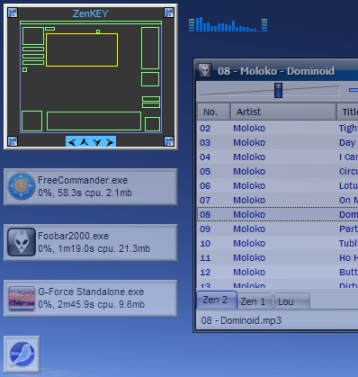 With a simple application like ZenKEY you can assign any keystroke to perform these tasks, and create pop-up menus with often used commands that appear at the press of a button. It is also interesting to note that you won’t be paying a dime to download and use this program with all its features. With a simple application like ZenKEY you can assign any keystroke to perform these tasks, and create pop-up menus with often used commands that appear at the press of a button. It is also interesting to note that you won’t be paying a dime to download and use this program with all its features.
What’s ZenKEY?
Using keystrokes, you can use ZenKEY to launch a program or bring it back into focus, open a document or Internet resource, resize or move a window, access utilities, control media players, issue system commands and simulate keystokes. You can assign any keystroke to perform these tasks, and create pop-up menus with often used commands that appear at the press of a button.
ZenKEY has a lot of newly updated changes and features that include the following: Iconizing a window now returns the focus to the previously active application; added a “Display Hotkeys” function to the “Backup/Restore” section (where else?) in the Configuration Utility; and fixed a bug in the Infinite Desktop Autofocus setting that prevented it from working as desired.
Any downside?
ZenKEY is a nice program with basic hotkey features that won’t pose any problem to any user. However, advanced users may require some more advanced programs with advanced features.
Want to check it out? Visit Zenkey at SourceForge.
Posted in Main | No Comments »
Thursday, August 1st, 2013
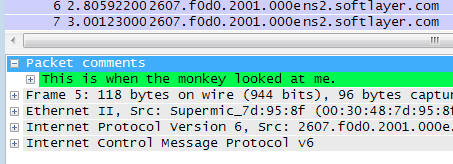 Did you know you can examine data from a live network or simply from a capture file on disk? Yes you can with Wireshark. It not only lets you examine data from a live network; but also do a lot of other things especially if you an experienced user. Did you know you can examine data from a live network or simply from a capture file on disk? Yes you can with Wireshark. It not only lets you examine data from a live network; but also do a lot of other things especially if you an experienced user.
What’s Wireshark?
Wireshark is a network protocol analyzer for Unix and Windows. It allows you to examine data from a live network or from a capture file on disk. You can interactively browse the capture data, viewing summary and detail information for each packet. Has several powerful features, including a rich display filter language and the ability to view the reconstructed stream of a TCP session.
Wireshark is an excellent program that does what the publisher say it does; and also comes preloaded with loads of very useful features. It is highly useful if you are always having connection issues with your network. It simply resolves such issues by examining where there is a problem. In terms of security too; this program is not a bad idea if that is what you are worried about.
Wireshark is without a doubt one of the best programs for fixing network issues; but inexperienced users may have a little bit of challenge trying to get used to it for the first time.
Want to check it out? Visit WireShark.
Posted in Main | No Comments »
Tuesday, July 30th, 2013
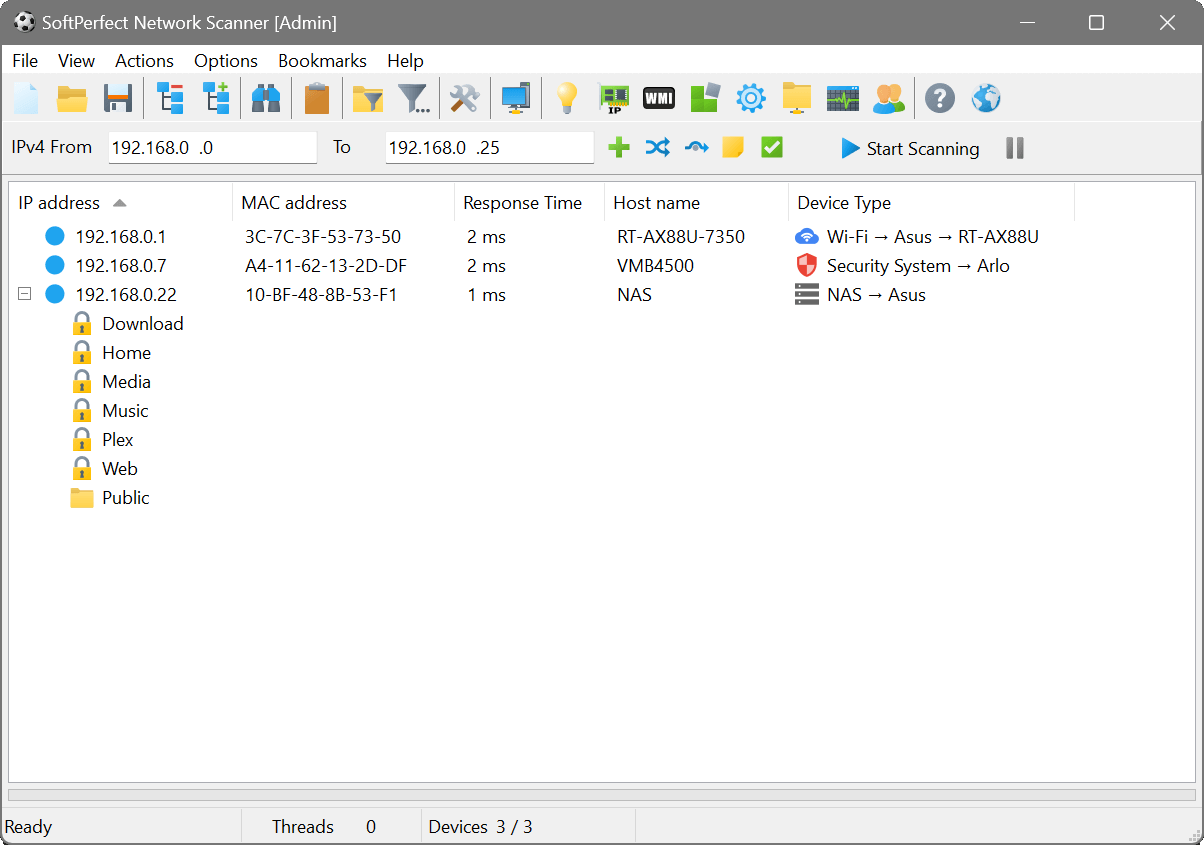 It is very easy to identify a great application from the very first few minutes of installing and using it. If computer security is a serious concern for you; then you might as well take a look at SoftPerfect Network Scanner. It is very easy to identify a great application from the very first few minutes of installing and using it. If computer security is a serious concern for you; then you might as well take a look at SoftPerfect Network Scanner.
What’s SoftPerfect Network Scanner?
SoftPerfect Network Scanner is a free multi-threaded IP and NetBIOS scanner. Both system administrators and users who are interested in computer security can use this. The scanner pings computers, scans for listening TCP ports and shows what types of resources are shared on a network (including system and hidden). It allows you to mount shared resources that are found by the program as network drives, simply browse them using Windows Explorer, etc.
Latest additions and changes made to SoftPerfect Network Scanner include the following: added bookmark drag-n-drop in the bookmark manager; added automatic saving to the most recent file in addition to automatic load; added a warning if closing the application while scan is in progress; and Fixed passing parameters in double braces when no user-prompted parameters were present.
It is a great program when it comes to scanning and getting you notified of any privacy invasion to your system. As a matter of fact, it is one of the best IP scanning software available for download.
SoftPerfect Network Scanner is a great program no doubt; but inexperienced users may need some time to get used to it.
Want to check it out? Visit SoftPerfect.
Posted in Main | No Comments »
Monday, July 29th, 2013
 Most of us are damn too busy to remember some little tasks that may eventually cause a lot of setbacks at the end of a busy day. For the very busy executive, there is never a better time to install an application that reminds you of those major or minor tasks; and that is where you might need to find out what Two-Click Reminder is all about. Most of us are damn too busy to remember some little tasks that may eventually cause a lot of setbacks at the end of a busy day. For the very busy executive, there is never a better time to install an application that reminds you of those major or minor tasks; and that is where you might need to find out what Two-Click Reminder is all about.
What’s The Big Deal About Two-Click Reminder?
Two-Click Reminder lets you offload small upcoming tasks from your mind until you’re ready to work on them. You can stop checking the clock constantly and simply let Two-Click Reminder remind you when it’s time to switch gears and work on those tasks. In the meantime, you can fully focus on your current work and maximize your concentration.
It is a useful application that is designed to schedule reminders for important tasks and not so important ones. With Two-Click Reminder, you won’t have to worry about forgetting those schedules and meetings; and things can now begin to work just as they should.
In two or three very easy steps, Two-Click Reminder can be set to manage your calendar; thereby ensuring that you never get to forget or miss out of any major or minor appointment again.
Downsides?
Two-Click Reminder has an annoying nag screen for a 60 day trial version.
Want to check it out? Visit Domador.
Posted in Main | No Comments »
Monday, July 29th, 2013
 Did you know you could take control of your Windows HTPC (or any PC) over the network just by installing a simple application? That’s what MCE Controller is designed for; it runs in the background listening on the network (or serial port) for commands. Did you know you could take control of your Windows HTPC (or any PC) over the network just by installing a simple application? That’s what MCE Controller is designed for; it runs in the background listening on the network (or serial port) for commands.
What’s MCE Controller?
MCE Controller lets you control a Windows HTPC (or any PC) over the network. It runs in the background listening on the network (or serial port) for commands. It then translates those commands into actions such as keystrokes, text input, and the starting of programs. Any remote control, home control system, or application that can send text strings via TCP/IP or a serial port can use MCE Controller to control a Windows PC.
MCEControl.commands is now an optional file; and the previously defined set of commands from older builds are now built into the program. If a MCEControl.commands file is present, it will add to and override these pre-defined commands. Also added to this latest version/update are new icon and minor menu tweaks.
MCE Controller works great with any remote control system that supports TCP/IP or RS-232 connections including iRule, which is an iPhone/iPad app that turns your iPhone/iPad into a universal remote control for your home.
Want to check it out? Visit CodePlex.com.
Posted in Main | No Comments »
Monday, July 29th, 2013
 Do you want an all-in-one power packed application that contains a lot of useful tools that will enable you achieve all your SEO tasks without stress? Then you might as well check out SEO PowerSuite with four unique and advanced tools. Do you want an all-in-one power packed application that contains a lot of useful tools that will enable you achieve all your SEO tasks without stress? Then you might as well check out SEO PowerSuite with four unique and advanced tools.
What’s SEO PowerSuite?
SEO PowerSuite is a powerful SEO software pack made up of 4 cutting-edge SEO tools that are easy to use, yet deliver professional results. Each of the 4 apps inside SEO PowerSuite is responsible for a different stage of the SEO cycle.
The program contains four separate tools including Rank Tracker, WebSite Auditor, SEO SpyGlass, and LinkAssistant. The application allows you to easily schedule all reports to be generated and sent out automatically.
The four tools in SEO PowerSuite allow you to easily check your site’s rankings in more than five hundred search engines. All your web pages can be monitored either on demand or automatically.
Some of the advanced features in this program include the following: you can find the most profitable keywords for your own website; secretly spy on your top-ranking competitors; tune up your website’s structure; generate Google-friendly XML sitemaps to ensure search engines quickly index and rank your entire websites; create your personal SEO Audit Report; easily manage your link campaign like a pro; monitor search engine ranking; and many more.
Any downside?
This version cannot schedule events, and there is a minor limitation to number of extracted search engine related data.
Want to check it out? Visit Link-Assistant.
Posted in Main | No Comments »
Wednesday, July 24th, 2013
 Are you searching for a freeware program that can help you convert your CDs that come with various encoders? Then you can give fre:ac is a try since it has some nice features that can be of help. fre:ac is absolutely free for download and installation for all users. Are you searching for a freeware program that can help you convert your CDs that come with various encoders? Then you can give fre:ac is a try since it has some nice features that can be of help. fre:ac is absolutely free for download and installation for all users.
What’s fre:ac?
fre:ac is a free audio converter and CD ripper which integrates various popular formats and encoders. It currently supports MP3, MP4/M4A, WMA, Ogg Vorbis, FLAC, AAC and Bonk files. fre:ac makes it easy to convert your audio CDs to MP3 or WMA files which you can use in your hardware player or with your favorite audio software. The program supports the CDDB/freedb online CD database and CDText and automatically writes song information to ID3V2 or Vorbis comment tags.
This latest version includes a number of changes and fixes that made the new version a bit more stable: fixed WMA output files being deleted after encoding; fixed edit field menu buttons being non-clickable; fixed rare FLAC encoder problem at compression levels 7 and 8; fixed online updater not working after smooth library upgrade; fixed compilation with Microsoft Visual C++. This release fixes several bugs that have been found in fre:ac v1.0.21, the most important being one to make the WMA encoder work again.
Want to check it out? Visit Freac.org.
Posted in Main | No Comments »
Tuesday, July 23rd, 2013
 Do you want a music tagger that can also work or perform as a renamer, cataloger, browser, playlist manager and report creator? Then one of the programs you should seriously consider is Helium Music Manager. Do you want a music tagger that can also work or perform as a renamer, cataloger, browser, playlist manager and report creator? Then one of the programs you should seriously consider is Helium Music Manager.
What’s Helium Music Manager?
Helium Music Manager is a music tagger, renamer, cataloger, browser, and playlist manager and report creator. It can catalog, edit and play the most common music formats (MP3, Ogg, WMA, iTunes M4A, FLAC, APE and MPC) as well as standard Audio CDs. Catalog your entire music collection with a few clicks. Use the new built in Music Information Browser to navigate through your music collection in an intuitive manner by means of a Web style user interface.
The program makes it easy to find your favorite music by searching for criteria such as Artist, Title, Genre, Rating etc. Avoid manual typing by downloading artist and title information from various sources on the Internet (freedb/CDDB, Amazon.com, Discogs to mention a few). Helium Music Manager supports downloading of album pictures, artist pictures, track information, artist relations, biographies, discographies and lyrics.
Helium Music Manager is able to catalog, edit and play the most common music formats (MP3, Ogg, WMA, iTunes M4A, FLAC, APE and MPC) as well as standard Audio CDs.
Downside
Editing the tags is very cumbersome compared to other free programs.
Want to check it out? Visit Helium-Music-Manager.com.
Posted in Main | No Comments »
|
|
|




