Author Archive
Tuesday, April 16th, 2013
 Quite agreeably there are several desktop management programs out there. But if you want something that is unique and feature rich, then go for Fences. Quite agreeably there are several desktop management programs out there. But if you want something that is unique and feature rich, then go for Fences.
What is Fences all about?
The unique thing about this program is that it allows you to draw labeled shaded areas on your desktop, which becomes movable & resizable containers for your desktop icons. It can hide icons when they are not in use as well as make it easy to place icons into moveable groups called “fences”. You can create several pages of fences on your desktop which you can use to organize all of your programs, documents, websites and more.
It also allows you to define how you want your icons to be arranged. It can also act as a portal to a particular folder. You can set your documents as fences and access them without having to clutter your desktop. If you want, you could also create virtual desktops. So if you have a crowded desktop, Fences is the solution you need.
Stardock, the author of this program has added a few changes to this version. They are: Persistent fences (and their icons) across pages, Network drive connection detection. Fences will attempt to recreate mapped folder locations on a reboot, Page indicator and Added ability to reset appearance of All Fences. Others include Recycle bin jumps out of Fence, Right click actions make files jump into the same fence, Unable to move portal fence if title is off and “Sort by” appears twice for folder fences with labels hidden among other changes.
Downsides?
It is not free beware! A neat program though.
To know more about this program, please go to Stardock.com.
Posted in Main | No Comments »
Tuesday, April 16th, 2013
 Now you can create virtual machines for Windows running on MAC operating system X, MAC operating system X, and Linux with a simple application known as VirtualBox. Now you can create virtual machines for Windows running on MAC operating system X, MAC operating system X, and Linux with a simple application known as VirtualBox.
What is VirtualBox?
VirtualBox is an all-purpose full virtualizer for x86 hardware targeted at server, desktop, and embedded use. The program is perhaps the only professional-quality virtualization solution that is equally an open source. Over the years, the developers or publishers of this highly effective application have been able to maintain its standard; and the newly added updates are just confirmation of this fact.
This latest release features a number of changes including; maintenance of VirtualBox 4.2 that comes with improved stability and fixing of regressions. Other major fixes or updates include the following; fixing of a Guru Meditation on putting Linux guest CPU online if nested paging is disabled, GUI multi-screen support, fixing of a crash on visual-mode change, fixing of VMM invalidate TLB entries for non-present pages, GUI multi-screen support handle host/guest screen plugging/unplugging in different visual-modes, fixing of bug when empty seamless screens were represented by full screen windows, and a host of others.
VirtualBox is an open source applications; but this has stopped it from providing some of the most advanced features. The program currently runs on Windows, Linux, Macintosh, and Solaris hosts. It also supports a large number of guests’ operating systems such as Windows, DOS/Windows 3.x, Linux, Solaris and OpenSolaris, OS/2 and OpenBSD.
Any downsides?
As much as this program is rated among the best online; one still needs to go through the manual to easily install it.
Want to check it out? You can easily find it at Virtualbox.org.
Posted in Main | No Comments »
Monday, April 15th, 2013
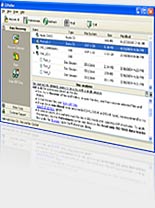 Trying to retrieve lost data from your CD or DVDs, and Blu-Ray discs that the regular Windows tools could not access? Then get CDRoller. Trying to retrieve lost data from your CD or DVDs, and Blu-Ray discs that the regular Windows tools could not access? Then get CDRoller.
What is CDRoller?
This program helps you to find, retrieve and copy lost data from CD or DVDs, and Blu-Ray discs that standard Windows tools cannot access. It can effectively retrieve lost data from the discs created by “drag and drop” CD/DVD/BD writing software, such as Sonic, Ahead Nero software. It comes with a fault-tolerant UDF reader which allows you to manage old discs on your new computer under Windows 7 or Vista. If you accidentally deleted a file or saved it a corrupt folder, CDRoller can find and retrieve such files.
It can retrieve lost videos, pictures and other file types from flash memory cards. It can convert recovered VOB or VRO into generic MPG files without any loss in quality. It erases CD, DVD and BD re-writable media. Supports quick and full erase methods. It comes with its own /CD/DVD/BD burner so no need for third party burners.
Digital Atlantic Corp., the publisher of this program, has added some changes to this version. These changes are: Tests under Windows 8 Professional successfully completed, Russian version of CDRoller 9 issued and numerous bug fixes and workarounds added.
Downsides?
This is one program I like as it allows me to retrieve my lost valuable data. Very good customer service too.
To know more about this program, please visit CDroller.
Posted in Main | No Comments »
Wednesday, April 10th, 2013
 Want to watch all your video files at the best quality? Get GOM Player. Want to watch all your video files at the best quality? Get GOM Player.
What is GOM Player?
It is freeware media player with so many rich features for both advanced users who desire to watch video files at the best quality. It has built-in support for all the most popular video and audio formats – AVI, MP4, MKV, FLV, WMV, MOV, and more! It comes with tons of advanced features, extreme customizability, and the Codec Finder service.
Some of the features of this freeware are A-B repeat, screen capture, audio capture, playback speed control, and video effects, GOM Media Player allow you do much more than simply play your videos. Its skinable interface with its advanced filter control makes it very easy to customize it to suite your desires. You can get a lot on interesting skins and logos from their official website. Its Codec Finder allows you to search for and download any missing codec thus allowing you to watch some uncommon video formats that it does not support.
Other advanced features include: Use the Codec Finder to help locate missing codecs, Export images from videos using various Image Capture methods, Save a video’s audio track as an MP3 with Advanced Audio Capture and Speed up / slow down playback and loop sections of video/audio.
Downsides?
It’s kind of frustrating upon the installation, adware-like behavior that adds unwanted application on installation.
To find out more visit http://player.gomlab.com/eng/
Posted in Main | No Comments »
Wednesday, April 10th, 2013
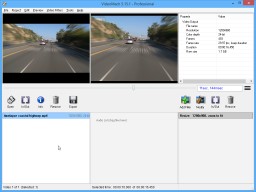 There are several video creation application out there. But for a program that allows you to convert still images into video what you need is VideoMach. There are several video creation application out there. But for a program that allows you to convert still images into video what you need is VideoMach.
What is the deal about this program?
This program allows you to convert image sequences from high-speed imagers, 3D renderers, time-lapse photography, stop-motion animation and screen capture applications to video. It is a very powerful application that is designed to help you create video clips using still images, while also offering advanced editing tools.
VideoMach lets you convert the most popular image formats out there to video files, but also merge audio and video files or simply extract audio or images from a stand-alone video clip. You could convert AVI, Bayer, BMP, Vision Research / Phantom CINE, FLI/FLC, GIF, HAV, JPEG, JPEG-2000, MPEG, OGV, PCX, PNG, PNM, RAS, RGB, Targa, TIFF, WMV, XPM, AC3, OGG, WAV, WMA and other multimedia formats. It allows you to clean up noisy dark videos to read license plates, speed up/slow down videos, like in TV commercials, overlay text and logos and much more.
Some of the key features of this program are: supports popular video and image formats (mpeg, avi, divx, flc, jpeg, png, tif, gif, bmp and more), Reads and writes standard Linux and UNIX image formats (xpm, pnm, sgi, ras and more), Supports most popular audio formats (mp3, mp2, ogg, wav, ac3), Imports the output of high-speed images and time-lapse cameras (bayer, cine), World’s fastest image sequence detection, more than 50,000 images per second among several other features.
Gromada.com, the publisher of this program, has added a few changes to this version. They are Fixed: No more warnings when output picture is over 1200×1200 pixels and Fixed: License decoding module.
Downsides?
There is no real issue with this application. Nice free program to convert time-lapse images and music into amusing video.
To find out more about this program please visit Gromada.
Posted in Main | No Comments »
Wednesday, April 10th, 2013
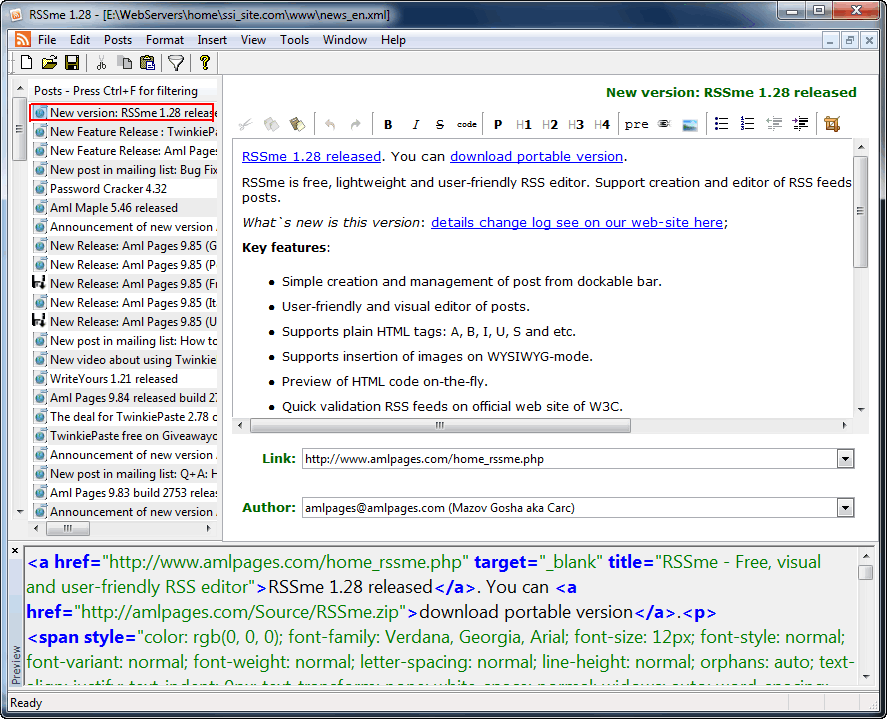 Did you know you can now download and install an easy-to-use application that allows you to create and edit RSS news feeds in a very simple manner? Did you also know that a program like RSSme enables you to add new posts personalized with images and also preview HTML code? Those are just a couple of things included in RSSme. Did you know you can now download and install an easy-to-use application that allows you to create and edit RSS news feeds in a very simple manner? Did you also know that a program like RSSme enables you to add new posts personalized with images and also preview HTML code? Those are just a couple of things included in RSSme.
What is RSSme?
RSSme is a lightweight application or editor that supports creation and editing of RSS feeds. With RSSme, you can implement visual editing of posts. Among its latest changes include the following; create backup files in folder, and added command (copy RSS item title). With RSSme, you can also validate the RSS feeds. RSSme is lightweight (1mb), and does not take up space on your system, which is good news to all users with light PCs.
Some of its key features include the following; simple creation and management of post from dockable bar, user-friendly and visual editor of posts, supports plain HTML tags (A, B, I, U, S, and many more), supports insertion of images on WYSIWYG-mode, preview of HTML code on-the-fly, quick validation RSS feeds on official website of W3C, and a few others.
Any Downsides?
Nice piece of program, easy to use, and does not take up space on your system.
Want to check it out? Visit AMLpages.
Posted in Main | No Comments »
Tuesday, April 9th, 2013
 Cloud computing is now taking a new turn these days with software developers competing with one another to attract internet users. Today, you can do almost anything through cloud technology including editing files, storing files, and a host of others. Gladinet Cloud Desktop is one of such applications that enable you edit and save your files online. Cloud computing is now taking a new turn these days with software developers competing with one another to attract internet users. Today, you can do almost anything through cloud technology including editing files, storing files, and a host of others. Gladinet Cloud Desktop is one of such applications that enable you edit and save your files online.
What can Gladinet Cloud Desktop do for you?
Gladinet Cloud Desktop mounts cloud storage as local folders; which mean users can access their files in Windows Explorer. The application’s supported storage includes the following; FTP, WebDav servers, EMC Atmos online, Box.net, Amazon S3, Google Docs, Picasa, and many more.
With Gladinet Cloud Desktop, you can choose to use online application to edit your files or use local software to edit your files and save them online. It basically allows you to experience cloud computing in a different dimension.
Gladinet Cloud Desktop also enables you to access or enjoy the following advanced features; maintain control of data security, share data across multiple devices, collaborate between teams, access online cloud storage securely with any client, publish team folders (share files with peers), migrate file server network shares to cloud seamlessly, and many more.
Downsides
Free version of Gladinet Cloud Desktop has just a 14 day trial limitation.
Want to check it out? Visit Gladinet.
Posted in Main | No Comments »
Tuesday, April 9th, 2013
 The internet is experiencing a lot of changes with various social media sites coming on board. Internet users want to chat, and possibly make as many friends as they possibly could make; and that is why applications like AOL, IRC, and a lot of others are very popular. However, you can have most of these protocols in a single application called Miranda. The internet is experiencing a lot of changes with various social media sites coming on board. Internet users want to chat, and possibly make as many friends as they possibly could make; and that is why applications like AOL, IRC, and a lot of others are very popular. However, you can have most of these protocols in a single application called Miranda.
What is Miranda IM?
Miranda is a multi-protocol instant messenger client for Windows. The application is designed to be resource efficient and easy to use even for a newbie. Miranda is designed to use very little memory, and requires no installation and can be carried around easily on a single floppy disc. The application was not designed to duplicate the features or functions of the popular ICQ and AOL. However, the features included by the publisher are designed for mouse-less operation with just a little memory use or requirement; which makes it a great application even for users with less space on their computers.
Miranda features a powerful plugin-based framework, and also boasts over 350 plugins. The lightweight application is flexible and very easy to customize. Miranda supports the following protocols; AIM, Facebook, Gadu-Gadu, IAX, ICQ, IRC (Internet Relay Chat), Jabber, MSN, Netsend, Tien, Yahoo, and many more.
Downsides:
This particular version of Miranda IM also ignored support for Bonjour, and relies too much on third-party plugins.
Want to check it out? Visit Miranda IM.
Posted in Main | No Comments »
Monday, April 8th, 2013
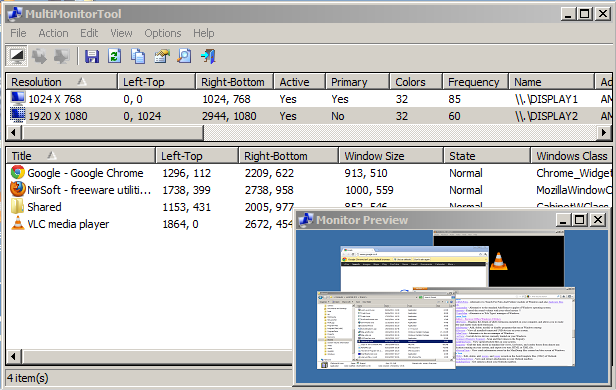 Searching for a tool that enables you to enable/disable monitor when you’re working with multi-monitors? Get MultiMonitor Tool. Searching for a tool that enables you to enable/disable monitor when you’re working with multi-monitors? Get MultiMonitor Tool.
What is the big deal about this program?
This is a handy utility that is designed to help you enable/disable monitors when working with multi-monitor systems. Using this program, you can set the primary monitor, save and load the configuration of all monitors, and move windows from one monitor to another. It is able to do all these from the user interface or from command-line, without displaying user interface. The application is also capable of moving windows between monitors.
MultiMonitorTool also provides a preview window, which allows you to watch a preview of every monitor on your system. This utility is only useful if your desktop is extended to multiple monitors. If you have multiple monitors that display the same content, then MultiMonitorTool is useless for you.
Nirsoft, the author of this program, has added a few changes to this version. These changes include: Added ‘Maximum Resolution’ column, Added ‘Set Maximum Resolution’ option, Added /setmax command-line option and Fixed the status-bar flickering.
This program works on all versions of Windows from Windows XP up to Windows 8. Both 32-bit and x64 systems are supported.
Downsides?
Yet to experience any. This is a very useful utility if you are working with multi-monitor systems.
To find out more about this program, please visit Multi Monitor Tool.
Posted in Main | No Comments »
Monday, April 8th, 2013
 Tired of browsers that that are mere clones of Chrome and Firefox? If you want a browser that is not just different from the rest but also fast and opens your entire favorite sites, then go for SlimBoat. Tired of browsers that that are mere clones of Chrome and Firefox? If you want a browser that is not just different from the rest but also fast and opens your entire favorite sites, then go for SlimBoat.
What is SlimBoat?
It is a free browser that is fast to start up and fast to open your favorite web sites, secure and loaded with powerful features. It allows you to surf the internet securely because it deploys several layers of protection. With SlimBoat, you can avoid all those unnecessary distractions and annoyances that are associated with some other browsers.
Some of the main features of this program include: form filler, ad and pop-up blockers, a download manager, a YouTube downloader, and integration with Facebook, Twitter, and other social media and Web sites. You can also import data from IE, Firefox, or Chrome. SlimBoat is free, too, with versions available for Windows, Mac, and Linux. The latest release extracts MP3 audio from YouTube downloads and is Windows 8-ready.
It offers several other features and tools such as Ad Blocker and Popup Blocker, an integrated display of local weather conditions, and translates languages. Compared to other browsers, it launches and loads very quickly.
FlashPeak Inc, the publisher of this program, has added quite a few changes to this version. The changes are: Updated the design of quick dial page to support setting the number of rows and columns, specifying background color and background image, improved startup speed when quick dial page is set as homepage and Added option to show bookmark menu as single column scrollable menu.
Downsides?
This is a very promising browser. It is fats and very light on system resources.
To find out more about this program, please go to SlimBoat.
Posted in Main | No Comments »
|
|
|




