Author Archive
Friday, March 15th, 2013
 If you want an application that helps you connect two computers together; if you want to take complete control of another PC from your own computer, irrespective of the distance between both computers, then you should try out TeamViewer. If you want an application that helps you connect two computers together; if you want to take complete control of another PC from your own computer, irrespective of the distance between both computers, then you should try out TeamViewer.
What is TeamViewer?
It is a simple and fast solution for remote control, desktop sharing and file transfer that works behind any firewall and NAT proxy. It allows you to connect with another computer without the need of an installation procedure. It is a freeware that makes it very easy to set and use a VPN connection; a Virtual Private Network that lets you take complete control of another PC from your own computer, no matter how far apart both computers are.
It activates a two-way connection in which users can bounce control back and forth. You can use TeamViewer to hold virtual meetings with several other people (who also would have installed TeamViewer on their computers). It is a smart utility that allows users to remotely connect to a computer, view its desktop and operate it as if it was their own. It is user friendly and very easy to use even for beginners.
Some of the key features of this application include: remote control of any PC anywhere without installation, remote presentation of products, solutions and services from your desktop live to a partner, integrated file and folder transfer, with TeamViewer you don’t have to worry about firewalls. It is entirely safe to use, no worries about its security.
The publisher of this program has added a few new changes to this version. They are: Groups shared with a contact can be listed from the contact’s context menu, The comment window doesn’t open a browser window anymore, The Management Console can be opened directly from the menu, Additional placeholders (e.g. meeting start time or custom phone conference data) can be used within the custom and a few other changes.
Downsides?
None at all. This is the best remote desktop manager available by far. Good work publishers.
To know more about this amazing program, please visit TeamViewer.
Posted in Main | No Comments »
Friday, March 15th, 2013
 There are several applications that allow users to run virtual machines on a windows or Linux PC. But one program that stands out in all of these is the VMware Player. There are several applications that allow users to run virtual machines on a windows or Linux PC. But one program that stands out in all of these is the VMware Player.
What is the deal about VMware Player?
This freeware enables PC users to easily run any virtual machine on a Windows or Linux PC. VMware Player runs virtual machines created by VMware Workstation, GSX Server or ESX Server and also supports Microsoft virtual machines and Symantec LiveState Recovery disk formats.
This program is ideal for running legacy Windows XP applications on Windows 7 or Windows 8. Using its unity mode, copy-and-paste, drag-and-drop, and networking and printing that do not require any additional setup, XP applications will run seamlessly on modern hardware. It’s the easiest way to run restricted virtual machines on Windows or Linux PCs.
Taking advantage of the latest hardware, it can create virtual machines with up to 4 virtual processors, 2 TB virtual disks and up to 64 GB of memory per virtual machines. VMware Player can easily handle your most demanding applications. This program can be used to convert your existing Windows PC into a virtual machine and eliminate the need to re-install and re-configure your existing applications. Now you can recycle the old machines you have running under your desk or stored in the closet.
Downsides?
This is one of the best virtualization applications around.
To know more about this program, please visit http://www.vmware.com/products/player/
Posted in Main | No Comments »
Wednesday, March 13th, 2013
 There are several download managers out there. But if you’re truly looking for a download manager that will increase your download speed and resume broken downloads, then what you need is Free Download Manager. There are several download managers out there. But if you’re truly looking for a download manager that will increase your download speed and resume broken downloads, then what you need is Free Download Manager.
What is the deal with Free Download Manager?
It is a powerful, easy-to-use and absolutely free download accelerator and manager. It helps you increase your download speed by as much as 600% and more. It does this by splitting the files to download into sections and downloading them all at once. If you need to discontinue the download for whatever reason, you can resume the download right from where you left off without starting from the beginning.
It allows you to download files and whole web sites from any remote server via HTTP, HTTPS and FTP. You can also use BitTorrent protocol to download files. You can use this application to download your favorite movies online and save them in in native .flv format or converted to one of more popular video formats.
Some of the features of this program include: Free Download Manager is released under GNU Public License, Download files using BitTorrent protocol, Create new downloads or view the list of active and completed downloads remotely, via the internet, If you want to use Free Download Manager on different computers, you can easily create its portable version and avoid the need to install and configure the program on each computer and several other new and interesting features.
Freedownloadmanager.org, the publisher of this program, has added a few changes to this version. They are: RTSP/MMS downloads, FDM saves list of downloads and other service data only when it’s required, Auto update system for Firefox extension, Support of “Decrease traffic usage on browser activity” option for Firefox browser, Compatibility issue with Internet Explorer 10 and fixed bugs.
Any downsides?
None, I can think of! Works as it is designed to.
To familiarize yourself with this application, please go to FreeDownloadManager.org.
Posted in Main | No Comments »
Tuesday, March 12th, 2013
 Trying to figure out how to build web menus, multi-browser navigation menus but you lack experience of DHTML or Javascript? Well you don’t really need that knowledge to achieve that. With AllWebMenus PRO you can do that and more. Trying to figure out how to build web menus, multi-browser navigation menus but you lack experience of DHTML or Javascript? Well you don’t really need that knowledge to achieve that. With AllWebMenus PRO you can do that and more.
What is AllWebMenus PRO?
This program is a web menu builder that requires absolutely no DHTML or Javascript experience from you. It creates cross-browser navigation menus that work alike in all browsers supporting DHTML. It can be fully customized by applying a vast available number of features through the Properties Pane or by choosing a predefined appearance from the Theme Gallery.
It is a JavaScript menu or CSS menu builder that allows you to create any kind of popup or drop-down menu for websites, without programming knowledge required. You could choose from several stylish themes to easily build SEO-friendly web menus, CSS menus, sliding menus, mega drop-down menus, AJAX menus etc. that work alike in all browsers (IE, Firefox, Mozilla, Safari, Chrome, Opera etc.) and all popular platforms (Win, Mac, Unix). Customize your DHTML, JavaScript, or CSS menus through stylish themes or examples and plenty of properties.
Likno Software, the publisher of this application, has added a few changes to this version. These changes include: The “Responsive Menu” feature now fully supports: Joomla menu implementations, WordPress menu implementations, CSS menu implementations and “UL/LI” populated JavaScript menu implementations (like CSS menu).
Downsides?
None. This is a decent web menus builder.
To know more about this program, please visit Likno.
Posted in Main | No Comments »
Tuesday, March 12th, 2013
 Sometimes you want to run some floppy-based diagnostic tools from your CD ROM but your floppy drive is taking forever to load. If that is what you are experiencing, then what you need is the Ultimate Boot CD Full. Sometimes you want to run some floppy-based diagnostic tools from your CD ROM but your floppy drive is taking forever to load. If that is what you are experiencing, then what you need is the Ultimate Boot CD Full.
What is the big deal about this program?
This freeware allows you to run floppy-based diagnostic tools from CD ROM drives, it frees you from the annoying and time consuming waiting session from the slow loading speed of the floppy drive, or Consolidate as many diagnostic tools as possible into one bootable CD.
As more and more PCs without floppy drives are entering the market, it would be such a harrowing experience to run diagnostic tools on them. But with this program, you can run floppy-based diagnostic tools from CDROM drives. Even when you have a floppy drive, it is a whole lot slower running your diagnostic tools from it. Ultimate Boot CD is much faster as it runs from the CD ROM.
Using this application, you can consolidate as many diagnostic tools as possible into one bootable CD. No need to be searching for the right floppy drive. Simply run all of them from a single CD. It is also very portable. You can run this application from your USB.
UltimateBootCD, the publisher of this program, has added a few changes to this version. They are:The Linux-based distro Parted Magic is now included with UBCD V5.0. This should be the method of choice when you need to resize/rescue partitions; access NTFS filesystems or work with USB storage devices and UBCD V5.x now supports both syslinux/isolinux and grub4dos. This helps improve the chances that UBCD will boot on any particular machine.
Downsides?
This is a CD you should at least give a try.
To find out more about this application, please go to SourceForge.
Posted in Main | No Comments »
Tuesday, March 12th, 2013
If you provide computer support and are searching for an application that allows you to work on a remote PC as if you were sitting in front of it, right from your current location? Then you should check out UlraVNC.
What is UltraVNC?
UltraVNC is a powerful freeware that can display the screen of another computer (via internet or network) on your own screen. The program allows you to use your mouse and keyboard to control the other PC remotely. This allows you to work on a remote computer as if you were sitting right in front of it. With this program, you can provide help desk solutions to your customers wherever they are in the world without leaving your location.
It has optional DSM Encryption that ensures secure communications between the viewer and the server, reducing the possibility for man-in-the-middle attacks that would be able to see 100% of the remote screen. You could compress and transfer entire files and folders to and from remote computers rather than emailing them. It also comes with an embedded Text Chat with a very beautiful GUI which allows for easy communication.
This program works very fast and is very friendly with the hardware resources on both computers. When using UltraVNC as a server will require two different passwords, one for full control of the computer and one for the view mode only. As a client however, you’ll need the server’s IP and the password to establish a connection.
Some of the key features of this program are: File transfer, Video driver, Optional Encryption Plugins, MS Logon, Text chat, Viewer Toolbar, Java Viewer with File Transfer , as well as Viewer Auto scaling and Server Side Scaling, Multiple-Monitors-support,Repeater/Proxy-support, Auto reconnection, good performances and tons of other functionalities.
The add-ons are: Repeater, SingleClick generator and NATtoNAT connectors , that help you to easily handle the most complex connection situations.
Downsides?
All in all it is a simple but cool remote VNC.
To find out more about this program, please visit UltraVNC.
Posted in Main | No Comments »
Tuesday, March 12th, 2013
 Tired of wasting papers because you have an extra blank page or a page with only 2 lines of text which is the header of a web page? Save your time, save your money, just preview and validate the pages you really need to print, or combine several pages when it is only a draft or paper to read job. GreenCloud Printer is a fully optimized virtual printer and is capable of working with any printer model. Tired of wasting papers because you have an extra blank page or a page with only 2 lines of text which is the header of a web page? Save your time, save your money, just preview and validate the pages you really need to print, or combine several pages when it is only a draft or paper to read job. GreenCloud Printer is a fully optimized virtual printer and is capable of working with any printer model.
What is the real deal about this program?
It allows you preview with the same dialog whatever the software you are using before printing. In a single click you can deselect pages you don’t need to print, or to group several pages in one sheet of paper thus preventing wasting of paper. It is a fast PDF creator and allows you to send PDF by email, to Dropbox, Minus or Google Docs with the integrated file uploader.
You can save up to 60% on ink, print cartridge and toner by defining a setting, you can also print with dark grey instead of printing in pure black without affecting the overall quality. It is an eco-friendly PDF and printer driver to save money on your daily print jobs. It also includes a free Word to PDF converter.
Downsides?
Can print a maximum of 50 pages.
To find out more about this program, please visit ObviousIdea.
Posted in Main | No Comments »
Monday, March 11th, 2013
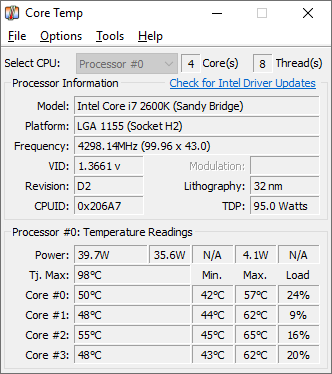 Do you know that you could monitor the temperature of your CPU? Core Temp does this and more. Do you know that you could monitor the temperature of your CPU? Core Temp does this and more.
What is Core Temp?
Core Temp is a compact and portable program that not only monitors the temperature of your CPU but has the unique feature of showing you the temperature of each individual core in each processor in your system. You can see in real time how the CPU temperature varies when you load your CPU. Core Temp is also motherboard agnostic. It is very easy to use and has a high level of customization and expandability.
It provides a platform for plug-ins, which allows developers to add other new features and expand its functionalities. Now its mobile version for Android and Windows phone devices allows you to keep an eye on your systems while you are out of the home or office.
Arthur Liberman, the publisher of this program, gas added a few changes to this version. They are: Multilingual interface. Core Temp now natively supports adding non-English languages, Plugin system – 3rd party developers can now create plugins and extensions for Core Temp, both native code and .Net is supported, Added support for Intel Pentium and AMD K5 and newer processors, Added support for VIA processors, Intel Sandy Bridge, Ivy Bridge, AMD Bulldozer, Piledriver and Fusion (Trinity, Llano, Brazos) support among several other changes.
Downsides?
Works without any hitches.
To find out more about this program, please visit Alcpu.com.
Posted in Main | No Comments »
Monday, March 11th, 2013
 Skyscraper is a fully-featured, modular, 3D real time building simulator. It is powered by the Scalable Building Simulator (SBS) engine. Skyscraper is a fully-featured, modular, 3D real time building simulator. It is powered by the Scalable Building Simulator (SBS) engine.
What is the big deal about this program?
Its main feature SBS provides a very elaborate and realistic elevator simulator, but also simulates general building features such as walls, floors, stairs, shaft work and more. It could also be used to plan several other things such as gaming support (single and network multiplayer), and a graphical building designer. Skyscraper is written in C++ and uses the OGRE graphics engine, Bullet for collisions and physics, Caelum for realistic sky, FMOD for sound, the wxWidgets GUI library, and is multiplatform.
Ryan Thoryk, the publisher of this program, has added quite a few changes to the recently released version – Skyscraper 2.0 Alpha 8.
These changes include: Elevators now report as available if on the same floor as the call and not moving, regardless of the door state – fixes an issue where pressing call buttons more than once would open additional elevators, Fixed Truncate Number function, to return correct floating point precision without exponent. Other changes include Dialog text box resizes, Remade queue resets feature, Floor announcement sound is now played along with the other arrival notifications, and so is affected by Notify Early and Up/down message sounds now play according to last chime direction.
Downsides?
It has a low resolution and the graphics are not up there. But for an open source software it really is worth checking out!
To know more about this program, please visit SkyScraperSim.
Posted in Main | No Comments »
Friday, March 8th, 2013
 If you need an application that secures your browsing session and helps you detect malware, then check out Hotspot Shield. If you need an application that secures your browsing session and helps you detect malware, then check out Hotspot Shield.
What is the big deal about Hotspot Shield?
Its powerful VPN encryption secures your internet browsing session, detects and blocks malware and protects your privacy while allowing you to browse all your favorite sites. It allows you to browse the internet anonymously. It enables you to bypass geo-restrictions and grants you access to blocked sites. Your personal details are kept invisible to third party ISPs (Internet service providers) and websites and all transactions are secured through HTTPS. It allows you uncensored access to all your favorite websites. Its powerful algorithm makes it virtually impossible for anyone to trace you.
Mobile users are not left out as this program is now available on iPhone, iPad, iPod and android devices. The mobile version has all the features of the desktop version. Its VPN for iPhone and android offers a significant data compression that allows you to save on both bandwidth and money on your phone bills. With Hotspot Shield you can bypass any filter or firewall that restricts your online access.
Some of the main features of this program are: Secure your web session with HTTPS encryption, Hide your IP address for your privacy online, Access all content privately without censorship; bypass firewalls, Protect yourself from snoopers at Wi-Fi hotspots, hotels, airports, corporate offices and ISP hubs, and Works on wireless and wired connections alike
and Secure your data & personal information online.
Downsides?
It’s a bit slow. However it does what is is supposed to do.
To know more about this application, please visit AnchorFree.
Posted in Main | No Comments »
|
|
|




