Author Archive
Monday, June 2nd, 2008
 VIP organizer creates and tracks everyday professional task with detailed information. It reminds all important events and meetings by sending visual or audible alarm. Task management software provides effective tracking by categorizing tasks. VIP organizer creates and tracks everyday professional task with detailed information. It reminds all important events and meetings by sending visual or audible alarm. Task management software provides effective tracking by categorizing tasks.
Pros: Managing time and task for meetings, tasks, activities, to-do lists and appointments is quite easy with this application. It increases professional productivity by organizing task efficiently with ease. Assigning priorities to the tasks provides a way of managing tasks flexibly. Task completion and project workflow monitoring is built in too. It is a powerful application that combines organizer, planner, notepad and reminder functions are all combined in one well rounded package.
New task can be created with reminder and detailed description and categorized to provide effective tracking. A list of tasks can be assigned priorities and printed in easy to use format. VIP organizer software sets up audible or visual alarm for task notification. The tracked information can be imported/ exported in CSV text format. The details are protected from unauthorized access. Password can be set to do that.
Cons: Looks like trial options are not set correctly. Downloads and installs easily. On executing it says trial period is over and asks for a license string even the first time. Looks like, the trial period management in the package is not set properly. I did the download and installation twice just to make sure I was not making any mistakes. Thus I have not been able to review the look and feel of the package.
{More Info and Download}
Posted in Main | No Comments »
Monday, June 2nd, 2008
 This package helps creation of printed albums and PDF photo catalog’s with automatic layout and labeling. Contains an integrated thumbnail browser and fast picture viewer for convenient reviewing and selection. This package helps creation of printed albums and PDF photo catalog’s with automatic layout and labeling. Contains an integrated thumbnail browser and fast picture viewer for convenient reviewing and selection.
Pros: PrintStation is professional photo catalog software that creates printed albums, index files, photo documentations and much more. It allows printing of multiple pictures on multiple pages, with custom page layouts, along with header and footer text.
Pages to be printed out are logically divided into a number of rows and columns. Required number of cells are sized accordingly depending on the size of the pages. Pictures are fitted automatically to the cells but can also be enlarged in horizontal or vertical direction. The order in which pictures were arranged may change to ensure gaps do not arise due to the size of the images; thereby producing a professional looking layout that does not waste paper area.
Selecting the pictures for printing is helped by a viewer that displays photos in the full display screen and can be operated like a slideshow. One can choose the complete folder or selected ones from the thumbnail views displayed. Pan and zoom controls help selecting the images easier. This way making sure of what pictures get printed actually can be ensured very closely. Marking up the target picture is done easily with clicks or of the keyboard or the mouse. One can save the selections for later printing.
Full “what you see is what you get” kind of preview of printed page make sure users get what they desired. Headers & footers choices are made by the user. He may even have the filename, date, time and other information above or under each image. Many image formats are supported including the DICOM format for medical images.
Cons: Ability to drag a picture around for a final tweak in the layout would be useful.
{More Info and Download}
Posted in Main | No Comments »
Monday, June 2nd, 2008
 This piece makes it possible to keep information about your schedule, meetings and special events always with you on a portable flash drive. Plan your day, manage your time, and schedule appointments quickly and easily with Calendarscope. This piece makes it possible to keep information about your schedule, meetings and special events always with you on a portable flash drive. Plan your day, manage your time, and schedule appointments quickly and easily with Calendarscope.
Pros: Keeping information about your schedule, meetings and special events and keeping it always available with you is now possible with this application. Carry the program and all data with you on a flash memory drive, USB Sticks, U3 smart drives and smart cards. Even if no laptops are being taken this important set of information can always be available in your pocket. Calendarscope Portable Edition can do everything that the regular desktop edition does, yet runs perfectly from a pocket able memory drive. The security of data is guaranteed with strong encryption that protects your schedules from unauthorized access even if you lose the flash device.
The user interaction panel displays current and the next month prominently. There are several different views possible including a year at a glance. View all or selected scheduled tasks, include or exclude Active, Overdue and Completed assignments, and keep track of the tasks with and without deadlines. Tasks and appointments are just as easy to schedule and re-schedule as events.
Different reminders can be assigned to personal and work events, upcoming tasks and appointments. It allows creating distinctive reminders with customizable fonts, colors and sounds to design an alarm that fits an event perfectly. Calendarscope can synchronize its clock with Atomic Time Servers on the net. You can then carry this precise information with you.
Manage special events easily with this application. This lets you create single or recurring events with just a few clicks. Never forget about a special event with comprehensive as well as customizable and distinct reminders. A sudden change of plans can easily be accommodated with simple drag & drop actions.
Cons: With laptops everywhere and web based facilities this functionality looks redundant. But then this is another alternative. There may be situations where this could be useful.
{More Info and Download}
Posted in Main | No Comments »
Thursday, May 29th, 2008
 Google has released a browser plugin that lets you access most of the key features of Google Earth in your web browser. No need to download and install the standalone Google Earth application. Google Earth provides more detailed imagery and navigational controls than Google Maps. You can also see 3D models of buildings and view KML files in Google Earth. Google has released a browser plugin that lets you access most of the key features of Google Earth in your web browser. No need to download and install the standalone Google Earth application. Google Earth provides more detailed imagery and navigational controls than Google Maps. You can also see 3D models of buildings and view KML files in Google Earth.
You do still need to download and install a small utility though. While the plugin works with Internet Explorer and Firefox (2.0 only, Firefox 3 is not yet supported), it’s not available through the Mozilla Add-ons page. The plugin is also Windows-only.
The Google Earth browser plugin is powered by a JavaScript API, which Google has also released, allowing web publishers to embed a Google Earth widget in their web pages and build customizable applications around it. You can see some examples at the Google Earth plugin samples page. (more…)
Posted in Main | 2 Comments »
Thursday, May 29th, 2008
 While going on vacation, all of us like to take the digital pictures to save the memories. Have you ever thought of having these images turned into collages, greeting cards, or any other form that would give a combined beautiful look to your images? Well to make the images look amazing and wonderful you can try using Auto Collage Studio 2.0. The software helps the user to compose the digital pictures into stunning artwork that impress by their sheer looks. It also enables the user to apply different effects to the images placed. Add text, effects, frames, etc to the images and even you’re provided with the templates to use for the desired creation. You can also have them printed and share these with your friends and family. While going on vacation, all of us like to take the digital pictures to save the memories. Have you ever thought of having these images turned into collages, greeting cards, or any other form that would give a combined beautiful look to your images? Well to make the images look amazing and wonderful you can try using Auto Collage Studio 2.0. The software helps the user to compose the digital pictures into stunning artwork that impress by their sheer looks. It also enables the user to apply different effects to the images placed. Add text, effects, frames, etc to the images and even you’re provided with the templates to use for the desired creation. You can also have them printed and share these with your friends and family.
Auto Collage Studio 2.0 is not complicated and can be used by even a novice user. When you launch the program it shows some of the options on the right side and the left side is the working area. Select the images that you want to be changed or applied the effects to. Having the images selected they are shown on the left screen where you’re also shown the immediate effects of the changes made by you. Make your images look astonishing and different by applying different frames to them. Make your images look cute and nice with the clip arts containing nice flowers, and other figures. Change the look by setting the perspective for the images and even you can have the images turned into portraits, embossed images, mosaic, grayscale, so on. Change the image view to make them clear and better by selecting the level of contrast, brightness, hue, saturation, and other provided features. The variety of features is provided to the users to have you’re images beautifully modified.
Auto Collage Studio 2.0 has a collection of easy to use features that help the users to show their creativity while having fun at the same time.
{More Info and Download}
Posted in Main | 1 Comment »
Thursday, May 29th, 2008
 Do you wish that you could enjoy playing with images while creating icons, bitmap images and cursor file? Well now you can do this with Graphics Editing Tool 1.31 that makes it easy for you to have the images modified and even create new ones for different purposes. Paint a new image or place the text in your image, and apply variety of others features, it’s all about having fun while working. It allows you to work like a professional without getting scared of getting stuck with any complicated features. Do you wish that you could enjoy playing with images while creating icons, bitmap images and cursor file? Well now you can do this with Graphics Editing Tool 1.31 that makes it easy for you to have the images modified and even create new ones for different purposes. Paint a new image or place the text in your image, and apply variety of others features, it’s all about having fun while working. It allows you to work like a professional without getting scared of getting stuck with any complicated features.
Graphics Editing Tool 1.31 consists of the features that would make it easy for the users to create the images and make changes to the existing ones. To start up with you need to select the type of the images that you want to create. You can create a BMP, ICON or cursor file as desired by you and even have the size of the image selected at the very beginning. The right side of the screen shows the tools for painting an image like that of MS Paint that makes these extremely easy to use. You’re provided with different tool like eraser, color replacer, pick color, brush, pencil text, rectangle, rotation, invert color and more. Place text, modify colors and have the RGB level set for the images. The color palette contains a large variety colors and with the customization you can create more of them. You’re even presented with the Filters and Effects features to make the images grayscale, smooth, blur, etc. It is even capable of capturing screen shots of the window, or selected regions as you like. All this and much more can be experienced by having the software.
Graphics Editing Tool 1.31 provides the user liberty with a great deal of flexibility and set of powerful features.
{More Info and Download}
Posted in Main | No Comments »
Tuesday, May 27th, 2008
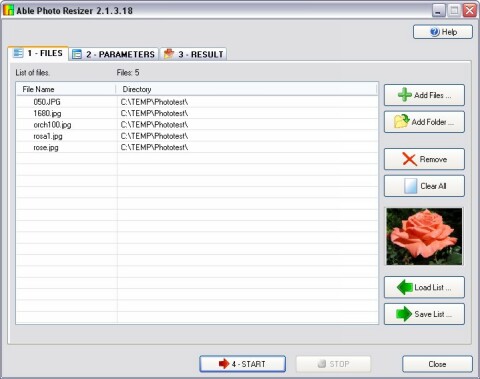 Able Photo Resizer is a simple, quick and easy tool to resize (reduce or enlarge) any single or batches of photos or images for the purpose of sending it by email, publish it on the web or just to save space on your hard drive. Able Photo Resizer is a simple, quick and easy tool to resize (reduce or enlarge) any single or batches of photos or images for the purpose of sending it by email, publish it on the web or just to save space on your hard drive.
Pros: Most photos acquired using a digital camera or a scanner are too large for use on any web page, they must be resized first. On the other hand you would like to share the images with family & friends or even through a website. You may want to resize one to set it up as your avatar.
We have provided Able Photo Resizer to allow you to easily resize your photos in three easy steps.
Able Photo Resizer includes the ability to batch resize pictures, batch resize photos, and perform batch image resize functions for the purpose of email (to friends and family) and web sites, or just to save space on your hard drive, or whatever reason you might have.
It can be used to enlarge a small image for better viewing using different filters for optimum results. The resizing allows you to force a specified width or height and keep the proportions, or define fixed image dimensions. Besides, the program can rename file and more. With the digital camera producing hundreds of images quite easily and quickly you need to be able to process thousands of files as soon as possible. This application aims to all that and does that quite well. Able Photo Resizer can keep or remove all metadata information (Jpg EXIF, Tiff Tags etc). Most cameras add information about aperture, light, comments and much more to the photo. You can delete this to reduce the file size even more.
The program supports 60 odd input formats including JPEG, JPG, GIF, PCX, DCX, TIF, TIFF, BMP, WBMP, RLE, DIB, ICO, CUR, PNG, EMF, WMF, TGA, VDA, ICB, PCD, PIX, PGM, PPM, PSD, PSP, SGI, JPEG200, RAW (CRW, CR2, NEF, PEF, RAF, X3F, BAY, ORF, SRF, MRW, DCR, SR2, DNG, ARW) etc and 18 output formats that are JPG, TIF, GIF, PCX, PNG, BMP, TGA, PXM, PPM, PGM, PBM, JP2, J2K, PDF, PS, DCX, PSD, ICO.
{More Info and Download}
Posted in Main | 1 Comment »
Tuesday, May 27th, 2008
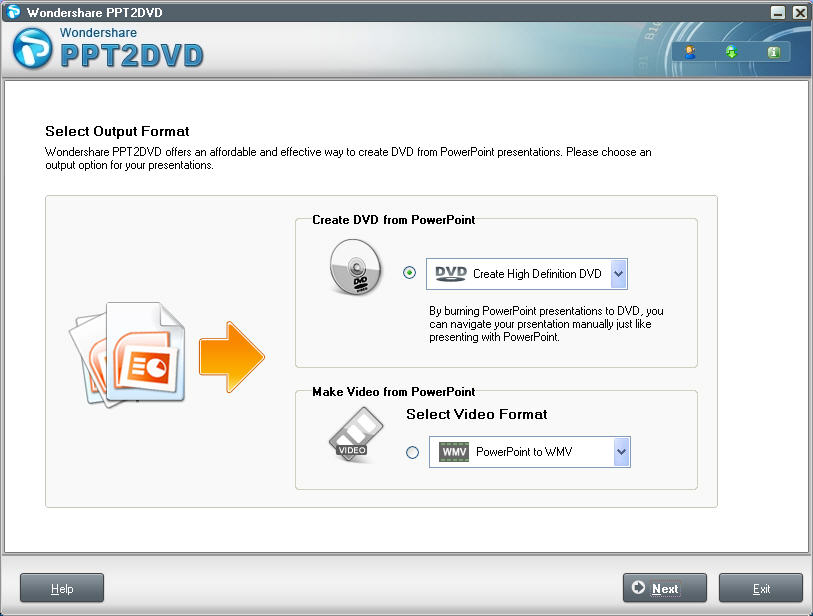 Wondershare PPT2DVD is a tool for creating DVD or video in popular formats (WMV, AVI and MPEG) from Powerpoint presentations. Wondershare PPT2DVD is a tool for creating DVD or video in popular formats (WMV, AVI and MPEG) from Powerpoint presentations.
Pros: Given a MS PowerPoint presentation, this application creates DVD out of that. The presentation then can be played from a DVD player. The options available are the standard definition or even the HD version. You could decide to create a video file instead. The options there are the WMV, AVI, MPEG2 or the MPEG1 formats. The whole conversion process is operated through wizards like screens that collect the parameters and settings through mouse clicks. Wondershare PPT2DVD is a tool for creating DVD or video in popular formats (WMV, AVI and MPEG) from Powerpoint presentations retaining animations, sounds, video clips and internal links (links between slides). Besides, you can create professional looking DVD menu for quickly navigating presentations with a DVD remote control. It is so easy-to-use that even beginners can create DVD without learning.
User chooses whether he wants to create a DVD or just a video file on the first step. Next step you set lot of parameters. Video size in terms of pixels and display size choices are made here. Next are the layout choices. Presentation control buttons and the menu are the choices made her. Menu is made from templates that can be further customized. Settings of border, background etc are made at this stage. Audio settings and sound processing settings are next. Sampling rate, quality of sound and so on are the issues here. At play options timings between slides can be set, but only if they are not set in the original presentation. What remains to be done is to confirm through preview that everything is fine and then burn thesuff.
Cons: While transitions and effects are carried over from the presentation without change, should there be a need to add any while getting this conversion done there’s no way but to go back to the presentation.
{More Info and Download}
Posted in Main | No Comments »
Thursday, May 22nd, 2008
 IcoFX is a freeware icon editor. It is an all-in-one solution for icon creation, extraction and editing. It is designed to work with Windows XP, Windows Vista and Macintosh icons supporting transparency. IcoFX is a freeware icon editor. It is an all-in-one solution for icon creation, extraction and editing. It is designed to work with Windows XP, Windows Vista and Macintosh icons supporting transparency.
Pros: IcoFX is a icon editor. It is an all-in-one solution for icon creation, extraction and editing. It is designed to work with Windows XP, Windows Vista and Macintosh icons supporting transparency. A variety of tools are available along with some 40 odd effects that can be used to create impressive icons. Possibilities are limitless. Images can be converted into icons conversely icons can also be turned into images. IcoFX gives you the possibility to create icon libraries or change icons inside exe files.
It is easy to covert a Mac icon file into a Windows compatible one and vice versa. Extractions of icons also work reversibly between these two systems without a problem. There’s a batch processing facility available too.
This application is useful in a wide range of operating systems. One can create icons for not only Windows 98/ME/2000/XP or Vista but also PNG compression based icons for the Vista environment too. Same goes for icons in the Mac OS X environments as well. Creating a icon library and managing the same is easy within this application.
Icon sizes that can be handled are up to 256x 256 pixels. Besides color and transparency adjustments there are some image effects tools. These are brighten/darken the image/icon or sharpen/blur the same.
{More Info and Download}
Posted in Main | No Comments »
Thursday, May 22nd, 2008
 Convert Video to Flash in console. Use Adobe Flash Video Encoder in console mode. By default you can convert files using Adobe Flash Video Encoder. And if you need to automate conversion process from another application or *.bat file. Convert Video to Flash in console. Use Adobe Flash Video Encoder in console mode. By default you can convert files using Adobe Flash Video Encoder. And if you need to automate conversion process from another application or *.bat file.
Pros: This is an application with a command line interface that helps convert video files to flash. While an individual file conversion can be done, the program is really useful when a batch of files need to be converted. A batch file of commands will do the job easily. Command Line arguments of Flash Console Wrapper include all quality parameters for conversion and you can modify and set arguments as you need. You can use Flash Console Wrapper on web servers and run conversion using command line parameters automatically by scheduling or by calling scripts. Result files will be *.swf or *.flv with the same quality as with Adobe Flash Video Encoder.
The set of parameters that can be set are the input file and folder names. Similarly output file and folder names can be specified. There’s a file mask that can be specified, defaults to AVI. Three levels of quality, that is a trade off between quality and file size, can be specified as quality low, medium or high. Lastly “silent” parameter decides if there will be message as the conversion progresses or the application will communicate only when the job is completed.
Cons: As with any conversion programs, particularly when intricate formats are involved, problems if any, come out in some specific combinations. Such combinations may not come up in low volume usage. So it is important to seek out user feedback.
{More Info and Download}
Posted in Main | No Comments »
|
|
|




