Archive for the 'Main' Category
Friday, October 19th, 2012
 Have you always wanted a tool that will always come in handy whenever you want to generate file listings? Well, Directory Lister could perform some of the tasks you have always wanted to carry out. It comes in handy when you have listings like HTML, TXT, or even CSV format. Have you always wanted a tool that will always come in handy whenever you want to generate file listings? Well, Directory Lister could perform some of the tasks you have always wanted to carry out. It comes in handy when you have listings like HTML, TXT, or even CSV format.
What Can You Get With Directory Lister?
Directory Lister is a tool for generating listings of files from user-selected directories on hard disks, CD-ROMS, Floppys, USB storage and many more. The listing can be in HTML, TXT or CSV format. It is like old dir command, but much more convenient. Now the publisher has added an option that displays customized folder icons in the tree view to make Directory Lister more stable than it used to be.
When you print a file list, you can include standard file information like file name, extension, type, owner and attributes as well as executable file information (EXE, DLL, OCX) like file version, description, and company. The program also enables you to find out what is the given directory size, sort by folder size and check, which folders occupy the most space on your disks. You can also find the largest files on your computer by using size filter options.
Want to check it out? Visit Krksoft.
Posted in Main | No Comments »
Thursday, October 18th, 2012
 Things get easier with a number of programs being introduced these days; and some of us only wished we had programs that could help us organize contacts, music, and pics from the comfort of your desktop a few years back. Well things have really changed from the way they used to be back in the days with various applications that allow you to easily manage your files. One of the programs that can certainly be used today is SnapPea; it allows you to manage your Android from your computer. Things get easier with a number of programs being introduced these days; and some of us only wished we had programs that could help us organize contacts, music, and pics from the comfort of your desktop a few years back. Well things have really changed from the way they used to be back in the days with various applications that allow you to easily manage your files. One of the programs that can certainly be used today is SnapPea; it allows you to manage your Android from your computer.
SnapPea allows you to manage your Android from your PC. Organize your contacts, music, and pics from the comfort of your desktop. It allows you to transfer any file in the blink of an eye, and download thousands of apps for your Android, instant and free of charge. SnapPea also allows App download to the desktop, so you no longer need to worry about your mobile data plan, send text messages from a full-size keyboard, without touching your phone. Importing your iTunes library to your Android is just a click away.
SnapPea has a lot of features including the following; Send text messages from a full-size keyboard, without touching your phone, importing your iTunes library to your Android is just a click away, etc.
Want to check? Visit SnapPea.
Posted in Main | No Comments »
Thursday, October 18th, 2012
 Sometimes there is hardly enough time to manually conduct a search for some of the files we have on our computers or in our email inbox. These files are actually there; but finding them may not be that easy because of the huge amount of files available on the system. That is exactly one of the reasons a program like Copernic Desktop Search application is worth a try. Sometimes there is hardly enough time to manually conduct a search for some of the files we have on our computers or in our email inbox. These files are actually there; but finding them may not be that easy because of the huge amount of files available on the system. That is exactly one of the reasons a program like Copernic Desktop Search application is worth a try.
Copernic Desktop Search
Copernic Desktop Search gives you an option to easily search the entire hard drive of your system in less than a second to pinpoint the right file, email, music or pictures. The application brings the power of a sophisticated, yet easy-to-use search engine right to your computer; allowing you to instantly search files, e-mails, as well as email attachments stored somewhere on your computer hard drive.
Copernic Desktop Search also executes sub-second searching of Microsoft Word, Excel, and PowerPoint files, Acrobat PDFs, and all popular music, picture and video formats. CDS also searches your browser history, favorites, and contacts.
Copernic Desktop Search also creates an initial index the hard drive and provides an attractive and easy to use search interface that returns results instantly, as soon as you type in your keyword. The application also provides image thumbnails for integrated preview with keyword highlighting, picture matches, etc.
Downsides
Copernic Desktop Search is an ad-support application, and displays ad banners or other types of advertising material during its runtime.
Want to check it out? Visit Copernic.
Posted in Main | No Comments »
Thursday, October 18th, 2012
 VirtuaWin is absolutely free for use since it’s an open source program. The fact that it even gives you access to 20 desktops, configurable key/mouse control, user defined icons, modules for additional makes it one of few popular applications of its kind. VirtuaWin is absolutely free for use since it’s an open source program. The fact that it even gives you access to 20 desktops, configurable key/mouse control, user defined icons, modules for additional makes it one of few popular applications of its kind.
What Is The Big Deal?
VirtuaWin is an Open Source, virtual desktop manager for Windows that can organize applications over several “virtual” desktops. If you use two virtual desktops you can put a Web browser on desk 1 and by using a desktop manager “switch away” the Web browser and it will seem like you have a new empty workspace (desk 2) to put another application/applications on. VirtuaWin supports up to 20 desktops, configurable key/mouse control, user defined icons, modules for additional features, and a host of others.
VirtuaWin is not only free, it also comes in portable version so you can carry it on a stick and benefit from multiple desktops on every computer you work on. However, the program does not have main interface to analyze, but the Spartan of the configuration window’s does not fit too well in Vista’s shiny shell.
The General tab of the Setup window enables you to choose the number of desktops to be enabled via VirtuaWin. The number can however, be increased to twenty, thereby providing you with plenty of space for a slew of applications.
Downsides
Definitely users are going to have some issues with the fact that VirtuaWin doesn’t have an interface. Users may also be scared of the myriad of configuration options included by the publisher.
Want to check it out? Visit VirtuaWin.
Posted in Main | No Comments »
Thursday, October 18th, 2012
 For years reviewers have continued to give massive ratings to browsers like Internet Explorer, Mozilla Firefox, Opera, Google Chrome, and Safari. However, these are all browsers that have some very nice features without mincing words; however, a browser like Maxthon is one of those programs coming up. Maxthon was initially developed as an improved version of the Internet Explorer when Mozilla Firefox was not even known; and has since become a favorite of millions of users all over the world. For years reviewers have continued to give massive ratings to browsers like Internet Explorer, Mozilla Firefox, Opera, Google Chrome, and Safari. However, these are all browsers that have some very nice features without mincing words; however, a browser like Maxthon is one of those programs coming up. Maxthon was initially developed as an improved version of the Internet Explorer when Mozilla Firefox was not even known; and has since become a favorite of millions of users all over the world.
What’s The Deal?
Maxthon is a beautifully designed web browser based on dual display engine (Webkit and Trident) so as to be extremely fast as well as compatible. The browser has a powerful set of easy-to-use and efficiently built-in features. You can do much more things on the web instead of just viewing it. With Maxthon, you can do a lot of things such as Mouse Gestures, Online Video/Image downloader, Sync Account. Highlight/Blur Highlight, Reader Mode, New Session, URL Alias, Quick Access, etc.
Maxthon 3 is one of few browsers that do more right out of the box, and now features free cloud services including; enabling you to store your bookmarks and notes securely on the web for anytime, anywhere access, and share screen grabs with the built-in Snap feature.
Downside
Maxthon 3 doesn’t have more features than previous version; however, it offers simplicity to users.
Want to check it out? Visit Maxthon.
Posted in Main | No Comments »
Wednesday, October 17th, 2012
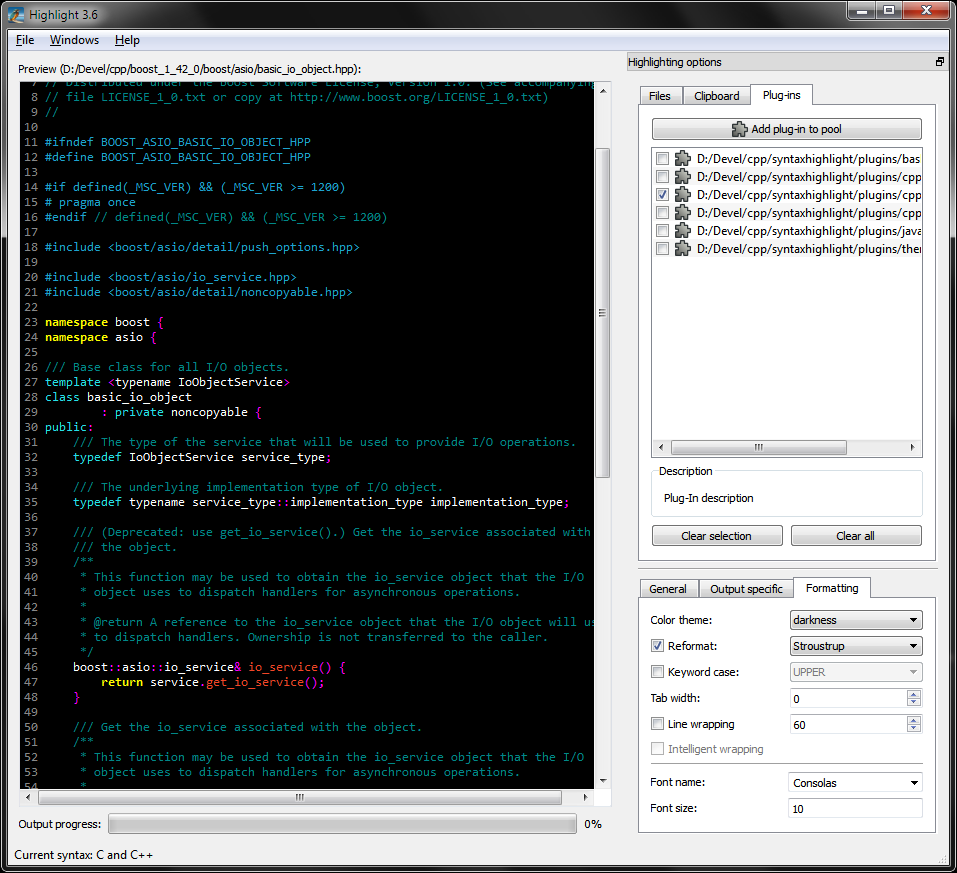 One of many open source applications that have been on the lips of several users for the past few years is Highlight. The program has been rated highly and severally by several users who use it to transform code to several versions. This time around, the publishers have added a couple of updates to enable users explore several other options not in past versions. Highlight now features updates such as; replacement of Regex engine with boost expressive, support for Dart and TypeScript, and addition of Chinese translation. One of many open source applications that have been on the lips of several users for the past few years is Highlight. The program has been rated highly and severally by several users who use it to transform code to several versions. This time around, the publishers have added a couple of updates to enable users explore several other options not in past versions. Highlight now features updates such as; replacement of Regex engine with boost expressive, support for Dart and TypeScript, and addition of Chinese translation.
What Is “Highlight” All About?
Highlight is an open source universal source code converter that transforms code to HTML, XHTML, RTF, LaTeX, TEX, SVG and BBCode files with syntax highlighting. (X)HTML and SVG output is formatted by CSS. The open source program supports customizable color theme and language descriptions with regular expressions. The configuration files are Lua scripts with plug-in support. Highlight is also a tool that contains several options to provide a consistent formatting of the output code.
Highlight also has other power-packed features to enrich your tasks; and they are not as complex as the ones featured by a few other programs. Some of these notable features include: customizable keyword groups; supports 175 programming languages; colored output in HTML, XHTML, RTF, TeX, LaTeX, SVG and BBCode format; Plug-In interface to tweak syntax parsing and coloring; etc.
Downside
Highlight has no major downside, and the fact that it is an open source program makes it one of the most attractive programs in its category.
Want to check it out? Visit Andre-Simon.
Posted in Main | No Comments »
Tuesday, October 16th, 2012
 Malware and other potentially dangerous programs have caused more sever damages to people’s computers and files than most of us expected. That is why putting a stop to them before they cause any or more damages to your personal files should be a top priority. However, blocking or getting rid of malware requires the use of applications that have advanced and easy to use features. Malware Inspector is one of several that have been published to tackle this problem. Malware and other potentially dangerous programs have caused more sever damages to people’s computers and files than most of us expected. That is why putting a stop to them before they cause any or more damages to your personal files should be a top priority. However, blocking or getting rid of malware requires the use of applications that have advanced and easy to use features. Malware Inspector is one of several that have been published to tackle this problem.
What Has Malware Inspector Got To Offer?
Malware Inspector is powerful anti-malware, antispyware tool that offers protection to your computer against viruses, worms and other dangerous software that could attack while surfing the Internet. The program is built with features that can detect a large chunk of already identified viruses, worms and other dangerous software. With Malware Inspector, you have your computer on palm.
Malware Inspector is also a small, innovative, and fast tool that will surprise you with speed and efficiency when it comes to detecting various malware that have found their ways or about accessing your system. The program has a complete list of active processes and startup programs with the details, and also has the ability to monitor each process.
Downside
A couple of false-positives have been reported with Malware Inspector, but this should not take anything away from the program; after all, it is a freeware.
Want to check it out? Visit MalwareInspector.
Posted in Main | No Comments »
Tuesday, October 16th, 2012
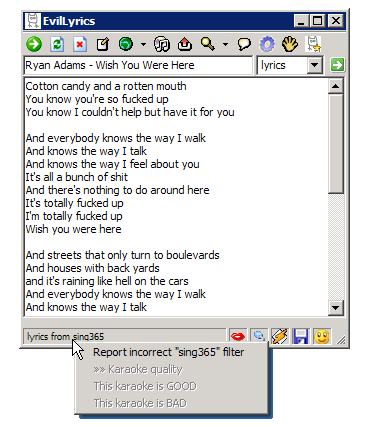 There is never going to be a day when software freaks won’t find one or two programs to choose from. Basically, everyone needs one or two programs from time to time in order to carry out a couple of tasks on the PC. The fact that some are freeware and some are shareware also means it is a world where one is free to make a choice. For music lovers, the choice of a quality program depends on so many reasons including quality of features, and ease of use. The name may sound strange and funny; but EvilLyrics has so much to offer when playing your media. There is never going to be a day when software freaks won’t find one or two programs to choose from. Basically, everyone needs one or two programs from time to time in order to carry out a couple of tasks on the PC. The fact that some are freeware and some are shareware also means it is a world where one is free to make a choice. For music lovers, the choice of a quality program depends on so many reasons including quality of features, and ease of use. The name may sound strange and funny; but EvilLyrics has so much to offer when playing your media.
EvilLyrics
EvilLyrics is a free utility that automatically searches for lyrics as your song is played in your media player. The freeware program searches over 5,000,000 lyrics, and currently supports Winamp, Windows Media Player, iTunes, RealPlayer, Foobar, Jetaudio, QCD, MusicMatch, MediaMonkey and Yahoo! Music Engine. EvilLyrics contains no spyware or adware and is completely free.
Now with support for AIMP2, VLC, and WMP Classic; EvilLyrics has been improved to enhance your music experience. The publisher has also fixed lyrics downloading features, which makes the program a lot better than what it was in the past.
Downside
None that is immediately noticeable.
Want to check it out? Visit EvilLabs.
Posted in Main | No Comments »
Monday, October 15th, 2012
 Managing loads of music on a PC can sometimes be time consuming, and can sometimes be described as highly frustrating. A unique program with a few advanced features won’t be of any harm especially if you are a music lover. CATraxx is one of many of such programs that can catalog and manage your music collection. Managing loads of music on a PC can sometimes be time consuming, and can sometimes be described as highly frustrating. A unique program with a few advanced features won’t be of any harm especially if you are a music lover. CATraxx is one of many of such programs that can catalog and manage your music collection.
What Does CATraxx Really Do?
CATraxx is a powerful database program designed to help you catalog and manage your music collection. The program will let you catalog all media types such as CDs, LPs, cassettes, mini discs, and MP3s. CATraxx supports CDDB – the world’s largest music database.
CATraxx has a comprehensive set of data fields for both albums and tracks that enables you to catalog a wide range of information: artist, album title, media format, release year, label, catalog number, purchase price, current value, music category, playing time, song titles, and songwriters, producers, recording studios, musicians and instruments. You can store an image of the album cover, attach a MP3 file to each track, and add your own personal comments for both albums and tracks.
Various changes have been made to CATraxx by the publisher; and these updates have made it a bit more stable than it used to be.
Downside
The program requires a lot of space on your system, and may not be all that suitable for users who fail to meet this requirement.
Want to check it out? Visit Catraxx.
Posted in Main | No Comments »
Monday, October 15th, 2012
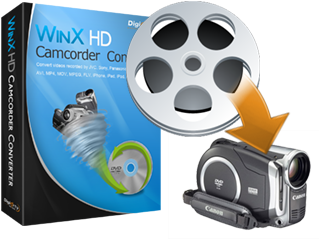 WinX HD Camcorder Video Converter is a program that converts HD videos and transfer videos to portable and console players. It means you no longer have to just play your video recorded from HD camera on your PC, laptop, but also on iPod, iPhone, iPad, PSP, Xbox, mobile phone. WinX HD Camcorder Video Converter is not a shareware, but with a couple of features that you will find a bit helpful when converting some of your favorite files. WinX HD Camcorder Video Converter is a program that converts HD videos and transfer videos to portable and console players. It means you no longer have to just play your video recorded from HD camera on your PC, laptop, but also on iPod, iPhone, iPad, PSP, Xbox, mobile phone. WinX HD Camcorder Video Converter is not a shareware, but with a couple of features that you will find a bit helpful when converting some of your favorite files.
What’s The Big Deal?
WinX HD Camcorder Video Converter is an AVCHD M2TS/MOD/TOD/TS/MTS video converter program designed for converting videos collected from JVC, Sony, Panasonic, Canon, and many others to AVI, MP4, MOV, MPEG, AVC, FLV, etc. With WinX HD Camcorder video converter, you can not only play your video recorded from HD camera on your PC, laptop, but also on iPod, iPhone, iPad, PSP, Xbox, mobile phone.
WinX HD Camcorder Video Converter is designed with professional ready-made profile for new users; which means all audio and video are editable for advanced users to convert high quality video. You can also enjoy a few other amazing benefits that include the following; transfer videos from HD Camcorder to HD AVI, HD MP4, HD MPEG, HD WMV, HD MOV, HD YouTube, etc, Apple iPhone/5/4S, iPod, iPad/3, Apple TV, Apple TV HD, Microsoft Xbox, Xbox HD, Zune, Zune HD, etc.
Downside
Only half of files that are less than five minutes will be converted by the application WinX HD Camcorder Video Converter also features a nag screen.
Want to check it out? Visit WinXDVD.
Posted in Main | No Comments »
|
|
|




