Archive for the 'Main' Category
Thursday, September 27th, 2012
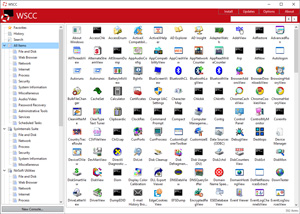 Did you know there is a program that lets you update, execute and organize the utilities from various system utility suites? WSCC is designed with those features that were not thought possible a couple of years back. The publisher has taken some steps to update current version to enable you enjoy the program in a different way. Did you know there is a program that lets you update, execute and organize the utilities from various system utility suites? WSCC is designed with those features that were not thought possible a couple of years back. The publisher has taken some steps to update current version to enable you enjoy the program in a different way.
WSCC is a free, portable program that allows you to install, update, execute and organize the utilities from various system utility suites. Like previous version of the program; version 2.0.7.0 also included Update Manager that can check for newer versions of the utilities already installed and can download and install the missing items. Alternatively, WSCC can use the http protocol to download and run the programs.
Latest version of WSCC now supports Windows Sysinternals Suite (including support for systernals live service), and NirSoft Utilities.
One doesn’t always find a freeware program that has features that are easy to understand. As a matter of fact, the publisher of WSCC did a great job on this program; and the beauty of it is that it is also available for free for both private and commercial users. WSCC is portable, installation is not required. Simply extract the content of the downloaded zip archive to any directory on your computer.
On a final note, WSCC is very easy to use with features that take only a couple of minutes to understand.
Want to check it out? Visit Kls-soft.
Posted in Main | No Comments »
Thursday, September 27th, 2012
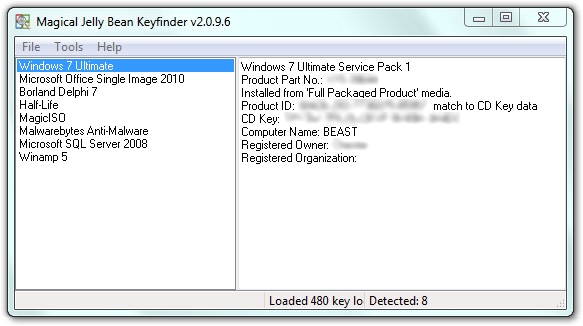 How many times have you had to search all over the place for your Product Key? A lot of people barely manage to have their Product Keys for a long time; and that is why a program like Magical Jelly Bean Keyfinder sounds like a brilliant idea. It is not actually the first of its kind as there are a couple of such programs out there; however, it has some features that make it stand out. How many times have you had to search all over the place for your Product Key? A lot of people barely manage to have their Product Keys for a long time; and that is why a program like Magical Jelly Bean Keyfinder sounds like a brilliant idea. It is not actually the first of its kind as there are a couple of such programs out there; however, it has some features that make it stand out.
Magical Jelly Bean Keyfinder is a freeware utility that retrieves your Product Key (cd key) used to install windows from your registry. It works on Windows 95, 98, ME, 2000, XP, Server 2003, Windows Vista, Office XP, Office 2003, and Office 2007. The program features an optional config file; a functionality that lets you pull a key stored in the registry for any software. A sample config file is included in the zip and can be seen here.
The Magical Jelly Bean Keyfinder is a freeware utility that retrieves your Product Key (cd key) used to install windows from your registry. The program also has a community-updated configuration file that retrieves product keys for many other applications. Another feature is the ability to retrieve product keys from unbootable Windows installations.
Any Downside?
The program might be a bit confusing for the first time; however, it has a couple of features you can easily understand. However, it doesn’t have as much features as a lot of advanced users would have loved to use.
Want to check it out? Visit http://www.magicaljellybean.com/keyfinder/
Posted in Main | No Comments »
Thursday, September 27th, 2012
 Actually there are various programs out there that give you all the flexibility needed to do all you can with files on your system. Nevertheless, there is need to choose a program based on what it has to provide in terms of features. Competition for fame has brought about all kinds of hype; and that is why you need to take a second look at every program before hitting the download or installation button. Actually there are various programs out there that give you all the flexibility needed to do all you can with files on your system. Nevertheless, there is need to choose a program based on what it has to provide in terms of features. Competition for fame has brought about all kinds of hype; and that is why you need to take a second look at every program before hitting the download or installation button.
 So, what about Attribute Changer? Does it have all the kinds of features the publisher claim it has? Attribute Changer is a tool that can be used to change all kind of file and folder attributes, date and time and even NTFS compression. The features are a bit easy to use, and the interface is preloaded with some exciting features as well. You can establish filters and exceptions to fine tune the update process. Some of these filters include size, date and time. Exceptions also let you to include or exclude files and folders based on entire file and folder names respectively patterns. So, what about Attribute Changer? Does it have all the kinds of features the publisher claim it has? Attribute Changer is a tool that can be used to change all kind of file and folder attributes, date and time and even NTFS compression. The features are a bit easy to use, and the interface is preloaded with some exciting features as well. You can establish filters and exceptions to fine tune the update process. Some of these filters include size, date and time. Exceptions also let you to include or exclude files and folders based on entire file and folder names respectively patterns.
Downside
Several users have complained that this version is very difficult to use, and consumes a lot of time when it comes to scrubbing or removing any file with a suspect data from a large 2TB drive.
Want to check it out? Visit Petges.lu.
Posted in Main | No Comments »
Thursday, September 27th, 2012
 Security management in an organization requires installing the right application in order to enhance efficiency. Microsoft is one organization that takes the issue of centralized security seriously; and that explains a program like Security Compliance Manager. Security management in an organization requires installing the right application in order to enhance efficiency. Microsoft is one organization that takes the issue of centralized security seriously; and that explains a program like Security Compliance Manager.
Microsoft Security Compliance Manager provides centralized security baseline management features, a baseline portfolio, customization capabilities, and security baseline export flexibility to accelerate your organization’s ability to efficiently manage the security and compliance process for the most widely used Microsoft technologies.
The Microsoft Security Compliance Manager is the next evolution of the Microsoft Security Compliance Management Toolkit Series. The program incorporates an extensive guidance and documentation, including the previously stand-alone product-specific security guides. This enables you to access and automate all of your organization’s security baselines in one centralized location.
The Security Compliance Manager from Microsoft is designed with some advanced features that include the following; integration with the System Centre 2012 Process Pack for IT GRC, lets you import and take advantage of your existing Group Policy or create a snapshot of a reference machine to kick-start your project, deploy your configurations to non-domain joined computers using the new GPO Pack feature, the centralized management console of the Security Compliance Manager provides you with a unified, end-to-end user experience to plan, customize, and export security baselines, and many more.
Downside
It will take sometime to get used to this software; but the good news is that it is a freeware.
Want to check it out? Visit Microsoft.
Posted in Main | No Comments »
Wednesday, September 26th, 2012
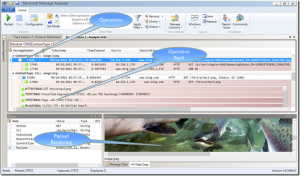 Perhaps there is a freeware programs out there that has that extra ability besides being a network sniffer or packet tracing. Perhaps, you can take a look at Microsoft Message Analyzer since it has some extra features that really sound convincing. Perhaps there is a freeware programs out there that has that extra ability besides being a network sniffer or packet tracing. Perhaps, you can take a look at Microsoft Message Analyzer since it has some extra features that really sound convincing.
Microsoft Message Analyzer is the successor of Network Monitor but does much more than a network sniffer or packet tracing tool. The program has ability to help you browse for logs of different types (.cap, .etl, .txt) and import them together. The fact that it is a freeware program doesn’t take anything away from it because it is packed with some useful features.
The program’s key capabilities include; Integrated “live” event and message capture at various system levels and endpoints, Parsing and validation of protocol messages and sequences, Automatic parsing of event messages described by ETW manifests, summarized grid display top level is operations, (requests matched with responses), user controlled “on the fly” grouping by message attributes, ability to browse for logs of different types (.cap, .etl, .txt) and import them together, automatic re-assembly and ability to render payloads, ability to import text logs, parsing them into key element/value pairs; and support for Trace Scenarios (one or more message providers, filters, and views).
Downside
Not easy to understand for a newbie.
Want to check it out? Visit MessageAnalyzer.
Posted in Main | No Comments »
Wednesday, September 26th, 2012
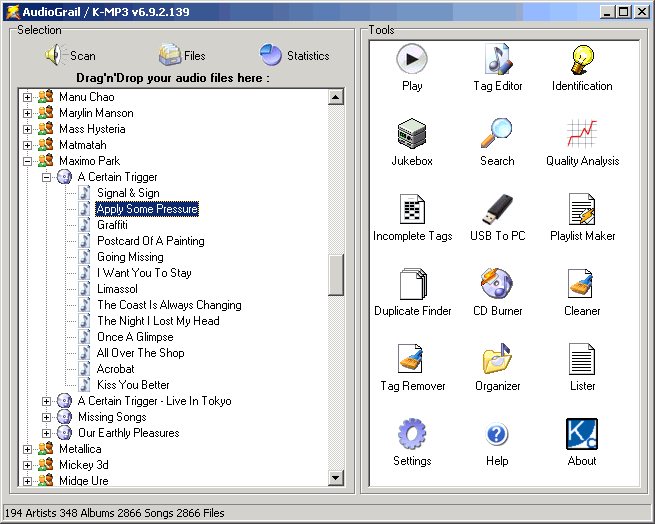 Now here is a program that you might want to have on your system basically for a lot of possible reasons. It is not one of many MP3 file renammer programs that are limited to a couple of unimportant features as it tries to roll them all in a single package. AudioGrail gives you a lot of features to help you do a lot of things with your MP3 including renaming your files. Now here is a program that you might want to have on your system basically for a lot of possible reasons. It is not one of many MP3 file renammer programs that are limited to a couple of unimportant features as it tries to roll them all in a single package. AudioGrail gives you a lot of features to help you do a lot of things with your MP3 including renaming your files.
AudioGrail (Formerly K-MP3) is the Swiss army knife for everything that is related to audio files (MP3, MPC, OGG…). It can very easily rename and tag (tag: info such as artist name, album, track title) your files automatically. The program can also analyze quality, organize files on your system, find duplicated files as well as improve your everyday audio experience.
AudioGrail is an automatic MP3 files renammer and tagger that can automatically fetch tracks name from the internet thank to the power of the FreeDB online database. A couple of other features of the program are as follows; supports MP3, OGG, MPC, APE, AAC, FLAC, and WavPack, audio files to audio CD burning capabilities, tags normalizer, quality analyzer, playlist creator and analyzer, incomplete tag finder, etc.
Downside
Not enough features for the free version; and the fact that some other freeware programs offer better features is a little minus for this program. However, this doesn’t affect the other positive side to AudioGrail.
Want to check it out? Visit KCSoftwares.
Posted in Main | No Comments »
Wednesday, September 26th, 2012
 A lot of applications are hitting the internet these days; but did you know that some of them just make things absolutely easier for a lot of us? Uninstallers for instance are designed to help us get rid of certain programs that we no longer find useful on our PCs. However, did you know a program like Ashampoo UnInstaller could do even more than just helping you uninstall your unwanted programs? The program is built by a German company renowned for the very best in various quality programs. A lot of applications are hitting the internet these days; but did you know that some of them just make things absolutely easier for a lot of us? Uninstallers for instance are designed to help us get rid of certain programs that we no longer find useful on our PCs. However, did you know a program like Ashampoo UnInstaller could do even more than just helping you uninstall your unwanted programs? The program is built by a German company renowned for the very best in various quality programs.
Ashampoo UnInstaller 5 does more than merely record and remove software installations from your system. It is built with multiple functions to keep your system running smoothly such as removing orphaned files and cleaning your registry. It will even protect your privacy by removing Internet traces and permanently erasing files from your system.
Ashampoo Uninstallers 5 is a combination of traditional Windows uninstallation and intelligent system monitoring that extends time-tested procedures with advanced algorithms for unmatched cleaning results.
Normally, installation monitoring creates huge logfiles while noticeably impairing system performance in the process. Ashampoo UnInstaller 5 uses smart filter technologies to only record modifications that are actually related to installation routines. This creates smaller records and allows for more efficient uninstallations.
Downside
No major hassles.
A couple of fixes have already been made to this version, and it is more stable than previous version.
Want to check it out? Visit Ashampoo.
Posted in Main | No Comments »
Sunday, September 23rd, 2012
 Here is a program that is available for free, but actually requires some kind of technical skills to use. You will find OCCT very interesting and helpful if you can find your way around its technical features. Here is a program that is available for free, but actually requires some kind of technical skills to use. You will find OCCT very interesting and helpful if you can find your way around its technical features.
OCCT is the short form for “OverClock Checking Tool”. The application boasts of so many useful features despite the fact that it is a freeware. Users who already know how OCCT works can easily find their ways around some of its key features that include the following; up to 16-core support, customizable tests, CPU and Motherboard detection, monitoring support through 3rd party application, can produce graphs showing temperature and voltages during the test, multilingual support; and a couple of others.
OCCT performs a lot of monitoring functions including; real time frequency monitoring for CPU, and GPU, translation in several languages, and many more. The fact that the program is a freeware gives users who have no technical knowledge to take their time to find out just how it works. OCCT has undergone lots of changes since it was first introduced; and that explains why it is a bit more stable than it used to be.
Downside
Couldn’t find any just yet, it’s a great freeware!
Want to check it out? Visit Ocbase.
Posted in Main | No Comments »
Sunday, September 23rd, 2012
 Nowadays, it has become absolutely essential that any computer connected to the internet has a good level of protection against viruses, malware, spyware, and other online threats such as phishing. Nowadays, it has become absolutely essential that any computer connected to the internet has a good level of protection against viruses, malware, spyware, and other online threats such as phishing.
F-Secure is a company that has been around for many years, which is always a reassuring thing when dealing with choosing security products for your computer. This is a fully featured suite of security tools and comes with at least a 12 month license to use them all. The tools it comes with are an antivirus program, firewall tools, and also spam blocking,and anti-phishing.
It’s included parental controls ensure it’s also quite good for a family situation as well. Individual user accounts can be made for each member of the family for example. Each of these can have different levels of browser protection, web filters, as well as setting time limits on use. Standard users can be kept out of the settings, while parents for example, can be the only ones who can change settings.
As is usual with these types of suites, there are several settings you can change and set-up to your own personal taste and needs. You do have to go through quite a few questions upon initial installation though. It’s worth taking the time to configure everything correctly to avoid any minor issues at a later date. Having done that, this program is pretty much a set-it-and-forget-it type of thing,until it’s time to renew your subscription again.
So if you are seeking Advanced real-time cloud-based technology against viruses, spyware and other malicious attacks, as well as a user-friendly firewall to prevent hacker attacks, along with such bonus extras as parental control and personalized settings per user, it is well worth checking out F-Secure Internet Security 2013.
It supports Windows 7, Vista and all XP versions.
For full details, visit the homepage at F-secure.
Posted in Main | No Comments »
Saturday, September 22nd, 2012
 Everyone is looking for programs that will simplify their day to day tasks online and offline. The good news is a lot of people also go to work everyday trying to provide access to various applications that will make that dream a reality; and that exactly one of the reasons behind FinePrint. The program now has something extra to offer its numerous users unlike in recent past where a couple of features were unavailable. Everyone is looking for programs that will simplify their day to day tasks online and offline. The good news is a lot of people also go to work everyday trying to provide access to various applications that will make that dream a reality; and that exactly one of the reasons behind FinePrint. The program now has something extra to offer its numerous users unlike in recent past where a couple of features were unavailable.
FinePrint is a Windows printer driver that provides advanced printing capability. The program gives you the edge when it comes to creating booklets, printing double sided on any printer, printing on your electronic letterhead, as well as creating new documents by combining print jobs together. FinePrint also allows you to add gutters for binding all with complete assurance that the printed output will match the preview on screen.
One quality of a great program is when its publishers continue to add changes just to improve on last or previous releases; and that is why FinePrint is worth a try. The program has been updated to include a few changes such as; you can now move pasted signatures and initials when in Text Note mode, rearranging your printed content using Snapshot notes no longer results in overly large FP files (Pro only), and a couple of others.
Want to check it out? Visit Fineprint.
Posted in Main | No Comments »
|
|
|






