Archive for the 'Main' Category
Thursday, May 17th, 2012
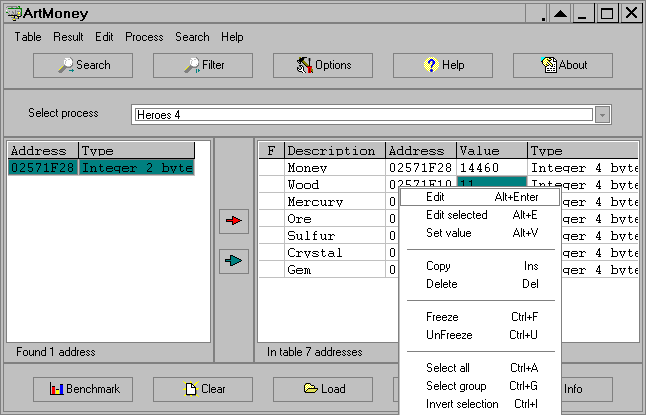 ArtMoney is a cheating program that you can use for all games. The program is designed with features that can make a troublesome game easier to win by helping you find the memory address where a desired quantity (like amount of money) is located so you can change that quantity. In spite of its title, ArtMoney actually allows you to change any quantity specified in a game, whether it be dollars, bullets, swords, or health points. The program finds a hex address based on the input parameters you set and prints these addresses with their corresponding values. For example, if your character has 1,431 dollars, ArtMoney searches and displays all memory addresses containing the value of 1431. Of course, as there can be hundreds of memory addresses displayed after a simple search, you will need to filter this addresses. ArtMoney is a cheating program that you can use for all games. The program is designed with features that can make a troublesome game easier to win by helping you find the memory address where a desired quantity (like amount of money) is located so you can change that quantity. In spite of its title, ArtMoney actually allows you to change any quantity specified in a game, whether it be dollars, bullets, swords, or health points. The program finds a hex address based on the input parameters you set and prints these addresses with their corresponding values. For example, if your character has 1,431 dollars, ArtMoney searches and displays all memory addresses containing the value of 1431. Of course, as there can be hundreds of memory addresses displayed after a simple search, you will need to filter this addresses.
ArtMoney Special Edition 7.39 comes with a few updates that include; module addressing” works on Windows x64 for 64-bits processes, Added “Bytes order” field in emulator options, New emulator options for Capcom Play System 3, Nintendo Virtual Boy, Atari 5200, Atari ST, PolyGame Master, Midway Wolf Unit System, and Commodo.
Hopefully, some users won’t use ArtMoney Special Edition for illegal activities.
Want to check it out? Visit Artmoney.
Posted in Main | No Comments »
Thursday, May 17th, 2012
 FBackup is freeware backup program for Windows that protects your important files and folders from partial or total loss by automating backup tasks, password protecting and compressing it to save storage space. Using FBackup you can easily backup to any local or network drive or to external drives (such as USB drives). The program can backup open/locked files and it can perform full and mirror backups (backup type that does not compress the files). When defining a backup you can also set file filters and schedule the backup for automatic execution. FBackup is freeware backup program for Windows that protects your important files and folders from partial or total loss by automating backup tasks, password protecting and compressing it to save storage space. Using FBackup you can easily backup to any local or network drive or to external drives (such as USB drives). The program can backup open/locked files and it can perform full and mirror backups (backup type that does not compress the files). When defining a backup you can also set file filters and schedule the backup for automatic execution.
Once a backup job is defined, you can run it manually by pressing the Backup button (or F6), or if you add a scheduler it will run automatically. FBackup can easily back up sources from local drives (including USB connected drives) to destinations such as USB/Firewire connected devices or mapped network locations. It creates either standard zip files (when using “full backup”), or exact copies of the original sources without any compression (using “mirror backup”).
FBackup has a number of key features that include the following; you can define a backup job, set it to run automatically, and forget about it, for each backup job, you can define an action to execute before or after the backup, multiple backup destinations, easy to use, and many more.
Want to check it out? Visit fbackup.com
Posted in Main | No Comments »
Wednesday, May 16th, 2012
 With new and highly improved features added to version 5.3.1; Abrosoft FantaMorph lets you create image morphing movies easier and faster than ever before. You can do everything a professional animation director does to create amazing images and animations. It supports most image formats including BMP, JPEG, TIFF, PNG, GIF, TGA, PCX, and even professional 32bit with alpha formats. Exporting to Image Sequence, AVI, Animated GIF, Flash, Screen Saver and other formats are supported. You can crop, rotate, flip and adjust source image, all with its built-in tools, without having to go to any additional software. Creating morphing pictures and action sequences are even easier with the program’s revolutionary rendering engine and a super-friendly user interface. With new and highly improved features added to version 5.3.1; Abrosoft FantaMorph lets you create image morphing movies easier and faster than ever before. You can do everything a professional animation director does to create amazing images and animations. It supports most image formats including BMP, JPEG, TIFF, PNG, GIF, TGA, PCX, and even professional 32bit with alpha formats. Exporting to Image Sequence, AVI, Animated GIF, Flash, Screen Saver and other formats are supported. You can crop, rotate, flip and adjust source image, all with its built-in tools, without having to go to any additional software. Creating morphing pictures and action sequences are even easier with the program’s revolutionary rendering engine and a super-friendly user interface.
Abrosoft FantaMorph has a lot of key features that are easy to use. Some of these features include the following; new Layer Morph, improved rendering engine, new Face Extractor and Face Locator, new Camera tool, new dual view mode supports dual monitors, each sequence can now have different effects, new sequence effect: Trail, Radial, use camera on movie/sequence effects, new dots transform: rotate, skew, flip, improved Crop tool, and a host of others.
Abrosoft FantaMorph is a shareware program that has a 30 day trial period for users.
Want to check it out? Visit FantaMorph.com.
Posted in Main | No Comments »
Wednesday, May 16th, 2012
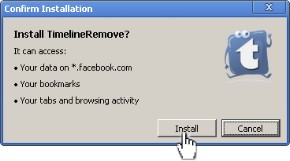 TimelineRemove is a tiny, but handy tool that disables the new Facebook timeline feature and restores the classic look, without changing the timeline behaviour for other visitors of your Facebook profile. The extension basically works by hiding the timeline, so you can view your own and others’ profiles in the old style. TimelineRemove works automatically once installed, and a button is added to the toolbar that lets you toggle the timeline on and off, whenever you want. You don’t have to put up with your new Time Line feature on Facebook; all you need is to use TimelineRemove as an extension. TimelineRemove is a tiny, but handy tool that disables the new Facebook timeline feature and restores the classic look, without changing the timeline behaviour for other visitors of your Facebook profile. The extension basically works by hiding the timeline, so you can view your own and others’ profiles in the old style. TimelineRemove works automatically once installed, and a button is added to the toolbar that lets you toggle the timeline on and off, whenever you want. You don’t have to put up with your new Time Line feature on Facebook; all you need is to use TimelineRemove as an extension.
TimelineRemove disables the new Facebook timeline feature and restores the classic look,
without changing the timeline behaviour for other visitors of your Facebook profile. The program is compatible with the following browsers; Mozilla Firefox, Google Chrome, Safari, and Internet Explorer. You can download a version that suits your browser directly from the publisher’s website. A couple of issues have also been resolved in this release, which include Internet Explorer. Some antivirus programs may raise alarm concerning the safety of this program on your system; well, the truth remains that TimelineRemove is a nice program for all Facebook enthusiasts. The program is a freeware, and is available for download without limitations.
Want to check it out? Visit TimelineRemove.
Posted in Main | No Comments »
Monday, May 14th, 2012
 Handy File Tool has utilities necessary for webmasters, programmers and anybody who is concerned with computers. HFT has a two-panel interface, which calls to mind the popular Norton Commander, but here you have the basket, a clipboard for files. The suite’s main tools, Finder, Replacer, and Renamer, help you make quick work of file searching, text replacement, and bulk renaming across a range of file formats and attributes. Handy File Tool is light, and consumes very little space on your PC; thereby making it very fast, and easy to use. It reduces the time it would have taken you to manually process hundreds of files. With HFT you can solve these problems with one mouse click. You can even process files from several directories or even disks simultaneously, using Basket a clipboard for files. Handy File Tool has utilities necessary for webmasters, programmers and anybody who is concerned with computers. HFT has a two-panel interface, which calls to mind the popular Norton Commander, but here you have the basket, a clipboard for files. The suite’s main tools, Finder, Replacer, and Renamer, help you make quick work of file searching, text replacement, and bulk renaming across a range of file formats and attributes. Handy File Tool is light, and consumes very little space on your PC; thereby making it very fast, and easy to use. It reduces the time it would have taken you to manually process hundreds of files. With HFT you can solve these problems with one mouse click. You can even process files from several directories or even disks simultaneously, using Basket a clipboard for files.
Handy File Tool is very light, and can be downloaded and installed in a couple of seconds. Some of its unique features include the following; browse and manage files and folders, copy files and folders, move files and folders, create new folders, delete files and folders, find files by file mask or files date, rename files in several folders simultaneously, replace several strings in list of files in several folders simultaneously, and a host of others.
Want to check it out? Visit HandyFileTool.
Posted in Main | No Comments »
Monday, May 14th, 2012
 HM2Go is a free local webserver that is only 1.7 mb in size and does not require installation. It is designed to serve a Webhelp system locally or from CD/DVD. You can use and redistribute HM2Go royalty-free. Technical documentation, online help and manuals are increasingly distributed as HTML on CD or DVD, or installed locally together with the software. The good thing about the program is that technical documentation, online help and manuals are increasingly distributed as HTML on CD or DVD, or installed locally together with the software. The HTML-based “WebHelp” generated by modern documentation tools like Help+Manual, RoboHelp and Doc-to-Help comes with powerful navigation, search and other features and displays in standard web browsers, making it very user-friendly and accessible. HM2Go is a free local webserver that is only 1.7 mb in size and does not require installation. It is designed to serve a Webhelp system locally or from CD/DVD. You can use and redistribute HM2Go royalty-free. Technical documentation, online help and manuals are increasingly distributed as HTML on CD or DVD, or installed locally together with the software. The good thing about the program is that technical documentation, online help and manuals are increasingly distributed as HTML on CD or DVD, or installed locally together with the software. The HTML-based “WebHelp” generated by modern documentation tools like Help+Manual, RoboHelp and Doc-to-Help comes with powerful navigation, search and other features and displays in standard web browsers, making it very user-friendly and accessible.
You can get all the benefits of full-featured interactive WebHelp locally in their standard browsers, instead of laboriously searching through PDF files or putting up with the creaky and ancient interface of the HTML Help CHM viewer. Featuring intelligent caching, the mini server is just as fast, or even faster, than loading the HTML files directly from the hard disk or CD. HM2Go runs on all versions of Windows from Windows 2000 and higher and is available as a completely free download.
Want to check it out? Visit: HelpandManual.
Posted in Main | No Comments »
Sunday, May 13th, 2012
 SteelSoft TV is one of the best and free Internet TV software on the market. It is perfectly compatible with every Windows platform (Windows XP, Vista, and Windows 7). The application enables you to watch over 300 free online TV channels from different countries. Users can run up to 3 TV stations at the same time, play a TV station, preview a second one and record the 3rd picture in picture functionality. With SteelSoftTV application, you can also record as .wmv files; these files can be opened by almost any player on the market. You can record while watching the favorite show. SteelSoft TV is one of the best and free Internet TV software on the market. It is perfectly compatible with every Windows platform (Windows XP, Vista, and Windows 7). The application enables you to watch over 300 free online TV channels from different countries. Users can run up to 3 TV stations at the same time, play a TV station, preview a second one and record the 3rd picture in picture functionality. With SteelSoftTV application, you can also record as .wmv files; these files can be opened by almost any player on the market. You can record while watching the favorite show.
With recent expansion on the World Wide Web, more and more TV stations are starting to transmit their shows live, on the internet. However, finding a program (or even website) to watch all these TV stations can be tricky. Even worse, some may ask you a monthly fee just to be able to connect to them. This doesn’t sound fair, but SteelSoft TV comes with a great alternative.
SteelSoftTV is designed with lots of features that include the following; -Zoom in and Zoom out functions, great interface design and functionality, run up to 3 TV station in the same time, play a TV station, preview a second one and record the 3rd -Picture in Picture functionality, and many more.
Want to check it out? Visit SteelSoftLab.
Posted in Main | No Comments »
Sunday, May 13th, 2012
 Digsby is a multi-purpose IM client, email notification tool, and social networking utility. The IM functionality allows you to chat with all your friends on your favorite IM such as AIM, MSN, Yahoo, ICQ, Google Talk, and Jabber all on a single friend list. You get alerts when there is a new email and you could choose to either Dele or Report Spam with a single click of the mouse. The social networking capability alerts you when there is a new message and lets you in on what your buddies are up to. Digsby is a multi-purpose IM client, email notification tool, and social networking utility. The IM functionality allows you to chat with all your friends on your favorite IM such as AIM, MSN, Yahoo, ICQ, Google Talk, and Jabber all on a single friend list. You get alerts when there is a new email and you could choose to either Dele or Report Spam with a single click of the mouse. The social networking capability alerts you when there is a new message and lets you in on what your buddies are up to.
The IM allows you to chat with several of your friends on different chat accounts at the same time. You can also rename buddies whose user names are aliases so you could easily remember who they are. You could combine several IM accounts into one so eliminating duplicates. You can also send your buddies SMS right off your IM window.
Its email functions include email accounts management, new mail notifications, view snipets of your unread mails with a single click. You could also send your buddies emails from your IM window. The social networking tool helps you to stay connected with your friends, get alerts about new messages, friend requests and group invites. You could also customize the skins of this application to give it a personal look, change the looks of your conversation and change the looks of your buddy list.
It also allows complete synchronization between your computer and installations. You could also manage simultaneous transfers of several files at the same time.
To find out more about this application, please kindly visit Digsby.com.
Posted in Main | No Comments »
Saturday, May 12th, 2012
 Looking for a reliable tool to recover corrupt data from damaged CD or DVD? Then look no further. AnyReader is an excellent example of such application. Looking for a reliable tool to recover corrupt data from damaged CD or DVD? Then look no further. AnyReader is an excellent example of such application.
AnyReader is a program that will help you to effectively copy corrupt files from any type of disks, storage or faulty connections when standard copy methods fail. If your download was paused or broken, this application supports resumed downloads from a remote PC.
AnyReader is amazing copying files from scratched CD/DVD/Blu-ray(BD) or damaged floppy/hard disks. Usually when your computer is unable to copy files from a damaged disk it will abort and delete the part of the file it has copied. But with this application, you can continue copying the file till the very end. This will enable one to effectively read every byte of information that can be read at all.
This program is both safe and risk-free. It does not write any data to your hard disks: it just saves the recovered data to a new folder that you choose.
Some of the benefits of using this program include the following: you can use this program to recover data from your CD/DVD disks even when it is damaged, read data from your disks, download your favorite applications, videos, games e.t.c across wireless LAN even with a bad connection. There are several more benefits of using this utility.
To find out more about this program please visit AnyReader.com.
Posted in Main | No Comments »
Friday, May 11th, 2012
 XYplorer is a program that allows tabbed file management for Windows. It does not need any installation or does it make any changes to your system registry. It is very portable and you can carry it in your USB stick. XYplorer is a program that allows tabbed file management for Windows. It does not need any installation or does it make any changes to your system registry. It is very portable and you can carry it in your USB stick.
Here are a few selections of some of its key features: its multi-tabbed interface allows for advanced file management, you can search for files very quickly and be able to see all subfolders in a single list. Using this application, your can color-code your files by whatever criteria you choose to deploy whether it is name, size, date e.t.c to quickly access what’s important to you.
Using its named filters, you can quickly focus on the subsets of all your files. It allows you to preview all your important data-image, videos, web and so much more with just a single click. You can save and automatically restore the view settings of any particular folder. One intriguing feature of this program is the customizable keyboard shortcuts. This allows you to over 500 keyboard functions. So its your keyboard, your way!
Accidentally deleted a file some time ago? No problem. Its multi level-undo tab allows you to restore previous sessions and fix errors you made yesterday today.
System requirement: this program supports the following operating system: Windows 7, 2008, Vista, XP, 2003, 2000, NT, Me, 98. Both 32-bit and 64-bit versions, where applicable, are supported.
To find out more about this amazing software, please visit XYplorer
Posted in Main | No Comments »
|
|
|





