Archive for the 'Main' Category
Monday, February 13th, 2012
 inSSIDer is an award-winning free Wi-Fi network scanner for Windows Vista and Windows XP. The publishers built this program simply because NetStumbler doesn’t work well with Vista and 64-bit XP. inSSIDer is an open-source Wi-Fi network scanner designed for current generation of Windows operating systems. inSSIDer has undergone a lot of improvements since it was first introduced. Some of the latest changes made to this version include the following; fixing of Spelling error on Network Type Drop down, fixing of 2.0 and 2.1.0 upgrade process, fixing of issue with some SSID’s with the same name displaying only one instance, fixing of method not found (‘Int32 System.Threading), fixing of Spelling error on Network Type Drop down, fixing of 2.0 and 2.1.0 upgrade process, fixing of issue with some SSID’s with the same name displaying only one instance. inSSIDer is an award-winning free Wi-Fi network scanner for Windows Vista and Windows XP. The publishers built this program simply because NetStumbler doesn’t work well with Vista and 64-bit XP. inSSIDer is an open-source Wi-Fi network scanner designed for current generation of Windows operating systems. inSSIDer has undergone a lot of improvements since it was first introduced. Some of the latest changes made to this version include the following; fixing of Spelling error on Network Type Drop down, fixing of 2.0 and 2.1.0 upgrade process, fixing of issue with some SSID’s with the same name displaying only one instance, fixing of method not found (‘Int32 System.Threading), fixing of Spelling error on Network Type Drop down, fixing of 2.0 and 2.1.0 upgrade process, fixing of issue with some SSID’s with the same name displaying only one instance.
inSSIDer enables you to do a lot of things that include the following; inspect your Wi-Fi and surrounding networks, scan and filter hundreds of nearby access points, troubleshoot access points and clogged Wi-Fi channels, highlight access points for areas with high Wi-Fi concentration, track the strength of received signals in dBm over time, sort results by MAC Address, SSID, Channel, RSSI, Time Last Seen, export Wi-Fi and GPS data to a KML file in Google Earth, and many more.
Want to check it out? Visit Metageek.
Posted in Main | No Comments »
Sunday, February 12th, 2012
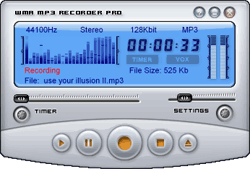 i-Sound WMA/MP3 Sound Recorder Professional is a audio recording and real-time MP3-compression software. The program gives you the option to record sound from any internal or external source directly to MP3 format. I-Sound WMA/MP3 Sound Recorder is also very easy to use; and all you need to do is to configure the sound card and press “Start” button. i-Sound WMA/MP3 Sound Recorder Professional is a audio recording and real-time MP3-compression software. The program gives you the option to record sound from any internal or external source directly to MP3 format. I-Sound WMA/MP3 Sound Recorder is also very easy to use; and all you need to do is to configure the sound card and press “Start” button.
i-Sound WMA MP3 Recorder is also built with features to help turn your computer into complete home recording studio. You can capture streaming audio into MP3, OGG, WMA, APE, WAV format sound file directly without costing any other disk space. I-Sound WMA/MP3 Sound Recorder Professional also comes with built-in scheduler that allows you to record streaming audio from specified URL at predefined time. VOX system automatically monitors the input source and activates streaming recording when the input volume reaches a specified level. The recording automatically stops once the audio level drops below a specified threshold.
i-Sound WMA/MP3 Sound Recorder Professional includes a number of features such as the following; convert cassette to MP3 or Vinyl to MP3, record radio with built-in scheduler, record Skype calls, (both sides), record MIDI protected MP4, WMA, and AAC files to MP3, record all what you hear, and voice activated sound recorder.
Want to check it out? Visit AbyssMedia.
Posted in Main | No Comments »
Sunday, February 12th, 2012
 Workbook Compare is an application that lets you compare any two Excel workbooks in just a few clicks, or limit the comparison to specific worksheets. You can also see your differences in an Excel report. This is an essential Excel utility for analysts, auditors, project managers, Excel developers, and everyone who needs to compare one spreadsheet to another. Workbook Compare is used by businesses, organizations, government agencies and universities around the world. For 15 days you can try out this program; and thereafter choose to go for the license that costs just $100. Workbook Compare is an application that lets you compare any two Excel workbooks in just a few clicks, or limit the comparison to specific worksheets. You can also see your differences in an Excel report. This is an essential Excel utility for analysts, auditors, project managers, Excel developers, and everyone who needs to compare one spreadsheet to another. Workbook Compare is used by businesses, organizations, government agencies and universities around the world. For 15 days you can try out this program; and thereafter choose to go for the license that costs just $100.
Workbook Compare enables you to automatically map worksheets, automatically locate headers and maps columns based on header values, and customize any worksheet or column mapping with an intuitive user-interface. Other features of this program include the following; set unique keys to columns to treat worksheets like database tables, create projects to make repeated comparisons a breeze, highlight differences to make them easy to spot, compare formulas as either formulas or values, case-sensitive text option, assign a variance allowance to ignore tiny differences, includes “Table Compare” for simple table comparisons, choose from several difference report layouts, compare formulas as formulas (A1 or R1C1) or values, and a host of others.
Want to check it out? Visit HigherData.
Posted in Main | No Comments »
Sunday, February 12th, 2012
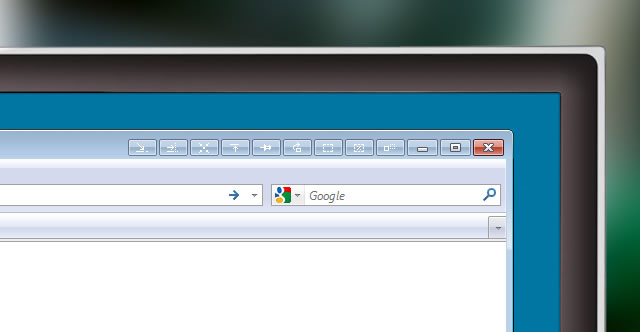 eXtra Buttons adds set of buttons in the caption of all windows. They look like system standard buttons and become built into a system. Ten buttons set contains the following; Always on top, Send to back, Copy window, Roll-up/Unroll, Minimize to Box, Transparency, Percentage transparency, Minimize to Tray, Minimize to Tray Menu, Move to another monitor. eXtra Buttons extends standard OS functionality and looks like standard system buttons. eXtra Buttons enables you to organize things easily, with so many useful functional features, that you won’t even notice the change of the way you work with computer. eXtra Buttons adds set of buttons in the caption of all windows. They look like system standard buttons and become built into a system. Ten buttons set contains the following; Always on top, Send to back, Copy window, Roll-up/Unroll, Minimize to Box, Transparency, Percentage transparency, Minimize to Tray, Minimize to Tray Menu, Move to another monitor. eXtra Buttons extends standard OS functionality and looks like standard system buttons. eXtra Buttons enables you to organize things easily, with so many useful functional features, that you won’t even notice the change of the way you work with computer.
eXtra Buttons combines a lot of key features that are very easy to use. Some of these features include the following; you won’t spot any look and feel difference with standard buttons while using this program, and because they are using native Windows’ system functions, they will always appear according to your desktop theme, works in all windows versions starting from Windows 98 and including the latest Windows 7, add application to the blacklist if you do not want eXtra Buttons to appear, assign any valid keyboard and shift key (including <Alt> and <Ctrl>) combination for each of eXtra Buttons, and many more.
Want to check it out? Visit XtraButtons.
Posted in Main | No Comments »
Sunday, February 12th, 2012
 Cascading Slides is a media browser and slideshow application that makes viewing large collections of pictures and videos a breeze. You can tag folder favorites, add image captions, and even password encrypt your files. Cascading Slides is fully customizable, and with full keyboard support, it’s also user friendly. Cascading Slides 2.5 has a few changes that include the following; loosened restrictions on use when trial period has expired (“Cascading Slides Free”), folder views are now called “Albums,” overhauled the main menu, adding standard menu bar on the main menu window, multiple albums can now be opened at the same time with one action, main menu window state is now saved and restored when the app is re-started, and main menu window now minimizes upon close into the system tray (optional). Cascading Slides is a media browser and slideshow application that makes viewing large collections of pictures and videos a breeze. You can tag folder favorites, add image captions, and even password encrypt your files. Cascading Slides is fully customizable, and with full keyboard support, it’s also user friendly. Cascading Slides 2.5 has a few changes that include the following; loosened restrictions on use when trial period has expired (“Cascading Slides Free”), folder views are now called “Albums,” overhauled the main menu, adding standard menu bar on the main menu window, multiple albums can now be opened at the same time with one action, main menu window state is now saved and restored when the app is re-started, and main menu window now minimizes upon close into the system tray (optional).
Cascading Slides requires java to effectively run on your system; and has a 14 day limitation for users. Some of its key features include the following; random/Shuffle across dozens/hundreds of folders and thousands of photos/videos, optional auto-hide feature makes the tree menu only appear when the cursor is moved toward window edge, easily add and edit photo/video caption, support for opening videos in your video editing application (i.e. Windows Movie Maker), and many more.
Want to check it out? Visit Globalisk.
Posted in Main | No Comments »
Saturday, February 11th, 2012
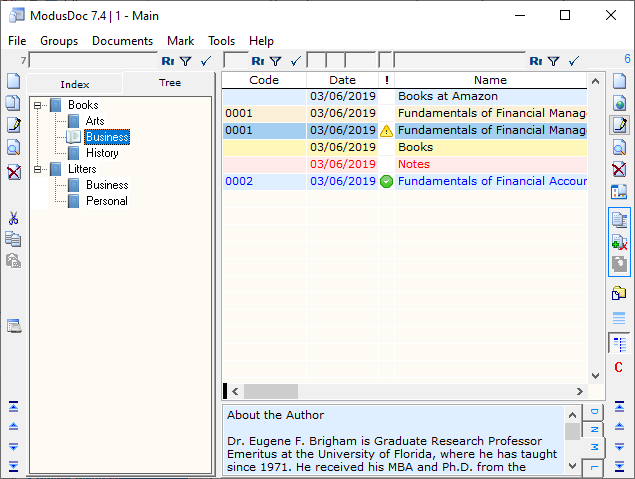 ModusDoc is a nice application designed to organize your documents, files, links, programs, folders, and notes; all in the form of a database for quick and easy access to them. Database ModusDoc consists of a table and the table entries. The Group presented two tabs Index and wood, and Wood is generated automatically. The program enables quick access to any data stored in this database which consists of a table with entries. The ModusDoc database is customizable according to the user’s preferences. Filtration system (selection), located directly above the tabs and groups on each table field recordings, you can easily and quickly find the information you want. ModusDoc is a nice application designed to organize your documents, files, links, programs, folders, and notes; all in the form of a database for quick and easy access to them. Database ModusDoc consists of a table and the table entries. The Group presented two tabs Index and wood, and Wood is generated automatically. The program enables quick access to any data stored in this database which consists of a table with entries. The ModusDoc database is customizable according to the user’s preferences. Filtration system (selection), located directly above the tabs and groups on each table field recordings, you can easily and quickly find the information you want.
You can add database ModusDoc any documents shortcuts folder simply by dragging them from the desktop, start menu or from Windows Explorer. Also, you can drag a hyperlink, selected text, e-mail messages, cataloger ModusDoc automatically create the appropriate records (hyperlinks, or Notes). Users of ModusDoc can also add all the objects in the folder, simply pointing to the folder in the dialog box. Objects are written in a cataloger ModusDoc may be not only on your local computer, but also on removable media, as well as on remote computers (network). Cataloger ModusDoc can is also able to create an unlimited number of databases with switching between them via a special table or list in the menu [File].
ModusDoc is a shareware program, and is available for $19.00; but you can try it for 30 days before making up your mind on it.
Want to check it out? Visit Modus58.
Posted in Main | No Comments »
Friday, February 10th, 2012
StockTicker7 lets you stay updated on the current stock prices. The program stays on top of other windows on the desktop and shows the current stock prices. The program basically lets you stay updated with investments with ease. StockTicker7 by showing the latest market trends in selected stocks. By downloading stock ticker onto a computer, the background will run stock ticker with the items selected. This helps novice investors keep track of their stock portfolio by constantly seeing the changes to the stocks they have in their personal stock account via the stock ticker figures running on the computer.

Stock ticker looks to be one of those perfect programs needed by those who are trying to buy stocks while the price is low and then sell the stocks when they go back up and are high. By watching on stock ticker, it is possible to determine when the market price for any stock is starting to go down. If the stock is a strong company and the drop is not related to problems within the company, the price drops are likely to increase again. This is particularly true of any popular Fortune 500 company or any business that sells popular products.
The publisher still has a lot of work to do on this one; especially on how to use it.
Want to check it out? Visit Stockticker7.
Posted in Main | No Comments »
Friday, February 10th, 2012
 SecureFX lets you choose standard FTP or secure data transfer with FTP over an encrypted SSH2 connection. The program has a simple Explorer-like interface, which makes it easy to learn and use. One Client for Standard and Secure File Transfer, if your company network, ISP or web host supports SSH2; you can create a fully encrypted FTP session using SecureFX. The program meets your evolving file transfer needs with a single application that lets you choose between SFTP or FTP over SSL (TLS) for secure transfers, or standard FTP for non-secure transfers. It has a simple Explorer-like interface, so it’s easy to learn and use while offering powerful automation capabilities for unattended, secure file transfers. SecureFX lets you choose standard FTP or secure data transfer with FTP over an encrypted SSH2 connection. The program has a simple Explorer-like interface, which makes it easy to learn and use. One Client for Standard and Secure File Transfer, if your company network, ISP or web host supports SSH2; you can create a fully encrypted FTP session using SecureFX. The program meets your evolving file transfer needs with a single application that lets you choose between SFTP or FTP over SSL (TLS) for secure transfers, or standard FTP for non-secure transfers. It has a simple Explorer-like interface, so it’s easy to learn and use while offering powerful automation capabilities for unattended, secure file transfers.
SecureFX has a lot of key benefits that include the following; maintain file systems and documents securely, transfer files across networks and the internet with a choice of SFTP over SSH2, FTP over SSL, SCP, or FTP for internal networks, get running quickly with an easy-to-learn tabbed interface to help you organize your sessions, you can drag and drop files to start transfers, even between SecureFX and applications like Explorer or WinZip, Synchronize files using QuickSynchronize, upload, download, and mirror files, with filtering to include or exclude files or file types, and a few others.
Want to check it out? Visit Vandyke.com.
Posted in Main | No Comments »
Thursday, February 9th, 2012
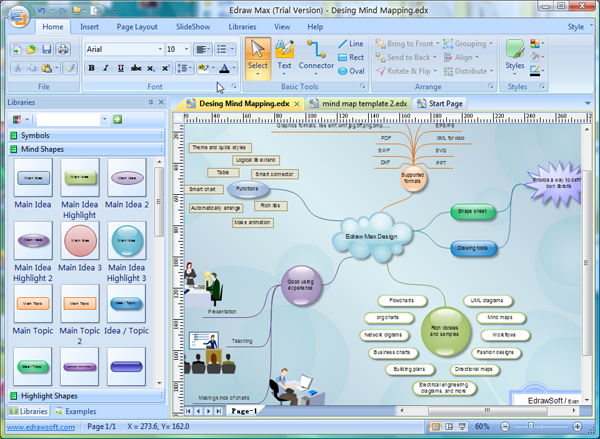 Edraw Mind Map is an application that makes it easy to create mind maps (graphical representations of thought processes) for brainstorming, problem solving, rational analysis, and decision making. Easy to use drawing tools, many pre-drawn flowchart templates and more than 600 flowchart symbols and flowchart samples, drawing couldn’t be easier. Edraw Mind Map is a vector-based mind mapping software with rich examples and templates which make it easy to create mind maps, brain-storming diagrams, project timeline, life planner, SWOT analysis and sketch maps. With this program, you can visualize your thinking and quickly arrange and organize your work, all to benefit you as well as people around you. Edraw Mind Map is an application that makes it easy to create mind maps (graphical representations of thought processes) for brainstorming, problem solving, rational analysis, and decision making. Easy to use drawing tools, many pre-drawn flowchart templates and more than 600 flowchart symbols and flowchart samples, drawing couldn’t be easier. Edraw Mind Map is a vector-based mind mapping software with rich examples and templates which make it easy to create mind maps, brain-storming diagrams, project timeline, life planner, SWOT analysis and sketch maps. With this program, you can visualize your thinking and quickly arrange and organize your work, all to benefit you as well as people around you.
Edraw Mind Map comes with a lot of features that enable you carry out a lot of functions. These features include the following; lots of high-quality topics, examples and templates, supports big size mind map and collapsible topics, supports multiple page Mind Map document and hyperlinks, themes, effects and quick styles help create professional-looking mind maps quickly, gain greater productivity in mapping with features like automatically aligns and add multiple topics one time, integrated with Microsoft Office application and easy to share, generics graphic formats support and WYSIWYG printing, and a host of others.
Want to check it out? Visit Edrawsoft.
Posted in Main | No Comments »
Thursday, February 9th, 2012
 VueMinder Calendar is an application that enables you to receive content-rich popup reminders, desktop alerts, and reminders that can be sent to you via email or direct to your phone using SMS. The application is a bit different from other applications in the sense that it enables you to do just more than entering date and time of an appointment. Latest changes include the following; addition of an option to show another reminder when an event ends, addition of a webcal browser to the Add Public Calendars window, addition of an option for the visible time slot range in the Day and Week views, Improved task tray icon to show a popup of today’s events when hovering the mouse, and a few bug fixes. VueMinder Calendar is an application that enables you to receive content-rich popup reminders, desktop alerts, and reminders that can be sent to you via email or direct to your phone using SMS. The application is a bit different from other applications in the sense that it enables you to do just more than entering date and time of an appointment. Latest changes include the following; addition of an option to show another reminder when an event ends, addition of a webcal browser to the Add Public Calendars window, addition of an option for the visible time slot range in the Day and Week views, Improved task tray icon to show a popup of today’s events when hovering the mouse, and a few bug fixes.
VueMinder Calendar Lite is a FREE calendar and reminder program for Windows. It supports multiple calendars displayed simultaneously in layers. These can be viewed and printed by day, week, or month. They can also be visually distinguished using unlimited combinations of fonts, background colors, and gradient styles. It also integrates a semitransparent calendar into your Windows desktop, so you’ll always be able to see your upcoming events. VueMinder is a freeware application that is compatible with Windows 7, 2000, 9x, vista, and XP.
Want to check it out? Visit Vueminder.
Posted in Main | No Comments »
|
|
|




