Archive for the 'Main' Category
Tuesday, January 10th, 2012
 DeployMaster is a tool to distribute your software or other computer files and deliver them with a good first impression. Being a painless installation, you have come to the right place. It is unique in that it accommodates both the needs of inexperienced computer users and those of advanced users. DeployMaster can create a single installer that installs your software on Windows 98, ME, NT4, 2000, XP, 2003, Vista, 2008, and 7. Those who have 32-bit and 64-bit versions of their software can create a combined 32/64-bit installer, or separate 32-bit and 64-bit installers. DeployMaster is a tool to distribute your software or other computer files and deliver them with a good first impression. Being a painless installation, you have come to the right place. It is unique in that it accommodates both the needs of inexperienced computer users and those of advanced users. DeployMaster can create a single installer that installs your software on Windows 98, ME, NT4, 2000, XP, 2003, Vista, 2008, and 7. Those who have 32-bit and 64-bit versions of their software can create a combined 32/64-bit installer, or separate 32-bit and 64-bit installers.
If you are a computer novice, then you can enjoy its ability to install your software without asking any question. Computer experts on the other hand can enjoy the control and feedback it offers when they click the “Advanced Options Installation” button. And you will enjoy both the positive response from your customers and the ability to effortlessly build those setup packages with DeployMaster. Some of the key features of the program include the following; no-questions-asked installation option allows people inexperienced with computer to instantly install your software, advanced installation option gives computer experts among your customers full control, create portable installations on removable devices, without administrator rights, and a few others.
Want to check it out? Visit DeployMaster.
Posted in Main | No Comments »
Tuesday, January 10th, 2012
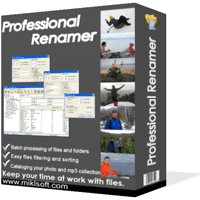 Professional Renamer is a shareware tool that can rename multiple filenames at once. The program is designed to be very flexible and user friendly. Its features make it ideal for MP3 collectors, digital camera users, programmers, system administrators, or file collectors of any kind. Professional Renamer is a shareware tool that can rename multiple filenames at once. The program is designed to be very flexible and user friendly. Its features make it ideal for MP3 collectors, digital camera users, programmers, system administrators, or file collectors of any kind.
The Professional Renamer has visual templates that allow applying different name patterns to every file or folder type. One name pattern can include up to nine fields with the user-set separators in between. Each field in its turn carries a variety of attributes like source name, date, time, counter, user string, etc. The attributes are set through dialogues that avail users of a choice of parameters. For instance, time can form a part of a name string as a one- or two-digit value and allows a choice between the time of creation, modification, last access or any other user-set value.
Professional Renamer also has an intuitive clarity of the program’s interface aims at easier and faster renaming. The three-panel window allows moving through system folders, editing templates, and addressing the changes to file names at the same time. You will also find the toolbar as well as status bar easy to use since they both complement the pleasure of operating Professional Renamer.
Want to check it out? Visit Miklsoft.
Posted in Main | No Comments »
Tuesday, January 10th, 2012
 Fresh Download is an easy-to-use and very fast download manager software that allows for easy downloading of files from the Internet, such as your favorite software, mp3 files, video files, picture collections, and many more. This version has easy integration into Internet Explorer, Mozilla Firebird, Firefox, Netscape Communicator, Opera, Avant Browser, Crazy Browser, Maxthon / MyIE2, Slim Browser, in any Windows operating system (95, 98, Me, NT, 2000, XP, Vista, 7). Fresh Download is an easy-to-use and very fast download manager software that allows for easy downloading of files from the Internet, such as your favorite software, mp3 files, video files, picture collections, and many more. This version has easy integration into Internet Explorer, Mozilla Firebird, Firefox, Netscape Communicator, Opera, Avant Browser, Crazy Browser, Maxthon / MyIE2, Slim Browser, in any Windows operating system (95, 98, Me, NT, 2000, XP, Vista, 7).
Fresh Download is built with features to enable you get the highest possible speed. It is designed with ability to some powerful tools to use four simultaneous connections (up to 8 connections) for the same file, while many other similar software only support single connection download. Fresh Download has a lot of key features that include the following; Turbo charges downloading files in FTP, HTTP and HTTPS protocols using your current internet connection (dial-up, cable, DSL / ADSL, satellite, T1, etc), pause and resume broken downloads recovered from a dropped Internet connection, Clipboard monitoring and drag & drop features. Easily grabs any URL from any applications, Support for the latest browsers including Mozilla Firefox 5, Firefox 4, Opera 11, Internet Explorer 9, Internet Explorer 8, Proxy Server support in both HTTP and FTP protocols and many more.
Want to check it out? Visit Freshdevices.com.
Posted in Main | No Comments »
Tuesday, January 10th, 2012
 KUpload+ is an ASP.Net File Upload component with Pure HTML Progress bar. It allows great control over the upload of huge files (Up to Virtually Unlimited) from client browser to web server through HTTP. KUpload+ has real time progress bar which keeps track of every file upload and allows you to watch how much of your file has been uploaded. Latest version of the program now supports Visual Studio 2005, 2008 and 2010, and .Net Framework 4.0, size validation, upload page filter, and addition new demo with sample code for visual studio 2005. KUpload+ is an ASP.Net File Upload component with Pure HTML Progress bar. It allows great control over the upload of huge files (Up to Virtually Unlimited) from client browser to web server through HTTP. KUpload+ has real time progress bar which keeps track of every file upload and allows you to watch how much of your file has been uploaded. Latest version of the program now supports Visual Studio 2005, 2008 and 2010, and .Net Framework 4.0, size validation, upload page filter, and addition new demo with sample code for visual studio 2005.
KUpload+ file upload control operates on totally different Upload technology from standard ASP.Net Classes. KUpload+ utilizes disk memory rather than server memory to store uploaded files. This means for large upload, KUpload+ .net upload control utilizes small amount of server memory. Hence new technology provides ultimate flexibility on the upload size. The program also includes some new uploads benefits such as; reducing development time in web based application, does file streaming to speed up huge file uploading and save server memory, easy to use and customizable, allows file uploads of large size through HTTP, can be used with both VB, .NET, C#.net, does not require any client server, and buy and build benefit.
Want to check it out? Visit DimpleSoftwares.
Posted in Main | No Comments »
Saturday, January 7th, 2012
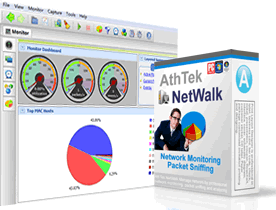 AthTek NetWalk is a program developed specifically for experienced network administrator. The publisher includes a number of powerful functions and great quantity of information that only experienced network administrator can totally handle. If you are not so familiar with network management, you may get lost in great quantity information, much less network analysis. You can now select binary strings in packet hex panel, and shorten the waiting time when opening large trace file in this version. AthTek NetWalk is a program developed specifically for experienced network administrator. The publisher includes a number of powerful functions and great quantity of information that only experienced network administrator can totally handle. If you are not so familiar with network management, you may get lost in great quantity information, much less network analysis. You can now select binary strings in packet hex panel, and shorten the waiting time when opening large trace file in this version.
AthTek NetWalk also concentrates on enterprise network management by enabling enterprise owner or the network administrator to monitor traffic throughout the network, and gives a graphical real-time collection of data which the network adapter is accessing, including all the different websites/host address, ports, trends, etc. AthTek NetWalk is expert in packet sniffing; and works easily with Wireshark and WinPcap, and has achieved better performance in packet sniffing and network analysis. AthTek NetWalk supports almost all protocols, including those unnamed ones. It also perfectly supports IPv6, which only a few network monitoring tools can deal with. The program can be used for networking monitoring, networking traffic analyzing, network intrusion detection, etc.
AthTek NetWalk includes a number of features such as; support super large trace file, take advantage of Wireshark, built-in traffic filter, support IPv6, supports all protocols, and many more.
Want to check it out? Visit Athtek.com.
Posted in Main | No Comments »
Friday, January 6th, 2012
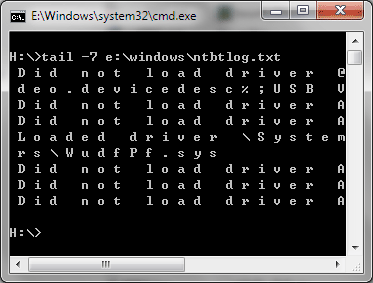 tail for Windows is 100% Freeware UNIX/Linux like tail DOS Command for Windows. The program has great features that can be used to display last lines of a file and trace/monitor file’s change. You can also intercept a file from specified line no. into another file by using the redirection symbol (> or < ). tail for Windows is portable software, do NOT need to be installed. tail for Windows is very easy to use, and all you need to do is simply extract the exe from the downloaded package (tail-for-windows.zip) and put it into c:\windows\system32 (c: = system drive, this path is recommended due to you can use tail DOS command without path setting). tail for Windows is 100% Freeware UNIX/Linux like tail DOS Command for Windows. The program has great features that can be used to display last lines of a file and trace/monitor file’s change. You can also intercept a file from specified line no. into another file by using the redirection symbol (> or < ). tail for Windows is portable software, do NOT need to be installed. tail for Windows is very easy to use, and all you need to do is simply extract the exe from the downloaded package (tail-for-windows.zip) and put it into c:\windows\system32 (c: = system drive, this path is recommended due to you can use tail DOS command without path setting).
tail supports most options compared with UNIX/Linux tail command. There is a manual (manual.html) in the downloaded package, and once you read it you can find out more about all supported options. Some of the key features include the following; displays Last Lines of a File, Trace/Monitor File’s Change, intercept a File from Specified Line No, free (actually free in the real sense of it), portable application, easy to use, no need for any installation, and a couple of others.
Want to check it out? Visit TrisunSoft.
Posted in Main | No Comments »
Friday, January 6th, 2012
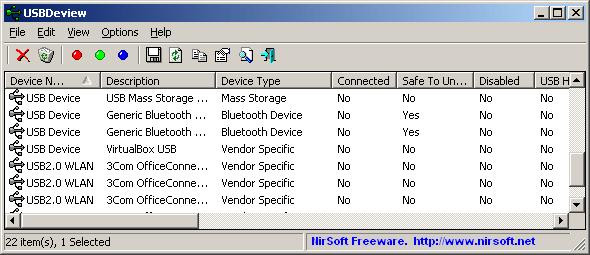 USBDeview is a small utility that lists all USB devices that are currently connected to your computer, as well as all USB devices previously used by you. For each USB device, the following extended information is displayed; Device name/description, device type, serial number (for mass storage devices), the date/time that device was added, VendorID, ProductID, and more. USBDeview also allows you to uninstall USB devices that you previously used, and disconnect USB devices that are currently connected to your computer. You can also use the program on a remote computer, as long as you login to that computer with admin user. This version of USBDeview contains a few updates such as the following; addition of more accelerator keys, addition of a few more command-line options, and a few bug fixes. However, the publisher still haven’t be able to make this version fully compatible with USB 3.0. USBDeview is a small utility that lists all USB devices that are currently connected to your computer, as well as all USB devices previously used by you. For each USB device, the following extended information is displayed; Device name/description, device type, serial number (for mass storage devices), the date/time that device was added, VendorID, ProductID, and more. USBDeview also allows you to uninstall USB devices that you previously used, and disconnect USB devices that are currently connected to your computer. You can also use the program on a remote computer, as long as you login to that computer with admin user. This version of USBDeview contains a few updates such as the following; addition of more accelerator keys, addition of a few more command-line options, and a few bug fixes. However, the publisher still haven’t be able to make this version fully compatible with USB 3.0.
USBDeview works on Windows 2000, Windows XP, Windows 2003, Windows Vista, Windows Server 2008, and Windows 7. Windows 98/ME is not however, supported by the program. The program doesn’t require any installation process or additional DLL files. All you have to do is simply copy the executable file (USBDeview.exe) to any folder you like, and run it.
Want to check it out? Visit Nirsoft.net.
Posted in Main | No Comments »
Friday, January 6th, 2012
Aspose.Cells is a Java component for spreadsheet reporting without using Microsoft Excel. Some of the features include creating spreadsheets, opening encrypted excel files, macros, VBA, Unicode, formula settings, pivot tables, importing data from JDBC ResultSet and support of CSV, SpreadsheetML, PDF, ODS and all file formats from Excel 97 to Excel 2007. It is compatible with Windows, Linux & Unix and supports all advanced features of data management, formatting, worksheet, charting and graphics.

Aspose.Cells for Java is a mature, scalable and feature rich component that offers many functions that are way beyond the simple data exporting capabilities of other vendors. With Aspose.Cells for Java developers can export data, format spreadsheets to the most granular level, import images, import charts, create charts, apply and calculate complex formulas, stream Excel data, save in various formats and much more; all these without the need of Microsoft Excel or Microsoft Office Automation.
Some of the things you can use the program for include the following; platform independence (highlights how Aspose.Cells for Java can be used on a variety of platforms), build dynamic Excel reports on the fly, Create Excel dashboards, incorporating charts and pivot tables, spreadsheet conversion, spreadsheet manipulation and editing, spreadsheet generation, import data from Excel spreadsheets, and many more.
Want to check it out? Visit Aspose.
Posted in Main | No Comments »
Friday, January 6th, 2012
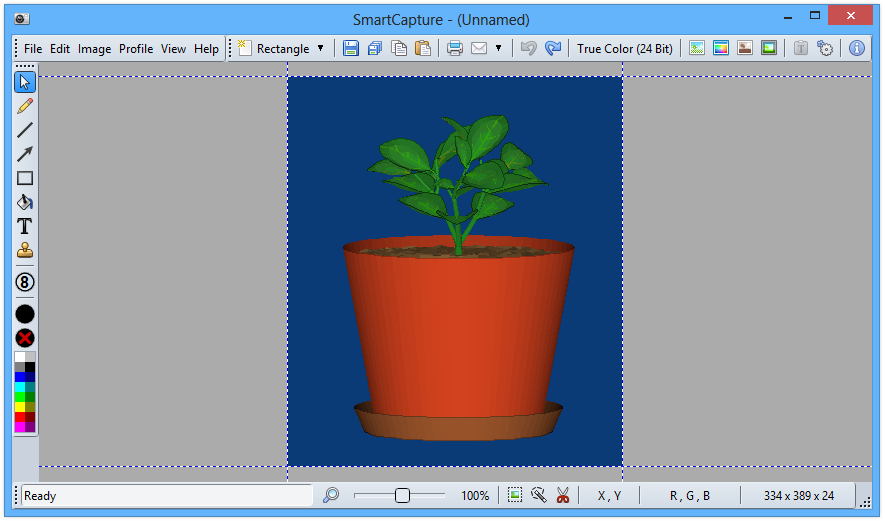 SmartCapture is a professional easy to use screen capture application for Windows. The application’s clear and intuitive user interface and powerful features make it the ideal utility for everyone who wants to capture any contents of the Windows desktop. SmartCapture can capture rectangular screen areas, whole objects, windows or screens and it can acquire images from Twain compatible data sources. The captured images can be cropped very easily and the color depth can be changed to any desired value from monochrome to true color. Images can be printed, saved, copied to the clipboard, sent to an email recipient, MS Word or any image editor, and a host of others. SmartCapture is a professional easy to use screen capture application for Windows. The application’s clear and intuitive user interface and powerful features make it the ideal utility for everyone who wants to capture any contents of the Windows desktop. SmartCapture can capture rectangular screen areas, whole objects, windows or screens and it can acquire images from Twain compatible data sources. The captured images can be cropped very easily and the color depth can be changed to any desired value from monochrome to true color. Images can be printed, saved, copied to the clipboard, sent to an email recipient, MS Word or any image editor, and a host of others.
SmartCapture supports all major file formats, image manipulations (e.g. resize, flip, rotate, color replace, invert, optimized color palettes, dither, etc.), multiple monitors, full automation, capture wizards, capture profiles, multi-level undo and much more. Many other options allow the customization of all actions to individual user needs. SmartCapture is not only one of the most powerful screen capture utilities available – it was also designed to be the most user-friendly tool of all.
Some of the key features you will find in the application include the following; capture modes: rectangle, window, active window, screen, area, fixed size, capture the mouse cursor, multiple monitor support, separate Hot-Keys for different capture modes, and many more.
Want to check it out? Visit Desksoft.com.
Posted in Main | No Comments »
Thursday, January 5th, 2012
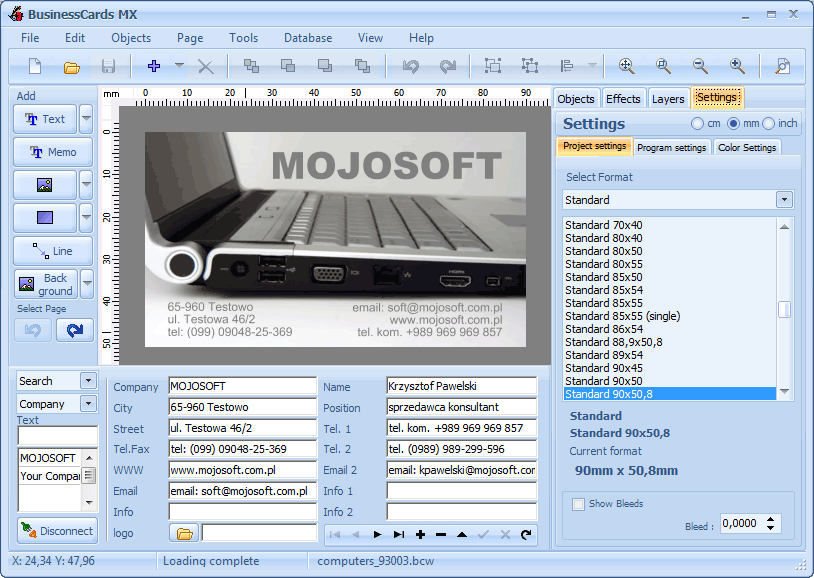 BusinessCards MX software is created to help you design and print a professional business card. The interface of the program has been designed in such a way that even a beginning user will not have problems with using the program. The process of designing is based on inserting ready for use elements accessible in the program such as figures, images and the background, and freely shifting them on the prepared project. One of the benefits of the program is the possibility of saving data about a company or people so that it can be used later while designing a business card. BusinessCards uses templates, which you can prepare on your own, or you can use ready models of business cards accessible in it. The program includes 400 templates of business cards. BusinessCards MX software is created to help you design and print a professional business card. The interface of the program has been designed in such a way that even a beginning user will not have problems with using the program. The process of designing is based on inserting ready for use elements accessible in the program such as figures, images and the background, and freely shifting them on the prepared project. One of the benefits of the program is the possibility of saving data about a company or people so that it can be used later while designing a business card. BusinessCards uses templates, which you can prepare on your own, or you can use ready models of business cards accessible in it. The program includes 400 templates of business cards.
BusinessCards software is designed for both advanced and inexperienced users. It comes with a variety of tools that enable you to create a lot of professional business cards within a very short time. The program also comes with a lot of modifiable templates that simply allows you to design your cards the way it suits you. As a matter of fact, BusinessCards MX software includes 750 examples of business cards that you can draw inspiration from.
Want to check it out? Visit Businesscards-MX.
Posted in Main | No Comments »
|
|
|