Archive for the 'Main' Category
Monday, December 19th, 2011
 YUMI (Your Universal Multiboot Installer) is the successor to MultibootISOs. The program can be used to create a Multiboot USB Flash Drive containing multiple operating systems, antivirus utilities, disc cloning, diagnostic tools, and more. Contrary to MultiBootISO’s which used grub to boot ISO files directly from USB, YUMI uses syslinux to boot extracted distributions stored on the USB device, and reverts to using grub to Boot Multiple ISO files from USB, if necessary. YUMI (Your Universal Multiboot Installer) is the successor to MultibootISOs. The program can be used to create a Multiboot USB Flash Drive containing multiple operating systems, antivirus utilities, disc cloning, diagnostic tools, and more. Contrary to MultiBootISO’s which used grub to boot ISO files directly from USB, YUMI uses syslinux to boot extracted distributions stored on the USB device, and reverts to using grub to Boot Multiple ISO files from USB, if necessary.
YUMI (Your Universal Multiboot Installer) enables each user to create their own custom Multiboot UFD containing only the distributions they want, in the order by which they are installed. A new distribution can be added to the UFD each time the tool is run. YUMI works much like Universal USB Installer, except it can be used to install more than one distribution to run from your USB.
This probably is one of the best multi-boot USB applications available on the internet; and the fact that it is even free makes it amazing! YUMI also covers Linux distros, including a group of other essential tools. The program runs on the following operating systems; Windows 7, 2000, 2003, Vista, and XP.
Want to check it out? Visit YUMI.
Posted in Main | No Comments »
Monday, December 19th, 2011
 Magican is a powerful system optimization tool for Mac OS X; and is created to make Mac operating system run fast. The system monitor helps users perfect Mac in all directions, including cleaning Mac to enlarge disk space, monitoring system status in real time, like CPU usage and disk info, listing installed software for further operation, managing all your working documents, sportful music and photos and showing your hardware info for upgrade. Version 0.9.64 is now out with a couple of new features that include display of the total amount of deleted junks, floating window displays monthly network traffic, and some minor bug fixes. Magican is a powerful system optimization tool for Mac OS X; and is created to make Mac operating system run fast. The system monitor helps users perfect Mac in all directions, including cleaning Mac to enlarge disk space, monitoring system status in real time, like CPU usage and disk info, listing installed software for further operation, managing all your working documents, sportful music and photos and showing your hardware info for upgrade. Version 0.9.64 is now out with a couple of new features that include display of the total amount of deleted junks, floating window displays monthly network traffic, and some minor bug fixes.
Magican also has a lot of features and benefits that include the following; system optimization items that help users clean Mac to speed up Mac, one click helps scan out all useless data existing on Mac and also one click enable Magican to clean Mac perfectly, it shows Mac basic information, like system info, hardware info, document info and software info, helps you to monitor fresh system activity in seconds, like memory usage, CPU usage and CPU temperature, etc. Magican requires 10MB or more disk space, Mac OS 10.6 or higher (64bit), Intel based Mac (Does not support PPC) to function properly on your system.
Want to check it out? Visit Magicansoft.
Posted in Main | No Comments »
Sunday, December 18th, 2011
 nSpaces gives you a lot of options when it comes to workspaces for different applications. The point is sometimes you may have many applications such as mail client, editor and Web browser running on one desktop, and you don’t want to mess them up. But things go contrary to your wishes. Fortunately, with nSpaces you may have separate workspaces (we call them virtual desktops) for different applications, each workspace (desktop) has different applications for graphic design, checking mails and writing reports. nSpaces gives you a lot of options when it comes to workspaces for different applications. The point is sometimes you may have many applications such as mail client, editor and Web browser running on one desktop, and you don’t want to mess them up. But things go contrary to your wishes. Fortunately, with nSpaces you may have separate workspaces (we call them virtual desktops) for different applications, each workspace (desktop) has different applications for graphic design, checking mails and writing reports.
nSpaces gives you a lot of features that are absolutely easy to use with a little experience. You can create multiple desktops on your computer, and open different applications on each separate virtual desktops to improve your productivity. Some of its key features include the following; label your tag for each virtual desktop, the tag is shown on the space switcher, set a custom desktop image for each of your desktops and watch as the pictures fade into each other when switching between your desktops, set a background color for them, protect your space, nSpaces has a group of hotkeys for each desktop you created, hotkey for the space switcher, etc.
nSpaces is a freeware application, and is compatible with Windows 7, 2000, Vista, and XP.
Want to check it out? Visit Bytesignals.com.
Posted in Main | No Comments »
Sunday, December 18th, 2011
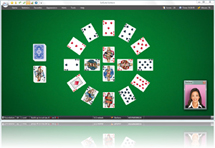 SolSuite is a high-quality collection of 500 solitaire games, and includes implementation of every of your favourite games including the following; Spider, Klondike, FreeCell, Pyramid, Golf, Busy Aces, Canfield, Forty Thieves, Four Seasons, Carpet, Flower Garden, Rouge et Noir, Monte Carlo and original solitaires that you cannot find elsewhere. SolSuite is a high-quality collection of 500 solitaire games, and includes implementation of every of your favourite games including the following; Spider, Klondike, FreeCell, Pyramid, Golf, Busy Aces, Canfield, Forty Thieves, Four Seasons, Carpet, Flower Garden, Rouge et Noir, Monte Carlo and original solitaires that you cannot find elsewhere.
SolSuite without a doubt offers the most exciting gaming experience; and users have hundreds of games to choose from, including a dazzling selection of card faces & backs, large card sets for ease of viewing, ribbon interface for enhanced game play, skins to customize your playing area and fast, courteous support. There is also no doubt about the fact that SolSuite being one of the most addictive games available.
SolSuite includes a lot of key features such as; over eighty awesome card sets, more than 300 beautiful card backs, more than 100 backgrounds, large card sets easier to see, lots of advanced key features, 535 world’s best solitaire games, and a host of others. SolSuite 2011 11.11 is definitely an improvement over previous versions; and this makes it even more addictive and fun to download. SolSuite goes for $19.95, and is compatible with all Windows operating systems.
Want to check it out? Visit Solsuite.com.
Posted in Main | No Comments »
Sunday, December 18th, 2011
 1and1Mail is free email marketing software specifically designed for small and medium business worldwide to create, schedule and send personalized mass emails, manage email contacts and design email newsletters. The application differentiates itself from other mass mailing software by offering unique features that can greatly boost your email deliverability and lower your email marketing cost. A couple of these features include the following; Automatic IP Switcher, Multi-threaded Sending, Email Template Downloader and Multi Account Manager. With 1and1Mail, you are able to not only send more emails to your customers per day, but also build a better corporate image with professional and well-designed email templates. 1and1Mail is free email marketing software specifically designed for small and medium business worldwide to create, schedule and send personalized mass emails, manage email contacts and design email newsletters. The application differentiates itself from other mass mailing software by offering unique features that can greatly boost your email deliverability and lower your email marketing cost. A couple of these features include the following; Automatic IP Switcher, Multi-threaded Sending, Email Template Downloader and Multi Account Manager. With 1and1Mail, you are able to not only send more emails to your customers per day, but also build a better corporate image with professional and well-designed email templates.
It is not every day you get find a program that is not only free, but combines a lot of wonderful features. 1and1Mail is miles ahead of a couple of similar freeware programs that are stuffed with ads or taglines in your email footer to promote their products. It allows you to maximize your email deliverability and avoid being blacklisted by email service providers, and ensures your email marketing campaigns will be delivered accurately and safely to your clients. 1and1Mail allows you to directly download and use any WebPages on the Internet as your email templates.
Want to check it out? Visit 1and1soft.
Posted in Main | No Comments »
Wednesday, December 14th, 2011
 Sometimes, malicious and other potentially unwanted software, including rootkits, try to install themselves on your PC. This can happen when you connect to the Internet or install some programs from a CD, DVD, or other media. Once on your PC, this software might run immediately, or it might run at unexpected times. Windows Defender Offline Beta is that program created to help you remove such hard to find malicious and potentially unwanted programs using definitions that recognize threats. Definitions are files that provide an encyclopaedia of potential software threats. Sometimes, malicious and other potentially unwanted software, including rootkits, try to install themselves on your PC. This can happen when you connect to the Internet or install some programs from a CD, DVD, or other media. Once on your PC, this software might run immediately, or it might run at unexpected times. Windows Defender Offline Beta is that program created to help you remove such hard to find malicious and potentially unwanted programs using definitions that recognize threats. Definitions are files that provide an encyclopaedia of potential software threats.
As a matter of fact, since new threats appear daily, it is important to always have the most up-to-date definitions installed in Windows Defender Offline Beta. Armed with definition files, Windows Defender Offline Beta can detect malicious and potentially unwanted software, and then notify you of the risks. There are actually four basic steps to installing Windows Defender Offline on your system, and these steps include the following; download Windows Defender Offline Beta and create a CD, DVD, or USB flash drive, restart your PC using the Windows Defender Offline Beta media, scan your PC for malicious and other potentially unwanted software, and remove any malware that is found from your PC.
Want to check it out? Visit Microsoft.com.
Posted in Main | No Comments »
Wednesday, December 14th, 2011
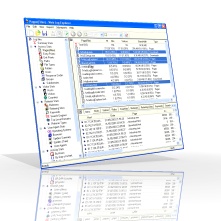 Web Log Explorer is a web server log analyzer program that generates reports of any kind and displays them. The system of filters provides the ability to carry out deep analysis of visitor activity. The program gives you activity statistics, file access statistics, and information about referring pages, search engines, errors, visitor countries, referring sites, you will get complete information about search words and phrases and more. The flexible system of filters provides an ability to carry out deep analysis of the visitors’ activity. You can get information about visitors who accessed a specific page or came from a specific URL. You must analyze your web site traffic to be able to effectively market and increase the revenue generated by your website. Latest updates include the following; new graph chart, minor improvements, and a number of bugs fixes. Web Log Explorer is a web server log analyzer program that generates reports of any kind and displays them. The system of filters provides the ability to carry out deep analysis of visitor activity. The program gives you activity statistics, file access statistics, and information about referring pages, search engines, errors, visitor countries, referring sites, you will get complete information about search words and phrases and more. The flexible system of filters provides an ability to carry out deep analysis of the visitors’ activity. You can get information about visitors who accessed a specific page or came from a specific URL. You must analyze your web site traffic to be able to effectively market and increase the revenue generated by your website. Latest updates include the following; new graph chart, minor improvements, and a number of bugs fixes.
Web Log Explorer also allows you to filter visits by search engine robots. You can switch the program into “All requests”, “Without spiders” and “Spiders only” modes with the click of a button. The program also supports more than 30 log file formats. It was tested with all popular web server programs, web proxies, firewalls and MS Windows Media Services.
Want to check it out? Visit Exacttrend.com.
Posted in Main | No Comments »
Wednesday, December 14th, 2011
 Mipony is a free download manager program specially designed to automate the downloading of files of free host sites such as Rapidshare, Megaupload, Hotfiles and many others. The program enables you to enjoy comfortable features when it comes to downloading files by avoiding host sites inconveniences. Mipony is in charge of everything, it accesses the web where the file is hosted; it waits the required time and starts downloading them one by one. Mipony is a free download manager program specially designed to automate the downloading of files of free host sites such as Rapidshare, Megaupload, Hotfiles and many others. The program enables you to enjoy comfortable features when it comes to downloading files by avoiding host sites inconveniences. Mipony is in charge of everything, it accesses the web where the file is hosted; it waits the required time and starts downloading them one by one.
When it comes to downloading of files from the internet, all you need do is put the addresses of the files in Mipony and the program will be in charge of everything to have the files downloaded as fast as possible. The program also checks every link to see if the file has been deleted from the server or if it is available to be downloaded. Mipony works with both premium and free accounts of Rapidshare, Megaupload and Hotfile.
Mipony has a lot of key features that include the following; it can analyze full sites looking for links, indicating if they are still available in the server to be downloaded or if they have been erased, a web interface to control it remotely, inclusion of a captcha trader plugin that gives you access to the captchas decoding system developed by captchatrader.com, and many more.
Want to check it out? Visit Mipony.net.
Posted in Main | No Comments »
Tuesday, December 13th, 2011
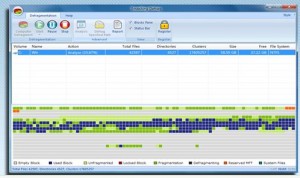 Smashing Defrag is a simple defragmenter software program. This program can defrag disk more efficiently and reliably because of the kind of features added to it. Smashing Defrag has a user-friendly interface makes our defragmenter do easy and fast defragmentation, and accelerate the launch time of programs, improve the file access speed, and provide detailed report for every defragmenting analyze and defragmentation action. It is compatible with the following Windows operating systems; Windows 7, 2000, 2003, 2008, Vista, and XP. Smashing Defrag is a simple defragmenter software program. This program can defrag disk more efficiently and reliably because of the kind of features added to it. Smashing Defrag has a user-friendly interface makes our defragmenter do easy and fast defragmentation, and accelerate the launch time of programs, improve the file access speed, and provide detailed report for every defragmenting analyze and defragmentation action. It is compatible with the following Windows operating systems; Windows 7, 2000, 2003, 2008, Vista, and XP.
Smashing Defrag is a shareware application that costs $34.95 per download, and comes with an uninstaller. Though, not yet up to the level of a few other programs in similar category; you will still be able to find a couple of its features very useful.
Smashing Defrag includes the following key features; user-friendly interface makes our defragmenter do easy and fast defragmentation, defragmenter will accelerate the launch time of programs, improve the file access speed, detailed report for every defragmenting analyze and defragmentation action, never lose data or corrupt your disk. Our defragmenter guarantees data safe, enhance performance windows defrag, defragmenting will increase a 20% performance, a highly effective defragment algorithm does fast and exceptional defragmenting, and a couple of others.
Want to check it out? Visit Defrag-defragmenter.
Posted in Main | No Comments »
Tuesday, December 13th, 2011
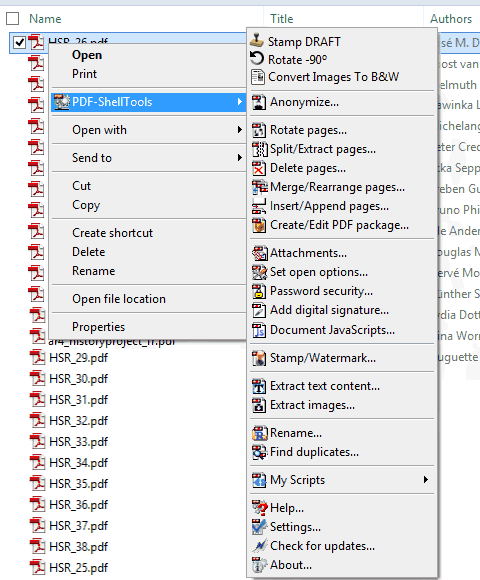 PDF-ShellTools are Windows shell extensions to interact with PDF files directly from the Windows shell. The program enables you to make interesting things to PDF documents without the need to open them in Acrobat or another desktop PDF application. It also show PDF info metatags in ToolTip windows, edit metatags in the file properties sheet, Anonymize, Split and Merge, set/reset Password Security, Stamp, are some of the current features. The publisher has successfully taken care of a bug that was crashing the Windows Shell in 64-bit Windows systems. PDF-ShellTools are Windows shell extensions to interact with PDF files directly from the Windows shell. The program enables you to make interesting things to PDF documents without the need to open them in Acrobat or another desktop PDF application. It also show PDF info metatags in ToolTip windows, edit metatags in the file properties sheet, Anonymize, Split and Merge, set/reset Password Security, Stamp, are some of the current features. The publisher has successfully taken care of a bug that was crashing the Windows Shell in 64-bit Windows systems.
Some of the group tools in this program include the following; PDF-InfoTip – show file metadata information in shell Infotip balloons, PDF-InfoEdit – Property sheet to edit the metadata information, Insert/Append/Attach on Drop – insert, append or attach supported document(s) onto a PDF file, by drag dropping it onto that PDF file, Column Handler – supported in Windows 2000 and XP, provides the ability to add new columns to the details view of Explorer window to display, in our case, PDFs metadata. Very useful to easily identify and sort PDFs, Property Handler – Introduced in Windows Vista, this powerful extension provides Shell read and write access to, in our case, PDFs metadata, and Shell Context Menu Tools – accessible from the Shell file context menu, the menu that pop-up when we right click a file in the Windows Shell.
Want to check it out? Visit Rttsoftware.
Posted in Main | No Comments »
|
|
|