Archive for the 'Main' Category
Tuesday, October 25th, 2011
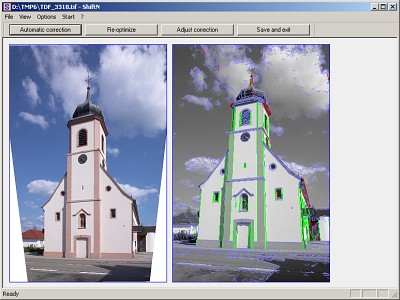 Professional photographers work with costly shift lenses or even special large-format cameras to prevent the unwanted visual effects brought on by converging lines in images, particularly in architectural as well as landscape photos. Professional photographers work with costly shift lenses or even special large-format cameras to prevent the unwanted visual effects brought on by converging lines in images, particularly in architectural as well as landscape photos.
Marcus Hebel’s ShiftN is a freeware program which will do much the same thing, examining images for parallel lines and improving the perspective. ShiftN’s easy, effective user interface is split between two panels, an image pane and an EXIF data view that at the same time acts as a preview pane for image processing. Apart from a file menu bar, this program has five buttons: Open, Automatic Correction, Re-Optimize, Adjust Correction, and Save and Exit. Clicked Open and load an image. You are able to apply a grid to the image via the View menu. By selecting the autocorrect option ShiftN processes the image, showing converging lines and other image elements in the preview pane image. Save the image and then open both the original and processed images for comparison.
The modifications made by ShiftN are subtle, but highly effective, shifting the perspective in the frame to a more attractive plane. When using the adjustment sliders you can significantly alter the perspective to achieve customized effects. ShiftN’s Options and Help file make this versatile tool easy to set up, too. With ShiftN, users of point-and-shoot cameras can approximate the capabilities that professional photographers pay thousands of dollars to get.
Check out the homepage Shiftn.de (Mainly in German but with English info page)
Posted in Main | No Comments »
Monday, October 24th, 2011
 When it comes to software programs that can deal with text documents, it’s a balancing act: occasionally you would like much more functionality than bare-bones text editors such as Notepad can provide, however full-featured word processors may be too large as well as bloated, particularly for portable use. When it comes to software programs that can deal with text documents, it’s a balancing act: occasionally you would like much more functionality than bare-bones text editors such as Notepad can provide, however full-featured word processors may be too large as well as bloated, particularly for portable use.
Qjot is the best of both worlds, with all the slimness of a text editor, but most of the basic features of a word processor. It’s a good choice if you want a way to work with documents on the go. The program’s user interface is plain and intuitive, with menus and a couple of toolbars across the top. There are formatting tools including text alignment, bulleting, word wrap, and indentation, as well as options for text and background color. Important word-processing tools like word count and find and replace are here, and there is even a link to take users directly to online dictionaries. Perhaps most importantly, Qjot lets users insert images and other objects into documents without difficulty. This program supports a number of file formats, such as RTF and DOC files.
There is no Help file, but this is not a huge problem; anyone who has used a word processor before will be quite familiar with Qjot’s features. Overall, Qjot can be a great alternative to bigger (and pricier) word processors; it has the features that most people use most of the time, without useless extras. And with its size of 600KB, the program can easily fit on a USB drive for portable use.
Get it from the QJot Homepage at Xtort.net.
Posted in Main | No Comments »
Monday, October 24th, 2011
Praat is Dutch for “talk.” It’s also the name of this lab-quality phonetics software that can record and analyze speech sounds both in mono and in stereo. While it is not difficult for an average person to use, it is really meant for linguists and those studying linguistics as well as other scientists and researchers who require the analysis of human speech in their work.
It supports speech synthesis, including articulatory synthesis. Additionally it creates high-quality images of data suitable for publication. Praat’s interface consists of two parts, Praat Objects and Praat Picture. The Help file has an excellent introduction to Praat and an overview of its functions and it is recommended to read it before delving into the science.
The speech recording is accomplished via the system microphone and sound card. Praat lets you make both mono and stereo recordings. Mono recordings are preferable for analyzing speech, but mono recording equipment is uncommon outside the lab. However, most handheld note-takers record monophonic sound, and they are commonly used in fieldwork. Although nothing is stopping you from choosing stereo. The process for recording sound is a little complicated, though the manual indicates it is easier in Linux and Mac versions of the program.
You’ll be able to create sound recordings not only from an external source such as a microphone but also from a WAV file and even directly inside Praat via formulas. This intriguing capability lets you create tones like sine waves with noise added. Once you have recorded a sound, it can be viewed as a waveform (two waveforms for stereo signals) in the SoundEditor window; Save, Cut, and Paste it; and open longer files with a LongSound feature that keeps most of longer sound files on your disk instead of being written to memory every time you play them.
This program is free and supported by Windows 2000 / XP / Vista / 7.
Check it out at Praat.
Posted in Main | No Comments »
Monday, October 24th, 2011
 Tray Dictionary is a free desktop dictionary application based on the Encarta online dictionary. By using it you are able to look up words immediately without needing to open up the online dictionary website. Additionally, it enables speedy right-click searches within Internet Explorer. Tray Dictionary is a free desktop dictionary application based on the Encarta online dictionary. By using it you are able to look up words immediately without needing to open up the online dictionary website. Additionally, it enables speedy right-click searches within Internet Explorer.
Open Tray Dictionary’s Start Menu folder and click on the program’s dictionary icon to start its System Tray user interface. Clicking the icon calls up a small search area for swift searches. If you put the Windows taskbar on the right edge of your wide-screen computer, it will cover the Tray Dictionary’s search button, and you will not have the ability drag this out. However should you drag the taskbar horizontally and back again, Tray Dictionary’s search box realigns itself. Having said that, you have to do this every time when using the entry field. Type in any word and click on the Search button. A page will appear with the Encarta logo and “Language Advisory” in red letters if the word might be not suitable for a younger audience. Clicking on “View full definition” will open up a webpage with more specific definition.
The online Help file is incredibly basic and you might not find very much information within it. You can also highlight words and phrases in internet explorer for example, in addition to right-click to search them in Tray Dictionary. This small utility is free and supported by Windows 98 / Me / 2000 / XP / 2003 / Vista / Server 2008 / 7.
Check it out at Wenpoint.com.
Posted in Main | No Comments »
Monday, October 24th, 2011
 SSuite Office is a totally free productivity suite that could go head-to-head with Microsoft’s Office along with other free of charge and premium suites. This bundles a word processor, spreadsheet, PDF creator, e-mail, web browser, and plenty of additional items. A lot of its tools are fully compatible with various applications and file types, which makes it a worthwhile alternative not only as a standalone suite, and also in collaborative and business environments. SSuite Office is a totally free productivity suite that could go head-to-head with Microsoft’s Office along with other free of charge and premium suites. This bundles a word processor, spreadsheet, PDF creator, e-mail, web browser, and plenty of additional items. A lot of its tools are fully compatible with various applications and file types, which makes it a worthwhile alternative not only as a standalone suite, and also in collaborative and business environments.
Just like MS Office, SSuite Office has an extensive Start Menu folder filled with its numerous tools as well as subfolders for Games, General Utilities, Graphics, Multimedia, Network Utilities, and Security. The bundle also includes SSuite Personal Office, that is made up of two lightweight apps, SpreadForm One and WordFormat Two. The created files can be saved in many formats. Netsurfer, the IE-based browser, looks fast enough; it is a nice extra, though not enough to displace your default browser.
 
When it comes to other extras, these are simply too many to summarize, however you will notice everything from a VoIP application to a full suite of EZ graphics and photo tools to address books, briefcases, calendars, and much more. Help files are well illustrated with screenshots and even offer English and Afrikaans options.
You’ll be quite impressed by SSuite Office’s Excalibur Release. Its main tools are compatible with the standard apps in use, and it bundles enough extras to run an entire business, or nearly so, which seems to be its objective. How it does it all at no cost is a good question.
Check it out at SSuitesoft.com.
Posted in Main | 1 Comment »
Sunday, October 23rd, 2011
 Highlight is a universal source code converter which transforms code to HTML, XHTML, RTF, Latex, TEX, SVG, BBCode and XML files with syntax highlighting. (X)HTML and SVG output is formatted by CSS. It supports customizable color theme and language descriptions with regular expressions. Highlight is an application that contains several options to provide a consistent formatting of the output code. However, the publisher has added some new few features and updated a couple of others that include the following; addition of support for MoonScript, UPS, N3, N-Triples, Turtle SPARQL, the print-style option has been fixed, and the addition and improvement of a few color schemes among other changes. Highlight is a universal source code converter which transforms code to HTML, XHTML, RTF, Latex, TEX, SVG, BBCode and XML files with syntax highlighting. (X)HTML and SVG output is formatted by CSS. It supports customizable color theme and language descriptions with regular expressions. Highlight is an application that contains several options to provide a consistent formatting of the output code. However, the publisher has added some new few features and updated a couple of others that include the following; addition of support for MoonScript, UPS, N3, N-Triples, Turtle SPARQL, the print-style option has been fixed, and the addition and improvement of a few color schemes among other changes.
Highlight has some unique and powerful features that include the following; coloured output in HTML, XHTML, RTF, TeX, LaTeX, SVG, BBCode and XML format, supports 160 programming languages, inclusion of 80 color themes, recognizes nested languages, language definitions and themes are Lua scrips, plugin interface to tweak syntax parsing and coloring, CLI, GUI and Lib builds available, and platform independent.
Highlight is open source and that means you have opportunity to use it for as long as you wish to; and of course, it is unlimited. The program supports a lot of non-win platforms including MAC operating system.
Want to check it out? Visit Andre-simon.
Posted in Main | No Comments »
Saturday, October 22nd, 2011
 PhotoLikr is a fast photo viewer application to review and upload your images, then your contacts will sort pictures for you by voting on the pictures they like or dislike by creating a lovely photo wall gallery. The program gives you the opportunity to quickly rate and sort pictures of a selected folder; using the arrow keys up or down to vote and left and right to navigate. PhotoLikr is a fast photo viewer application to review and upload your images, then your contacts will sort pictures for you by voting on the pictures they like or dislike by creating a lovely photo wall gallery. The program gives you the opportunity to quickly rate and sort pictures of a selected folder; using the arrow keys up or down to vote and left and right to navigate.
PhotoLikr allows you to upload pictures using Google+, Picasa or Gmail, Minus.com or PhotoOnWeb account. You also have the opportunity to Share on Facebook, Google+, Digg, Delicious, LinkedIn as well as Twitter. Some of its features include the following; unlimited storage using your Google account or email (if you choose 800 x 600), local application will let you vote for pictures and so you can upload to G+, Minus.com , PhotoOnWeb only the picture you prefer, online, the photo wall gallery, (let people see the picture but also vote for the one they prefer or hate, and after they have voted, you can see the vote in the computer desktop application, and thereby able to adjust to publish all-public favourites photos, or delete in batch the picture with the less votes), and a few others.
Want to check it out? Visit Obviousidea.com.
Posted in Main | No Comments »
Saturday, October 22nd, 2011
 MyChat is a client-server chat that is ideally suited for message passing and an exchange of files in a network. The application can easily work in corporate or intranet networks, and also through the Internet. MyChat will be useful to the companies to which need a resource of corporate dialogue, but usage of such IM systems, as ICQ is inadmissible because of possibility of information leakage. With MyChat such problems will not be: you install a server and can inspect all. Its latest changes and additions include the following; version control, new rights of user groups, improvements in panel contacts, convenient transfer of files, ban exit conference as well as option to filter users on the server. MyChat is a client-server chat that is ideally suited for message passing and an exchange of files in a network. The application can easily work in corporate or intranet networks, and also through the Internet. MyChat will be useful to the companies to which need a resource of corporate dialogue, but usage of such IM systems, as ICQ is inadmissible because of possibility of information leakage. With MyChat such problems will not be: you install a server and can inspect all. Its latest changes and additions include the following; version control, new rights of user groups, improvements in panel contacts, convenient transfer of files, ban exit conference as well as option to filter users on the server.
MyChat is a powerful LAN chat and messenger for local networks and you will discover that it is also useful for instant messaging and files exchanging in the corporate or SOHO networks. The program also serves as an effective tool organizing a useful instant messenger system in your company. Some of the program’s key features include the following; notice board, flexible and easy user management, tree-like list of contacts, SL encryption of transmitted messages, mass notification, and lots of other amazing features.
Want to check it out? Visit Nsoft-S.com.
Posted in Main | No Comments »
Friday, October 21st, 2011
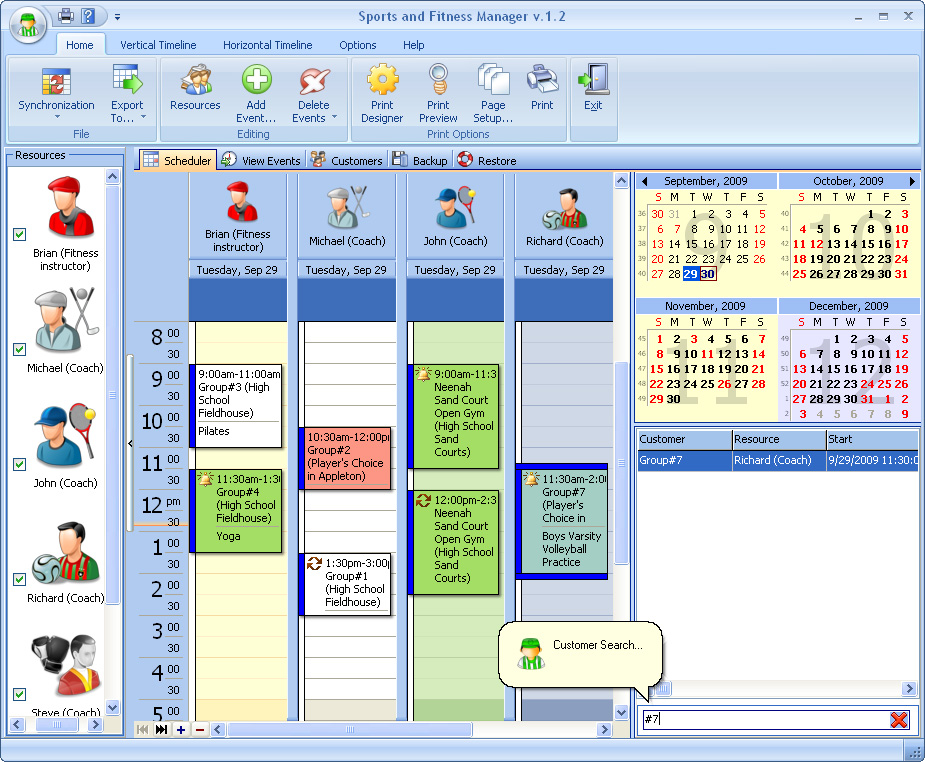 Sports and Fitness Manager is a comprehensive solution that simply allows creating the database and events planned. The program is absolutely essential for coaches, fitness instructors, aerobics instructors, group exercise instructors, fitness coordinators, scuba diving instructors, trainers and team leaders, as it provides them with a tool to organize the business and to manage it effectively. If you are a coach or a trainer or a sport instructor, Sports and Fitness Manager will help you plan your working hours so you can practice; thereby not allowing your lessons to overlap with someone else and keep track of scheduled appointments. Sports and Fitness Manager is a comprehensive solution that simply allows creating the database and events planned. The program is absolutely essential for coaches, fitness instructors, aerobics instructors, group exercise instructors, fitness coordinators, scuba diving instructors, trainers and team leaders, as it provides them with a tool to organize the business and to manage it effectively. If you are a coach or a trainer or a sport instructor, Sports and Fitness Manager will help you plan your working hours so you can practice; thereby not allowing your lessons to overlap with someone else and keep track of scheduled appointments.
Sports and Fitness Manager stores information about clients, such as their address, health and emergency data, personal notes, family data, membership fee and renew dates, comments. Add as many comments as you wish. The program is built with lots of features that are flexible and easy to use; and this flexibility allows changing time intervals, creating numerous profiles and viewing multiple schedules at a time. You can also customize various export, pagination, and document settings via a built-in PDF Export Options form.
Sports and Fitness Manager has a 14 day trial period, and goes for $39.95 for the unlimited version. The program is not difficult to understand, and might just be what some sport instructors actually require to get going.
Want to check it out? Visit Binaryhouse.com.
Posted in Main | No Comments »
Friday, October 21st, 2011
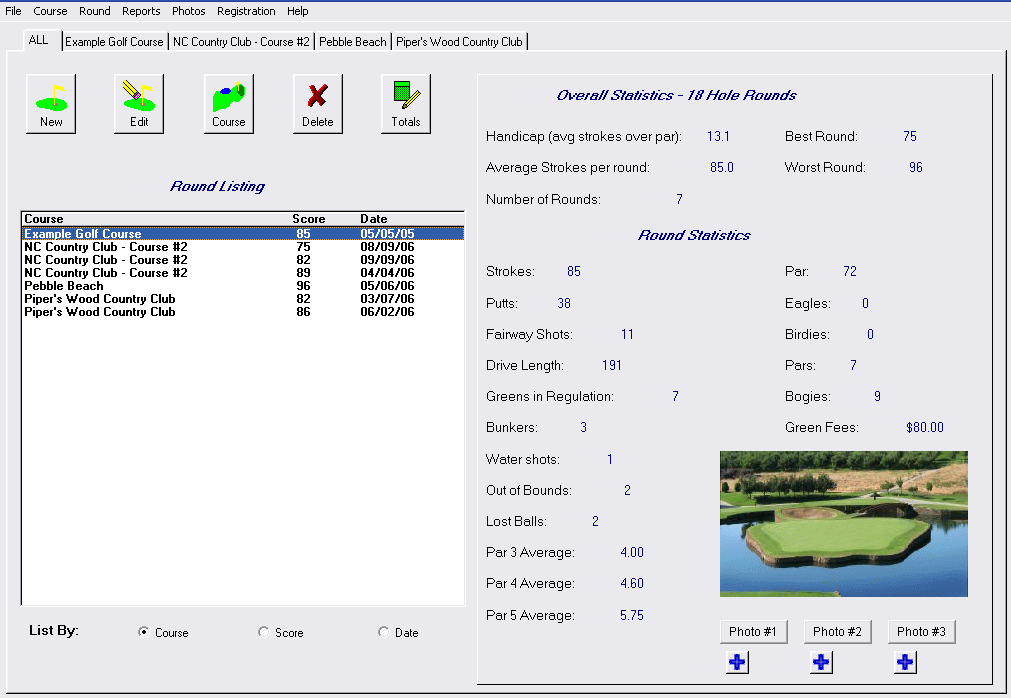 Golf Tracker is a free software program that helps keep track of your golf rounds as well as tons of statistics to see how your game is progressing. With Golf Tracker software you can enter each round of golf. The application simple allows you to compile as well as analyze different kinds of statistics of your game. For each round of golf you play you can track stats like putts, drive length, greens in regulation, water balls, lost balls, bunkers, fairways hit, handicap, and more. Golf Tracker is a free software program that helps keep track of your golf rounds as well as tons of statistics to see how your game is progressing. With Golf Tracker software you can enter each round of golf. The application simple allows you to compile as well as analyze different kinds of statistics of your game. For each round of golf you play you can track stats like putts, drive length, greens in regulation, water balls, lost balls, bunkers, fairways hit, handicap, and more.
It will give you stats like how you are performing on par 3s vs. par 4’s vs. par 5’s. Overall averages for each golf statistic are compiled and can be shown as an overall average or per golf course. This enables you to see how you are scoring on one golf course versus another. Your overall handicap is compiled as well.
Golf Tracker has a picture feature where you can store multiple pictures of a golf course or round played. The program’s main screen includes a list of rounds that can be sorted by golf course, score, as well as date. The statistics, as well as any picture, are displayed for the round which is currently selected.
Want to check it out? Visit DuckSoftware.
Posted in Main | No Comments »
|
|
|




