Archive for the 'Main' Category
Tuesday, May 19th, 2015
 Want to customize your desktop and enhance your Windows computer at home or work with skins? Do you want to keep an eye on your system resources, like memory and battery power, or your online data streams, including email, RSS feeds, and weather forecasts? With Rainmeter you can do all that and even more. Want to customize your desktop and enhance your Windows computer at home or work with skins? Do you want to keep an eye on your system resources, like memory and battery power, or your online data streams, including email, RSS feeds, and weather forecasts? With Rainmeter you can do all that and even more.
What is the big deal about Rainmeter?
Rainmeter is a desktop customization platform. Through Rainmeter, you can enhance your Windows computer at home or work with skins: handy, compact applets which float freely on your desktop, much like Windows Sidebar gadgets, or dashboard widgets for the Mac.
Rainmeter skins provide you with useful information at a glance. It is easy to keep an eye on your system resources, like memory and battery power, or your online data streams, including email, RSS feeds, and weather forecasts. A lot of skins are functional. They can record your notes and to-do lists, launch your favorite applications, and send your tweets to Twitter; all in a clean, unobtrusive interface that you can rearrange and customize to your liking.
Some new features have been added to this version including: Changed the values accepted for the Interface option to accept new values of “Best”, which will automatically use the active network interface.
Want to check it out? Visit RainMeter.
Posted in Main | No Comments »
Monday, May 18th, 2015
Do you want to automate tedious tasks with regular expressions? RegexBuddy is not a bad companion for working with regular expressions. It allows you to easily create regular expressions that match exactly what you want, and enables you to clearly understand complex regexes written by others.
What’s the big deal about RegexBuddy?
RegexBuddy is your perfect companion for working with regular expressions. Easily create regular expressions that match exactly what you want. Clearly understand complex regexes written by others. Use plain English building blocks instead of, or in addition to, the standard regex syntax.
With RegexBuddy, you can quickly test any regex on sample strings and files, preventing mistakes on actual data, debug without guesswork by stepping through the actual matching process. You can also use the regex with source code snippets automatically adjusted to the particulars of your programming language.
Some other features of RegexBuddy include: it also allows you to collect and document your libraries of regular expressions for future reuse, GREP (search-and-replace) through files and folders, integrate RegexBuddy with your favorite searching and editing tools for instant access.
At a first glance RegexBuddy does not have any downside. Still you’ll have a week-long trial to try the software and see if it fits your needs. Licensed version will cost you $39.95.
Want to check it out? Visit: RegexBuddy.
Posted in Main | No Comments »
Monday, May 18th, 2015
Want a server that allows you to monitor every user connected to the server and collect detailed user information? Have you tried Wing FTP Server? It is a secure multi-protocol file server (FTP, HTTP, FTPS, HTTPS, SFTP).
What’s the big deal about Wing FTP Server?
Wing FTP Server is a secure multi-protocol file server (FTP, HTTP, FTPS, HTTPS, SFTP). It has Real-Time information function that enables you to monitor the file server in real time, you can keep an eye on each user connected to the server and collect detailed user information. It also offers email notification and event manager, allowing the program to respond to different events, such as file upload or download by sending a default notification email to the administrator automatically.
Wing FTP Server includes a new set of advanced tools (web based remote control, web based client, administrator console, task scheduler). It provides scripts support let users extend the server by Lua language, virtual directories for easily sharing files and directories, and ratio, disk quota system for controlling how much a user or a group uploads and downloads.
Some important new features have been added to this version including: improved stability of the FTP/HTTP/SFTP service; adition of a “Weblink password protection” in the Web Client; and others.
Wing FTP Server has a 30-day trial limitation. One license price starts at $199. You should see comparison chart to choose the right version.
Want to check it out? Visit wftpserver.com.
Posted in Main | No Comments »
Monday, May 18th, 2015
 Sometimes it can be pretty difficult managing some of our big projects. Meeting up with schedules and keeping customers/clients happy and satisfied can even become a difficult task without proper timing and planning. However, this shouldn’t be a problem anymore with BSI Professional Time Billing, which is a freeware that boasts of a lot of useful features. Sometimes it can be pretty difficult managing some of our big projects. Meeting up with schedules and keeping customers/clients happy and satisfied can even become a difficult task without proper timing and planning. However, this shouldn’t be a problem anymore with BSI Professional Time Billing, which is a freeware that boasts of a lot of useful features.
What’s BS1 Professional Time Billing all about?
BS1 Professional Time Billing and software is a free program for accounting that has a lot of features. Despite being a free program, it enables you to carry out some very important steps on your programs such as Accounts Payable, Accounts Receivable, General Ledger, Inventory, Time Billing, Sales Analysis, and Bank Reconciliation. Jobs are tracked by priority and due date. Customization and Delphi source code available for several databases.
Multi-currency features facilitate purchasing and billing internationally. Payables and receivables are tracked separately for each currency and the GL automatically converts revenues and expenses to domestic currency. Gain or loss due to exchange rate fluctuations is tracked.
Despite being a freeware, BS1is an advanced billing program that has a lot of unique features. The features are not difficult to understand, though, you are expected to have some basic knowledge about accounting.
Want to check it out? Visit dbsonline.com.
Posted in Main | No Comments »
Monday, May 18th, 2015
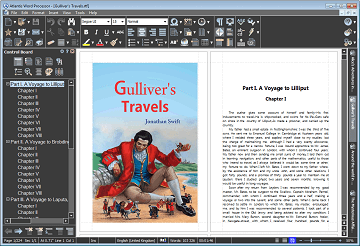 One of the major flaws of some word processing programs is the bloated user-interface. This is usually a big problem for a novice who may struggle to understand how to find his way through some advanced features. However, one program that seems not to have that kind of a problem is known as Atlantis Word Processor. One of the major flaws of some word processing programs is the bloated user-interface. This is usually a big problem for a novice who may struggle to understand how to find his way through some advanced features. However, one program that seems not to have that kind of a problem is known as Atlantis Word Processor.
What is the big deal about Atlantis Word Processor?
Atlantis is a full-featured Word Processor with an innovative approach to document processing. It has been carefully designed with the end-user in mind. When processing text is work enough, the last thing you need is bloated software with a slow and awkward interface. Atlantis Word Processor has an intuitive user-friendly application and provides all the tools both novice and power users need for their everyday word processing tasks.
The word processor has some or all of the features you need to create simple documents or great works of literature including: novels, essays, reports, letters, diaries, newspaper articles, and many more. It also allows you to compose rich-formatted documents from scratch, or edit existing MS Word documents, and send them to colleagues, customers, partners, and friends.
Note that Atlantis Word Processor has a 30-day trial limitation. Full version of this word processor would cost you $35.
Want to check it out? Visit: http://www.atlantiswordprocessor.com/en/
Posted in Main | No Comments »
Tuesday, April 28th, 2015
 Ever been bothered about recovering and repairing your company’s corrupt database? Lepide Exchange Recovery Manager lets you restore mailboxes from damaged EDB to Live Exchange Server, Office 365, and PST. Ever been bothered about recovering and repairing your company’s corrupt database? Lepide Exchange Recovery Manager lets you restore mailboxes from damaged EDB to Live Exchange Server, Office 365, and PST.
What’s the big deal about Lepide Exchange Recovery Manager?
Lepide Exchange Manager is a complete exchange recovery and backup restore solution with the facility to search, export and recover entire mailboxes or selected email items from corrupt information stores, live exchange servers, exchange backups and OST files.
Lepide Exchange Recovery Manager also allows you to restore mailboxes from damaged EDB to Live Exchange Server, Office 365, and PST; besides you can export data to EML, HTML, MSG, RTF, and Text Files. It also supports small migrations and let you migrate mailboxes and Public Folders from Live Exchange, Office 365, and Offline EDB to Live Exchange Server and Office 365. It can also extract EDB from third-part backups.
Amongst its key features are; it performs faster restoration from backup without making use of extra resources and manpower; it is a complete package for Exchange database repair, backup restoration, migration, email search and OST restoration; it reduce cost and resource consumption in small migrations; and many more.
Does it have any downside?
It does not have any downsides, but commands a huge price for those who wish to buy it (standard edition at the moment goes for $399, Professional – $799).
Want to check it out? Visit Lepide.com.
Posted in Main | No Comments »
Monday, April 27th, 2015
 Did you know you can grab a lot of screenshots without much intervention? With Screenshot Captor, you have access to a program that supports full image explorer with full shell functionality. Did you know you can grab a lot of screenshots without much intervention? With Screenshot Captor, you have access to a program that supports full image explorer with full shell functionality.
What’s the big deal about Screenshot Captors?
Screenshot Captor is designed for grabbing lots of screenshots with minimal intervention. It has multi-monitor support and includes a full image explorer with full shell functionality and unsurpassed integration with external tools like graphic editors, watermarkers, etc. It also supports unique effects not seen in other capture tools including the ability to automatically locate and enhance the active window.
Version 4.9.6 already boasts of a couple of changes including the following; [Improvement] Renaming files in thumbnail panel now preserves file extension, [Feature Preview] standalone screenshot window mode (see View menu), allows full screen editing, full-window file browser, and/or small floating preview window.
One of the reasons a lot of users love Screenshot Captor is its customizable features. The program is so easy to customize, which makes it easier for even a newbie to understand within a few minutes of installation.
Want to check it out? Visit DonationCoder.com.
Posted in Main | No Comments »
Monday, April 27th, 2015
 Ever wanted to run Windows 8 “Modern” apps in a window on the desktop? Of course, everyone wanted an opportunity to do just that; and that is what ModernMix brings to your system. Ever wanted to run Windows 8 “Modern” apps in a window on the desktop? Of course, everyone wanted an opportunity to do just that; and that is what ModernMix brings to your system.
What’s ModernMix?
ModernMix allows you to run Modern (Metro) apps in a window on your desktop. Windows 8 Modern apps, also known as Metro or RT apps, will use the full screen on your display regardless of how much of the screen they really need. As a result, that weather app, mail program or stock ticker is going to use the entirety of your computer display.
The program has a lot of useful features including some of the following: it enables you to run multiple Modern apps in individual separate windows on the desktop as well as launch them from the desktop; modern app window sizes are remembered the next time you launch them; active Modern apps will also appear on your taskbar where they can be pinned for quick access later. Also create desktop shortcuts for Modern apps; standard Windows 8 title bar is enabled for Modern apps; and others.
Want to check it out? Visit Stardock.com.
Posted in Main | No Comments »
Monday, April 27th, 2015
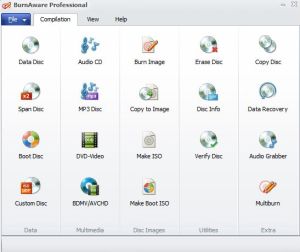 With loads of burning software available online these days, it takes time to choose one that actually combines all the features that you need. One of the programs that easily stand out in terms of helping you achieve your aim is BurnAware. With loads of burning software available online these days, it takes time to choose one that actually combines all the features that you need. One of the programs that easily stand out in terms of helping you achieve your aim is BurnAware.
What’s the big deal about BurnAware?
BurnAware is a program that allows you to burn CD, DVD and BD discs with data, audio and video in a simple and hassle-free manner. It is a disc burning tool that is intended for users seeking balanced, lightweight and easy to use burning tool for everyday use.
BurnAware is a full-fledged, easy-to-use, free burning software which allows you to write all types of files such as digital photos, pictures, archives, images, documents, music and videos to CDs, DVDs and Blu-ray Discs.
Some new changes have been made to this version. These changes include: disc spanning tool; BDMV/AVCHD support; new file processing system with exceptionally fast and stable engine; ability to move files among the folders within compilation (drag & drop); new user interface and few new themes; and fully customizable Main Window.
Does the program have any downside?
BurnAware free version comes with some ads some users may not be comfortable with.
Want to check it out? Visit BurnAware.com.
Posted in Main | No Comments »
Sunday, April 26th, 2015
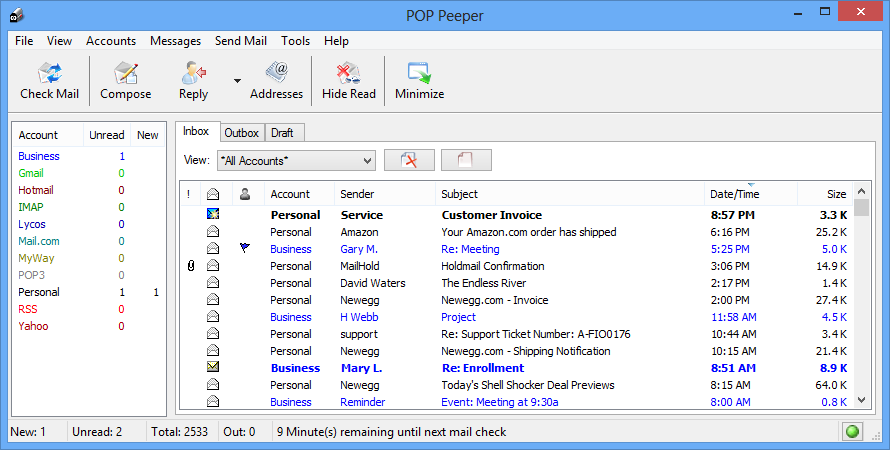 One of the challenges of a busy executive is the ability to access his email or find out if there is a new mail waiting in his inbox to be attended to. This is a basic problem that has caused quite a few problems for such people, and that is why a desktop email alert is not a bad attempt at sorting things out. With POP Peeper, this should be sorted out. One of the challenges of a busy executive is the ability to access his email or find out if there is a new mail waiting in his inbox to be attended to. This is a basic problem that has caused quite a few problems for such people, and that is why a desktop email alert is not a bad attempt at sorting things out. With POP Peeper, this should be sorted out.
What’s POP Peeper all about?
POP Peeper is an email notifier that runs in your Windows task bar and alerts you when you have new email on any of your POP3, Hotmail, MSN, Yahoo, Mail.com, MyWay, Excite, Lycos.com, or RediffMail accounts. You can send an email using your SMTP server or through your webmail account directly from POP Peeper.
POP Peeper supports HTML email, so you can see your email the same way as you would in your email client. Several options are available that will decrease or eliminate the risks of reading your email (viruses, JavaScript, webbugs, etc). If you share your computer, you can password-protect your accounts or password-protect access to POP Peeper.
A couple of changes have been made to this version including the following: error log window now supports clickable links (error messages from server may contain links); fixed potential crash involving IMAP/IDLE and servers that don’t provide a reliable connection; and a few others.
Want to check it out? Visit Esumsoft.com.
Posted in Main | No Comments »
|
|
|





