Archive for the 'Main' Category
Monday, March 16th, 2015
 Passwords are very sensitive and private parts of our online activities, which means they must be kept safe and protected from privacy invaders. Managing all your password is therefore essential to staying protected from online theft and other activities that might expose your sensitive data to the public. With Password Depot, you can manage your password without having any problem. Passwords are very sensitive and private parts of our online activities, which means they must be kept safe and protected from privacy invaders. Managing all your password is therefore essential to staying protected from online theft and other activities that might expose your sensitive data to the public. With Password Depot, you can manage your password without having any problem.
What’s the big deal about Password Depot?
Password Depot is a user-friendly tool for the management of all your passwords. It uses the latest security algorithms such as BlowFish and Rijndael to encrypt your files. Its file shredding method complies with the directives DOD 5220.22-M of the US Department of Defense and allows you to fully destroy files created with the programme. User-friendly interface similar to Windows Explorer allows for the efficient navigation through your password lists.
Some of the advanced features of Password Depot include: ability to help you memorise only one password; provides reliable security for your password; you can have all your sensitive data in one place; you can manage password files in the network to use them together in a team; and many more.
Does it have any downside?
Password Depot has a 30 day trial limitation.
Want to check it out? Visit: Password-depot.com
Posted in Main | No Comments »
Wednesday, March 4th, 2015
 Looking for an IM that is based on a fully managed client/server platform? Bopup Observer is a full IM and files transfer logging, user grouping, and offline and scheduled messaging app. Looking for an IM that is based on a fully managed client/server platform? Bopup Observer is a full IM and files transfer logging, user grouping, and offline and scheduled messaging app.
What’s the big deal about the program?
Bopup is an application that offers secure one-way instant messenger that is designed to receive messages and documents over LAN, enterprise-size networks and Internet. Bopup is a clear, and easy to use light-weight client that also acts as a quick and efficient solution for alerting and sending urgent messages. The messenger is based on a fully managed client/server platform which provides a full IM and files transfer logging, user grouping, and offline and scheduled messaging. Bopup Observer fully supports Terminal Server/Citrix environment.
Several authentication modes are supported: Simple, Windows Authentication or private login ID and password pair. Few changes have already been made to this version such as addition of option to display time of messages in 12-hour clock format with AM/PM indicators; and several other improvements. You can activate the Confirmation Mode on the instant messages. Messaging and File Transfer are encrypted with strong algorithms so that personal and group conversations are safe and secure.
Bopup Observer has a 45 day trial limitation. Standard pack goes for $460.
Want to check it out? Visit Bopup.com.
Posted in Main | No Comments »
Tuesday, March 3rd, 2015
 Having issues with outdated drivers? Is your system acting funny and you suspected the issue has to do with old drivers? Perhaps, what you need is a driver updater that will keep your drivers up to date. Having issues with outdated drivers? Is your system acting funny and you suspected the issue has to do with old drivers? Perhaps, what you need is a driver updater that will keep your drivers up to date.
What is Driver Reviver?
Driver Reviver is a program that will keep your PC’s Drivers up to date and restore optimum performance and functionality to your PC and its components. One of the most difficult and time-consuming things to do is keeping your drivers up to date. Your printers, scanners, web cams, Hard Drives and more all need to be kept up to date, and this can be difficult if you don’t have the experience and time to do it.
Driver Reviver has what you need to solve a lot of driver issues by allowing you to scan all of your hardware to identify the current Driver that is installed on your system, and determines if it is the most up-to-date version. Once the required updates are identified, Driver Reviver then allows you to quickly and easily download and install all these updates from one central location. Driver Reviver ensures you are getting the maximum performance from your PC, its components and its software.
Does it have any downside?
Despite the fact that the price is a bit on the high side ($29.99), Driver Reviver is a nice program that can help you keep drivers on your system up to date.
Want to check it out? Visit Reviversoft.com
Posted in Main | No Comments »
Monday, March 2nd, 2015
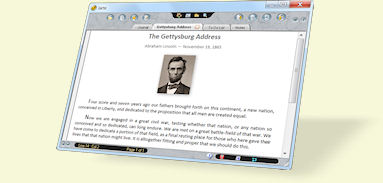 Do you want a word processor and WordPad replacement with a unique and easy-to-use interface? Jarte is a nice word processor that has loads of nice and easy to use features including ability to edit Microsoft Word documents, OLE support (the ability to insert pictures and sounds), tabbed document access, and many more. Do you want a word processor and WordPad replacement with a unique and easy-to-use interface? Jarte is a nice word processor that has loads of nice and easy to use features including ability to edit Microsoft Word documents, OLE support (the ability to insert pictures and sounds), tabbed document access, and many more.
What’s the big deal about Jarte 5.3?
Jarte is a compact word processor and WordPad replacement with a unique, easy-to-use interface. Features include the ability to edit Microsoft Word documents, OLE support (the ability to insert pictures and sounds), tabbed document access, a quality spelling checker, page breaks, print previewing, visual header and footer designer, clip history, a reference bar, multilevel undo and redo functionality, and single-click bookmarking. A detailed help file is included.
It is a unique interface that will make you feel very comfortable when using the Microsoft Office Word Processors. However, Jarte is different from your usual Word Processor, but it can help you handle Word Processing with ease. The best part of this software is that it is available as a freeware, and can be downloaded and used without a trial license.
Jarte is a nice word processor-based program with a lot of features, and is also available for free.
Want to check it out? Visit Jarte
Posted in Main | No Comments »
Monday, March 2nd, 2015
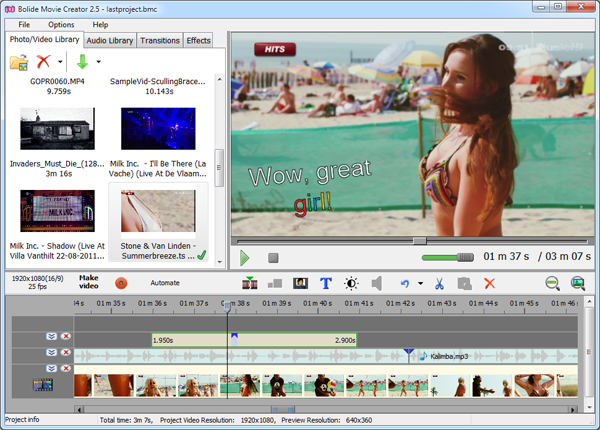 Want a video editor that supports a lot of features and also accepts almost any video/audio/image format as the source and can save the final movie to AVI, MKV, WMV, FLV or MP4 video file in up to FullHD resolution? Bolide Movie is a program that has some nice features. Want a video editor that supports a lot of features and also accepts almost any video/audio/image format as the source and can save the final movie to AVI, MKV, WMV, FLV or MP4 video file in up to FullHD resolution? Bolide Movie is a program that has some nice features.
What’s the big deal about Bolide Movie Creator?
Bolide Movie Creator is simple but powerful HD video editor for Windows. It accepts almost any video/audio/image format as the source and can save the final movie to AVI, MKV, WMV, FLV or MP4 video file in up to FullHD resolution. We tried to make the video editing process as easy as possible. Just drop your media files to the timeline and save the project as a video file. As simple as that! So, give it a try and make your first movie today.
A few changes have been added to this version of the software including the following: added the ability to preview video/photo/audio from the local library; added two more animations for text blocks – Slide upward/downward; fixed a bug with drag and dropping the effects to the timeline; and a few others.
Bolide Movie Creator has a 30 day trial limitation, while licensed product would cost you $39.95 (which to my mind is a bit too much).
Want to check it out? Visit Movie-Creator.com.
Posted in Main | No Comments »
Sunday, March 1st, 2015
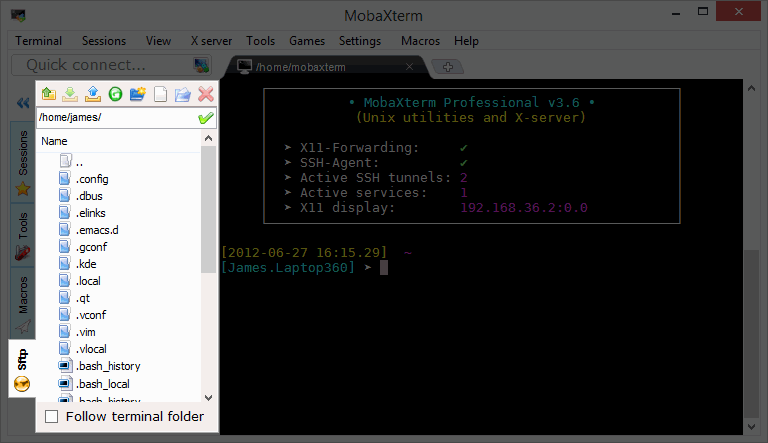 The advantages of having an all-in-one network app for your remote projects are quite amazing. This is especially so when you use SSH to connect to a remote server, a graphical SFTP browser will automatically pop up in order to directly edit your remote files. MobaXterm is a very useful tool that has a lot of features. The advantages of having an all-in-one network app for your remote projects are quite amazing. This is especially so when you use SSH to connect to a remote server, a graphical SFTP browser will automatically pop up in order to directly edit your remote files. MobaXterm is a very useful tool that has a lot of features.
What’s the big deal about MobaXterm?
MobaXterm is an enhanced terminal with an X server and a set of Unix commands (GNU/Cygwin) packaged in a single portable exe file. MobaXterm includes a great multitab native Windows terminal, a new X server based on X.Org for easily export your Unix/Linux display and a lot of new GNU Unix commands. You can also use some of the free plugins for extending MobaXterm capabilities.
A lot of improvements have been made to this version of the program, which include the following: the software is now compatible with Windows 10 Technical Preview build 9926; OpenSSH has been upgraded to version 6.7 with new ed25519 (curve25519) SSH keys support; it is now compatible with 4K (Ultra-HD / High-DPI) monitors. Native HDPI mode has been added; and many more.
MobaXterm is a great tool for SSH, SCP, SFTP, RDP connections.
Want to check it out? Visit Mobaxterm.Mobatek.net.
Posted in Main | No Comments »
Saturday, February 14th, 2015
 Are you looking for a free tool that an environment variables editor that includes easy to use GUI, which also replaces small and inconvenient Windows edit box? With Rapid Environment Editor you don’t need to type long path names. All you have to do is to choose path using File Explorer tree. Are you looking for a free tool that an environment variables editor that includes easy to use GUI, which also replaces small and inconvenient Windows edit box? With Rapid Environment Editor you don’t need to type long path names. All you have to do is to choose path using File Explorer tree.
Rapid Environment Editor (RapidEE) is a Windows environment variables editor. It includes easy to use GUI and replaces small and inconvenient Windows edit box.
Rapid Environment Editor shows environment variables and values as an editable tree; but that is not all the features that have been included in the software. Other features added to the editor include the following: Variable Inspector which shows miscellaneous information about variables: name, type, value, short file name in the 8.3 naming convention for each long file name and vice versa; Portable Mode which means it doesn’t require installation and could be run as a “portable application”; automatically checking for invalid pathnames and filenames; you don’t need to type long pathnames. Just choose a path using the File Explorer tree; and many more.
Want to check it out? Visit Rapidee.com.
Posted in Main | No Comments »
Friday, February 13th, 2015
 With loads and loads of audio and video converters online these days, choosing the right one can be a bit cumbersome. Nonetheless, you can make your decision slightly easier by taking a look at some of the features that can help you do your conversion without stress. EZ CD Audio Converter has some nice features that you can trust. With loads and loads of audio and video converters online these days, choosing the right one can be a bit cumbersome. Nonetheless, you can make your decision slightly easier by taking a look at some of the features that can help you do your conversion without stress. EZ CD Audio Converter has some nice features that you can trust.
EZ CD Audio Converter is the ultimate audio suite that features CD ripper, audio converter, metadata editor, and disc burner. It is designed to provide best user experience with its excellent user interface and ultimate audio quality. EZ CD Audio Converter includes the best audio codecs and extremely accurate 32-bit audio processing.
The converter also takes advantage of the modern computer performance, and is optimized to utilize the power of the multi-core and multimedia features of the processors (MMX, SSE1/2/3/4/5). It can run up to 8 parallel conversions. A couple of fixes and additions have been made to this version including the following: cover Art thumbnail image quality improvements; cover Art resize image quality improvements; it now uses high quality Lanczos image re-sampling algorithm for Cover Art thumbnails and resizing; and a few others.
Want to check it out? Visit PoikoSoft.com.
Posted in Main | No Comments »
Friday, February 13th, 2015
 Are you a database developer looking for a powerful, yet easy-to-use SQL editor? Perhaps, you might want to find out more about Universal SQL Editor, which boasts of a lot of nice features that are also very easy to use. Are you a database developer looking for a powerful, yet easy-to-use SQL editor? Perhaps, you might want to find out more about Universal SQL Editor, which boasts of a lot of nice features that are also very easy to use.
What’s the big deal about Universal SQL Editor?
Universal SQL Editor is a powerful, yet easy-to-use graphical query tool for all database developers. It allows you connect any ODBC compliant databases, such as Oracle, DB2, SQL Server, Sybase, etc., and edit SQL queries and scripts with code completion, syntax highlighting, SQL formatting, plus other useful features that allow you to work more efficiently.
Universal SQL Editor supports Oracle, DB2, SQL Server, Sybase and other ODBC compliant databases. Some other features it supports include the following: it features Intellisense-like code completion, highlight references, parameter hinting, syntax highlighting, SQL formatting, multiple levels of undo and redo, column mode edit, code folding, etc.; convenient query tool that supports grouping, filtering and searching query results; in addition, query results can be exported to Excel spreadsheet or as a set of SQL statements; fast and low memory consumption; and many more.
Does it have any downside?
Universal SQL Editor has a 14 day trial limitation. Single license would cost you $39.00 (to be tied to one PC) or $69 (for a single user – can be used on several PC’s, not simultaneously).
Want to check it out? Visit MingSoftware.com.
Posted in Main | No Comments »
Thursday, February 12th, 2015
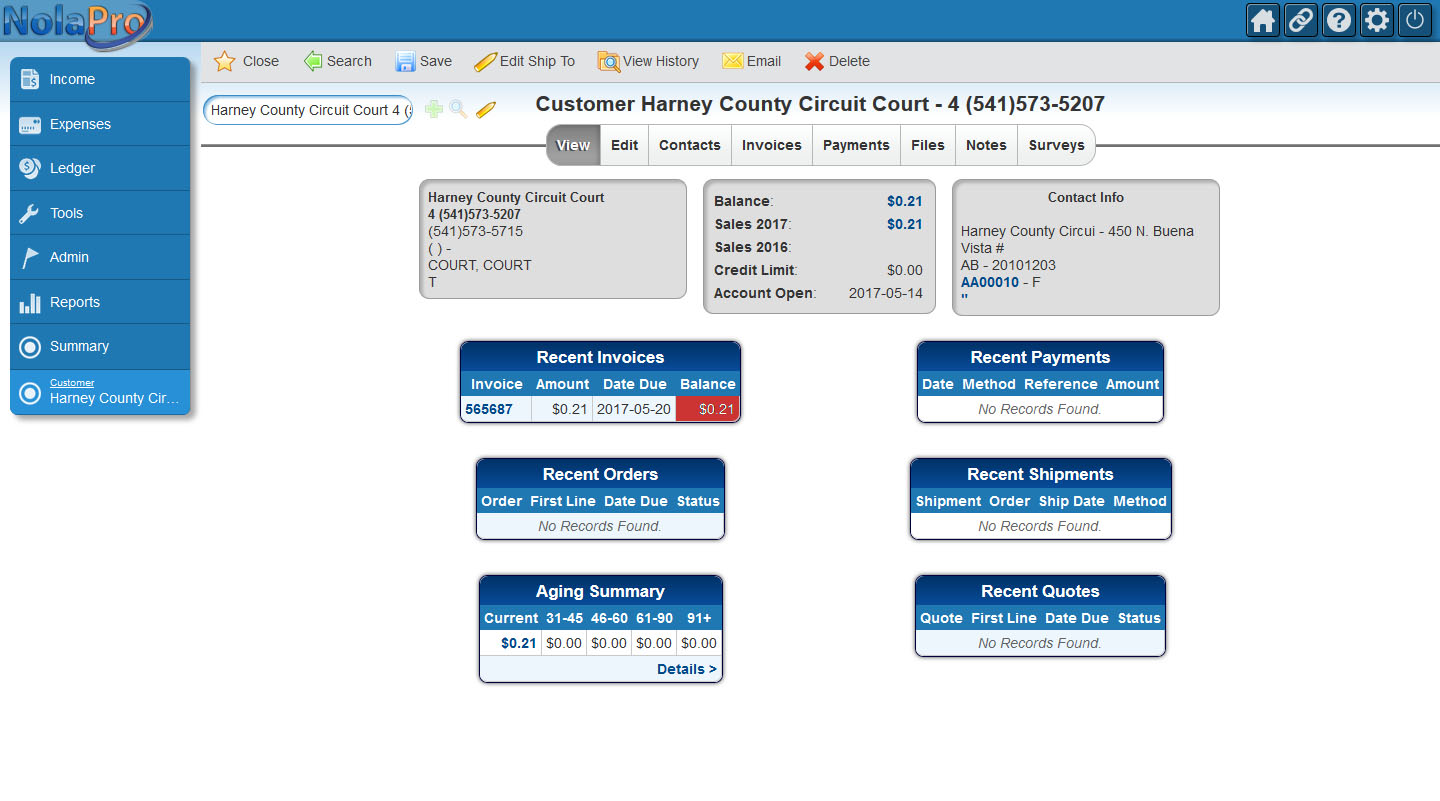 Did you know you can manage your business without having years of experience in handling some accounting software? With NolaPro, you can take your business to the next level with its easy-to-use features. The program itself is free, and installation only takes only a couple of seconds and then you can start using it. Did you know you can manage your business without having years of experience in handling some accounting software? With NolaPro, you can take your business to the next level with its easy-to-use features. The program itself is free, and installation only takes only a couple of seconds and then you can start using it.
What is NolaPro?
NolaPro is a free web-based ERP, Accounting and Inventory Suite. It installs quickly on your own PC for secure access worldwide via the web. Also includes standard accounting modules as well as order entry, inventory tracking, full payroll services, and plug-ins such as POS, a business-to-business web portal, and an editable Ecom shopping cart. The robust, flexible interface provides user-customizable options for colors, icon sets, menu displays, and more. NolaPro allows multiple sets of books for different companies, unlimited simultaneous users, and no data restrictions.
NolaPro is easy to use, and can be personalized to suit your kind of business. It has some nice features that include the following: you can modify it to suit your business needs; it can be integrated for instant financial management; and many more.
Want to check it out? Visit: NolaPro.com.
Posted in Main | No Comments »
|
|
|





