Archive for the 'Main' Category
Thursday, January 13th, 2011
 Precision Language Suite for VCL is a program that allows localization of VCL component properties, text strings and system messages. The program uses a text format for localization files; that is why languages can be easily adapted to your needs even without installing additional software or altering the distribution image of your product. Precision Language Suite for VCL contains localization source codes, which can be included into your products. The publishers also included editor localization projects for easy design of language files, and an additional source codes for embedded localization. Precision Language Suite for VCL is a program that allows localization of VCL component properties, text strings and system messages. The program uses a text format for localization files; that is why languages can be easily adapted to your needs even without installing additional software or altering the distribution image of your product. Precision Language Suite for VCL contains localization source codes, which can be included into your products. The publishers also included editor localization projects for easy design of language files, and an additional source codes for embedded localization.
Some of its features include: Microsoft Terminology Collection dictionary, FreePascal/Lazarus support, more formats now supported for import, new tutorials, quick searching and filtering items, finding and replacing the texts and identifiers, one-time import of resource strings and component properties, automatic generation of the source file for the text constants identifiers (including the default text), insertion of selected components from Delphi to the localization project (via the clipboard), and many more.
To implement the localization, you will need to do the following; create an instance of TLanguageManager, determine a list of available languages and present it to the user, define an OnLanguageChanged event, and choose your way to use text constants.
Precision Language is a shareware program, and can be downloaded and tried for a limited period. The actual download costs $40.00 for users who may wish to go for the unlimited trial period.
Want to check it out? Visit Be-Precision.
Posted in Main | No Comments »
Wednesday, January 12th, 2011
 Vermilion Desktop Composer is an open source programs that is used for computer music composing. The program is a full approach to composing, and actually requires nothing, but a computer with sound. Vermilion Desktop Computer is written on java; as a matter of fact, this program was formerly named VioLet Composer, before it was changed to its present name. The program has witnessed a lot of changes besides its name that was changed; and now includes more features and improvement, and stability than what it was in the past. Vermilion Desktop Composer is an open source programs that is used for computer music composing. The program is a full approach to composing, and actually requires nothing, but a computer with sound. Vermilion Desktop Computer is written on java; as a matter of fact, this program was formerly named VioLet Composer, before it was changed to its present name. The program has witnessed a lot of changes besides its name that was changed; and now includes more features and improvement, and stability than what it was in the past.
Vermilion Desktop Composer can be used to write music from scratch to finish using only a single x86 compatible computer that has a soundcard. The application is a unique desktop music composing application that comes with a tracker interface just like that of a buzz. As an open source program, you can change or replace any of its user interfaces. Vermilion Desktop Composer runs on most platforms; however, you need to have DSP coders on your system to use this program.
A lot of users had a lot of complaints in the past, and this has brought about a lot of changes that have made version 0.16B more stable. For those who like composing music, Vermilion is not a bad idea; after all, it is an open source program.
Want to check it out? Visit Sourceforge.
Posted in Main | No Comments »
Wednesday, January 12th, 2011
 If you want to temporarily strip down your slowing computer to its bare essentials for gaming; GBoost is not a bad idea. This free Windows game booster is designed to improve the overall speed of your game, which include frame rate drops, lag spikes, and alt tabbing out of games faster and more responsive gaming. If you want to temporarily strip down your slowing computer to its bare essentials for gaming; GBoost is not a bad idea. This free Windows game booster is designed to improve the overall speed of your game, which include frame rate drops, lag spikes, and alt tabbing out of games faster and more responsive gaming.
GBoost ensures your computer does not run slowly or sluggishly; and helps your CPU, RAM and your internet connection as well. You can also return your computer to its former status by simply pressing the Restore button or wait until the next system reboot to have it automatically restored. You may also not have to worry much about any permanent change to your computer.
The major features of GBoost include; computer enhancement reduces lad, stabilizes your game, no permanent changes to your computer system, no overlocking, you can enjoy your game smoothly when installed, easy to use, and works just by a single click, free to use, and a few others. GBoost 1.02.728 runs on the following operating systems: Windows 7, Windows Vista and Windows XP.
GBoost is a freeware program and open to all gamers who want to enjoy or have a smoother game play.
Want to check it out? Visit Gzero.com.
Posted in Main | 1 Comment »
Thursday, December 30th, 2010
 Dexpot is a program that optimizes the Windows management of your computer system; eliminating the problem of the disorder on your desktop with some of its features. Actually, Dexpot comes with a lot of features and functions, which makes it worth trying out on your desktop. The program is capable of making you work faster and more comfortable; with different functions using a unified graphical interface, which is a bit easy to operate. Dexpot is a program that optimizes the Windows management of your computer system; eliminating the problem of the disorder on your desktop with some of its features. Actually, Dexpot comes with a lot of features and functions, which makes it worth trying out on your desktop. The program is capable of making you work faster and more comfortable; with different functions using a unified graphical interface, which is a bit easy to operate.
Some of the features of Dexpot include: complete with similar features one would find in a virtual desktop manager; fast and easy to set up, and even easier to use; stunning 3D transition effects (of course, this depends on your choice); supports stylish wall papers; can be expanded with plugins; lovely design; and many more.
Despot 1.5.8 creates additional workspaces so you can quickly switch between. For instance, you can listen to the music of your choice on desktop 1, enjoy your surfing on the second desktop, and use desktop 3 to handle your daily word processing or switch to desktop 4 for whatever game you love. That means you can do a lot of things with this program, which makes it useful in more ways than one. Moreover, you can configure different icons, wallpapers, start-ups, and a couple of other settings on each desktop.
Want to check it out? Visit Dexpot.
Posted in Main | No Comments »
Wednesday, December 29th, 2010
 SmartCode VNC Manager is a great remote administration and monitoring software that is basically used for remote network management, remote system administration and in helpdesk environments. With SmartCode VNC Manager Enterprise, you can take remote control of any computer running VNC, Remote Desktop Services, Citrix ICA, Microsoft Hyper-V, Virtual Server 2005, RAdmin, SSH or Telnet servers. Users of this application can also benefit from over twenty remote management tools. SmartCode VNC Manager is a great remote administration and monitoring software that is basically used for remote network management, remote system administration and in helpdesk environments. With SmartCode VNC Manager Enterprise, you can take remote control of any computer running VNC, Remote Desktop Services, Citrix ICA, Microsoft Hyper-V, Virtual Server 2005, RAdmin, SSH or Telnet servers. Users of this application can also benefit from over twenty remote management tools.
SmartCode VNC Manager Enterprise requires .NET Framework 4.0 to be installed on your system. It also comes with the following features: WMI Properties, which allows fetching WMI properties from a remote computer and shows the results in the registered computer list; support for team viewer connection; support for DdameWare Mini Remote Control connection; support for HP Remote Graphics Connection; addition of Start/Stop/Pause Hyper-V Virtual Machine command to the registered computer text menu.
The developer of this program has really demonstrated a lot of commitment towards ensuring that users of SmartCode VNC Manager always get support anytime; this is quite encouraging. This is one of the reasons one should give this program a shot; at least one can always be sure of getting support from the publishers.
SmartCode is a shareware application, and goes for $98.94 per download; however, you can download a trial version for a limited period of use.
Want to check it out? Visit S-Code.com.
Posted in Main | No Comments »
Wednesday, December 29th, 2010
 Analogue Vista Clock is one of those desktop utilities that can be used to bring your desktop by to life. This clock will help you remind all your schedules because of the alarm feature that is included in it. Analogue Vista Clock will stay on your desktop ignoring all mouse and keyboard input, in order not to interfere with any other application. You can use the tray icon to adjust and set features such as; size, positioning, transparency level, alarm hour, and a host of others. Analogue Vista Clock is one of those desktop utilities that can be used to bring your desktop by to life. This clock will help you remind all your schedules because of the alarm feature that is included in it. Analogue Vista Clock will stay on your desktop ignoring all mouse and keyboard input, in order not to interfere with any other application. You can use the tray icon to adjust and set features such as; size, positioning, transparency level, alarm hour, and a host of others.
Analogue Vista Clock can be configured to suit your taste; especially its appearance. It comes with Vista-look skins; and the options of downloading additional skins is open to registered users or even make their own skins if they want to. You can also choose from five built-in alarm sounds, but can also be used to play any file you want or even randomly play sound files from selected folder or directory. Of course there is also a feature that lets you define which days of the week alarm should be played.
Analogue Vista Clock 1.30 is a shareware program, and can be purchased and downloaded for $9.00. The program is compatible with Windows 2000/XP/2003/Vista/7.
Want to check it out? Visit 4neurons.com.
Posted in Main | No Comments »
Wednesday, December 29th, 2010
 VideoChimeraHome is an application that has features that can change or improve the quality of your webcam video and add impressive effects. Some of the benefits include: processing video with the 48 precision; a powerful noise removal system a feature that can dynamically change sharpness and contrast, adding effects; a smart graphical motion detector; all in real time. It is possible for you to embed the processed video into programs you use. These programs may include; Skype, Yahoo Messenger, iuVCR, Windows Live Messenger, and VirtualDdub (all these can be achieved with the driver supplied.) VideoChimeraHome is an application that has features that can change or improve the quality of your webcam video and add impressive effects. Some of the benefits include: processing video with the 48 precision; a powerful noise removal system a feature that can dynamically change sharpness and contrast, adding effects; a smart graphical motion detector; all in real time. It is possible for you to embed the processed video into programs you use. These programs may include; Skype, Yahoo Messenger, iuVCR, Windows Live Messenger, and VirtualDdub (all these can be achieved with the driver supplied.)
VideoChimeraHome requires the following to work effectively on your system: 1.5GHz or higher processor clock speed, and 1GHz minimum required Intel Pentium/Celeron family; 256 megabytes of RAM or higher; super VGA or higher-resolution adapter and monitor; DirectX 8.1 or later; Microsoft Windows 2000+SP4 or later, Microsoft Windows XP, Microsoft Windows Server 2003, and Microsoft Vista.
VideoChimeraHome is a shareware and can be downloaded for $29.00. However, you may take advantage of the seven days trial period to further have a practical understanding of how it works. Actually, the features are easy to understand, and you may not find it too challenging to understand before the trial period expires.
Want to check it out? Visit Uuusoft.
Posted in Main | 1 Comment »
Wednesday, December 29th, 2010
 Softros Messenger is a secure network messenger application for LAN, WAN and Intranets. The program does not really require a server and is one of the easiest messengers to install and to use on a system. Softros Messenger correctly identifies all Windows NT/2000/XP user accounts and works in any TCP/IP network. Some of the features include; notification alarms, WinXP theme support, intuitive interface, instant messaging with LAN chat ability, secure LAN messaging, group broadcast messaging, offline messaging, message logging, user grouping, serverless architecture, does not require an internet connection, terminal services support, Multilanguage user-interface, import and export your LAN settings, full Windows/Vista support, and many more. Softros Messenger is a secure network messenger application for LAN, WAN and Intranets. The program does not really require a server and is one of the easiest messengers to install and to use on a system. Softros Messenger correctly identifies all Windows NT/2000/XP user accounts and works in any TCP/IP network. Some of the features include; notification alarms, WinXP theme support, intuitive interface, instant messaging with LAN chat ability, secure LAN messaging, group broadcast messaging, offline messaging, message logging, user grouping, serverless architecture, does not require an internet connection, terminal services support, Multilanguage user-interface, import and export your LAN settings, full Windows/Vista support, and many more.
Softros Messenger is good for corporate instant messaging, and helps most organizations to get by with group and corporate chatting easily. The program can be configured by each individual or group within an organization without requesting for any assistance from the IT unit or system administrator. As a matter of fact, all settings can be easily saved and transferred to a different computer if the need arises. Once installed, it is ready for use; and may not require any further technical skill. Version 4.5 comes with an addition of active directory integration.
Softros Messenger is not a freeware, but has a limited trial period of 30 days.
Want to check it out? Visit Softros.com.
Posted in Main | No Comments »
Tuesday, December 28th, 2010
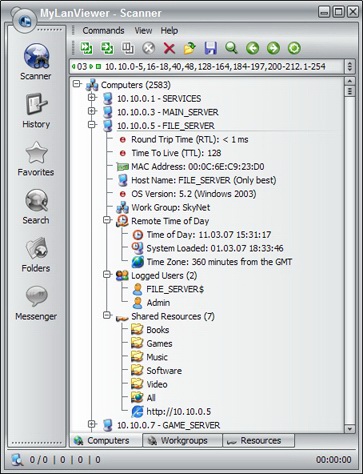 MyLanViewer is an application designed for scanning network computers, navigating their shared resources and for monitoring local shared resources on your computer. The program is very light, and easy to install with a user-interface that is so easy to understand. MyLanViewer is an application designed for scanning network computers, navigating their shared resources and for monitoring local shared resources on your computer. The program is very light, and easy to install with a user-interface that is so easy to understand.
The application also works as an IP and NetBIOS Scanner, whois and traceroute tool, remote shutdown and wake-on-LAN manager, LAN messenger and network monitor. MyLanViewer scanner displays your network computers in an easy to read, buddy-list style window that provides the machine names, IP addresses, MAC addresses, shared resources and other technical details for each computer.
MyLanViewer supports the following features: remote wake up; lock; log off; sleep; hibernate; reboot; shutdown; power off; terminate user sessions and disable shared resources; view and access shared folders; and is fast when it comes to network scanning.
The download price is put at $15.00; not a high amount to pay, but are you really sure one can’t get some other programs even better than this for free? Not really top-notch compared to other commercial and freeware programs around. However, users still have the opportunity to try it out for a limited period of 30 days. MyLlanViewer 4.4.3 did not come with an uninstaller.
Want to check it out? Visit MyLANviewer.com.
Posted in Main | 2 Comments »
Tuesday, December 28th, 2010
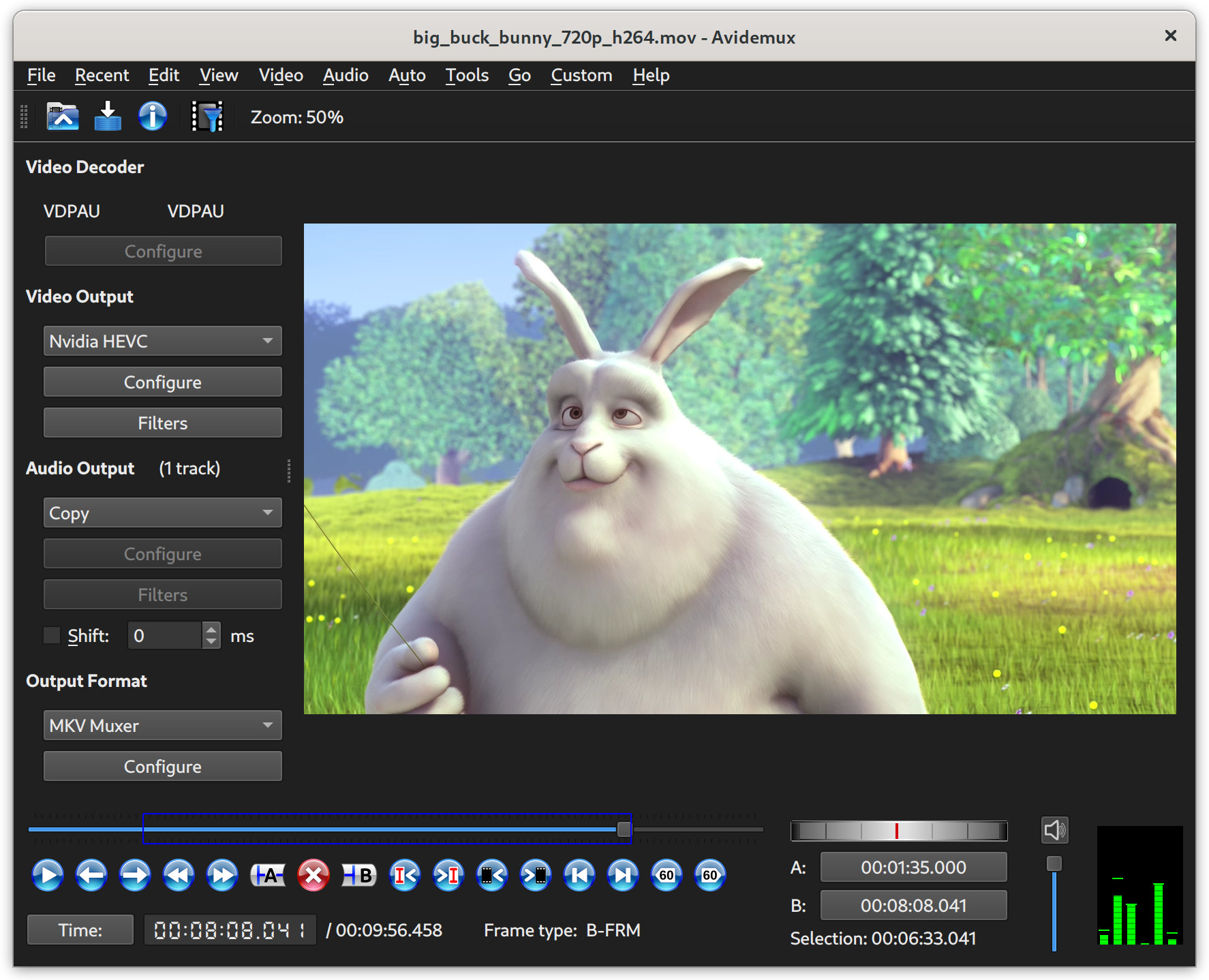 Avidemux for Windows is a free video editor built for easy cutting, filtering as well as encoding tasks. The program supports various file types, which include the following; AVI, DVD compatible MPEG files, MP4 and ASF. Avidemux uses a variety of codecs; and tasks can be automated using projects, job queue and powerful scripting capabilities. Avidemux for Windows is a free video editor built for easy cutting, filtering as well as encoding tasks. The program supports various file types, which include the following; AVI, DVD compatible MPEG files, MP4 and ASF. Avidemux uses a variety of codecs; and tasks can be automated using projects, job queue and powerful scripting capabilities.
Avidemux is one of the simplest video editors on the internet, yet it is very effective, and rates also as one of the best freeware editor available. It is so amazing how a freeware program could have so much use; it has so much potential and could possibly compete favorably with some commercial programs because of its ease of use and features.
Similarly, the user-interface is so simple to understand; and you might not even have to go through the help menu to find your way around its features or functions. It works well with all your simple edits and file type-conversions, and works right out of the box. It has definitely witnessed so much in terms of improvements over the years; and I just have to say that the publishers have been able to keep up the good work they started in previous versions.
Want to check it out? Visit Avidemux.
Posted in Main | 1 Comment »
|
|
|




