Archive for the 'Main' Category
Tuesday, August 12th, 2014
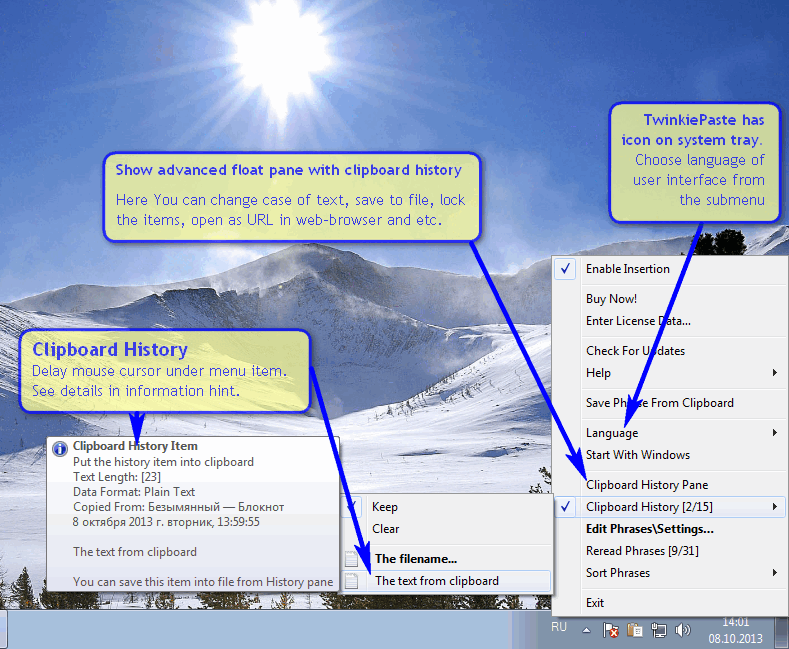 Are you looking for a simple and easy to use utility that lets you type commonly used text, dates, greetings, standard responses, Internet URLs, logins and passwords, code templates? Then you might want to try out TwinkiePaste because it has some nice features that are also very easy to use. Are you looking for a simple and easy to use utility that lets you type commonly used text, dates, greetings, standard responses, Internet URLs, logins and passwords, code templates? Then you might want to try out TwinkiePaste because it has some nice features that are also very easy to use.
What’s the big deal about TwinkiePaste?
TwinkiePaste is a utility to quickly type commonly used text, dates, greetings, standard responses, Internet URLs, logins and passwords, code templates. TwinkiePaste helps to quickly type text in almost any application, thus saving a lot of time and saving you from routine.
This version of TwinkiePaste already boasts of a couple of changes that include the following: addition of Turkish language; addition of settings of method of spy for clipboard; and updated Russian language file.
The program works when a user presses the hotkey in any application, which enables the cursor to display a menu with text templates to be inserted. Once you have selected the menu command, you are through with the entire process; it is that easy even for a newbie.
Does TwinkiePaste have any downside?
TwinkiePaste makes things easier for anyone using it. However, it has a 40 day trial limitation. Note that personal license goes for $19, while Home license (up to 4 computers) – for $29.
Want to check it out? Visit: Amlpages.com.
Posted in Main | No Comments »
Monday, August 11th, 2014
 One of the things most people don’t have is the luxury of time. When you type on your system, you sometimes wish things would just speed up so you can move to other things; but things don’t always work that way. That is why a program like ShortKeys is not a bad idea since it speeds up the process of typing and repeating similar texts all over again. One of the things most people don’t have is the luxury of time. When you type on your system, you sometimes wish things would just speed up so you can move to other things; but things don’t always work that way. That is why a program like ShortKeys is not a bad idea since it speeds up the process of typing and repeating similar texts all over again.
What is the big deal about ShortKeys?
ShortKeys is a text replacement utility. Type a few characters and it will replace them with up to 3000 keystrokes. Great for repetitive text needs. Automate tedious and repetitive typing. Reduce errors. You will be amazed how much time it can save. It monitors the keyboard activity on a global nature and anytime a user defined keystroke combination is typed in, it is replaced with the replacement text.
This current version of ShortKeys in review has a lot of changes including the following: addition of a panel to the ‘Modify Keys’ window that describes what to type to play back the shortkeys; addition of ‘Delay after keystroke down’ option to improve reliability of playback; renamed Invalid Characters to Solitary Usage Separator Characters in the preferences; and many more.
The program has a 30 day trial limitation. Full version license for 2 users would cost you $40.
Want to check it out? Visit ShortKeys.com.
Posted in Main | No Comments »
Monday, August 11th, 2014
 Do you want an e3asy to use FTP server that can be3 easily accessed from your system tray? Have you heard of Cerberus FTP Server? Do you want an e3asy to use FTP server that can be3 easily accessed from your system tray? Have you heard of Cerberus FTP Server?
What’s Cerberus FTP Server?
Cerberus FTP Server provides powerful, multithreaded FTP server performance without sacrificing ease-of-use. Designed to use very little CPU and memory, it features a user-friendly interface that can be easily hidden or accessed from the system tray. The server is able to listen for connections on multiple interfaces (Multi-homed PCs), run as an NT service, resume failed transfers, and offers an easy-to-use manager for controlling user access to files and file operations.
Connection limit, timeout, and IP access can be controlled by the administrator as well as a variety of other settings. In addition, it offers statistics on connections as well as robust logging capabilities. Cerberus FTP Server adheres to RFC959 and RFC1123.
Perhaps, Cerberus FTP Server can be described as one of the best servers available with some of the best features. The fact that the features are also very easy to use makes it an attractive option for a lot of people. Some of these features include the following; IP Auto-Banning; Active Directory & LDAP; Email Notification; File Integrity Checking; and many more.
Want to check it out? Visit Cerberusftp.com.
Posted in Main | No Comments »
Monday, August 11th, 2014
 Do you want a personal real-time Windows desktop weather station on your computer desktop? Have you tried or even heard of a program known as Weather Watcher Live? Do you want a personal real-time Windows desktop weather station on your computer desktop? Have you tried or even heard of a program known as Weather Watcher Live?
What’s the deal about Weather Watcher Live?
Weather Watcher Live is your personal, real-time Windows desktop weather station. View real-time weather conditions in your neighbourhood from NWS, WeatherBug and Weather Underground weather stations. Automatically retrieve the current conditions, hourly forecast, daily forecast, severe weather alerts from NWS (US only), and weather maps for thousands of cities world-wide. The current conditions can be quickly viewed by holding your mouse pointer over the Weather Watcher Live system tray icon.
Weather Watcher Live is a program that connects you to the closest weather stations in order to deliver the most accurate and up-to-date weather information. Quickly access your local weather conditions, hourly forecasts, daily forecasts, severe alerts, and maps on any Windows computer.
With this program, you no longer have to visit various weather websites, open your newspaper, or wait for your local news station to discuss weather that is usually not so local to you. With only a couple of clicks, you can quickly and easily access a nearby weather station and see your local current conditions, forecasts, maps, and severe weather.
The program is good, and very useful. However, it has a 30 day trial period. One year subscription would cost you $19.
Want to check it out? Visit: SingersCreations.com.
Posted in Main | No Comments »
Saturday, August 9th, 2014
 Any CD burner that comes with a lot of features will always attract a lot of users no matter its costs. However, when such a program is not only free, but combines a lot of features that lets you do a lot of things; the only thing you want to do is find out more about it. Have you heard of CDBurnerXP? Any CD burner that comes with a lot of features will always attract a lot of users no matter its costs. However, when such a program is not only free, but combines a lot of features that lets you do a lot of things; the only thing you want to do is find out more about it. Have you heard of CDBurnerXP?
What is the big deal about CDBurnerXP?
CDBurnerXP is a free application to burn CDs and DVDs, including Blu-Ray and HD-DVDs. It also includes the feature to burn and create ISOs, as well as a Multilanguage interface. Everyone, even companies, can use it for free.
The features are just excellent and very easy to use even if you are a newbie. Some of these features include the following: burn all kinds of discs; audio-CDs with or without gaps between tracks; burn and create ISO files; data verification after burning process; create bootable discs; multi-language interface; bin/nrg ? ISO converter, simple cover printing and several more.
Does it have any downside?
The reason why CDBurnerXP remains one of the best burners available today is because of its ease of use. It doesn’t have any downside.
Want to check it out? Visit: CDBurnerXP.se.
Posted in Main | No Comments »
Tuesday, August 5th, 2014
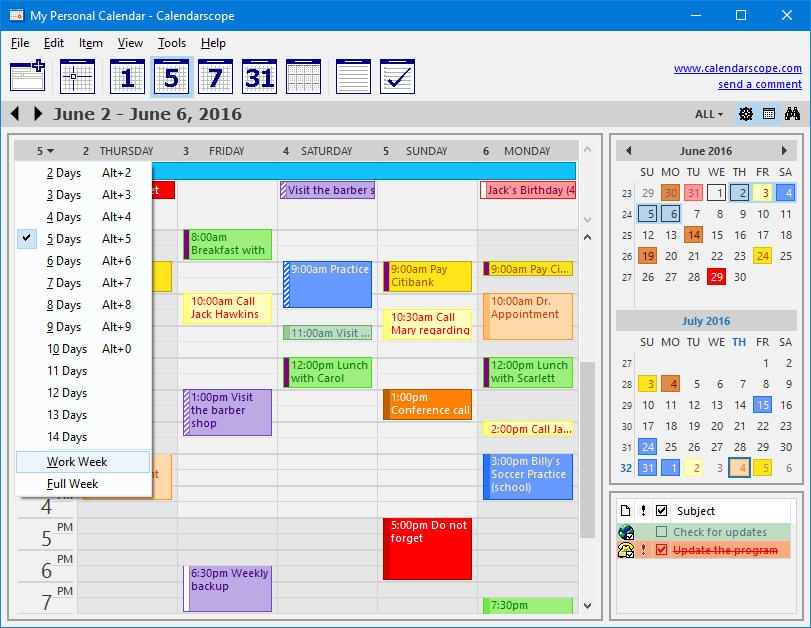 Having your work and daily activities all planned out can really help you do a lot of things easier than you used to. Good thing is there are several programs to help you do just that including Calendarscope. Having your work and daily activities all planned out can really help you do a lot of things easier than you used to. Good thing is there are several programs to help you do just that including Calendarscope.
What’s the deal about Calendarscope?
Calendarscope is a full-featured calendar program for planning, managing, and scheduling appointments, meetings, birthdays, vacations, and special events. It allows you to view all your events in a daily, weekly, monthly, or yearly overview. Reminders have customizable fonts, colors, and sounds, and may contain live web URLs and email addresses.
Several of Calendarscope’s features are accessible from a tray icon. Using it, you can create single or recurring events, colour-code different event types, set reminders for upcoming events, and more. A Drag and drop feature allows you to easily reschedule an event, or change its duration. You can also synchronize your data with Palm OS and Pocket PC handhelds, print your calendar to take it with you, or save it in HTML to publish it to the Web or to a company intranet. Unauthorized access to your data is prevented with strong encryption algorithms.
Does it have any downside?
Calendarscope has a 30 day trial limitation. Full version would cost you $29.95.
Want to check it out? Visit: CalendarScope.com.
Posted in Main | No Comments »
Tuesday, August 5th, 2014
 Are you looking for software that supports a lot of features including mask, layer and many other editing functions? The truth is Pixia is one fine program that has a user-friendly interface that is suitable for beginners as well as experts. Are you looking for software that supports a lot of features including mask, layer and many other editing functions? The truth is Pixia is one fine program that has a user-friendly interface that is suitable for beginners as well as experts.
What’s Pixia?
Pixia is the English version of a popular Japanese painting and retouch software for full colour graphics. It supports mask, layer and many other editing functions. You can use your own customized brush tips and even use an image file as a brush tip to create unique effects. Its user-friendly interface is suitable for beginners as well as experts. Supports the most common editing techniques and presents a user friendly interface.
The original Japanese edition of this software was created and developed by Isao Maruoka, but has also been aggressively raised by its fans, which makes this software quite unique and different from other tools. The Help File for version 4 is available as a separate installation file. To get better tips for using Pixia, you can visit users’ tutorials linked from the Tutorial page.
Does it have any downside?
Pixia is an awesome tool that has a lot of amazing and easy to use features just for anyone. It doesn’t have any downside.
Want to check it out? Visit: Pixia.
Posted in Main | No Comments »
Tuesday, August 5th, 2014
 Looking for powerful, and easy to use and free remote pc access software that can display the screen of another computer (via internet or network) on your own screen? Have you tried UltraVNC before? Looking for powerful, and easy to use and free remote pc access software that can display the screen of another computer (via internet or network) on your own screen? Have you tried UltraVNC before?
What’s the deal with UltraVNC?
UltraVNC is an enhanced VNC distribution. The software is based on RealVNC, features TightVNC smart cursor handling and encoding, almost all the special functionalities that can be found in eSVNC and Vdacc-VNC, and a lot more. UltraVNC allows you to use your mouse and keyboard to control the other PC remotely. It means that you can work on a remote computer, as if you were sitting in front of it, right from your current location.
Everyone who needs to support local or remote Windows users will find UltraVNC Products are must-have tools. The following categories of people need this program: Help desk (Internal External); IT departments; remote computer access; remote computer support companies; remote demonstration; eLearning, classroom control and individuals who want to help their relatives and friends, or access their home PC from work or cybercafés.
Want to check it out? Visit uvnc.com.
Posted in Main | No Comments »
Saturday, August 2nd, 2014
 What is the big deal about Microsoft Enhanced Mitigation Experience Toolkit? What is the big deal about Microsoft Enhanced Mitigation Experience Toolkit?
Microsoft Enhanced Mitigation Experience Toolkit is a toolkit for deploying and configuring security mitigation technologies. The enhanced Mitigation Experience Toolkit (EMET) is designed to help prevent hackers from gaining access to your system. Software vulnerabilities and exploits have become an everyday part of life.
Virtually every product has to deal with them and consequently, users are faced with a stream of security updates. For users who get attacked before the latest updates have been applied or who get attacked before an update is even available, the results can be devastating: malware, loss of PII, and many more.
The truth is we all have to deal with problems being created by all these malicious programs; and the best time to do that is now. With Microsoft Enhanced Mitigation Experience Toolkit, that can be taken care of fast. It should be seen as an extra layer of security because that is exactly what it is. It is an essential.
Want to check it out? Visit Microsoft.com.
Posted in Main | No Comments »
Friday, August 1st, 2014
 While these Alpha 2 images have been tested and work, except as noted in the release notes, Ubuntu developers are continuing to improve the Utopic Unicorn. While these Alpha 2 images have been tested and work, except as noted in the release notes, Ubuntu developers are continuing to improve the Utopic Unicorn.
Ubuntu is a Linux distribution that starts with the breadth of Debian and adds regular releases (every six months), a clear focus on the user and usability (it should “Just Work”, TM) and a commitment to security updates with 18 months of support for every release. Ubuntu ships with the latest Gnome release as well as a selection of server and desktop software that makes for a comfortable desktop experience off a single installation CD.
Alpha 2 includes a number of software updates that are ready for wider testing. This is quite an early set of images, so you should expect some bugs.
Of a particular note, once newer daily images are available, system installation bugs identified in the Alpha 2 installer should be verified against the current daily image before being reported in Launchpad. Using an obsolete image to re-report bugs that have already been fixed wastes your time and the time of developers who are busy trying to make 14.10 the best Ubuntu release yet. Please ensure your system is up to date before reporting bugs.
Want to check it out? Visit ubuntu.com.
Posted in Main | No Comments »
|
|
|




