Archive for the 'Main' Category
Wednesday, December 24th, 2008
 Free Ape player is a free audio player can play ape file and mp3 file. it can run under Windows 98/Me/2000/XP/2003 server. This application may be freely distributed. Free Ape player is a free audio player can play ape file and mp3 file. it can run under Windows 98/Me/2000/XP/2003 server. This application may be freely distributed.
Pros: Monkey’s Audio (APE) is used by Windows users mostly. It is a free lossless audio compression format with a highly competitive compression algorithm. Decompression speeds of Monkey’s Audio are slow compared to other lossless audio formats. Files generated are also quite large. The free player plays APE files. It plays MP3 files as well. The interface has the play controls like play/pause and stop etc. The file controls lets you find the right files easily as it is integrated with the Windows explorer. There is a large play time display and another display area shows the track details.
The details displayed indicate the sampling and the overall bit-rate of the track. Two slider controls control navigation through the play-list and also the specific track. The program runs within Windows 98/Me/2000/XP/2003 server. This application is not only free to use but free to distribute as well.
Cons: Slider control navigating play list or specific track is a little uncommon. Most users are familiar with the more common forward/fast forward and rewind controls.
{More Info and Download}
Posted in Main | No Comments »
Tuesday, December 23rd, 2008
 A lite version of the Feed Editor RSS Creator. A tool to create RSS Feeds. A lite version of the Feed Editor RSS Creator. A tool to create RSS Feeds.
Pros: This is a lite version of the Feed Editor RSS Creator which is useful for creating professional RSS feeds. It features an easy to use interface. The interface has an in-built HTML editor which makes HTML editing tasks simple and one doesn’t need to leave the tool to get that editing done. “Feed image” view is especially useful for visualizing what the RSS feed will look. “Feed items” view is where most of the editing takes place.
Cons: The publisher’s description reads the same as the Feed Editor RSS Creator version. This may give an impression that this is as good. Nothing can be farther from the truth.
Sadly, this is a (much) watered-down version of the Feed Editor and hardly any functions work or work to a level where they can be useful. The recommendation is to skip this one and go for the full version which is full-featured and a really nice tool for a novice as well as an expert looking to create professional RSS feeds. This is a trial version but one is better off trying the full version.
One of the best features which is the uploading of podcasts simply does not work in this version. As such the interface is too simple and could use some work.
{More Info and Download}
Posted in Main | No Comments »
Tuesday, December 23rd, 2008
 DocPoint is a document management and imaging management solution that provides organizations of any size with a powerful and affordable paperless office solution. DocPoint is a document management and imaging management solution that provides organizations of any size with a powerful and affordable paperless office solution.
Pros: DocPoint is a document management solution for an enterprise. It includes imaging solution to enable legacy documents to be integrated into the management solution. It provides document as well as record retrieval, effortless information distribution across an organization and high volume capture. Available in personal, pro and corporate editions take care of the needs of most organizations. What it helps with is reduce the time spent in finding documents, eliminates the need for reproductions for distribution while letting users maintain their existing work flow processes. The application integrates easily with existing applications. Storage structure can emulate filing systems used in the physical systems. Flexible and customizable folders & cabinets help you do that. Security processes protect the document archives from unauthorized access and modifications. Once scanned the legacy documents also go into this protected archives. File storage formats are non-proprietary thus there should not be problems in accessing data at times in the future. The application woks closely with MS Office including Outlook, and is easy set up on the corporate network. With ODBC connectivity this application can work with any ODBC compliant database.
The application provides fast retrieval of document supported by fast document capture and indexing. Tree like display of the documents helps retrieval. Sharing and collaboration is easy to set up. Direct benefits to the organization besides the productivity gains and regulatory compliance of document archival are customer service responsiveness, reduction is document handling costs, disaster recovery preparedness etc.
Cons: Facility to build in workflow such as automatic forwarding of documents for approval/review to persons on the team would have been a useful feature.
{Mopre Info and Download}
Posted in Main | 1 Comment »
Monday, December 22nd, 2008
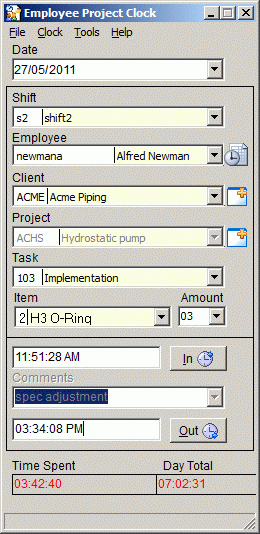 This is an employee time recording system. This is used by company who needs to track several employees’ time entry on one or more computers. Employee Project Clock is good for companies involved in automation, manufacturing, control engineering, tool and die and other job shops. This is an employee time recording system. This is used by company who needs to track several employees’ time entry on one or more computers. Employee Project Clock is good for companies involved in automation, manufacturing, control engineering, tool and die and other job shops.
PROS:
- It keeps accurate time logging records by making it possible for each employee to easily log time in and out.
- It gives the time spent by employee on different projects.
- It checks employee time logging by shift.
- It assigns rates by employee or project for time charging purposes.
- It also tracks the project costs and schedules with the project management and expense features.
- It access data from other database programs using the ODBC driver.
CON:
- Price- $75. Too high in my opinion
But a new version just hit the market- Version 6 and the basic difference in this version is the new time server feature. In this case there is no chance of user tampering.
So it is definitely worth checking out.
For more info check it out at http://cyber-matrix.com/epclock.html
Posted in Main | No Comments »
Monday, December 22nd, 2008
 Microsoft Office Outlook Connector offers a good access to Microsoft Office Outlook 2003 or Microsoft Office Outlook 2007 which collectively makes it possible to access and manage your Microsoft Windows Live Hotmail or Microsoft Office Live Mail accounts, including e-mail messages, contacts and calendars for free! Microsoft Office Outlook Connector offers a good access to Microsoft Office Outlook 2003 or Microsoft Office Outlook 2007 which collectively makes it possible to access and manage your Microsoft Windows Live Hotmail or Microsoft Office Live Mail accounts, including e-mail messages, contacts and calendars for free!
This program allows you to use your Live Hotmail accounts within Outlook:
- You can read and send your Office Live Mail/Windows Live Hotmail e-mail messages.
- Manage your contacts in Windows Live Hotmail.
- Apply better methods to block junk e-mail messages.
- Manage multiple e-mail accounts in one place.
- Manage, and synchronize multiple calendars, including shared calendars to Windows Live Calendar from Outlook.
Take note if you are currently using MSN Calendar service, the Outlook Connector 12.1 will automatically migrate your calendar to the new Windows Live Calendar service. Once you are upgraded to Windows Live Calendar, you will be able to synchronize multiple calendars, including shared calendars to Outlook but you will now be prevented from accessing MSN Calendar through Microsoft Office Outlook.
In ensuring that that all of your calendar items on the MSN Calendar service are correctly migrated to the Windows Live Calendar, you should follow these steps:
- After installing Outlook Connector 12.0, synchronize your calendar in Microsoft Office Outlook with the MSN Calendar service one last time.
- After synchronization is complete, do not create new items on the MSN Calendar site. If you do, you will have to synchronize again using Outlook Connector 12.0 before migrating to Outlook Connector 12.1.
- Install Outlook Connector 12.1.
- Start Outlook. At this point, the Outlook Connector 12.1 will upload all of your appointments and meetings to your new Windows Live Calendar.
Pls note that not all OS is supported, the supported ones include Windows Server 2003; Windows Vista; Windows XP
It also works well with:
- 2007 Microsoft Office system
- Microsoft Office 2003
- Microsoft Office Outlook 2007
- Microsoft Office Outlook 2003
Get more information from http://www.microsoft.com/downloads/details.aspx?FamilyID=9a2279b1-df0a-46e1-aa93-7d4870871ecf&DisplayLang=en
Posted in Main | 1 Comment »
Saturday, December 20th, 2008
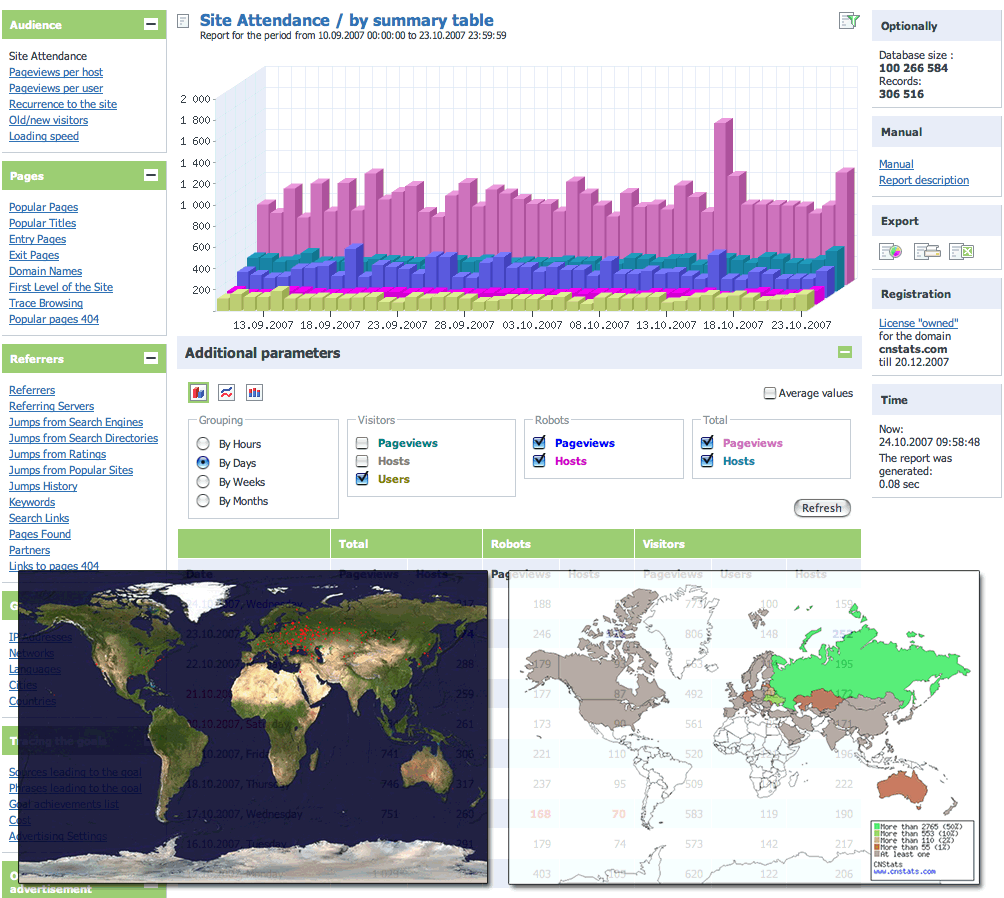 CNStats Standard is a system designed to ease the collation and analysis of site usage statistics. This software is flexible and versatile. Over 50 basic reports are available via web-interface. CNStats STD functions to maximum at any hosting which supports MySQL and PHP. CNStats Standard is a system designed to ease the collation and analysis of site usage statistics. This software is flexible and versatile. Over 50 basic reports are available via web-interface. CNStats STD functions to maximum at any hosting which supports MySQL and PHP.
This software suits to upcoming projects perfectly and gives you room to control your visitors’ actions online, evaluate advertising effectiveness, as well as to consider ROI. The program can be conveniently installed and to set up, and it also allows the counting all the visitors of your web-site.
WIth Features like
- Fast and easy installation
- Autonomy and safety – statistics is stored on your site and does not call the external sources while working;
- Time-proved accuracy and reliability;
- Unique interface – multi-functional, user-friendly, multi-lingual, fast;
- Built-in system of goals tracing – who, when, where from. The term “goal” may imply payment for products, registration on a site, photograph upload, message sending etc;
- Analysis of advertising campaigns effectiveness, counting of jumps, and calculation of goal achievement cost, selection of advertising sites;
- etc
This is a tool really worth having.
Visit www.cnstats.com for more info and download.
Posted in Main | No Comments »
Friday, December 19th, 2008
 GeoDataSource Free Cities Edition provides geographical database of world features, cities with place names and region names. GeoDataSource Free Cities Edition provides geographical database of world features, cities with place names and region names.
Pros: This application provides a database. Database consists of geographical details of world features. Country, region, cities and other sub-divisions are some of the details available. Details supplied with these features include maps, satellite pictures and a composite of these two views of the area/region depending on the level of subscription. All three data set displays are served by Google Maps. Several versions are available that provides increasingly more details with the class of subscription. Beside the free version a basic, silver and gold subscriptions are available.
Free database of worldwide cities in text format is suitable for any application requiring a comprehensive list of cities and country code. Subscribers get updates every month and the database is kept at a very accurate and up-to-date level. The list of cities and related items cover more than 2 million records and covers more than 260 countries, territories and sovereign regions. Users can download the database immediately on subscription. What you would require is a database capable of storing these 2million+ records such as SQL Server, Oracle, MySQL, PostgreSQL etc. Data needs to be imported from the tab delimited ASCII text file format.
Cons: This is obviously targeted at special applications and users need to be absolutely clear of what the usage is. Also it is for programmers who would be integrating SQL queries with the database.
{More Info and Download}
Posted in Main | No Comments »
Friday, December 19th, 2008
 Pet themed graphic images and web elements, including HTML web templates with a pet theme, stock photos of all types of pets and animals. Great collection for veterinarians, animal rescue clinics or other pet businesses. Pet themed graphic images and web elements, including HTML web templates with a pet theme, stock photos of all types of pets and animals. Great collection for veterinarians, animal rescue clinics or other pet businesses.
Pros: When setting up a website it helps to have the overall design based on some theme. A theme that gives a visitor the feeling of what the site is all about. This package puts together web elements required for such a site. The present set is about pets. That makes it suitable for setting up by veterinarians, animal rescue clinics and any other business related to pets. A nice collection of all web elements needed to build a website designed specifically for pet lovers Each themed CD contains a collection of web templates, layouts, images, logos, and photographs all related to this central theme. The web elements are supplied on CDs. The distribution media contains a large collection of stock photos, these images are high quality digital photographs of pets and domestic animals. There’s a set of logos, the graphics are again all based on animals that are pets for humans. The HTML templates are quite attractive. The template set includes CSS files and the web graphics and the images discussed above. The website material is easy to edit in any HTML editor. They include a variety of pets.
Cons: Like any such collection however big a collection is presented, not everybody is likely to like all of them. One would always look for more.
{More Info and Download}
Posted in Main | 2 Comments »
Friday, December 19th, 2008
 The easiest way to compare mobile phone deals from UK’s leading retailers to find the best deal for you. Compare over 50,000 best mobile phone contracts from UK retailers. Use this for the best mobile phone deals and offers. The easiest way to compare mobile phone deals from UK’s leading retailers to find the best deal for you. Compare over 50,000 best mobile phone contracts from UK retailers. Use this for the best mobile phone deals and offers.
Pros: The website helps find the best possible deal on mobile phones that are available from retailers in the UK. One could search for deals by handset or by inclusive minutes and text. You could use the simple search tools to filter and find the best mobile phone deal. You can compare over 50,000 best mobile phone contracts.
Find Cheap Mobile Phones Deals and Mobile Phones with Gifts. The search could be for all handsets or by specific manufacturers such as Nokia, Samsung, LG, Sony, Motorola. Similarly you could search all networks or specific networks including O2, Virgin, Vodafone, Orange, 3 or T. Use The Deal Tree for great deals on mobile phone contracts and handsets. The data available is extensive whether it is the handsets or the contract deals. On the handsets deals handsets are from a large number of manufacturers and a large range of models from each are represented.
The contract deals are wide-ranging too. If at all finding a deal is problematic it’ll be for the wide range of alternatives being available.
Cons: How good the comparisons are really depends on how well the deal details are collected by the software publishers.
{More Info and Download}
Posted in Main | No Comments »
Friday, December 19th, 2008
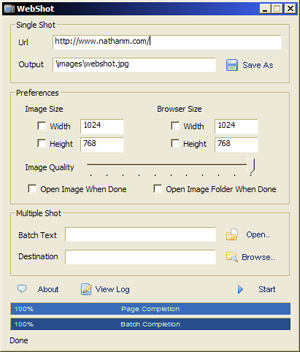 Webshot is a program that allows you to take screenshots of web pages and save them as full sized images. It can be found in the JPG, GIF, PNG, or BMP formats. Webshot is a program that allows you to take screenshots of web pages and save them as full sized images. It can be found in the JPG, GIF, PNG, or BMP formats.
The freeware edition does color screenshots via the graphical user interface and the freeware command line interface is limited to grayscale screenshots.The freeware version also has a demo of the command line interface, which can be bought, and used to streamline the screenshot process on whole websites. The server edition of WebShot comes with a DLL that will allow you to embed WebShot technology in your own applications.
It is a really cool tool with Basic Features like
- Automatic determination of page width and height that captures the whole page accurately.
- Frame dimensions are known and calculated on pages that have them.
- Browser size specification allows you to capture the whole page ure operation
- and lots more
You will love the fact that with this tool, Image thumbnailing reduces the final capture image easily
All in all it is really worth checking out! For more details, visit: www.websitescreenshots.com
Posted in Main | No Comments »
|
|
|




