Archive for the 'Main' Category
Friday, November 10th, 2006
 If you are a fan of ARCTIC RUSH and you enjoyed watching the popular screen saver “3D Artic Bear” then you are going to love the adventures of the popular bear in this advanced screensaver version. If you are a fan of ARCTIC RUSH and you enjoyed watching the popular screen saver “3D Artic Bear” then you are going to love the adventures of the popular bear in this advanced screensaver version.
In this advanced version, the adventures come alive like never before. Not only does he just drink and listen to music, you get to hear the music the bear is listening to too. The beautiful thing about this version is the bear’s dance step, now you have a dancing, beer-drinking bear that gets to play OLIVER TWIST with you – asking for more. And if you want to make him happy, just buy a box of beer at the online shop.
In the Free version, the bear has only one beer so it doesn’t dance much. But if you purchase the full version, you get a box of beer and it’s dancing galore. Check it out!
COOL FEATURES IN THIS VERSION INCLUDES
- Great 3d graphics
- Nice animation
- Beautiful visual effects
SYSTEM REQUIREMENTS
- All Windows OS [95 till date]
Posted in Main | No Comments »
Friday, November 10th, 2006
 Spam! What more can i say? We all get it, we all hate it! Spam Motel allows to create disposable email addresses, that way the mail gets forwarded to you from your spam motel account, the spammers never get their hands on your real email address! All you gotta do is sign up, totally free, and it generates disposable email addresses for you to use from now on when you sign up to anything online or use forums, etc. You can use the same account for multiple places and your account on the Spam Motel site will keep track of it all. You can even download a tiny program that you can use from a desktop shortcut, for instantly making new addresses. Spam! What more can i say? We all get it, we all hate it! Spam Motel allows to create disposable email addresses, that way the mail gets forwarded to you from your spam motel account, the spammers never get their hands on your real email address! All you gotta do is sign up, totally free, and it generates disposable email addresses for you to use from now on when you sign up to anything online or use forums, etc. You can use the same account for multiple places and your account on the Spam Motel site will keep track of it all. You can even download a tiny program that you can use from a desktop shortcut, for instantly making new addresses.
I highly recommend this for anyone sick of recieving spam, it won’t help your current email account if it’s already getting spam, but if you’re making a new email account, be sure to use this instead of giving out your real address to things you dont trust!
You can sign up here and read more info In the faq
Posted in Main | No Comments »
Friday, November 10th, 2006
 Speedfan is a free program for showing the information from the sensor chips in your windows system tray. It can sense and show voltages and the temperatures from your hard drive, CPU and graphics card. It can also sense and show the speed of your fans. It’s more advanced settings allow you to control the fan speeds, reducing power consumption and noise, but you need to know what your’re doing so your computer doesnt overheat! You need to register (free) from inside the program to check if it supports your motherboard type, but apart from that it’s totally free. It also supports S.M.A.R.T. drives (Self-Monitoring Analysis and Reporting Technology). Speedfan is a free program for showing the information from the sensor chips in your windows system tray. It can sense and show voltages and the temperatures from your hard drive, CPU and graphics card. It can also sense and show the speed of your fans. It’s more advanced settings allow you to control the fan speeds, reducing power consumption and noise, but you need to know what your’re doing so your computer doesnt overheat! You need to register (free) from inside the program to check if it supports your motherboard type, but apart from that it’s totally free. It also supports S.M.A.R.T. drives (Self-Monitoring Analysis and Reporting Technology).
This program is most useful for advanced users who overclock or build their own pc’s, as for the rest of us, we don’t need to worry about this kinda stuff! But for more info, you can go check it out here.
Posted in Main | No Comments »
Friday, November 10th, 2006
If you are looking for a software that will enable you to build your website easily without the stress of learning HTML codes then Antenna Web Studio is for you.
Antenna enables you to make great looking web sites rapidly. You can create your own web pages and digital photo galleries in minutes, without any HTML knowledge. Antenna’s powerful editor is entirely visual, and pixel accurate – putting you in control. Wherever you drag & drop text, pictures, buttons, flash animation and movies on the page, that’s exactly where they will appear in the web browser. It’s a WYSIWYG [WHAT YOU SEE IS WHAT YOU GET] editor.
One of the things I really love about it is that when you are ready to publish your site, you won’t need to buy any additional software. Because Antenna has its own publisher built in, and it can be set to publish changes only, so you can update your site very quickly.
The publishers make it so easy to use with the free online tutorials and expert tips. There is also a comprehensive 100 page fully illustrated color User Guide and free technical support. So it’s not one of those programs, you buy only to be left to figure it all out by yourself.
With Antenna web studio you can easily make any part of your website multilingual at any time and you can concentrate on aesthetics and design – instead of spending hours just trying to make your HTML code work – have fun and make your site look stunning!
One other thing I love about this software is that unlike other programs where you don’t get the full version until you pay; you can download the full version of Antenna Web Studio, fully functional, and try it out for 16 days before you have to pay a dime.
Click HERE to check out its key features.
Want to try it out? Click HERE for 16-day free trial download.
Posted in Main | 1 Comment »
Friday, November 10th, 2006
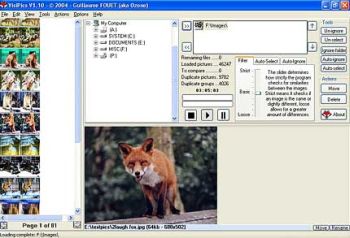 If you save a lot of images to your hard drive or do a lot of graphics editing then you might wanna check this out. Chances are you have at least some unneeded duplicate images taking up diskspace and cluttering your hard drive, possibly a lot more than you might realise. If you save a lot of images to your hard drive or do a lot of graphics editing then you might wanna check this out. Chances are you have at least some unneeded duplicate images taking up diskspace and cluttering your hard drive, possibly a lot more than you might realise.
This program scans your drive for duplicates. It uses four image comparison filters to find duplicates and it’ll detect two different resolution files of the same picture as a duplicate, or the same picture saved in different formats, or duplicates where only small cosmetic changes have taken place.
You can adjust the similarity levels and it starts to display the results while scanning,so you don’t have to wait to delete em’. Quick and simple way to tidy up your “picture collection” ; )
So if this sounds useful to you, you can read more and download it for free by going here.
Posted in Main | No Comments »
Thursday, November 9th, 2006
 Do you have great pictures on your digital camera that you want to share with friends but they are kind of too big to be emailed conveniently and too large to be displayed on websites? Are you in need of a freeware that can help you make high quality copies of your photos at a smaller size? Do you have great pictures on your digital camera that you want to share with friends but they are kind of too big to be emailed conveniently and too large to be displayed on websites? Are you in need of a freeware that can help you make high quality copies of your photos at a smaller size?
PhotoRazor might just be right for you. Photo Razor like the name implies is a freeware that acts as a razor to photos, cutting them to smaller sizes.
It is a free photo resizing software that helps you to make high quality copies of your photos at a smaller size – ideal for on-screen viewing. This reduces the file size making them much easier to email and share with friends and family.
Obviously you don’t want to lose your large originals in the process of resizing – you’ll need those for printing, so PhotoRazor saves the smaller resized copies to a separate folder, ensuring your precious original photographs are kept safe and untouched. It also allows you to adjust the size & quality and see the result before processing, a real time saver.
SYSTEM REQUIREMENT: Windows XP/2000/98/ME/NT
Click HERE for more info and free download.
Posted in Main | 1 Comment »
Thursday, November 9th, 2006
 Total Organizer is a Personal Information Manager that helps you organize and plan your business and personal life. The unique thing about it is that it allows you to store all of your contacts, tasks, notes, and to-do lists divided into tree-structured categories. Each item- note, task, contact, etc may belong to several categories (tags). So, this is a combination of folders (tree) and tags. Total Organizer is a Personal Information Manager that helps you organize and plan your business and personal life. The unique thing about it is that it allows you to store all of your contacts, tasks, notes, and to-do lists divided into tree-structured categories. Each item- note, task, contact, etc may belong to several categories (tags). So, this is a combination of folders (tree) and tags.
It is worthy of note that if you create subfolders or subcategories, then by opening a folder you can see all the items belonging to it, and the contents of all its subfolders.
Total Organizer comes in two versions: The freeware version, and the Pro version (TOTAL ORGANIZER PRO). The Pro version differs in that it allows you to view and manage so named “Relations” – that is, connections between items (created automatically, by the program, and manually). Both versions have recently been updated and their new updated versions just released.
Latest Changes In The Free Version [Total Organizer]:
- Converting types of items (e.g. converting a note to a task)
- Keywords auto-completion
- A few minor bug fixes
Latest Changes in Total Organizer Pro includes all the changes in the free version and:
- Adding file attachments and links
- Adding pictures to items (contacts, notes etc)
For more info and download of the free version and the Pro version, Click HERE!
SYSTEM REQUIREMENTS: Windows 2000/2003/XP
NOTE: Total Organizer Pro has a trial period of 20 days. After that you must buy it to continue to enjoy its features.
Posted in Main | 1 Comment »
Thursday, November 9th, 2006
 Have you heard of this great freeware that helps you increase the effectiveness of site promotion? It is called “Artemis Lite”; it’s really something great! Have you heard of this great freeware that helps you increase the effectiveness of site promotion? It is called “Artemis Lite”; it’s really something great!
When I saw the ad that said it increases the effectiveness of site promotion by 1875%, I thought it was just “advertising at its best.” I was surprised with what I learnt.
Most article submission tools submit the same article to every site in their list. Artemis Lite submits a unique article to every publisher in its list. That means you won’t be hit by the duplicate content penalty.
Using it, I have seen about 200 inbound links shrink to about 10 or 11 as they disappear into the “similar results” list. That’s like over 1000% increase in effectiveness.
Believe me, you’ll like how Artemis Lite makes articles unique and it won’t embarrass you when you see your article in print like some other tools will! It delivers it exactly as it is, no word substitution, no gibberish writings. It’s so cool!
And the great thing is this, it accomplishes a lot in a very short while, it takes less than 5 minutes to submit an article to thousands of sites and newsletters. There is just one simple form to fill out. And you are on your way to having great traffic to your website and great coverage for your articles. Are you thinking something cool as this will come with complex requirements, that’s the beauty of it all,
System Requirements: Windows XP or Windows 2000, an Internet connection, Internet Explorer 5.0 or later. Try it, you will love it! Click HERE for more info and download!
Posted in Main | No Comments »
Wednesday, November 8th, 2006
 Sorry, Windows users. This one’s for Macs only. When I started a new web page recently I quickly got fed up with the online ftp options offered by my host. It was nice that the hosting service offered a couple of web ftp clients, but the problem was that they didn’t have the features I wanted and were just plain difficult to use, not to mention unreliable. So I went searching for an alternative. Sorry, Windows users. This one’s for Macs only. When I started a new web page recently I quickly got fed up with the online ftp options offered by my host. It was nice that the hosting service offered a couple of web ftp clients, but the problem was that they didn’t have the features I wanted and were just plain difficult to use, not to mention unreliable. So I went searching for an alternative.
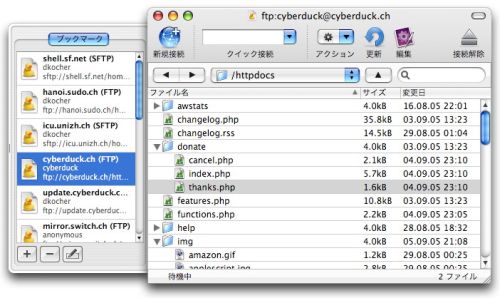
Everybody loves getting something useful for free, so you should love Cyberduck. It’s a freeware ftp client with an intuitive, easy to use interface and all the features you would need for the most common file transfer tasks. Cyberduck will remember your last connection settings and allow you to quickly reconnect to the last ftp server. Once there, you’ll be able to upload and download files as well as rename or change permissions on those files as needed.
The basic ftp functions are included on the toolbar at the top of the window. Uploading is accomplished by clicking the upload button and then selecting the file in the dialog box that appears. Downlaoding is even more simple. Either double click on the file in the Cyberduck window to download to the default download directory or drag and drop the file from Cyberduck to your finder window. When you’re finished, click the disconnect button and you’re done.
If you get stuck, check out the great online help linked from the Cyberduck site. There are a few more advanced features in Cyberduck, but if you have a need for a no-frills ftp client, Cyberduck is a great choice.
Posted in Main | 1 Comment »
Wednesday, November 8th, 2006
 If you want a screensaver that is more than just a screensaver, you might want to consider getting this one, Skeleton Adventures. It has an incredibly rich 3D environment. Getting this screensaver is not like getting most screensavers; you are invited to join the adventures of Sly Slim while he passes time at his home in Shale County Cemetery. Believe me, it’s really cool, its like a movie on your desktop, but one with an ever changing ending. If you want a screensaver that is more than just a screensaver, you might want to consider getting this one, Skeleton Adventures. It has an incredibly rich 3D environment. Getting this screensaver is not like getting most screensavers; you are invited to join the adventures of Sly Slim while he passes time at his home in Shale County Cemetery. Believe me, it’s really cool, its like a movie on your desktop, but one with an ever changing ending.
Though it’s really cool, you’ll need to purchase the full version to enjoy the best of it. But before you commit your cash to it, you can check out the free demo download HERE.
One problem is that it’s really bulky. The graveyard settings may also put you off if you don’t appreciate such stuff. Let’s face it , great animation or no animation, not everybody would want to have a skeleton in a graveyard adventure as a screensaver.
But all in all to those who don’t mind, it’s really cool. The animation, the effects, all make it a must have. This is not just a screensaver, it’s more than a screensaver.
If you download it and you have problems with the playback (if it is very jerky and sometimes stops) make sure you have a good video card and turn up all the accelerator settings.
Because video cards sometimes combine the on board RAM with your PCs RAM, you may need to check under the Troubleshooting section of the Advanced properties on your video card to make sure “Enable Write Combining” is unchecked. You should get a better and smoother playback after confirming this.
NOTE: It is only compatible with Windows 2000 and above.
Click HERE for more info and demo download!
Posted in Main | 5 Comments »
|
|
|