Archive for the 'Main' Category
Wednesday, November 8th, 2006
Translating web sites using a visual web design package or conventional text editor usually comes with problems like:
- Hidden text that wasn’t displayed so got missed;
- Text that you can see – but can’t seem to edit;
- Fonts and colors that changed;
- Hyperlinks that stopped working or got typed over;
- Scrambled formatting and page layout…
You find yourself spending lots of time spent trying to sort it all out , when all you wanted to do was translate. Catscradle is built to operate without these problems.
CatsCradle is a fast and easy to use web page editor for professional language translators. You get to translate whole websites without having to worry about page layouts and HTML code.
It’s a safe, all-in-one web site localization solution. It grabs all the text that requires translating from a web page, puts it into a built in editor for you to translate alongside, then automatically integrates your translated text back into the web page – leaving all the sensitive HTML code untouched.
To check all’s going smoothly you can instantly preview your work in progress in a web browser at the click of a button. It features a built in glossary, and a translation memory system. There’s also a real-time view where you can see the web page evolving as you translate.
A new updated version of CatsCradle has recently been released.
Latest Changes:
- Sentence Based Segmenting – much easier to translate whole sentences instead of tag based segments;
- Real time preview window scrolls to and highlights the selected sentence automatically – so you can see the sentence you are translating in context on the page without having to find it yourself;
- Click any sentence on the web page and CatsCradle will find that sentence in the editor;
- Improved character entity recognition – decodes Greek-math symbols and Unicode entities;
- More web page file extensions recognized (e.g. .aspx);
- Fixed problem parsing some Windows Help content and index files (.hhc / .hhk);
- Free for freelance translators, personal use and use in education.
CatsCradle offers full Unicode support so you can easily perform Cyrillic, Greek, Thai, Chinese and Japanese web site localization.
System Requirements: Windows 2000 or XP. Internet Explorer 5.0 or later.
For more info about the features of CatsCradle and free download, Click HERE!
Posted in Main | No Comments »
Wednesday, November 8th, 2006
 Are you looking for a program that provides so much fun? Freakstein might just be right for you. With Freakstein you can take pieces of any face and mix them up, the result will be MONSTROUS! It also allows to arrange all the faces that you want: define the main features of the face (eyes, nose, mouth, etc.) Are you looking for a program that provides so much fun? Freakstein might just be right for you. With Freakstein you can take pieces of any face and mix them up, the result will be MONSTROUS! It also allows to arrange all the faces that you want: define the main features of the face (eyes, nose, mouth, etc.)
All you have to do is to choose the parts of the face that you want to insert and Freakstein will automatically compose your patchwork, correcting features like the skin color and the shape of the face.
So have fun with your friends and foes alike: take their faces and arrange them in weird images! Have fun taking faces and mixing them up. One of the things I love most about Freakstein is that it allows you to increase, deform, and stretch every part of any face.
One Limitation is that it is not compatible with systems older than Windows 2000. Best performance is on Windows 2000 and XP operating systems.
So how about giving your friend (or even your boss) a new look? Click HERE for Free Demo and more info.
Posted in Main | 3 Comments »
Wednesday, November 8th, 2006
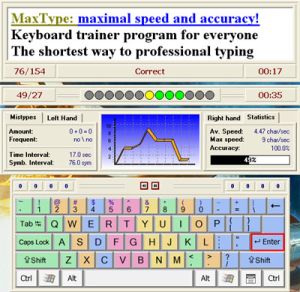 Maxtype Lite is a totally free program for teaching yourself how to touch type. Maxtype Lite is a totally free program for teaching yourself how to touch type.
In my personal experience, it’s just as easy to learn how to type the right way as it is to learn the wrong way (a.k.a the two finger, search and stab method!)
All it really takes is a little self discipline and pretty soon it becomes a habit. After that, you’ll just get better and faster.
This program allows you to test yourself and gives you your W.P.M (words per minute)CPS and CPM(yeah i didn’t know what they stood for either! Characters per minute and per second). As well as the typing speed for each hand, altogether 20 (!) statistics on your typing. Also you can load any text file at all that you wish to practice with, so you won’t get bored!
You can grab it for free here and use those other 8 fingers! (Well 6 fingers and 2 thumbs).
Posted in Main | No Comments »
Tuesday, November 7th, 2006
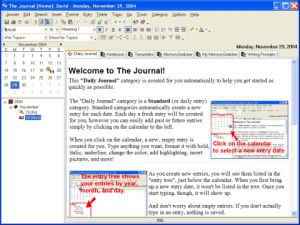 Okay, so “The Journal” is journaling/diary software. The idea of keeping a journal or diary always sounded kinda boring to me, unless you’re into that kinda thing or have an important or interesting time period in your life you’d like to document. So if that isn’t your thing, its also a very useful program for having a private place to store your research,thoughts, ideas, poetry, work notes, etc. Okay, so “The Journal” is journaling/diary software. The idea of keeping a journal or diary always sounded kinda boring to me, unless you’re into that kinda thing or have an important or interesting time period in your life you’d like to document. So if that isn’t your thing, its also a very useful program for having a private place to store your research,thoughts, ideas, poetry, work notes, etc.
What i like about it is that it’s password protected and encrypted, so not just anyone who used your computer can read your stuff! The Journal also provides important options like a hot-key for rapidly “locking” The Journal and a Lock on Minimize feature. In this new version you can also set reminders, so if you have something to do on time or an appointment to keep, you won’t forget about it due to being too involved in typing your life story or your plans to take over the world!
Lots more info and the 45 day trial are available by going here.
Posted in Main | No Comments »
Tuesday, November 7th, 2006
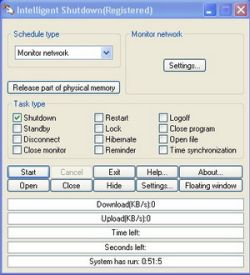 Intelligent Shutdown is a free program for turning off your computer at a specified time, among other things. It can also launch or close programs specified by you at a certain time. It can lock your computer and display a picture at a specified time too, for example when you’re gone to work (or gone home from work). Intelligent Shutdown is a free program for turning off your computer at a specified time, among other things. It can also launch or close programs specified by you at a certain time. It can lock your computer and display a picture at a specified time too, for example when you’re gone to work (or gone home from work).
So no need to remember to lock it or turn it off, as its all automated. All these things can be set to run at at a one off time or at a regular schedule, daily, once a week or month, etc. You can also set reminders for yourself. It also has a memory and CPU monitor so you can set things to happen only when memory or CPU is above or below a certain level, and it also shows idle time and uptime.
This program could be pretty useful for anyone who wants to automate things a little on their computer without having to remember to do it all each time.
It’s fully functioning shareware but you have to register if you wanna get rid of the welcome screen that pops up on start up. Get more info and the download here.
Posted in Main | 5 Comments »
Tuesday, November 7th, 2006
imgv is a unique and feature rich Image Viewer. It is released as free software with full sourcecode.
Features include a GUI that doesn’t get in the way of viewing your images, a file browser, slideshows, zooming, rotating, on-the-fly Exif viewing, histograms, fullscreen support, wallpaper setting, the ability to view 4 images on the screen at once, adjustable thumbnail sizes, playlists, view and download images from Web sites, movie playing, file searching/filtering, multiple directory loading, transitional effects, image hiding and more.
I actually wrote this program myself and have been working on it since the summer of 2001. It’s the only image viewer I use because it’s fast, has features that other image viewers don’t support that I like and it can run on other operating systems besides just Windows.
Here’s a screenshot of imgv I took where I’m using it to view a picture of my old cat with it:
Check out the documentation to quickly learn how to use it.
Posted in Main | No Comments »
Tuesday, November 7th, 2006
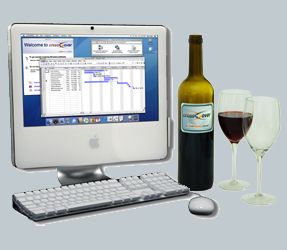 You know quite a lot of the time I am a Mac user. I know, it’s a dirty word in most parts of the blogisphere, but I have an Intel Mac and use it most of the time to run OS X software. BUT, and you will notice that is a big but, I do run a lot of PC software still, even though a lot of my productivity stuff has migrated to Mac. Fortunately using BootCamp I can run Windows XP on the Intel Mac Dual Core hardware, but it necessitates a reboot, which most of the time is okay but can be a royal pain. Solution? You know quite a lot of the time I am a Mac user. I know, it’s a dirty word in most parts of the blogisphere, but I have an Intel Mac and use it most of the time to run OS X software. BUT, and you will notice that is a big but, I do run a lot of PC software still, even though a lot of my productivity stuff has migrated to Mac. Fortunately using BootCamp I can run Windows XP on the Intel Mac Dual Core hardware, but it necessitates a reboot, which most of the time is okay but can be a royal pain. Solution?
Crossover by CodeWeavers is the answer. It allows you to run Windows apps natively on the Intel based Mac and Linux. You can install and run the software without installing Windows as the software sort of reverse engineers what the software needs to run and supplies right there on the Mac or Linux desktop.
Early versions of this software were a little buggy and larger software packages ran a little slow and the interfaces were a little broken, but the release version is much more stable. There are growing lists of compatible software on the website. To download a trial and see for yourself, go to CodeWeavers.
Posted in Main | 1 Comment »
Tuesday, November 7th, 2006
 A new version of Locate 32 has been released! A new version of Locate 32 has been released!
Locate 32 is a program that saves names of all files in your hard drives to file database. After that you can locate your files very fast. It works like updated and locate in Unix systems and Win32 based locating program is also included in this program.
The first version of LOCATE was released July 7 2005 and since then it has undergone 4 upgrades, making it better, faster and easier to use.
The problem with most desktop search suites is that you can either index everything, or not at all. There is no fine control of how often you want to update, for example, just 1 directory. With Locate you can do this very easily.
When you compare it to Windows desktop search and Google Desktop you’ll discover that it is far much better. To get the best of this program, you can set it up to index your locations but you’ll need to use several databases for different locations that see different amount of file update for optimized indexing. To top it all, Locate 32 is free.
Latest changes in the new version include:
- Exclude directories allows * and ?
- Regular expressions are changed to be caseless
- Fixed several bugs
Want to check out this and other related programs? Click HERE!
Posted in Main | 5 Comments »
Tuesday, November 7th, 2006
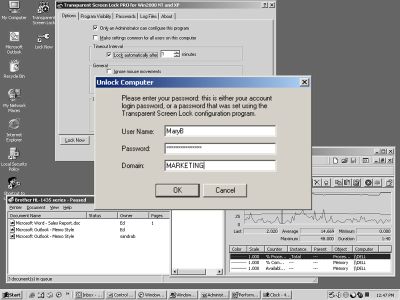 Transparent Screen Lock is a program for locking your computer. Big deal, right? Theres a few programs that already do this,or you could just password protect the screensaver. The difference with this program is that it’ll still display whatever’s running. This just means that no one can interefere with it, so they can look, but can’t mess up the settings. Transparent Screen Lock is a program for locking your computer. Big deal, right? Theres a few programs that already do this,or you could just password protect the screensaver. The difference with this program is that it’ll still display whatever’s running. This just means that no one can interefere with it, so they can look, but can’t mess up the settings.
For home or office users i can’t think of much use, as this idea seems to lack any privacy, since anyone can still see what you’ve been working on, I dunno, maybe that’s not an issue with some people?
Though this does seem like it could be very useful for things such as demo computers on display in computer stores or at trade shows, It could be a tad cheaper but may be worth it to certain people in those circumstances, but the rest of us regular home users can find similiar things for free, or just stick with password protecting the screensaver!
This seems like one of those programs that’s very useful to certain people working in certain conditions like i mentioned, and not very useful to everyone else, althought it has some advanced features such as logging attempts at unlocking the computer.
Theres a standard and a pro version, they seem pretty similiar to me,so if you wanna check it out and get more detailed info on what it can do, go here.
Posted in Main | 1 Comment »
Tuesday, November 7th, 2006
How many ways of using maps do you know? And online based, like Google Maps? Well, you can add one more to ’em, cause that’s what Dropspots is all about!
Of course you’ve heard about popular in our days social games? So that’s one of them: firstly, you have to hide a gift (well, nearly anything will work, that’s not the point) in some real place, than map it on site (which is powered by Google Maps) for someone to find. Well, it also works another way: you can find an interesting to your mind drop spot on the map, try your luck – go and pick it up!
It’s simple, fun with a bit of social interactive activity. So, why don’t you give it a shot?
Posted in Main | No Comments »
|
|
|






