Archive for the 'Main' Category
Monday, December 9th, 2013
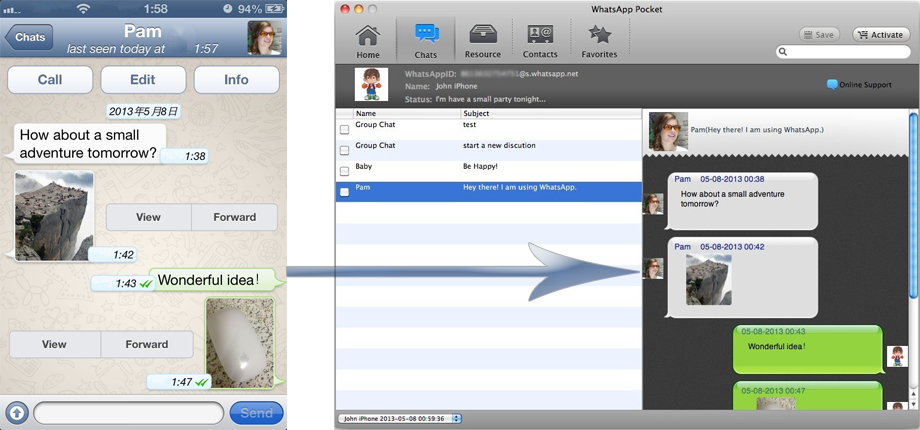 Have you always thought of the possibility of extracting your WhatsApp chat messages from your computer? Well, you can do that now with WhatsApp Pocket. Read more about the software below to find out how you can do just that and more. Have you always thought of the possibility of extracting your WhatsApp chat messages from your computer? Well, you can do that now with WhatsApp Pocket. Read more about the software below to find out how you can do just that and more.
What’s WhatsApp Pocket all about?
WhatsApp Pocket lets you extract WhatsApp chat messages from your iPhone to Mac with just a few, simple mouse clicks. It sports a very clean and intuitive user interface, making it easy to view and read your chat history. Have important WhatsApp chats that you want to save? Or accidentally deleted a crucial message? WhatsApp Pocket solves issues and many more!
WhatsApp Pocket automatically detects and loads the backups stored on your computer, it lets you extract data including messages, photos, videos, voice memos, location data, contacts and favorites.
Additionally, the program can help to recover WhatsApp chat messages from a previously-created backup with ease. With its internal search, you can type in keywords to find particular messages you need. What’s more, it converts contacts information into VCF file so they can be easily imported into outlook or webmail.
Any downside?
Only the name rings a bell, not the application itself since it doesn’t offer similar features and functions as the original WhatsApp that will all know.
Want to check it out? Visit Fireebok.com.
Posted in Main | No Comments »
Friday, December 6th, 2013
 Do you want an easy to use application that gives you opportunity to know more about processes, start-ups, etc? Then you should continue to read this review as it gives you more details about System Explorer. Do you want an easy to use application that gives you opportunity to know more about processes, start-ups, etc? Then you should continue to read this review as it gives you more details about System Explorer.
What’s System Explorer?
System Explorer gives you detailed information about Processes, Start-ups, Explorer, IE Add-ons, Uninstallers, Windows, Services, Drivers, Connections and Opened Files. It it also features action History for monitoring processes activities, making of Registry & Files snapshots for easy comparing of system changes.
Result of comparison is displayed in tree view and text list can be used for analysing product installers/uninstallers (like Total Uninstall). The program also enables you to perform graphs for monitoring usage of system resources in time, easily check for suspicious files via VirusTotal, easily search details about file/process via online databases, and easy access to System Utilities.
A couple of changes have also been made to this new version of System Explorer. Some of these changes and updates include the following: Brand new information panel in style of the Windows 8; improved ui and colour scheme; and Minor bug fixes and improvements.
System Explorer doesn’t use much space on your system, so you won’t have to be worried about a system that takes too long to load on startup. In other words, it doesn’t use too much space on your system.
Want to check it out? Visit SystemExplorer.net.
Posted in Main | No Comments »
Thursday, December 5th, 2013
 We all want to burn our files into various formats and versions that suit us; and that is why I think this review has a lot to show you about an easy to use program called BurnAware. We all want to burn our files into various formats and versions that suit us; and that is why I think this review has a lot to show you about an easy to use program called BurnAware.
What’s the big deal about BurnAware?
BurnAware products allow users to burn CD, DVD and BD discs with data, audio and video in a simple and hassle-free manner. These disc burning tools are intended for users seeking balanced, lightweight and easy to use burning tools for everyday use.
BurnAware Free is a full-fledged, easy-to-use, free burning software which allows users to write all types of files such as digital photos, pictures, archives, images, documents, music and videos to CDs, DVDs and Blu-ray Discs.
BurnAware has a lot of features including the following; support of a wide range of optical disc data storage, it covers all daily burning tasks such as disc burning, backup, verification, image creation, copying, erasing, data recovery, audio track extraction, etc.
A lot of improvements and fixes have been made to the program to include the following: added new method of data size calculation; improved performance after burn in DVD and MP3 compilations; added option to switch FileBrowser layout (View menu) between vertical or horizontal; improved performance while browsing content of compilation; and added option to skip folder size calculation (View menu) to speed up folder opening.
All in all the program is awesome.
Want to check it out? Visit Burnaware.com
Posted in Main | No Comments »
Thursday, December 5th, 2013
 If you are thinking of using Linux, then I advice you seat back and read this review that tells you some of the things you need to know about CentOS. If you are thinking of using Linux, then I advice you seat back and read this review that tells you some of the things you need to know about CentOS.
What’s CentOS?
CentOS is an Enterprise-class Linux distribution derived from sources freely provided to the public by a prominent North American Enterprise Linux vendor. It conforms fully with the upstream vendors redistribution policy and aims to be 100% binary compatible. It is a project of the cAos Foundation. CentOS gives you access to several other opportunities you never thought existed before, which is one of several reasons to love it
It is developed by a small but growing team of core developers. In turn the core developers are supported by an active user community including system administrators, network administrators, enterprise users, managers, core Linux contributors and Linux enthusiasts from around the world. CentOS has a lot of advantages over some of the other clone projects including: an active and growing user community, quickly rebuilt, tested, and QA’ed errata packages, an extensive mirror network, developers who are contactable and responsive, multiple free support avenues including IRC Chat, Mailing Lists, Forum, and a dynamic FAQ.
Any downside?
There is absolutely nothing to complain about to the best of my knowledge.
Want to check it out? Visit Centos.org.
Posted in Main | No Comments »
Thursday, December 5th, 2013
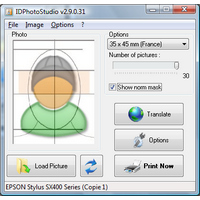 Are you looking for an easy to use ID Photo duplicator and printer? Then I think you might have found one especially when you read this review on IDPhotoStudio? Are you looking for an easy to use ID Photo duplicator and printer? Then I think you might have found one especially when you read this review on IDPhotoStudio?
What’s the big deal about IDPhotoStudio?
IDPhotoStudio is an easy to use but powerful program designed to help you adjust images to fit ID sizes for multiple countries across the globe, including Argentina, Austria, Canada, Hungary and Peru.
IDPhotoStudio has an easy to use interface that is just simple, which is one of the most attractive things about it. The application can be used by all types of users, including beginners or more experienced ones. IDPhotoStudio also provides a dedicated “Options” button that is nothing more than a printer configuration tool; thereby giving you the power to prepare the project for printing.
IDPhotoStudio is very straightforward, which means that the main window hosts the necessary tools for picking the country whose ID sizes you wish to use to adjust your photo, the number of pictures to be printed as well as a simple rotate tool for basic editing. IDPhotoStudio also includes several built-in languages, which means you can also use it in Chinese, Dutch, Romanian, Catalan or Arabic.
The program keeps improving, and that’s one of the best parts of it.
Want to check it out? Visit KCSoftwares.
Posted in Main | No Comments »
Tuesday, December 3rd, 2013
 Do you want an application that provides an up to date and complete software and hardware inventory of all your network p.c.s? Then keep reading this review because it has information that might do you some good. Do you want an application that provides an up to date and complete software and hardware inventory of all your network p.c.s? Then keep reading this review because it has information that might do you some good.
What’s DEKSI Network Inventory?
DEKSI Network Inventory provides a complete program and hardware inventory of all your network p.c.s. DEKSI Network Inventory is an extremely powerful, feature rich, advanced, but easy to use software system designed to provide network administrators with comprehensive and detailed reporting on all the application and hardware inventory installed on your networked computers.
You can view the Information remotely, generate a variety of different reports, as well as track the changes that occurred since your last inventory was run. With DEKSI Network Inventory you can export this valuable information into MS Access, MS Excel, CSV, and SQL.
Among its key features include the following: obtaining miscellaneous groups of hardware and software WMI data; 3 methods of gathering data: WMI, agents, clients; collecting configuration information from local and remote computers; tracking hardware and software changes on remote computers; offline computers are supported; generating various reports on network computers configuration (in HTML, MS Word, MS Excel, text file formats); etc.
Any downside?
After a 14 day trial period, you cannot enter more than three computers into an inventory database.
Want to check it out? Visit Deksoftware.
Posted in Main | No Comments »
Saturday, November 30th, 2013
 Do you want a program that can help you backup your important files even at no costs? Are you also interested in a program that does not come with those difficult to use features even for a newbie? Then you might need to read this review for more on FBackup. Do you want a program that can help you backup your important files even at no costs? Are you also interested in a program that does not come with those difficult to use features even for a newbie? Then you might need to read this review for more on FBackup.
What’s the big deal about FBackup?
FBackup is freeware backup program for Windows. FBackup protects your important files and folders from partial or total loss by automating backup tasks, password protecting and compressing it to save storage space. Using FBackup you can easily backup to any local or network drive or to external drives (such as USB drives).
FBackup has all the features that can help you backup open/locked files and can perform full and mirror backups (backup type that does not compress the files). When defining a backup you can also set file filters and schedule the backup for automatic execution.
Some of its key features include the following: it is a backup program that is free for both commercial and personal use; FBackup will automatically run backup at scheduled dates, so you have the benefit not only of having your data protected; it uses ZIP64 compression, which means that it can create zip files over 2GB in size; and many more.
Want to check it out? Visit Fbackup.com.
Posted in Main | 2 Comments »
Saturday, November 30th, 2013
 Do you want an application that will enable you to manage the plays posing problem with the processors multicores, and the throw on only one processor without having to worry about their management? Do you also want a program that makes it possible to create rules in order to indicate with which priority a program must be carried out, and which processors or cores it can use? Then I advice that you stick to this review since it contains information on a program called Bill2’s Process Manager. Do you want an application that will enable you to manage the plays posing problem with the processors multicores, and the throw on only one processor without having to worry about their management? Do you also want a program that makes it possible to create rules in order to indicate with which priority a program must be carried out, and which processors or cores it can use? Then I advice that you stick to this review since it contains information on a program called Bill2’s Process Manager.
What’s Bill2’s Process Manager?
Bill2’s Process Manager is a free application for Windows 2000, XP and Vista, for multicore PC. You can create rules to set priority and affinity for all processes. Rules are automatically applied when a process is detected. Include complete perfs and stats window, and many options in a clear and easy to use GUI.
Bill2’s Process Manager enables you to manage the plays posing problem with the processors multicores, and the throw on only one processor without having to worry about their management. However, it is important to let you know the program requires .Net Framework 2.0 before installation.
The publisher has been able to fix a couple of issues including typos in the “About,” and 2 new cases of crashes.
Any downside?
It takes up a lot of RAM.
Want to check it out? Visit Bill2-Software.
Posted in Main | No Comments »
Saturday, November 30th, 2013
 Are you looking for a feature-rich program for easy presentation of the list of data to users? Have you heard about TagCloud for VLC before now? TagCloud is a VCL implementation of a well known “tag cloud” navigation element that is widely used in an internet environment. You can read and find out more about how it works by reading the following review. Are you looking for a feature-rich program for easy presentation of the list of data to users? Have you heard about TagCloud for VLC before now? TagCloud is a VCL implementation of a well known “tag cloud” navigation element that is widely used in an internet environment. You can read and find out more about how it works by reading the following review.
What’s the big deal about TagCloud?
TagCloud is a VCL implementation of a well known “tag cloud” navigation element that is widely used in an internet environment. It has all the common features for easy presentation of the list of data to the user that you can expect from this kind of visual representation. This version comes with a couple of fixes as well as added support for Delphi XE4 and XE5.
Some of its unique features include the following: font size and/or the colour scaling (custom colour levels); support for linear, logarithmic and custom scales; settings for alignment and spacing between tags; transparent background; drawing over the Aero Glass effect on the parent controls; mouse hover and mouse click events for tags; multi-page views and an auto-sizing of the control; index labels can be displayed in various positions; etc.
Any downside?
The source code is only available after full purchase which will cost you 15 euros for a single license or 75 euros for a site license.
Want to check it out? Visit: TagCloud.
Posted in Main | No Comments »
Saturday, November 30th, 2013
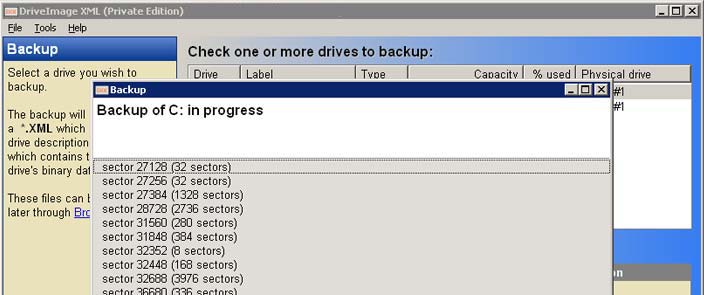 Do you want an application that will enable you backup your logical drives and partitions to image files, and to restore these images to the same or a different drive? Maybe you should you should consider DriveImage XML because it has some of the features you might like. Do you want an application that will enable you backup your logical drives and partitions to image files, and to restore these images to the same or a different drive? Maybe you should you should consider DriveImage XML because it has some of the features you might like.
What’s DriveImage XML?
DriveImage XML will backup logical drives and partitions to image files, and to restore these images to the same or a different drive. Browse these image files, view and extract files without having to restore the backup. Copy one drive directly to another.
DriveImage XML can also work in raw mode that creates an exact copy of the partition’s occupied space, but it generates a file that cannot be browsed. To view the content of the image you might need to extract the entire image. Unchecking the ‘Raw’ option enables you to browse the files from the image file and to also extract only a particular file.
DriveImage XML makes use of the Microsoft’s Volume Shadow Services in order to back up even the files that are currently in use which prevents corrupted disk snapshots.
Any downside?
DriveImage XML is one application you will love because it does what the publisher says it would do.
Want to check it out? Visit Runtime.org.
Posted in Main | No Comments »
|
|
|




