Archive for the 'Main' Category
Tuesday, November 12th, 2013
 When we click our pics with our digicams, we snap up series of memories and love with those images. And the next thing that comes to our mind is that the moment we reach our home after clicking the pics we should be enjoying the pics on our computer screen. Now just moving the pics one by one on the computer screen is very simple and uninteresting way to enjoy the pics and it might take away the glare from the pics. So add up an unimaginative lovely piece of work that can add such a beauty to your images will look just like your favorite thing to enjoy as well as show to your friends. How to spice up your images? Well ThunderSoft Slideshow Factory 3.4.4 will do it for you. When we click our pics with our digicams, we snap up series of memories and love with those images. And the next thing that comes to our mind is that the moment we reach our home after clicking the pics we should be enjoying the pics on our computer screen. Now just moving the pics one by one on the computer screen is very simple and uninteresting way to enjoy the pics and it might take away the glare from the pics. So add up an unimaginative lovely piece of work that can add such a beauty to your images will look just like your favorite thing to enjoy as well as show to your friends. How to spice up your images? Well ThunderSoft Slideshow Factory 3.4.4 will do it for you.
ThunderSoft Slideshow Factory 3.4.4 is indeed a factory for creating a lovely slide show with your pictures that can enhance one’s mind and heart in positive direction. This application has got as many as seventy different animated templates which will make it really amazing the for one to look at. You will also be able to set varied transition effect, apply caption and use clip arts to it. Further you can add music into the slide show and even add flash videos into it. After you make the slide show you can set the output file as your screensaver or you can set the file one your website as HTML5 video. After you create the files, you can also share them on YouTube and other social networking website and share them with your friends.
So if you have fantastic collection of pictures and photos that you want to imbibe new life in it, then ThunderSoft Slideshow Factory 3.4.4 will be the best thing to help you out.
{More Info and Download}
Posted in Main | No Comments »
Thursday, November 7th, 2013
 There are several applications that provide us useful information about things that happen in your environment as well as on earth generally. One application that has a reputation for consistently doing that over the years is Google Earth. You can read more about what Google Earth is all about by reading the review below. There are several applications that provide us useful information about things that happen in your environment as well as on earth generally. One application that has a reputation for consistently doing that over the years is Google Earth. You can read more about what Google Earth is all about by reading the review below.
What’s the big deal about Google Earth?
Google Earth combines satellite imagery, maps and the power of Google Search to put the world’s geographic information at your fingertips. Fly from space to your neighborhood. Type in an address and zoom right in. Search for schools, parks, restaurants, and hotels. Get driving directions. Tilt and rotate the view to see 3D terrain and buildings. Save and share your searches and favorites. Even add your own annotations.
Google Earth can be explored in three unique ways including; Desktop, mobile, and web. The Desktop version includes the Google Earth, Google Earth Pro and Google Earth Enterprise. The Mobile version enables you to explore the world from the palm of your hand, at home or on the go. While the Web version has a plug-in that enables you to enjoy 3D views of the globe on sites across the web or try Earth view in Google Maps.
Want to check it out? Visit Google.com/earth.
Posted in Main | No Comments »
Thursday, November 7th, 2013
 Some applications provide you with a lot more ways to have fun even if they are a bit weird. Well, you should stop reading this review because I just used the word weird; I suggest you go ahead if you truly want to have fun because that is what you get when you install TempleOS on your system. Some applications provide you with a lot more ways to have fun even if they are a bit weird. Well, you should stop reading this review because I just used the word weird; I suggest you go ahead if you truly want to have fun because that is what you get when you install TempleOS on your system.
What’s TempleOS?
TempleOS is an x86_64, multi-tasking, multi-cored, public domain, open source, ring-0-only, single-address-map (identity-mapped), non-networked, PC operating system for recreational programming. It sticks to common, 64-bit hardware instead of distinct drivers because you must shoot-the-moon. Also, redundancy and varied capabilities are unpleasant compared to everybody-has-the-same-thing.
It is a highly interesting way to have some fun on your computer; and there is never a dull moment since it requires quite a level of intelligence on your part or the part of the user.
TempleOS is one of the most talented piece of work I have seen especially as an open source. However, as a user, it is important to have some experience when it comes to using this program. Newbie may require some time to get used to it; but not a bad program all the same.
Any downside?
TempleOS is very interesting, but also too steep a learning curve.
Want to check it out? Visit Templeos.org.
Posted in Main | No Comments »
Wednesday, November 6th, 2013
 We have several uninstallers coming on these days with lots of unique and interesting features. As a matter of fact, the more uninstaller there are, the more options available to all users when it comes to removing unwanted applications from their systems. We have several uninstallers coming on these days with lots of unique and interesting features. As a matter of fact, the more uninstaller there are, the more options available to all users when it comes to removing unwanted applications from their systems.
Some applications are so stubborn that one may require an advanced uninstaller to remove them; and that is why you need to find out if the one you are installing has all the necessary features to help you achieve that. It does look like GeekUninstaller has a couple of features that might be of great help to a lot of users.
What’s GeekUninstaller?
GeekUninstaller is an uninstaller that performs deep and fast scanning afterwards and removes all leftovers. Keep your PC clean! Use Force Removal for stubborn and broken programs. In this version in review, the publisher has worked on the crash reporting, and there is now a significant improvement.
GeekUninstaller is very easy to use, and even a newbie won’t have a problem using it the first time. Some of its features include the following: it performs deep and fast scanning afterwards and removes all leftovers; instant start-up, minimalistic, simple but efficient user interfaces; no installation is required; etc.
All in all it is a nice program; and it does what the publisher says it does.
Want to check it out? Visit GeekUninstaller.com.
Posted in Main | No Comments »
Wednesday, November 6th, 2013
 Do you want a free, but unique application that enables you rename files and other things on your system? Well, you have one in ReNamer because it has a lot of wonderful features to help you achieve all your renaming with a bit of ease. Do you want a free, but unique application that enables you rename files and other things on your system? Well, you have one in ReNamer because it has a lot of wonderful features to help you achieve all your renaming with a bit of ease.
What’s ReNamer all about?
ReNamer is a small, yet very flexible and powerful file renaming tool that offers all the standard renaming procedures including prefixes, suffixes, replacements, case changes, as well as remove contents of brackets, add number sequences, change file extensions, etc. For advanced and experienced users, there is a PascalScript rule that allow users program their very renaming rule.
ReNamer is a program that also allows you to combine multiple renaming actions as a rule set, applying each action in logical sequence, which can be saved, loaded and managed within the program. In addition, ReNamer supports Meta Tags, such as: ID3v1, ID3v2, EXIF, OLE, AVI, Hashing and more; has an ability to rename folders, can process Regular Expressions, and supports Unicode filenames.
Some new features and updates have been made to this version, and they include; added hint to run as administrator when failed to apply system settings, added “Save” option for directly saving the currently loaded preset, fixed issue that caused incorrect limitation on number of presets, etc.
Any downside?
This free version is limited in terms to 5 presets and 5 rules, which may be a major concern for a lot of users.
Want to check it out? Visit .
Posted in Main | No Comments »
Tuesday, November 5th, 2013
 Are you searching for a multi-application that lets you do a lot of things including work with the Editor or Slideshow or Search separately from the main viewer? Then it is important that you continue reading this review on WildBit Viewer. Are you searching for a multi-application that lets you do a lot of things including work with the Editor or Slideshow or Search separately from the main viewer? Then it is important that you continue reading this review on WildBit Viewer.
What’s the deal with the WildBit Viewer?
WildBit Viewer is compact & fast image viewer with slideshow and editor. WildBit Viewer has an eye catching interface within blazing fast folder, file list and thumbnail viewer. Slide Show includes now multi-monitor support for fast switching between two monitors. WildBit Viewer supports all major graphic formats including BMP, JPEG, JPEG 2000, GIF, PNG, PCX, TIFF, WMF and TGA (over 70 formats).
WildBit Viewer includes Image Info with Image EXIF meta data JPEG and TIFF support and IPTC (IIMV4) information (like Photoshop file info) from JPEG and TIFF, Thumbview has changeable views, sorting and thumbnail predefined sizes for fast thumbnail size setting. Viewer also includes shell toolbar; you can drop your favorite folder there and use it as an organizer.
Some of its key features include the following: Explorer-style file handling with customizable headers; file List Generator which generates html, csv, rtf, uni and txt files; Normal Show with multiple folders setup or Custom Show with individual slide setup (Style, Step, Delay, Show the next image after, hms, Background Color with (Manual, Average and Dominant Color settings), Frame Width and Frame Color values for each image); and many more.
Any downside?
The program takes a long time to load even though some minor improvements have bee made to it.
Want to check it out? Visit Wildbit-Soft.
Posted in Main | No Comments »
Tuesday, November 5th, 2013
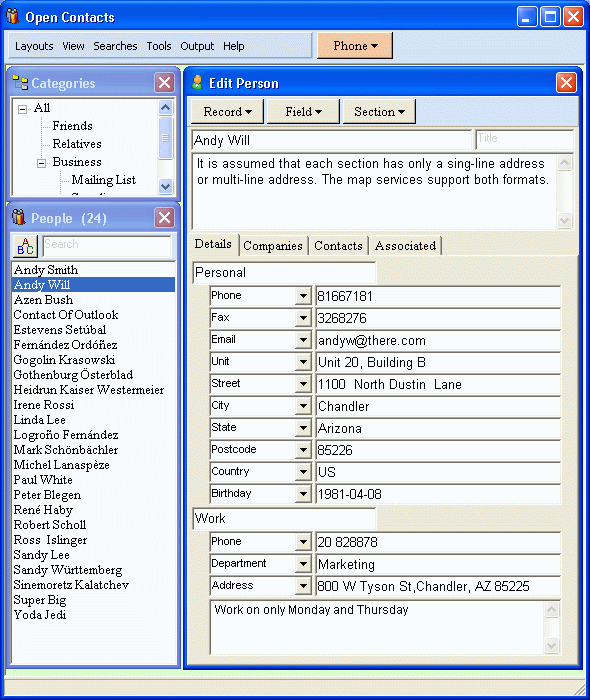 Do you want an address book that somehow different and unique to some of the ones you have used before? Do you want an application that can be easily customize to suit your peculiar needs? Then a program like Open Contacts might be of great interest to you. Find out more about the program by reading the review below. Do you want an address book that somehow different and unique to some of the ones you have used before? Do you want an application that can be easily customize to suit your peculiar needs? Then a program like Open Contacts might be of great interest to you. Find out more about the program by reading the review below.
What‘s Open Contact all about?
Open Contacts is an address book program with CRM features providing unified, flexible and intuitive interfaces for you to manage and lookup contact info of individuals and organizations. It displays only data fields with data. You can seamlessly customize what can be stored in your address book.
The database engine of this version of Open Contacts in review has been upgraded by the publisher from Firebird 2.1 to Firebird 2.5. Also, the default database file extension is now FDB rather than GDB.
Some of its major features include the following: print contact info and labels on papers of different sizes; unlimited data fields to store any contact info. Along with predefined fields, you may add unlimited data fields grouped by section; manage relationships between individuals, organizations and departments; import from MS Outlook, Outlook Express (WAB), Eudora, Netscape/Mozilla Thunderbird, XML (xCard), CSV, LDIF, Windows Contacts and vCard; export to indented text, CSV, Excel, vCard, XML (xCard), HTML, hCard and XFN (XHTML Friends Network); etc.
Any downside?
Open Contacts needs additional works in the GUI department.
Want to check it out? Visit Fonlow.com.
Posted in Main | No Comments »
Tuesday, November 5th, 2013
 Have you always wondered how you can get or install an application on your system that will help you remember or save you the stress of remembering all your passwords all the time? Do you want an application that will remember all your log information and simply log you in each time the need arises? Then you might want to check LastPass. Have you always wondered how you can get or install an application on your system that will help you remember or save you the stress of remembering all your passwords all the time? Do you want an application that will remember all your log information and simply log you in each time the need arises? Then you might want to check LastPass.
What’s the big deal about LastPass?
LastPass automatically is a program that fills in saved log-ins and forms with the click of a button. This handy Web freebie and browser plug-in also syncs your data to any computer that you use regularly.
The publisher has made a lot of changes to this version to include the following: LastPass icon in input fields can now be clicked, which replaces notification bar to fill; Chrome UI gets a complete redesign; Android app has a modern ‘holo’ UI, multitab support, clickable icons, better search; iOS app also now has a multitab browser, clickable icons, better search; LastPass Family Feature – premium users get 1 shared folder that they can share with up to 5 family members; immediate syncing for all users; and many more.
LastPass contains some nice features you will like this app for.
Want to check it out? Visit LastPass.
Posted in Main | No Comments »
Monday, November 4th, 2013
 How about installing a program that enables you to download files from different One Click Hosting sites and from various BitTorrent end eMule? Well, the good thing is that a lot of applications are now being developed that enables you to do a lot of things online with so much ease. How about installing a program that enables you to download files from different One Click Hosting sites and from various BitTorrent end eMule? Well, the good thing is that a lot of applications are now being developed that enables you to do a lot of things online with so much ease.
What’s NeoLoader?
NeoLoader is a download manager / filsharing client designed to work across network borders. It can download files from various One Click Hosting sites as well as from BitTorrent and eMule/eDonkey2000. In addition to that Neo provides an own anonymous filesharing Network, based on a TOR-like packet routing in its own Next Generation Kademlia network. NeoLoader supports a large amount of hosting sites. Both its BitTorrent as well as eMule support is state of the art, it supports all mainstream protocol extensions.
Some of its features include the following: download of the same file form multiple networks at the same time; supports trackerless torrents (using the Mainline kademlia DHT protocol) with some DHT extensions (BEP 5); file sharing can be performed in direct transfer mode (typical anonymous P2P) or push mode (Freenet style), as well as in a hybrid caching mode for optimized performance; and many more.
Want to check it out? Visit Neoloader.com.
Posted in Main | No Comments »
Wednesday, October 30th, 2013
 One of the many features a good Instant Messenger should have is the ability to enable you send messages or chat securely. No one wants an application or IM that exposes him to a third-party interference; and that is why it is important to read reviews or hear from others before installing one. It does look like a program or Instant Messenger like GoldBug has that kind of feature and more. One of the many features a good Instant Messenger should have is the ability to enable you send messages or chat securely. No one wants an application or IM that exposes him to a third-party interference; and that is why it is important to read reviews or hear from others before installing one. It does look like a program or Instant Messenger like GoldBug has that kind of feature and more.
What’s GoldBug?
GoldBug is a secure Instant Messenger. You can be sure with using GoldBug (GB), that no third party can look into your chat communication. Private user-to-user communication remains private. GoldBug (short: GB or GBIM) therefore uses multi-encryption with different layers of modern encryption Technologies (libgcrypt). It offers as well decentral and encrypted Email and decentral public E*IRC-Chat.
With GoldBug, you can enjoy the following features: create a group chat to all your friends just by selecting all; GoldBug uses public/private RSA keys. The public key must be exchanged between friends; GoldBug offers you serverless p2p Email without data retention; GoldBug encrypts your private chat to a friend with RSA-Keys, SSL and end-to-end encryption; Public Chat is provided with e*IRC, which is echo-ed IRC: Groupchat on AES Channels; MELODICA Button provides instant forward secrecy; and many more.
Any downside?
Great free program, with handy features that doesn’t seem to have any downsides.
Want to check it out? Visit GoldBug at SourceForge
Posted in Main | No Comments »
|
|
|






