Archive for the 'Main' Category
Wednesday, May 22nd, 2013
 Swamped with several tasks and you’re finding it difficult to manage and keep up with? What if I were to tell you that there’s a software that would help you simplify and manage these tasks easily? Get it – Hyena v9.2. Swamped with several tasks and you’re finding it difficult to manage and keep up with? What if I were to tell you that there’s a software that would help you simplify and manage these tasks easily? Get it – Hyena v9.2.
What is Hyena v9.2?
Hyena is a program that is specifically created to both simplify and centralize nearly all of the day-to-day management tasks, while providing new capabilities for system administration. It helps you to manage multiple parameters with minimum effort. It main advantage is the ability to gather all the administrative tools and important system tools in the same interface. The application is designed for the Windows administrators that need to manage users or devices, to view system logs and have limited time to make the changes.
It supports the management of the following: users, groups, shares, domains, computers, services, devices, events, files, printers and print jobs, sessions, open files, disk space, user rights, messaging, exporting, job scheduling, processes, and printing. You can start or stop services and devices without accessing the Computer Management console. The same interface provides access to the applications logs and the security logs generated by the operating system components.
Here are a few of its features:
- Create, modify, delete, and view users, groups, and group membership;
- Modify single or multiple user properties, including terminal server and Exchange mailbox settings;
- Automatically create home directory and home shares for users, including full security configuration;
- Export delimited text files of users, groups, printers, computers, group members, services, scheduled tasks, disk space, registry, and Active Directory information for your entire network and Browse all server shares;
- Copy and delete files without drive mappings among several.
To find out more about this program, please visit Systemtools.com website.
Posted in Main | No Comments »
Wednesday, May 22nd, 2013
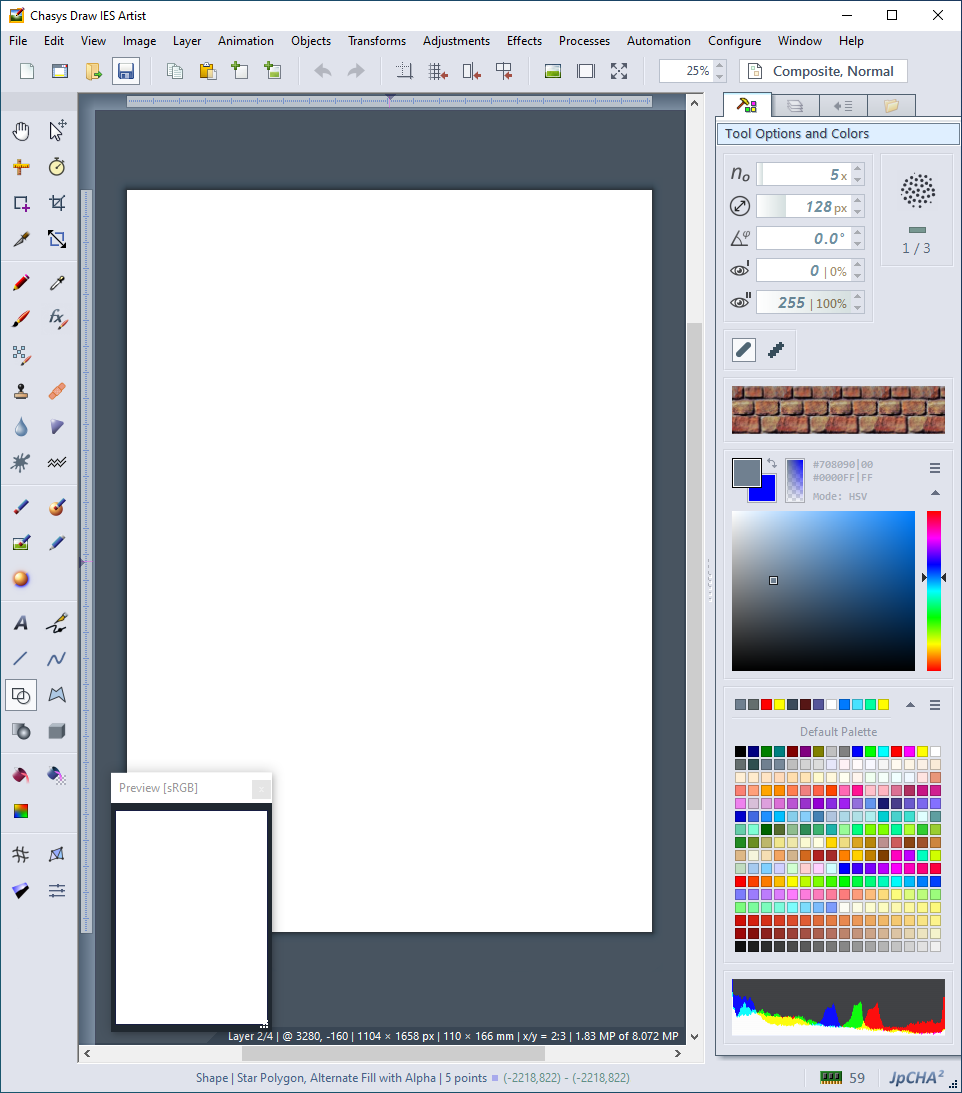 Do you want an application that not only does what it says; but is actually easy to use? Then Chasys Draw IES is worth a look. Chasys Draw IES does not require the installation of .NET, and is fast, small, and efficient Do you want an application that not only does what it says; but is actually easy to use? Then Chasys Draw IES is worth a look. Chasys Draw IES does not require the installation of .NET, and is fast, small, and efficient
What’s Chasys Draw IES?
Chasys Draw IES is a suite of applications that include a layer-based image editor with animation, vista-style icon support and super-resolution via image stacking (Chasys Draw IE Artist), a multi-threaded image file converter (Chasys Draw IES Converter), a fast image viewer (Chasys Draw IES Viewer), and a raw camera file processor (Chasys Draw IES raw-photo). The entire suit is UAC aware and is designed to take advantage of multi-core processors and touch-screens.
To further enhance its output and performance, the publisher has introduced a couple of changes including the following: new tool (Smudge); new printing feature-stretch to actual paper; improved print dialog and printing help; read support for HD-Photo/JPEG-XR (via WIC); Read support for Apple Icons (.icns); updated symbols dialog with new Unicode ranges; and many more.
One good thing this application has going for it is the fact that updates are regularly carried out. As long as you are always online; the publisher notifies you of a new update as soon as it is available; and usually every 3 to 6 weeks.
Any downside??
?? ?? ???? Chasys Draw IES does not have any downside; and is even very easy to use.
Want to check it out? Visit: ?hasysdraw.
Posted in Main | No Comments »
Saturday, May 18th, 2013
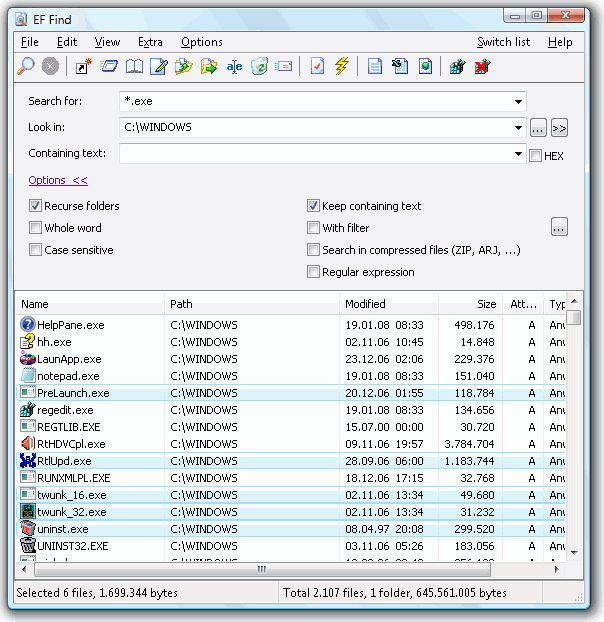 The need for a useful file that can help sought out the vast array of files on a system cannot be overemphasized. It gets increasingly difficult to locate certain items on a system the more you install and save files; but you can be sure that can be taken care of with a useful application that gets all the work done. EF Find is built with the features to help you find or look for those files wherever they are on your computer. The need for a useful file that can help sought out the vast array of files on a system cannot be overemphasized. It gets increasingly difficult to locate certain items on a system the more you install and save files; but you can be sure that can be taken care of with a useful application that gets all the work done. EF Find is built with the features to help you find or look for those files wherever they are on your computer.
What’s EF Find?
EF Find is a program that has a simple user interface that virtually anyone can easily get used to. Simply input the word, hit the search button, and the program gets to work. The program can also be customized to suit your taste.
EF Find is a shareware application that is built with features to find or look for files, text, HEX sequences, and regular expressions inside ACE, ARC, ARJ, BZIP2, CAB, GZIP, LHA, RAR, TAR, TGZ, ZIP, and ZOO archives.
EF Find is a program that also supports the following languages; English, German, Arabic, Bulgarian, Catalan, Czech, Dutch, French, Hebrew, Hungarian, Italian, Japanese, Italian, Latvian, and a few others. This version now supports WCX Packer formats; although this is at the risk of the user since it is a third-party plug-in.
Downsides
The program is only available for a 30 day trial. EF Find only displays names of only the first found files; with further file names being replaced by a Nag Screen. Full version would cost you $15.
Want to check it out? Visit: EFSoftware.
Posted in Main | No Comments »
Thursday, May 16th, 2013
 Problems such as network or outages are serious issues when it comes to downloading files from the internet. If you are the type that enjoys downloading loads of files, but gets frustrated because of frequent interruptions that affect your download; then you might want to install a download manager like Internet Download Manager. Problems such as network or outages are serious issues when it comes to downloading files from the internet. If you are the type that enjoys downloading loads of files, but gets frustrated because of frequent interruptions that affect your download; then you might want to install a download manager like Internet Download Manager.
What’s Internet Download Manager?
Internet Download Manager is a tool that is designed to speed up downloading of files up to 5 times faster than normal downloads. It is also built with features to resume, schedule, and organize downloads. Internet Download Manager also known as IDM is also built with capacity to resume unfinished downloads caused by network problems or unexpected power outages.
Internet Download Manager features full-fledged site grabber that downloads files that are specified with filters such as all pictures from a website, different parts of websites or complete websites for offline browsing. Internet Download Manager is built to easily integrate into Opera, Mozilla, Internet Explorer, Firefox, MSN, AOL, and into any application that uses FTP or HTTP protocols. It is also built to support Windows Vista and Internet Explorer 7.
Internet Download Manager supports HTTP, HTTPS, FTP, and MMS protocols, and has an adaptive download accelerator for MP3 audio and MPEG video files. IDM can also be used to download FLV videos from YouTube, Google Videos, MySpace TV, and several other famous websites.
Downside
Internet Download Manager is worth $29.95 and comes with 30-days trial period. There are quite a lot competitive tools and/or browser addons with the same functionality that comes free of charge.
Want to check it out? Visit IDM’s homepage.
Posted in Main | No Comments »
Wednesday, May 15th, 2013
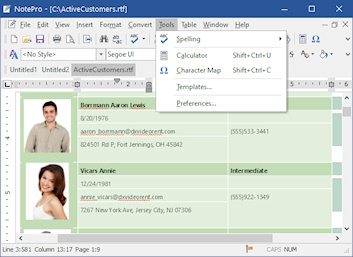 For those who need to create and edit text files and desire something with lots of options more than the default notepad or WordPad programs, a program like NotePro is not a bad program to choose. For those who need to create and edit text files and desire something with lots of options more than the default notepad or WordPad programs, a program like NotePro is not a bad program to choose.
NotePro is a multi-document replacement for the standard Windows WordPad editor that supports full text formatting, URL detection, and minimize to tray feature among others. Also in this beta version is support for bookmark and built-in calculator.
NotePro is built with powerful features that one would typically find in a word-processor; yet it remains one of the easiest applications to use. It has a clean, simple, and very attractive user-interface that puts you in charge of several options. NotePro is designed to handle several standard text files, and also create and save Rich Text Format, Word, Windows Write, and HTML files used by Microsoft Word and other word-processors.
NotePro is also built with other amazing features that include the following; absolute control over text appearances, and ability to use any TrueType font installed on your system, control the font size and attributes (bold, italic, underscore or strikethrough), and ability to use coloured text including background fills.
NotePro is amazingly powerful, but incredibly small in size; and you won’t even be required to spend more than a couple of hours to get used to it.
Downside:
NotePro does not have support for .ODT, and comes with only 30 day trial.
Want to check it out? Visit CrystalOffice.
Posted in Main | No Comments »
Wednesday, May 15th, 2013
 The need for an application that can help users handle several Torrent files or software has become even more relevant than before with the internet filled with lots of wonderful downloadable applications. BitComet is designed along with a few other applications to help users overcome challenges of downloading and resuming large files. The need for an application that can help users handle several Torrent files or software has become even more relevant than before with the internet filled with lots of wonderful downloadable applications. BitComet is designed along with a few other applications to help users overcome challenges of downloading and resuming large files.
What’s BitComet?
BitComet is a powerful, but clean, fast and easy-to-use bittorrent client. It supports simultaneous downloads, download queue, selected downloads in torrent package, fast-resume, chatting, disk cashe, speed limits, port mapping, proxy, IP-filter, and many more.
BitComet is a P2P file-sharing freeware as well as being one of the most famous P2P protocols designed for high-speed distribution. It supports network, download queue, selected downloads in the Torrent package, fast-resume, disk caching, speed limits, auto port mapping, proxies, and IP filtering.
This latest version features the following updates; GUI Bug fix (program crashes occasionally when delete task), and core improvement (support for Firefox 20).
Downsides:
BitComet slows down the speed of your internet connection; and can sometimes completely bring to a halt your internet connection when using BitTorrent to download certain large files or software. The interface might also need some minor improvement as it is not that attractive.
Want to check it out? Visit BitComet.
Posted in Main | No Comments »
Tuesday, May 14th, 2013
 Want to transfer your sensitive data across multiple servers with a guaranteed security but don’t know how to go about it? Let SecreFX handle that for you. Want to transfer your sensitive data across multiple servers with a guaranteed security but don’t know how to go about it? Let SecreFX handle that for you.
What is SecureFX?
This program allows you to deploy strong security with SFTP, SCP, and SSL-based protocols, as well as legacy FTP support. It lets you choose standard FTP or secure data transfer with FTP over an encrypted SSH2 connection. With this application, you can connect to many different servers, resuming multi-file transfers, and getting through network proxies and firewalls. It has a tabbed interface through which you can organize various sessions. Its high-productivity user interface is easy to learn and allows you to start transfers by simply dragging and dropping files.
Some other benefits of using this application includes: should a file transfer fail, SecureFX can automatically resume all such file transfers- whether single or multiple transfers. You could also upload, download, and mirror files, set up connections with shared sessions and server host keys. Its command line client (for windows only) allows you to automate tasks with powerful options like site synchronization.
Some of the main features of this program are: Improved integration with SecureCRT, SSH2 session passwords can be cached like passphrases. SecureCRT and SecureFX can share passwords while either application or the Activator utility is running, Windows Vista support and several other powerful features.
Downsides?
None. It is a cool application for secure file transfer.
To know more please go to Vandyke.
Posted in Main | No Comments »
Monday, May 13th, 2013
 If you need a software that can help you handle all your printing jobs efficiently, the Cobra Print Viewer might be a tool just for you. If you need a software that can help you handle all your printing jobs efficiently, the Cobra Print Viewer might be a tool just for you.
What is the big deal about this program?
It easily allows you to select any of your printers, see at a glance images of queued print jobs, perform actions on those jobs such as copying and moving jobs, viewing full screen, pause/resume the job, rename the job on the printer queue, cancel the job and even save the print job to an image file (all common image formats are supported).
This program is very useful if one of your printers fails and you need to quickly and easily move remaining queued jobs onto a different printer. It does far more job than your standard Windows print manager. You can view the actual images of a print job as it will appear on the printer, and view thumbnail images of all jobs queued and select individual jobs to see the image larger size or full screen. You can schedule a reminder of what paper type to load before printing and how many sheets to load see detailed information about print jobs such as paper type, print quality, number of pages, number of copies and rename print jobs to give it a more meaningful file name.
System requirement: Designed for Windows 7 and Vista, but will run on XP or any Windows platform that supports .NET 2.0. Both 32 bit and 64 bit operating systems are supported.
Downsides?
I didn’t have any issue of note with this application. This is one printer that would be every printer’s delight.
Want to know more? Visit CobraApps.
Posted in Main | No Comments »
Monday, May 13th, 2013
 Worried sick about how to recover a file you accidentally deleted or lost a very important data? Disk Drill can help you retrieve all such. Worried sick about how to recover a file you accidentally deleted or lost a very important data? Disk Drill can help you retrieve all such.
What is Disk Drill?
This program can help to protect your files from accidental deletion and retrieve lost data from your Mac disk. Whatever the cause of your data loss – accidental deletion, Disk Utility error, data corruption – Disk Drill will get it back. Whatever the data type, Disk Drill will surely find it. It is very easy to both for new beginners and advanced users.
It can scan and recover lost data from any storage device: most internal hard drives, external hard drives, USB flash drives, cameras, iPods, Kindles, and memory cards. Whether or not the storage device is failing, damaged, or has a lost partition, it can scan and recover data from it. For Mac OS X users, it has several free data protection features that can help you prevent loss of data in future, it allows you to restore the lost partitions and get back your data. You don’t have to be a Mac expert to be able to use this program; it so simple and easy to use. No other application makes data recovery from Mac that easy.
CleverFiles, the author of this publisher, has added some changes to this version. They are: Completely Redesigned UI, HFS+ Catalog File Rebuild, Universal Partition Search, Scan for Lost HFS+ Partition, Mount Scanning Results As Disk, S.M.A.R.T. Monitoring for External Disks, Export Forensics Data and Remount Partitions As Read-Only.
Downsides?
None at all. This program works real well.
To know more about this amazing program, please visit CleverFiles.
Posted in Main | No Comments »
Monday, May 13th, 2013
 If you need a program that helps to monitor your start-up menu, than you might consider trying WinPatrol. If you need a program that helps to monitor your start-up menu, than you might consider trying WinPatrol.
This tiny utility prevents applications from simply adding themselves to the start-up menu or associate files to themselves without your approval. WinPatrol protects your PC by helping to fight against malicious files, hijacking attempts and hidden system configuration attempts by keeping an eye on your data all the time.
This program is feature rich and its functions are neatly organized in their own tabs, each with a particular set of configurations available. It allows you to view the processes that run every time you start the computer, and schedule delayed starts to be sure it won’t take too much to boot the operating system. With a single mouse click it helps you to manage Internet Explorer or Firefox cookies. This light weight application is also easy to use even for beginners.
Some of the main features of this program are: it significantly increases your system speed an performance, it is able to detect and neutralize spyware and adware, detect and restore file types changes and automatically filter unwanted cookies, eliminates multiple tasks that replicate each other, stop programs that repeatedly add themselves and detects and removes stubborn infections.
BillP Studios, the author of this application, has added some changes to this version. They are: allows WinPatrol to start for current user or all users, reduced monitoring during sleep state to conserve battery, fixed reset function to remove duplicate Scotty icons, improved handling of repeating changes made by partner programs, speeds up real time detection.
All in all a well worth installing on your PC.
To find out more about this program, please visit WinPatrol.
Posted in Main | No Comments »
|
|
|





