Archive for the 'Main' Category
Monday, February 4th, 2013
 Are you a project manager and you need a program that will help you to planning and managing your projects more effectively and on schedule? Then get RationalPlan Project Management Software. Are you a project manager and you need a program that will help you to planning and managing your projects more effectively and on schedule? Then get RationalPlan Project Management Software.
What is the big deal about this program?
This program assists project managers in developing plans, allocating resources, tracking progress, managing budgets and analyzing workload. It is a very useful utility for project planning, estimate project costs and manage budgets, project scheduling and project tracking.
It is designed to help you easily manage your projects and shared resources, get resources and finances under control, bring project’s critical issues to your attention and track project evolution in terms of completion, time and costs. It can also break down your project, build schedules, allocate resources and manage budgets, enjoy our free Project Viewer, and can undo/redo on multiple levels.
Stand By Soft, the author of this program, has added a few changes to this version. These changes include: Timesheet view displays only the resources working in the current project, In Leveling panel the resources are displayed according to applied task filters, Added a percentage work load chart for resources, Ubuntu operating system integration, and Added a new report for task cost distribution.
Downsides?
This is one nice piece of application for project managers.
To learn more about this program, please go to RationalPlan.
Posted in Main | No Comments »
Monday, February 4th, 2013
 Are you worried that your photos may be stolen when you publish them on the web? If yes, then get Byescout Watermarking Pro. Are you worried that your photos may be stolen when you publish them on the web? If yes, then get Byescout Watermarking Pro.
What is the big deal about this program?
This program is an effective wizard-based images (JPG, PNG, GIF) watermarking software that protects your images with very refined text or image watermark label in just seconds. This softaware helps to secure your photos from unauthorized use. It includes EXIF macros support and advanced settings support (margins for annotation and other).
With this program, you can add several watermarks all at once instead of wasting time adding them one at a time. You also gives you access to the advanced settings that this program offers. This program allows you to watermark several photos at the same time.
Some of the key features of this program include: it has an easy to use interface, support for EXIF macros, Built-in set of ready-to-use watermark types with text and logo images support (annotation, text, text fits page, tiled text, vertical text, diagonal text, transparent logo image, logo image with text, DateTime, FileName stamps); ability to dinamically resize text according to the source input picture size; Ability to preserve original images file format or convert to another (JPG, TIFF, PNG, TIFF) and Integrates with Windows Explorer so just select image and right-click to add protection to the image(s)
Any downsides?
None. This software helps to protect you ownership of photos online and you could use it to watermark several photos at once.
To learn more about this program, please visit Bytescout-Watermarking-PRO.
Posted in Main | No Comments »
Monday, February 4th, 2013
 Need an outstanding on-page SEO application? Get WebSite Auditor Enterprise. Need an outstanding on-page SEO application? Get WebSite Auditor Enterprise.
What is the big deal about this program?
This is a choice utility that helps to optimize your website so as to guarantee a permanent top 10 search engine ranking. It is a two-in-one SEO tool: it deals with (1) on-page audit and (2) content optimization. This shareware runs an in-depth analysis of your site’s structure and display all the structural flaws that may curb your site’s rankings in plain view. It helps you locate and fix such problems as: broken links, HTML code errors, Missing meta data, and Duplicate content, and others.
This program allows you to run a complete SEO site audit, create business-specific optimization strategies for site’s structure and content, push up as many websites as you need, and communicate with your clients using the means they choose. It ensures that every word, HTML tag or link on one page is contributing to the success of all important pages of a site while brushing up keywords in the content.
This software gives a full outline of each winnable on-page optimization step, from techniques that pay back within weeks to quick revisions that transform a website’s sales literally in the same day.
Any downsides?
None yet. This is a very powerful SEO tool.
To know more about this program, please visit Link-Assistant.
Posted in Main | No Comments »
Thursday, January 31st, 2013
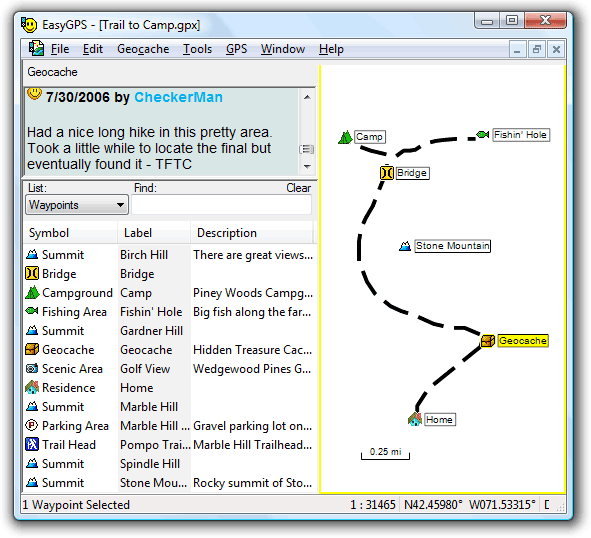 Do you want a tool or application that enables you manage your all your waypoints and routes, and display them in lists sorted by name, elevation, or distance? Well, EasyGPS is a freeware that also gives you several other options when it comes to fast and easy ways to create, edit, and transfer waypoints and routes between your computer and your Garmin, Magellan, or Lowrance GPS. Do you want a tool or application that enables you manage your all your waypoints and routes, and display them in lists sorted by name, elevation, or distance? Well, EasyGPS is a freeware that also gives you several other options when it comes to fast and easy ways to create, edit, and transfer waypoints and routes between your computer and your Garmin, Magellan, or Lowrance GPS.
What is EasyGPS?
EasyGPS is the fast and easy way to create, edit, and transfer waypoints and routes between your computer and your Garmin, Magellan, or Lowrance GPS. You can manage all of your waypoints and routes, and display them in lists sorted by name, elevation, or distance. The program connects your GPS to the best mapping and information sites on the Internet, giving you one-click access to street and topo maps, aerial photos, driving directions, weather forecasts, and nearby attractions.
EasyGPS is absolutely free, and comes with no nags, ads, or spyware that also enables you to download geocaches and waypoints to your GPS, and backup as well as print out your POIs and tracks.
EasyGPS also gives you the edge when it comes to loading new waypoint onto your GPS for your next hike or geocaching adventure. It also works with several famous handheld GPS receivers.
Any downsides?
EasyGPS has no downside, and is remarkably easy to use.
Want to check it out? Visit EasyGPS.
Posted in Main | No Comments »
Thursday, January 31st, 2013
 Having a webcam application that gives you a variety of options when it comes to using various applications on your system is seen by many as a boost these days. It simplifies the way you do things by also splitting one video stream into several video streams among other things you can do with it. Having a webcam application that gives you a variety of options when it comes to using various applications on your system is seen by many as a boost these days. It simplifies the way you do things by also splitting one video stream into several video streams among other things you can do with it.
What is ManyCam?
As the name suggest, ManyCam is a webcam application that enables you use more than one application at a time. It splits one video stream into several video streams. All you need to do is to choose ManyCam virtual Webcam as the video source in your webcam applications. You can also add some features to the video stream by using ManyCam (for example, funny animations, time and text). Right click the ManyCam icon in your bottom right tray to access these features.
ManyCam has a nice and attractive user-interface and with lots of outstanding and easy-to-use features to choose from. It is packed full with several configurable features that make video streaming a delight even for a newbie. Once downloaded and installed; ManyCam sits on your system tray, and does not consume too much space on your PC.
Some of its key features include the following; create your own custom webcam effects and graphics, switch between video & audio sources with our ManyCam Pro live video studio switcher, add thousands of amazing webcam effects and custom graphics inside any webcam application, etc.
Downsides
ManyCam now requires that you pay to have watermarks removed from some of the downloadable effects.
Want to check it out? Visit Manycam.
Posted in Main | No Comments »
Thursday, January 31st, 2013
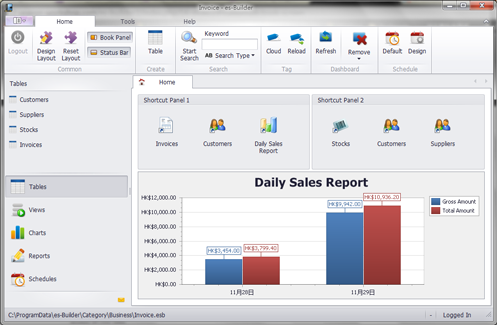 Are you looking for a freeware application that has all the features required to enable you manage and build your own information structure to fit your personal needs? Well, you are lucky because es-Builder is not only free; but has a couple of advanced features to enable you build and share your data quickly, and easily. Are you looking for a freeware application that has all the features required to enable you manage and build your own information structure to fit your personal needs? Well, you are lucky because es-Builder is not only free; but has a couple of advanced features to enable you build and share your data quickly, and easily.
What is es-Builder?
es-Builder is a flexible, customizable, friendly, powerful and unique information manager for private personal use. You can build your own information structure to fit your own needs. Easy to build, and quick to use and share your data. Without the database and programming knowledge, es-Builder is an ideal tool to keep your information in one place. If you are finding software to keep Contacts, Appointments, Tasks, Notes, Daily Journals, Expenses and more, es-Builder is exactly what you’ve been looking for.
Minor changes and fixes have also been made to this version to include the following; addition of progress bar control in report, Data Filter for all plugins, and some other minor bug fixes. es-Builder also has some flexibility in terms of usage, and can be customized even for advanced users.
Downsides
Windows 7 users may have a couple of challenges using this program especially when it comes to administrative privileges. However, this can be taking care of by running the application as an administrator.
Want to check it out? Visit es-Builder.
Posted in Main | No Comments »
Wednesday, January 30th, 2013
 Have you ever wondered if installing Windows fonts can be installed anywhere or from anywhere? The good news is that you can do just that by downloading and installing a program like ClickFont. It has those amazing and easy to use features that make things absolutely easy and quick. Have you ever wondered if installing Windows fonts can be installed anywhere or from anywhere? The good news is that you can do just that by downloading and installing a program like ClickFont. It has those amazing and easy to use features that make things absolutely easy and quick.
What is ClickFont?
ClickFont is a program that lets you install Windows fonts from anywhere. The program allows easy installation of TrueType, OpenType or PostScript fonts with just two mouse clicks, from anywhere in the system. Makes you wonder, why this wasn’t built into Windows in the first place.
The publishers have introduced a couple of new features and updates that include the following; addition of detection for source directory, skipping installation if matching windows\fonts, addition of UAC handling, addition of detection for already installed fonts, Fixing of UAC parameter stripping, removal, commandline parameters for font installation, and removal of unused language strings.
Before Windows Vista was introduced, it was very difficult installing fonts; and that is why ClickFont is regarded by several users as a nice piece of application. ClickFont can install a variety of font formats from the context-menu, including OpenType, TrueType and Adobe PostScript fonts – the latter is not supported by newer versions of Windows.
Any downsides?
Nice program; especially since it doesn’t cost a dime.
Want to check it out? Visit ClickFont.
Posted in Main | No Comments »
Wednesday, January 30th, 2013
 GPU-Z is a lightweight utility designed to give you all information about your video card and GPU. GPU-Z is a lightweight utility designed to give you all information about your video card and GPU.
What is the big deal about this program?
This freeware allows you to check the status of your video card and GPU. It will give you a snapshot of those items and presents the information in a dialog box-style window. It is an executable file that you run directly – there’s no installing or configuring necessary. GPu-Z is a small file program and it does not take up much system resources. It automatically scans your system and reports the card name, GPU, release date and transistors, BIOS version, ROPs, memory type, and memory size.
GPU-Z support NVIDIA and ATI cards, displays adapter, GPU, and display information, overclock, default clocks, 3D clocks (if available), and validation of results. Some of the main features of this program include: Support NVIDIA and ATI cards, Displays adapter, GPU and display information, Displays overclock, default clocks and 3D clocks (if available), Includes a GPU load test to verify PCI-Express lane configuration, Validation of results, No installation required and Support for Windows XP / Vista / Windows 7 (both 32 and 64 bit versions are supported).
Techpowerup.com, the author of this program has added a few changes to this version. The changes are: Added readout for texture mapping units (TMUs), Window position is now restored on startup, When GPU-Z is minimized, the tray icon tooltip will show some sensor data and Added support for AMD Tahiti LE, HD 7870M, HD 8000M Series.
Downsides?
Works great and does what it is supposed to.
To learn more about this program, please do visit TechPoweru.
Posted in Main | No Comments »
Wednesday, January 30th, 2013
 Are you experiencing network downtimes? Do you need an application that helps you to monitor located on your local network and the Internet? DESKI Network does. Are you experiencing network downtimes? Do you need an application that helps you to monitor located on your local network and the Internet? DESKI Network does.
What is the big deal about this program?
This is a utility that monitors servers located on your local network and the Internet. It enables you to learn when a device is available as well as the time it became unavailable or out of service. After detecting the problem, it attempts to fix it. Where it is not able to fix it, it notifies the admin about the problem via email or network SMS.
DEKSI Network Monitor scans a local area network and automatically retrieves the list of all available hosts. DEKSI Network Monitor generates a list of monitored devices and assigns default checks to all hosts that found, and allows adding a variety of other checks.
Some of the main features of this program are: Rapid multi-threaded scanning of a local network by a specific IP address range, Simultaneous application of a variety of different methods for detecting network devices such as ICMP ping, scanning a list of TCP ports, ARP ping (converting an IP to a MAC address.), Recognition of network and local printers, servers, DB servers, routers, switches, hubs, WiFi devices, etc and several others.
The author has added a few changes to this version. These changes include: Optimized the program operation with a large number of SNMP monitoring checks, Optimized the monitoring service’s operation with gathered statistics, Added ability to specify a unique alert email’s subject for each check, Added ability to display only failed checks in the list (filter out passed checks) and several others.
Downsides?
Nope. Great application. With this, one can easily take charge of his network.
To know more about this software, please visit Deksoftware.
Posted in Main | No Comments »
Tuesday, January 29th, 2013
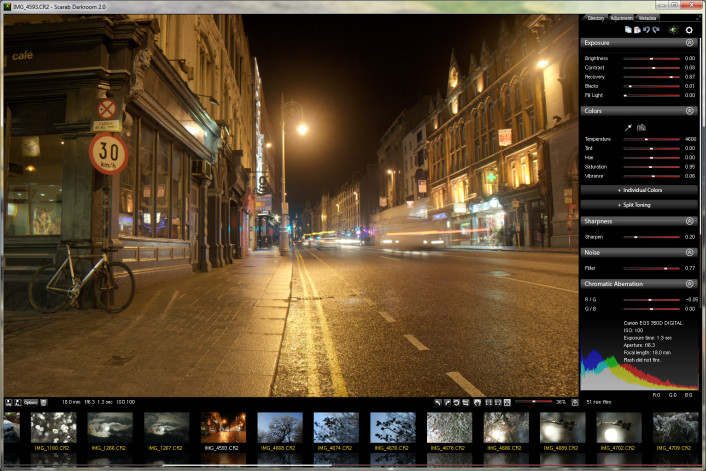 One of the programs that keep getting better and keep coming up with advanced and easy to use features is Scarab Darkroom. The program has improved in terms of features since the last time it was released. This version comes with a couple of fixes and updates that underline the importance attached to it by the publisher. One of the programs that keep getting better and keep coming up with advanced and easy to use features is Scarab Darkroom. The program has improved in terms of features since the last time it was released. This version comes with a couple of fixes and updates that underline the importance attached to it by the publisher.
What about Scarab Darkroom?
Scarab Darkroom is a digital camera raw file converter/photo editor that supports most raw format capable cameras from Canon, Nikon, Olympus, Panasonic, Pentax, Samsung, and Sony. It’s fast, easy-to-use, and produces excellent results.
Among several updates and fixes made to this version include the following; fixing of missing ISO values on some Nikon raw files, and tweaking of thread priorities among others. Among cameras supported in this version include the following; Canon (EOS 1D, 1D Mk II, 1D Mk III, 1D Mk IV, 1Ds, 1Ds Mk II, 1Ds Mk III, 1DX, 5D, 5D Mk II, 5D Mk III, 6D, etc) Fujifilm, Nikon, Olympus, Panasonic, Pentax, Samsung (EX1, GX-1, GX-1S, GX-1L, GX-20, NX10, NX11, Pro 815), and Sony (A100, A200, A230, A290, A300, A330, A350, A380, A390, A450, A500, A550, A560, A580, A700, A850, A900, NEX-3, NEX-5, NEX-5N, NEX-6, NEX-7, etc).
Any downsides?
Scarab Darkroom keeps getting better with each update.
Want to check it out? Visit ScarabLabs.
Posted in Main | No Comments »
|
|
|




