Archive for the 'Main' Category
Friday, January 18th, 2013
 Need an application that helps you monitor the weather conditions in your neighborhood right from your desktop? Weather Watcher can do it. Need an application that helps you monitor the weather conditions in your neighborhood right from your desktop? Weather Watcher can do it.
What is the big deal about this program?
Weather Watcher Live is your personal, real-time Windows desktop weather station. It automatically retrieves the current conditions, hourly forecast, daily forecast, detailed forecast, severe weather alerts, and weather maps from over 70,000+or cities world-wide.
Weather Watcher will allow you to automatically retrieve your weather data at a predetermined interval, display the current temperature and the current condition image in a customized tray icon, designate which weather information is displayed in the Weather Watcher system tray tool-tip, convert the weather data using almost any conversion, display a weather map as your desktop wallpaper, log the weather data in any format, export the weather data in any format, and customize the look of the Weather Watcher interface and icons via skins. It is also very easy to install and use.
Downsides?
It has a 30-day trial period. This program has all the info you will need and some more. It is very easy to install and use and it works pretty well.
If you want to learn more about this program, please go to WeatherWatcherLive.
Posted in Main | No Comments »
Friday, January 18th, 2013
 Do you need an application that backup and protects your data, documents, financial data and applications? EaseUS Todo can help you achieve that. Do you need an application that backup and protects your data, documents, financial data and applications? EaseUS Todo can help you achieve that.
What is the big deal about EaseUSTodo ?
EaseUS Todo Backup is a full-featured all-in-one backup and disaster recovery solution, protecting your data, including photos, music, videos, documents, emails, financial data and applications. It creates copies of your files and data and recovers them in the event of a crash. It has a cool and well-organized interface. One interesting feature of this program is that you could schedule full, incremental or differential backup jobs, so you could save extra data since your last backup.
You can also modify a backup plan and apply the changes instantly, remove image files or run previously created tasks. You could also convert the backup image into a bootable emergency disk or ISO file or virtual disk (Virtual PC or VMware).
Some of the main features of this program are: System Backup and Recovery, including the OS and installed applications. File and folder backup and recovery. Differential/Incremental Backup to save time and disk space. Backup Schedule for automatic system & data backup. Automatically delete/overwrite old images. Backup options: image split, image compression, set priority, set password, e-mail notification. Clone or transfer hard disk to another. Explore Image files.
The publisher of this program, CHENGDU Yiwo Tech Development Co., Ltd., has added a few changes to this version: Multiple Languages Supported: English, German, Spanish, French, Italian and Japanese, One click system backup and recovery, including the OS and installed applications and File and folder backup & recovery, including network data.
Downsides?
None that were noted. Excellent backup tool.
To learn more about this program, please visit ToDo-Backup.
Posted in Main | No Comments »
Thursday, January 17th, 2013
.jpg) Autoruns is a freeware that shows you what programs are configured to run during a system bootup or login session. It also shows you the entries in the order they are processed by Windows. Autoruns is a freeware that shows you what programs are configured to run during a system bootup or login session. It also shows you the entries in the order they are processed by Windows.
What is the deal about Autoruns?
You’ll probably be surprised at how many executables are launched automatically! This program shows you the programs that are configured to run when you bootup your computer. These programs include such programs as the ones in your startup folder, Run, RunOnce, and other Registry keys. It can also be configure to show other locations, including Explorer shell extensions, toolbars, browser helper objects, Winlogon notifications, auto-start services, and much more.
It is particularly very useful when you want to disable access for various malware that automatically run when Windows is initiated. Its Hide Signed Microsoft Entries option helps you to zoom in on third-party auto-starting images that have been added to your system and it has support for looking at the auto-starting images configured for other accounts configured on a system.
Systeminternals, the publisher of this freeware, ahs added a few changes to this version. They incude: additional startup locations, fixed several bugs related to image path parsing, added better support for browsing folders on WinPE and fixed a Wow64 redirection bug If you are a novice user, the standard interface probably looks cluttered with all sorts of technical terms. But experts are definitely overcome with joy right now.
Downsides?
None. This is a great program. A must for every computer.
To learn more about this program please do visit Autoruns for Windows.
Posted in Main | No Comments »
Thursday, January 17th, 2013
 DiskCryptor is an open source whole disk encryption software. It can be used to encrypt either a whole hard drive or its individual partitions, including the system partition. DiskCryptor is an open source whole disk encryption software. It can be used to encrypt either a whole hard drive or its individual partitions, including the system partition.
What is the big deal about DiskCryptor?
This program is a useful encryption solution designed to allow users encrypt or mount all the partitions. Some of the main features of this program are: Support for encryption algorithm AES, Twofish, Serpent, including their combinations- Transparent encryption of disk partitions, Full support for dynamic disks and Support for disk devices with large sector size (important for hardware RAID operation); Broad choice in configuration of booting an encrypted OS. Support for various multi-boot options- Full compatibility with third party boot loaders, Encryption of system and bootable partitions with pre-boot authentication, Option to place boot loader on external medium and to authenticate using the key medium; Support for hotkeys and optional command-line interface (CLI).
The publisher of this program, ntldr, has added a few changes to this version. These changes include: Added workaround for AES-NI support on Hyper-V, Added internal self-tests for PKDBF2 and XTS engines, Fixed bug with data loss with some cases on VIA-PadLock, Fixed regression with SSD detection on Windows XP and Fixed bug with no FS creation when formatting from GUI.
Downsides?
None that I know of.
To know more about this program, please go to DiskCryptor.
Posted in Main | No Comments »
Monday, January 14th, 2013
 Whole lots of tasks are required before you are ready with your PDF documents to get them uploaded on the internet. Starting from merging of several PDF documents into one to maneuvering the pages of a document are highly essential or should we say an obligatory requirement. To give you a hand in these PDF operations we present you Apex PDF Merger Program 2.3.8.2. This invention of Apex is a terrific answer to all your problems which you might counter all the time with PDFs like Joining, Splitting, Deleting and various other tasks. Working with this application is much easier than any of the similar utilities for the intuitive graphical user interface it has which brings in self explanatory options and trimmed buttons. Whole lots of tasks are required before you are ready with your PDF documents to get them uploaded on the internet. Starting from merging of several PDF documents into one to maneuvering the pages of a document are highly essential or should we say an obligatory requirement. To give you a hand in these PDF operations we present you Apex PDF Merger Program 2.3.8.2. This invention of Apex is a terrific answer to all your problems which you might counter all the time with PDFs like Joining, Splitting, Deleting and various other tasks. Working with this application is much easier than any of the similar utilities for the intuitive graphical user interface it has which brings in self explanatory options and trimmed buttons.
Let’s now count the feature this PDF merging program has. Leave aside merging several simple PDFs into a single document; it can also do the same function with password protected files. If merging is not perfect, it will allow you to split the same PDF effectively and carryout the merging operation again. The application permits in merging and splitting of PDFs in either in fixed pages or selected pages. All these maneuvering functions can also be done on quite a lot of PDFs together with the batch feature it includes. Pages that remains blank in between a document is deleted by it plus further aids in altering the Meta information of a PDF document like Author’s name, Title, Subject and keyword. The application is standalone which implies whether Adobe Acrobat is installed in your system or not, it can conveniently do its task.
Apex PDF Merger Program successfully gets installed as you will follow the few required steps and works well with entire version of MS Windows OS.
{More Info and Download}
Posted in Main | No Comments »
Sunday, January 13th, 2013
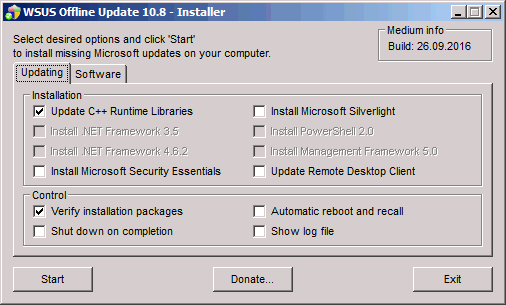 Want to update your MS Windows computer but have no internet access? Then go for WSUS Offline Update. Want to update your MS Windows computer but have no internet access? Then go for WSUS Offline Update.
What is the real deal about WSUS Offline Update?
WSUS Offline Update allows you to safely and quickly update any computer running Microsoft Windows safely without an Internet connection. It also allows you to easily download patches and updates for your Windows and Office without going through the whole procedure on Microsoft’s Windows Update website. So it helps to keep your windows computer updated even when you don’t have access to Microsoft Windows Update website.
Tortsen Wittrock, the publisher of this program, has added a lot of changes to this version. These changes include: Support added for Windows 8 and Server 2012, AddCustomLanguageSupport.cmd {lng}, Support added for Remote Desktop Connection 8.0 client (kb2592687) on Windows 7 / Server 2008 R2 (x86/x64) systems, ISO filters improved to mutually exclude .NET Framework 4.0/4.5 installation packages, Linux scripts reviewed and enhanced to support Windows 8 / Server 2012 targets and Removed obsolete “trailing colon” restriction for environment variable TEMP from UpdateGenerator script amongst several other changes.
Downsides?
This is a very good program for keeping your Windows Computer updated even when you do not have access to MS Windows Update site or internet access.
To familiarize yourself with this program, please go to Wsusoffline.
Posted in Main | No Comments »
Sunday, January 13th, 2013
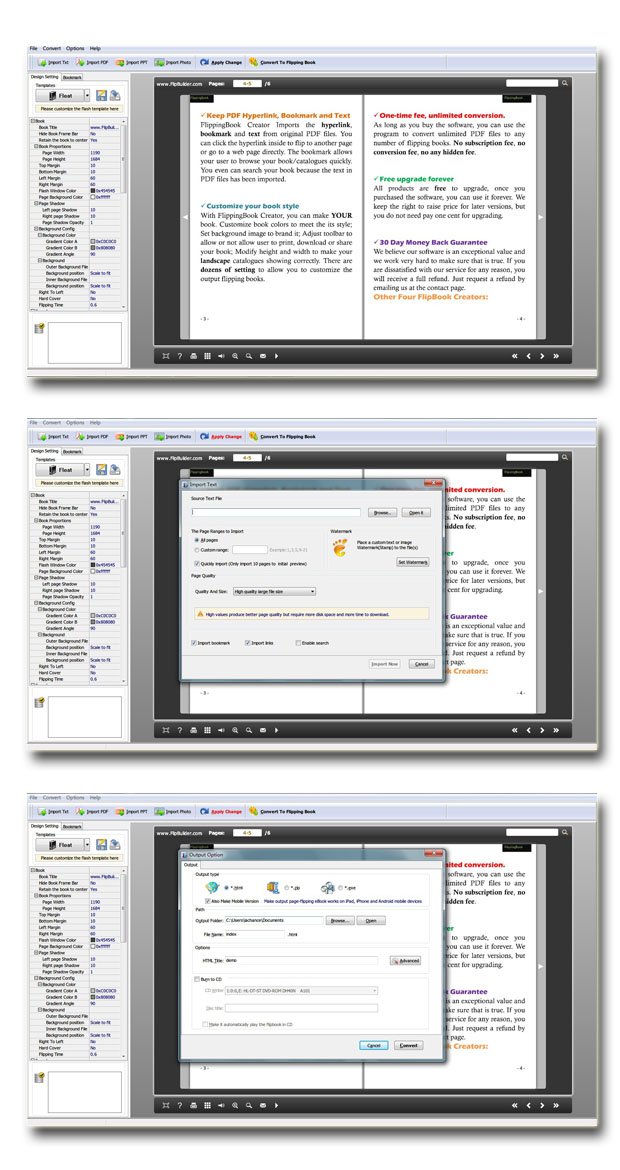 Bored with all the plain looking PDF files you have stacked in your system and not feeling like reading them anymore? Well we got an explanation which gives you an option to transform the entire look of the PDFs in more exiting flipping books. And that is through Free Page Turning Book Maker 2.5 you can attain lovely flash books from your PDF documents. Not only for personal use but also if you wish to get e-magazines, e-Catalogs or various publishable documents converted in to forms which could be read like a real book, this application can certainly come handy. As you will get the PDFs converted into Flipping books, they are bound to attract viewers quickly and more and more people will be able to read the items connected over the internet. Bored with all the plain looking PDF files you have stacked in your system and not feeling like reading them anymore? Well we got an explanation which gives you an option to transform the entire look of the PDFs in more exiting flipping books. And that is through Free Page Turning Book Maker 2.5 you can attain lovely flash books from your PDF documents. Not only for personal use but also if you wish to get e-magazines, e-Catalogs or various publishable documents converted in to forms which could be read like a real book, this application can certainly come handy. As you will get the PDFs converted into Flipping books, they are bound to attract viewers quickly and more and more people will be able to read the items connected over the internet.
Free Page Turning Book Maker comes for free and you can convert unlimited number of PDFs into page turning books without paying any penny. From the preservation of layouts, contents and all other aspect, you can be very sure with it. So you can find tables, images, hyperlinks etc. exactly the same way in the flipping books as it is available on the PDF document. While delivering the output format it offers choosing of several number of output format which includes HTML, mobile version for readable in iDevices and mobile phones and in to ZIP or EXE or burn them on CDs and DVDs. This brilliant converting tool also can enhance the overall look of the flip books by inputting background image and background color. The possibility of making the flip-books more interesting even rises with its ability to put background sound into it.
Free Page Turning Book Maker will enable you to obtain the turning books in just three steps plus with all the free upgrades you are certain to get can make the outputs even better.
{More Info and Download}
Posted in Main | No Comments »
Saturday, January 12th, 2013
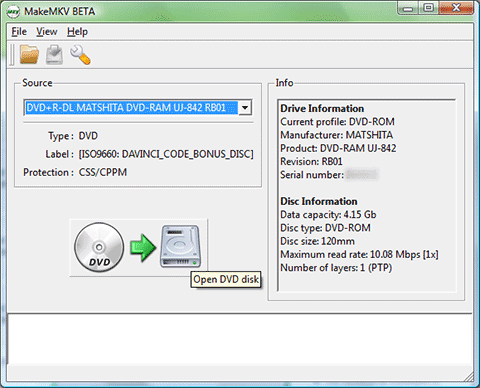 If you want an application that allows you to convert your videos into any format that you can play anywhere, the go get MakeMKV for Windows. If you want an application that allows you to convert your videos into any format that you can play anywhere, the go get MakeMKV for Windows.
What is the big deal about MakeMKV for Windows?
MakeMKV for Windows is a transcoder( a format converter). It allows you to convert your videos into free and patents-unencumbered format that can be played everywhere. It helps to convert videos from patented and usually encrypted disc into a set of MKV files, while preserving most of the original content. The MKV format can store multiple video/audio tracks with all meta-information and preserve chapters. There are several players that can play MKV files on almost all platforms, and there are tools to convert MKV files to many formats, including DVD and Blu-ray discs.
Also MakeMKV can stream decrypted video without intermediate conversion to wide range of players, so you may watch Blu-ray and DVD discs with your favorite player on your favorite OS or on your favorite device.
Some of the main functionalities of this program include: Reads DVD and Blu-ray discs, Reads Blu-ray discs protected with latest versions of AACS and BD+, Preserves all video and audio tracks, including HD audio, Preserves chapters information and Fast conversion – converts as fast as your drive can read data among several other functions.
Guinpin Soft Inc, the publisher of this program, has added these few new changes to this version:
Improved handling for DVD discs with mastering errors and many miscellaneous improvements. Other versions of this program are MakeMKV for Mac OS X.
Downsides?
It is not quite easy to understand. But unlike several other programs in its category, it can create MKV without having to extract first. It also has a quick, multi-audio stream.
To know more about this program, please visit MakeMKV.com.
Posted in Main | No Comments »
Friday, January 11th, 2013
 This is a very powerful open source defrag tool for Windows NT. This is a very powerful open source defrag tool for Windows NT.
What is the big deal about UltraDefrag?
The defragmentation is very fast because it is done by kernel mode driver. It has 3 interfaces: graphical, console and native. The graphical user interface is very cool because it represents your file system visually as a color coded cluster map. Users that prefer going through the command line will find its console interface very helpful. It allows you to run UltraDefrag from the task scheduler and scripts.
Some of the key features of this program are: driver features – Currently FAT, exFAT and NTFS are supported, Defragmentation of files and folders including system files and file system meta files and Filtering of files to process by name, fragment count and size; new GUI features are Graphical display of the drives cluster map, The current progress and all important information are displayed in the drives list and Color coding of the usage of the cluster map. It new command line tool has the following features are Useful for automation through scheduled tasks or batch scripts and Integrated into Explorer’s context menu.
Downsides?
A nice update on a cute little program. Does the defrag work real good.
To learn more about this program, please visit Ultradefrag.
Posted in Main | No Comments »
Friday, January 11th, 2013
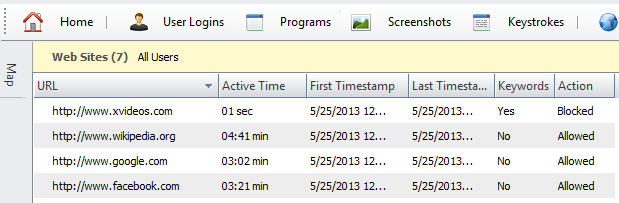 Need an application that will help to monitor and control your child’s online activities? Get HomeGuard. Need an application that will help to monitor and control your child’s online activities? Get HomeGuard.
What does HomeGuard really do?
It is a powerful parental control and activity monitoring tool for family and child safety online and offline. Upon installation on your computer, HomeGuard will quietly and automatically block all pornographic and inappropriate content online and record detailed website activity including time of visit and time spent on each website. Every website visited, program started, chat message sent and received, keystrokes typed, etc will be recorded in addition to activity based screen shots displayed in gallery view for quickly flipping through many shots and full view for focusing on specific shots.
It can also show warnings to users when blocking an activity and can send you notifications by Email when blocking. Plus individual programs usage time limiting and internet usage time limiting. It is absolutely impossible to tamper with, it cannot be bypassed using proxy servers and it cannot be closed or uninstalled unless the administrative password (provided during installation) is used.
Some of the features of this program includes: automatic filtering of web content and websites, built in keylogger, time and activity based screenshots capturing, chat and email monitoring and filtering, program/games blocking and time restrictions, Internet and computer usage time restrictions, email notifications and more.
Any downsides?
Completely blocks out all adult content from your computer. A very good program to have if you care about the viewing content of your family.
To learn more about this amazing software, please do visit Veridium.net
Posted in Main | No Comments »
|
|
|




