O. James Samson - July 8, 2010
 Adobe Reader is free software that creates the opportunity that enables vast majority of business professionals and home users to reliably share information using intelligent PDF files. With this tool, you can benefit from features like; print, search PDF files using a variety of platforms, and other devices. It is obviously the only PDF file viewer that can open and interact with all PDF documents. Adobe Reader is free software that creates the opportunity that enables vast majority of business professionals and home users to reliably share information using intelligent PDF files. With this tool, you can benefit from features like; print, search PDF files using a variety of platforms, and other devices. It is obviously the only PDF file viewer that can open and interact with all PDF documents.
The Adobe Reader for Windows 9.3.3 is a tool that also features like; digitally signing, searching, printing, verifying and collaborating with electronic documents. Users now have the chance to access CAD features like dimensions, or map features like longitude and latitude, for effective collaboration and interaction.
Adobe Reader user interface enables users to choose the reading mode that will fit more content on their screen or the two-up mode to view page spreads with little space in the middle.

Adobe Reader can be distributed internally by on an intranet site or a local network by government agencies, multi-national corporations, schools, and educational institutions. This will help colleagues, clients, and partners get on the same page at the same time with the ability to co-navigate documents.
Adobe Reader provides by far the best PDF reading and creation experience for the majority of businesses that work with PDF workflow on any serious level.
Want to check it out? Visit Adobe
Rating:  Loading... No Comments »
O. James Samson - July 8, 2010
 mIRC can best be defined as a full featured Internet Relay Chat client for Windows, which can be used to share, communicate, play or work with others on IRC networks the world over. This can be done either in multi-user group conferences or in one-to-one private discussions. mIRC can best be defined as a full featured Internet Relay Chat client for Windows, which can be used to share, communicate, play or work with others on IRC networks the world over. This can be done either in multi-user group conferences or in one-to-one private discussions.
mIRC is clean and practical interface. Because it is clean and practical means that it is very configurable and also supports numerous features such as buddy lists, file transfer, multi-server connections, proxy support, SSL encryption, customizable sounds, UTF-8 display, tray notifications, spoken messages, message logging, and so much more.
mIRC is designed with a highly efficient powerful scripting language that can be used to automate it and also create applications that perform a wide range of functions from network communications to playing games.
mIRC has been in development for several years now and it is constantly being improved and updated with new technologies. The constant development and improvement of mIRC is obviously what stands it out from other programs in its category.
Time after time, mIRC has continued to impress a lot of people with various versions. The latest version supports Unicode. Unfortunately, this version does not understand what version 6 clients are saying in other languages other than English.
Want to check it out? Visit mIRC
Rating: Loading... No Comments »
Ciaran Moore - July 8, 2010
 For those whose jobs demands capturing images of any means; a blogger that needs to capture a website used as a reference for quotation purposes or a system programmer needs an update of the user interface for the clients, recording screenshots demands a clearer and high quality screenshot output. Windows utilities such as print screen command, though can solve the job, it is not enough to provide the best screenshots output. Well why settle for the weak utilities when GreenShot screen can give you quality screenshots just when you need it the most. For those whose jobs demands capturing images of any means; a blogger that needs to capture a website used as a reference for quotation purposes or a system programmer needs an update of the user interface for the clients, recording screenshots demands a clearer and high quality screenshot output. Windows utilities such as print screen command, though can solve the job, it is not enough to provide the best screenshots output. Well why settle for the weak utilities when GreenShot screen can give you quality screenshots just when you need it the most.
Interface wise, its working environment is very informative and easy to understand. Capturing and saving screenshots is very easy, in fact navigating away from the program is not necessary. All menus are easy to find.
There’s more to this program than just screen capturing software. There are a lot of options on how to capture images from your screen to help you increase your productivity. First, you you can create a complete screen capture or just capture a portion of it or partial capture. This shows greater flexibility that the program offers to users. With complete capture, you can record the entire screen the way you need it say for your blog post or your portfolio. In partial capture, you can freely adjust what portion of the screen you want to record. This feature will surely save you from editing and cropping your image.
Second feature is the annotation and highlighting both important and unnecessary portions of the screenshot. This is very important when quality and reliability of image is of utmost concern. Also by using the settings menu you can customize on how to save the output file etc. Lastly, you can directly send the screenshots you’ve created directly to a file, to the clipboard, directly print it or send it to your friends or bosses as an e-mail attachment.
Recommended for users that needs screenshots either for their work or just for fun. And as an added bonus, the software is free.
You can download GreenShot software at Sourceforge.net
Rating: Loading... No Comments »
O. James Samson - July 8, 2010
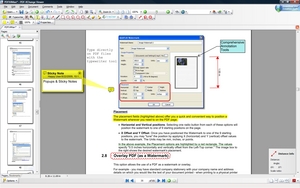 PDF-XChange Viewer is a tool which allows users to view PDF files on their PC or online like other PDF readers. The unique thing about PDF-XChange is that it has “Typewriter Mode” that enables users to type directly on any PDF page. With this tool, users can now fill out forms and add text to PDF documents that they would normally have to print out before they could write on them. PDF-XChange Viewer is a tool which allows users to view PDF files on their PC or online like other PDF readers. The unique thing about PDF-XChange is that it has “Typewriter Mode” that enables users to type directly on any PDF page. With this tool, users can now fill out forms and add text to PDF documents that they would normally have to print out before they could write on them.
Anyone who wishes to view, modify or perform editing of PDF files on their Windows computer, then there is no better alternative to this tool. It very small, unique, faster and comes with much more features than other free PDF Readers.
Some of PDF-XChange Viewer main features include: Mark-up pages with text and objects; allows users to add and apply Custom Stamps from any image or PDF file and even your Windows Clip board; users can now add Comments and Annotations to any PDF file; type directly on any PDF page; Export PDF pages or entire files to any one of the supported Image formats including BMP, JPEG, TIFF, PNG and much more.
Users also have the opportunity of trying the extended functionality offered by the PDF-XChange Viewer “PRO” in evaluation mode – for free.
Want to check it out? Visit PDF-Xchange-Viewer
Rating: Loading... No Comments »
Ciaran Moore - July 8, 2010
 Most PC speedup programs are, let’s be blunt, a disappointment. They’re frequently jammed with weak options that make no difference to your system’s speed at all. And some are so badly written that they can actually slow you down. Most PC speedup programs are, let’s be blunt, a disappointment. They’re frequently jammed with weak options that make no difference to your system’s speed at all. And some are so badly written that they can actually slow you down.
There are a few high quality exceptions to this rule, and Auslogics BoostSpeed 5 is among the much better ones. The program brushes aside the questionable tips advocated by so many of the competition, and instead focuses on genuinely useful techniques and technologies that really can revitalize almost every area of your PCs performance. And, best of all, you do not need to be a Windows expert to make this come about.
Here is a quick mention of just some of the tools available:
- A duplicate File Finder to scan your drives, searching duplicate files and letting you delete them.
- An Explore Disk option analyses your hard drive, then reports how all those gigabytes are being used (or misused!)
- Having liberated a few gigabytes from your hard drive, for example, you might then be able to significantly raise its performance by running the bundled Auslogics Disk Defrag.
- Auslogics Startup Manager can display your Windows startup programs, letting you disable unwanted entries (and save valuable system resources) at a click.
- The Startup Manager displays file handlers, shell extensions and IE add-ons beside the list of typical startup programs, for example, so it’s unusually comprehensive.
- The program can assure you in many cases which files are trustworthy, and which could be dangerous, making it easy to get rid of spyware and other threats from the list.
- You also get an remarkably easy way to optimise your Windows service settings.
- The program then picks out services that you can probably do without, and these will be ended in a click.
- A Locked Files section lists all the files your running programs have open, which both tells you what they’re doing, and, if you want to delete or move a file that’s locked, lets you know who’s holding on to it.
- A valuable set of privacy tools include options to delete your application, Windows and browser histories, securely delete confidential files so they can’t be recovered later, and even scrub entire hard drives clean of your personal information.
Check it out at Auslogics
Rating: Loading... No Comments »
O. James Samson - July 7, 2010
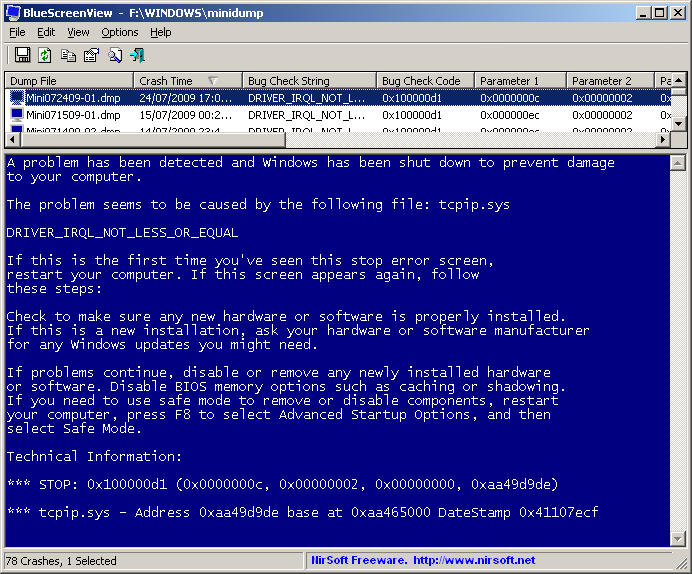 BlueScreenView can best be described as software that works by scanning minidump files created during “Blue Screen of Death” crashes, and display the information about all crashes in one table. For each crash, BlueScreenView can display basic information about each crash. The information that will be displayed includes the date/time of the crash, the basic crash information displayed in the blue screen, and the details of the driver or module that possibly caused the crash. BlueScreenView can best be described as software that works by scanning minidump files created during “Blue Screen of Death” crashes, and display the information about all crashes in one table. For each crash, BlueScreenView can display basic information about each crash. The information that will be displayed includes the date/time of the crash, the basic crash information displayed in the blue screen, and the details of the driver or module that possibly caused the crash.
The major system requirements for any user wishing to make use of BlueScreenView are: Windows XP; Windows server 2003, Windows server 2008, Windows Vista, Windows 7. Windows must be configured to save minidump files during BSOD crashes. It can read the minidump files of 32-bit and X64 system.
BlueScreenView does not require any installation process. All that is needed is for the user to run the executable file executable file and it will automatically scan minidump folders and display all crash details in the upper pane.
BlueScreenView comes with other features like: users can view a blue screen which is very similar to the one that Windows displayed during the crash; enumerates the memory addresses inside the stack of the crash; users can work with another instance of Windows, simply by choosing the right minidump folder; and so on.
Want to check it out? Visit Nirsoft.net
Rating: Loading... No Comments »
Ciaran Moore - July 7, 2010
 There is a lot of different ways of getting creative with graphics, and fulfilling all those needs can call for an entire library of applications. Perhaps, though, there’s a another way. Xara Designer Pro 6 is a photo editor, yes. But it’s also a vector drawing tool. A web graphics creator. An excellent desktop publishing tool, with templates to help you build calendars, greetings cards, brochures, business cards, CD covers and labels, newspapers and more. An easy to use and very capable WYSIWYG web designer, a useful collection of 3,000 clipart items, and more. There is a lot of different ways of getting creative with graphics, and fulfilling all those needs can call for an entire library of applications. Perhaps, though, there’s a another way. Xara Designer Pro 6 is a photo editor, yes. But it’s also a vector drawing tool. A web graphics creator. An excellent desktop publishing tool, with templates to help you build calendars, greetings cards, brochures, business cards, CD covers and labels, newspapers and more. An easy to use and very capable WYSIWYG web designer, a useful collection of 3,000 clipart items, and more.
There’s a down side to this level of graphics ability, : the user interface can be puzzling, at least at first. Open a photo to edit it, for example, and the toolbars remain jammed with options that you probably don’t need right now (extrude and transparency tools, “snap to objects”, link properties and more). The menus offer little help, too, so it’ll likely take some exploration before you find the options you require.
This Is not an issue for too long, though. After a bit time spent pointing and clicking, or maybe referring to the excellent Help file, you soon learn where everything is and be ready to begin using the functions on offer. Photo editing improvements include HD Photo/ Windows Media Photo import, and an enhanced Panorama Studio for stitching together any amount of photos, and even creating 360 degree web panoramas.
The assorted improvements do mean that Designer Pro 6 can now be accepted seriously as a photo editor – you might never have to use anything else. New to the version is live shape drawing, where you view a solid shape (not just an outline), with the correct fill and line colours, as you drag. There’s one likeable addition in the form of the new opacity masks, which will rapidly create an irregular transparent shape around any object, or group of objects.
There’s good support for image slicing and image maps, with Designer Pro 6 doing most of the hard work. The real star in Designer Pro 6, though, is the revamped web designer, delivering feature-packed and professional-looking pages even if you’ve no previous web design experience. Multi-core CPU support improves performance, while the option to reconfigure shortcut keys may help your workflow.
If you’re a newcomer to the package, Designer Pro 6 provides plenty of creative power and could be enough to handle all your illustration and design needs. There is many more features that can’t be mentioned in such a short space here. But if you like the sound of it so far, its well worth checking out at Xara.com
Rating: Loading... No Comments »
O. James Samson - July 7, 2010
 Website-Watcher is built with a new function that is able to Re-Create database from cache folder. Website-Watcher works by checking an unlimited number of web-sites for updates and changes with a minimum of time and online costs. Immediately changes in the websites are detected, Website-Watcher saves the last two versions of the computer hard disk and highlights all changes in the text. Website-Watcher is built with a new function that is able to Re-Create database from cache folder. Website-Watcher works by checking an unlimited number of web-sites for updates and changes with a minimum of time and online costs. Immediately changes in the websites are detected, Website-Watcher saves the last two versions of the computer hard disk and highlights all changes in the text.
Assuming the database has physical damages and the user does not have a working backup file and the function “Repair database” fails, he can now fully recreate a database from files that are stored in the cache folder.
Website-Watcher offers users the opportunity of spending fewer hours checking websites for updates by doing it automatically. Also, with this tool, a user can easily know when a new software version or driver update is released.
The major features of Website-Watcher that stands it out from others are: its capacity to monitor web pages, password protected pages, forums for new postings and replies; it monitors RSS feeds, Newsgroups and local files; highlight changes in a page; and a powerful filter system to ignore unwanted content.
The disadvantage of Website-Watcher is the fact that it actually requires the installation of another program like Firefox in order to function properly.
Want to check it out? Visit Aignes
Rating: Loading... No Comments »
Ciaran Moore - July 7, 2010
 Computer hard drive these days offer huge storage capacity to contain everything you want to save; from the most important documents to your memorable pictures and videos. While most users don’t seem to care about the amount of files they’re copying onto their hard drive, filling up a huge disk space can happen faster than you’d think – and one reason is duplicate content. This problem is can be very difficult to solve especially if your drive is almost full. Basic searching for duplicate content won’t do any good either. Well if you desperately need a good solution to this problem – try duplicate cleaner. Computer hard drive these days offer huge storage capacity to contain everything you want to save; from the most important documents to your memorable pictures and videos. While most users don’t seem to care about the amount of files they’re copying onto their hard drive, filling up a huge disk space can happen faster than you’d think – and one reason is duplicate content. This problem is can be very difficult to solve especially if your drive is almost full. Basic searching for duplicate content won’t do any good either. Well if you desperately need a good solution to this problem – try duplicate cleaner.
Duplicate cleaner scans your computer to save disk space occupied by these useless content duplicates. It offers a wide range of features when it comes to scanning for duplicate contents on your hard drive. The display window is simple but very concise. No special icons or images, just a plain window. Menus and display grids areas are provided so that even beginners can use the program conveniently. The display grid is also very informative as filename and file location are displayed.
Deeply scan your hard drive for duplicate content, then remove them – that’s the program’s main mission. It provides one of the fastest performance of scanning for duplicate contents on your drive. It scans accurately and quickly because of its MD5 Hash algorithm. The program also offers great flexibility as you have the option on what particular file type to recover; pictures, videos or word documents. This feature will save you a lot of time by narrowing its search parameter. The core functionality of the program lies on its thorough searching of files including its content and not just its filename.
Next is the program’s capability to even scan network drives,this is very important to save disk space on a network’s shared drive. Other features worth commending includes an image preview window which allow users to have an image preview of the files with duplicate contents. There’s no need for user to navigate away from the program just to browse a file. The program also has multiple language support.
Duplicate Cleaner is recommended for both typical and advanced users that are having problems with duplicate contents that are cluttering up their hard drive. Its fast and accurate performance is perfect to cater for most needs. And on top of that, its free.
You can download free Duplicate Cleaner at DigitalVolcano
Rating: Loading... No Comments »
Tilgore Kraut - July 6, 2010
 Applications like voice and sound recorders and web cameras are utilized in varied perspectives in variety of occasions. Many a times, we might feel like recording an old classic being played on FM Radio or record a live T.V. show or Podcasts, what do we do? We make use of various recording tools or sit and watch or listen to the telecast live along with commercial breaks, which brings unsolicited gaps in our entertainment experience. Furthermore, any kind of recording cannot guarantee quality of the requisite output and hence enhanced software like Replay AV 8.80 promises effectual results for recording content with ease and clarity. Applications like voice and sound recorders and web cameras are utilized in varied perspectives in variety of occasions. Many a times, we might feel like recording an old classic being played on FM Radio or record a live T.V. show or Podcasts, what do we do? We make use of various recording tools or sit and watch or listen to the telecast live along with commercial breaks, which brings unsolicited gaps in our entertainment experience. Furthermore, any kind of recording cannot guarantee quality of the requisite output and hence enhanced software like Replay AV 8.80 promises effectual results for recording content with ease and clarity.
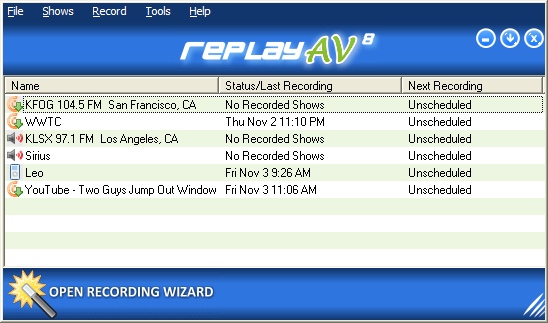
Replay AV opens with a bright looking interface with the chief options placed at the top pane and the main screen listing the recorded content. The navigation panel is simple to use and neatly arranged for user convenience. The software provides powerful medium to capture and convert all kind of streaming content comprising audio and video that includes online television broadcasts, video clips, webcam recordings and even audio archives. The user can record clips simultaneously along with their broadcast or schedule the recordings automatically later at a specific time. Moreover, the integrated Replay Media Guide lets the user to pick up Radio shows and stations and Podcasts to record the content with a single mouse click. The software comes with an in-built, free of cost MP3 editor and the free Replay player is also included to listen to recorded radio shows and skip ad commercials.
To sum up, Replay AV 8.80 definitely comes across as a constructive and practical utility for users aiming to record any audio or video content for any usage
{More Info and Download}
Rating: Loading... No Comments »
|
|
|





