Ciaran Moore - June 17, 2010
 Calibre is e-book management software that allows you to organize all your e-books from your computer. It offers all the necessary features and tools to manage and organize your e-books. Calibre is e-book management software that allows you to organize all your e-books from your computer. It offers all the necessary features and tools to manage and organize your e-books.
The user environment is simple as it doesn’t use that much detail for its window. Though it’s simple, the software’s flow is easy to understand by users of any type as comprehensive menu items where relevant icons are provided. You won’t get lost when using this program!
The program provides features and tools essential for e-book management. The program supports many e-book formats like CHM, PDF and even archived files. You can add an e-book to the program either one by one or by batch. You can also view e-books by selecting them on the list or by specific format.
As part of the program’s full support for e-book management and organization, you can sort all the e-books according to title, by author and many more. With this flexibility, you can arrange all your e-books the way you want them. Aside from that, you can add tags or keywords for easy book searching based on tags.
It does not only organize your e-books, you can even connect to external devices like disc drive and flash drives to open or save your e-book. The conversion also works well for given formats. Now you can convert your e-book to the format you wanted (convert chm to PDF etc.).
But the highlighted feature of this program is its functionality to connect to the Internet to search for other sources of information like online articles from New York Times, TIME Magazine and many more predefined by the program. You can discover more features and tools by installing and exploring the program.
Caliber E-book management program is recommended for users that uses their computer as a relevant source of information which includes a large E-book collection. You can manage, organize and search your e-books and online resources using this program free of charge. The program also runs on different platforms like Windows, Linux and Mac.
Download the full version of Calibre E-book management program at Calibre-ebook
Rating:  Loading... 1 Comment »
Ciaran Moore - June 17, 2010
 When you restart your computer frequently or just power it on from being off, it can be somewhat frustrating to wait for a minute or two just to start up your computer. Believe it or not, this interval is only for normal conditions and no errors. If you have problems with other programs on your computer especially the start-ups, then you’re in bigger trouble. Problems with start-up programs are very difficult to trace as you might affect other programs while searching and removing the ones with errors. If that’s the case, the Autoruns software is here to lend a helping hand. When you restart your computer frequently or just power it on from being off, it can be somewhat frustrating to wait for a minute or two just to start up your computer. Believe it or not, this interval is only for normal conditions and no errors. If you have problems with other programs on your computer especially the start-ups, then you’re in bigger trouble. Problems with start-up programs are very difficult to trace as you might affect other programs while searching and removing the ones with errors. If that’s the case, the Autoruns software is here to lend a helping hand.
Autoruns is a utility program that provides you with a quick grasp of information about all the programs running on your computer, from the registry to the start-up programs and even web browser addons that might be slowing things down. It provides an easy way to keep track of those programs that are causing slowness on your computer.
The user interface is very simple, but it’s still better than the windows utilities like msconfig and regedit. You have a clear view on different things like start-ups, registry, scheduled tasks etc.
This program does only one task and that is to help you remove unnecessary files that are causing trouble on your computer and affects its overall performance including boot time. You have a display of the different processes currently running on your computer including those that caused the trouble. Adjacent to the different processes is the location of the file, if the file is no longer referenced but still running, a file not found label will be placed instead of the file location. Most likely files with this label are the ones causing the trouble; you have the option of either disabling the file by removing the check mark, or removing the process by clicking the delete button. However, you need to be extra cautious in removing or disabling processes especially start-ups because you might end up deleting important files which may damage your operating system.
Autoruns is not just your ordinary program, so it is not recommended for ordinary users who don’t have the knowledge about start-up programs and operating system concepts. It is recommended only for advanced users who already have the experience and the knowledge about registry, start-up programs etc.
The program is free and you can download the full version of Autoruns from its homepage here
Rating: Loading... No Comments »
Ciaran Moore - June 17, 2010
 For a parent, monitoring their children whenever they use the computer is a very difficult task especially when their children could possibly end up viewing inappropriate sites. You can’t sit beside them every time they use the computer. The best thing you can do to keep track on their actions is to record everything the moment they sit down and use your computer; keystrokes, visited websites, passwords and more. For a parent, monitoring their children whenever they use the computer is a very difficult task especially when their children could possibly end up viewing inappropriate sites. You can’t sit beside them every time they use the computer. The best thing you can do to keep track on their actions is to record everything the moment they sit down and use your computer; keystrokes, visited websites, passwords and more.
Free Keylogger software conceals itself so that no one could ever notice that they are under surveillance the moment they use your computer for different applications.
Keeping track of every activity that’s happening on your computer by recording every keystroke, every website visited; that’s the main function of this program. The saved information will then be saved in your hard drive which you can view later. This file is kept secret and only the administrator has the authority to view it.
Aside from spying, the program’s feature to record keystrokes also known as keylogging is very useful in situations where you forgot your passwords to log-in on your e-mail or social networking accounts. All you have to do is browse the saved file to retrieve lost passwords. You’ve got flexibility on how to utilize the saved information. If you’re an employer, you can keep track if your employees have used the computer for other matters outside work. All of these are possible thanks to Free Keylogger.
When the program is running, it is invisible in task manager so there’s no way for other users to disable the program without your permission. Moreover, the program can’t be uninstalled by other users. (Its worth noting that this free version is visible when first starting up though).
As long as it is not used unethically, this program could be useful to some people such as parents and save them from unnecessary worries. Free Keylogger is recommended for users who are having problems with monitoring their children, or bosses wanting to make sure their employees are getting paid to work and not for checking their social network sites!
You can download Free Keylogger at Iwantsoft
Rating: Loading... No Comments »
O. James Samson - June 17, 2010
 Remove Fake Antivirus is an antivirus tool designed to help remove fake antivirus programs which may turn out to viruses or Trojans. With so cry and worry over the constant problem of malware antivirus, this software could not have come at a better time. Remove Fake Antivirus is an antivirus tool designed to help remove fake antivirus programs which may turn out to viruses or Trojans. With so cry and worry over the constant problem of malware antivirus, this software could not have come at a better time.
The problem of fake antivirus is growing by the minute. Fake antivirus usually disguises to be antivirus. This enables it to attack a computer when its user accidentally clicks a link in the website which will download the malware into the computer. And thereafter run automatically once the Windows boot.
Remove fake Antivirus 1.65 is used to remove the following: Antivirus Live, Personal Security, Security Tool, Cyber Security, Alpha Antivirus, Windows Enterprise Suite, Control Center, Braviax, Windows Police Pro, Antivirus Pro 2010, PC Antispyware 2010, Winshield2009.com, Green AV, Windows Protection Suite, Windows System Suite, Antivirus BEST, System Security, WinPC Defender, Anti-Virus-1, Spyware Guard 2008, System Guard 2009, Antivirus 2009, IGuardPC or I Guard PC, and Additional Guard, Antivirus 2009, Antivirus 2010, Antivirus Pro 2009.
Be that as it may, this software has some setbacks that are quite noticeable. The program ought to be stronger than the virus and be able to take over control but in most cases this is not the case. It also does not have the capacity to clean-up the fake antivirus.
Want to check it out? Visit FreeOfVirus
Rating: Loading... No Comments »
Ciaran Moore - June 17, 2010
 When it comes to backing up all the contents from your hard drive, selecting the right back-up software for your needs is quite a difficult task considering the fact that there are plenty of them in the market, both free and commercial products. Though some of them offer the most sophisticated features, others may only offer basic copy and paste features and just making fools out of unaware users. If bad luck favors you, you might end up wasting your money for software whose features can be performed using built-in windows utilities. With Genie Timeline back-up software, you’ll have the most flexible and reliable means of backing up your files. When it comes to backing up all the contents from your hard drive, selecting the right back-up software for your needs is quite a difficult task considering the fact that there are plenty of them in the market, both free and commercial products. Though some of them offer the most sophisticated features, others may only offer basic copy and paste features and just making fools out of unaware users. If bad luck favors you, you might end up wasting your money for software whose features can be performed using built-in windows utilities. With Genie Timeline back-up software, you’ll have the most flexible and reliable means of backing up your files.
Regarding the user interface, features are well-organized in such a way that users can quickly find and use each tool available. It comes with a very user friendly graphical user interface, concise and easy to understand.
Probably the biggest advantage of this program against its competitors is the advance features the program offers. There are 12 file categories the program supports; office files, music videos, images and other miscellaneous files. It can also back up your connected portable devices such as cellphones, iPads, etc.
File compression, encryption and password protection is also useful for large data backup and protecting backup files from being accessed by unauthorized users. You can save some disk space by compressing your backup files.
Next is the Smart Mode and Turbo Mode option for backing up your data. These features are available after the program generates the preliminary backup. With Turbo Mode, backing up occurs at full speed, though eats up lots of computer resources. Smart Mode on the other hand is a smarter option for backing up as full speed back up occurs only when computer resources are inactive. However, either way proves that data backup is incredibly fast.
The program also creates a folder referred to as “no backup zone” – everything that is in this folder is not included in the backup files. Save temporary files here to save space when backing up data. Also the program connects to windows explorer allowing you to have browsing access to other backup files created.
Lastly, disaster recovery rounds up the features of this backup software. With disaster recovery, you have the power to backup your entire system if something happen like sudden power interruption. You can easily go back to the previous state where the disaster happened. Also under this feature, you can create a disaster recovery startup disc on your USB flash drives or on CDs/DVDs.
Genie Timeline is recommended for users who need a strong backup tool installed on their computers.
It is available in a professional and home version from Genie-Soft
Rating: Loading... 1 Comment »
Ciaran Moore - June 17, 2010
 Listening to music and watching video is probably the most relaxing thing to do after long hours of doing your computer tasks. For a better music and video playing experience, you need a multimedia player that can give you the best quality audio and video output without causing your computer to slow down. There are too many multimedia players to choose from; both commercial and open-source software. Even your computer alone already has a built in media player (when you’re using Windows). But just in case you’re undecided on which among the numerous media player to install, why not give Winamp Lite a try. Listening to music and watching video is probably the most relaxing thing to do after long hours of doing your computer tasks. For a better music and video playing experience, you need a multimedia player that can give you the best quality audio and video output without causing your computer to slow down. There are too many multimedia players to choose from; both commercial and open-source software. Even your computer alone already has a built in media player (when you’re using Windows). But just in case you’re undecided on which among the numerous media player to install, why not give Winamp Lite a try.
Winamp Lite is multimedia software capable of playing selected audio and video file formats. This is the latest software version released by Winamp; lighter and smaller so downloading the program and installing it are definitely not a burden. There is lots of new from this latest multimedia player and these will be discussed in this review.
As mentioned, the program is very light so downloading it from the Internet is very convenient and does not take too much time. The program also requires only minimum hardware requirements; a Pentium III processor, 10 MB disk space, and 512 MB RAM will do.
The program runs only on Windows so you need to have Windows OS (98 or later versions). The audio driver of your computer must also be correct and updated.
First is the user-interface. The program’s graphical user interface is probably not user friendly for novices who are into using Windows Media player. But for the music savvy, understanding the program’s interface is very easy.
The program offers very useful features for all types of users. First is the file format support. This player supports multiple audio file formats including MP3, WMA and AAC audio files.It contains more control than any other media player and these include equalizer, volume, balance, repeat, playlist etc. these tools are very useful in adjusting the output of the player.
Other features include track information to know basic info about the media being played, creating a new playlist of your favorite songs and saving this list to play later, create and save a predefined equalizer setting for a particular song so you don’t need to adjust the output everytime you play that song. There’s still more features you will encounter if you explore the program in its entirety. After you read this review, you might wanna download and install the program right away for a cool music listening experience.
Winamp Lite is a free and available for free download at Winamp.com
Rating: Loading... No Comments »
Ciaran Moore - June 16, 2010
 MyPaint as the name implies, is painting software. It does the same thing as some similar programss, but with more added tools. There’s more to this software than merely a paint program, the way of painting on a canvas manually can also be done right on your computer. The features of this program a lot better than anything as basic as Microsoft Paint program, but not as sophisticated as the more popular Photoshop. MyPaint as the name implies, is painting software. It does the same thing as some similar programss, but with more added tools. There’s more to this software than merely a paint program, the way of painting on a canvas manually can also be done right on your computer. The features of this program a lot better than anything as basic as Microsoft Paint program, but not as sophisticated as the more popular Photoshop.
This is basically a digital paint editor that lets you create freehand drawings and painting by using your graphics tablet or mouse and a large assortment of digital paint brushes. It lets you toggle all tool windows with keyboard shortcuts, and it lets you cover your entire screen with your drawing canvas so you can concentrate on your masterpiece. It includes a ton of brushes for realistic paint effects (and you can even create your own), as well as layer support,which is a very important tool in image editing. With layers you can add more and more enhancements of your current image. In addition to all this, it has undo, color sampling and more. Your creation can be saved in Open Raster format (.ora) or exported to PNG or JPG image. The only thing you need to add is your own talent!
MyPaint is good image editing and painting software for artists who are seeking for more robust software than Microsoft Paint but don’t have the budget to purchase commercial image editing products like Adobe Photoshop. It contains most of the features you need to create and edit colorful images. You can obtain all these amazing features and tools free of charge. Check it out now if you enjoy painting without the expense and mess!
You can download this free image editing product at MyPaint
Rating: Loading... 1 Comment »
O. James Samson - June 16, 2010
 jv16 PowerTools is a full Windows is designed with one thing in mind and that is “ placing the end-user in mind”. jv16 PowerTools is a full Windows optimization utility suite which contains about 27 different main tools. All the tools were designed carefully to place the end-user. jv16 PowerTools is a full Windows is designed with one thing in mind and that is “ placing the end-user in mind”. jv16 PowerTools is a full Windows optimization utility suite which contains about 27 different main tools. All the tools were designed carefully to place the end-user.
This tool is very easy to use as it is quite user-friendly. Its Windows Control Panel is like user interface and its intuitive graphic tabs for instance make this tool easy to learn. Its automatic backup creation makes it safe to use – even if users are learning by trying and make a mistake sometime, they can always easily restore the backup created by the program.
jv16 PowerTools as a combination of features that makes it very uniques. Some of these features are: new registry cleaner engine with error analysis technology that delivers better and more accurate cleaning and error fixing results, fully uninstalls even the nastiest pest software from PC, improves user privacy by detecting and removing hidden history data and MRU lists, Small download size (under 3 MB), works perfectly even with older computer, low memory usage.
These unique features are not available in other software. All in all, this software offer user the opportunity of full Windows optimization.
Want to check it out? Visit Macecraft.com
Rating: Loading... No Comments »
Ciaran Moore - June 16, 2010
 There are situations where you had a nicely taken picture, with all the wonderful smiles of you and your family or friends. Everything is perfect except for unnecessary views that distract the whole picture; a passing stranger on the back might be accidentally caught or a garbage bin right beside you. Before thinking of cutting the picture and scanning it again, there’s a program that can remove unnecessary portions of your picture and retain the most important part. There are situations where you had a nicely taken picture, with all the wonderful smiles of you and your family or friends. Everything is perfect except for unnecessary views that distract the whole picture; a passing stranger on the back might be accidentally caught or a garbage bin right beside you. Before thinking of cutting the picture and scanning it again, there’s a program that can remove unnecessary portions of your picture and retain the most important part.
PhotoWipe is a program for removing or cleaning your pictures from unnecessary views or objects found in your favorite or precious photos. This software does only what it does best; remove unnecessary portions of your pictures.
The program only performs simple functions so it does not require any sophisticated hardware and software to perform better. Pentium III or higher processor, 256MB RAM and 10MB free disk space are enough to run the program to its full potential.
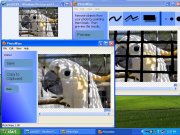
Simple but comprehensive, that’s how to describe the graphical user interface of the program. The workspace for editing images is very large and a smaller navigation window is provided to have a view on what part of the original image you are editing. The interface makes the program is very easy to use.
As mentioned, the program only performs what it does best and that is to remove unwanted portions of your favorite pictures. After you open the image, you are now ready to erase whatever portion you wanted to by using the eraser tool that’s included in the program. You’ve got plenty of brushes to choose from when you erase; dot (in different sizes), box, polygon and curves.
It also provides a real time view of the result of the edit. The edited portion can be viewed with a facsimile of the exact result of the erasure process. However, the result may differ depending on the size of the deleted portion etc.
PhotoWipe is the software you need to get rid of those unnecessary portions of your most treasured pictures. No matter what type of user you are; advanced or beginner, you can utilize the program’s full benefits. In addition you can have these at no cost at all as the program is free to use!
You can download PhotoWipe and see some amazing examples here
Rating: Loading... No Comments »
O. James Samson - June 16, 2010
 IE7Pro is an add-on for Internet Explorer that includes many features and tweaks to make IE friendlier, secure, a lot more useful and customizable. IE7pro includes Tabbed Browsing Management, Super Drag Drop, Spell Check, Inline Search, Crash Recovery, Mouse Gesture, Proxy Switcher, Tab History Browser, User Agent Switcher, Web Accelerator, Webpage Capturer, AD Blocker, Flash Block, User Plug-ins and so many more power packed features. IE7Pro is an add-on for Internet Explorer that includes many features and tweaks to make IE friendlier, secure, a lot more useful and customizable. IE7pro includes Tabbed Browsing Management, Super Drag Drop, Spell Check, Inline Search, Crash Recovery, Mouse Gesture, Proxy Switcher, Tab History Browser, User Agent Switcher, Web Accelerator, Webpage Capturer, AD Blocker, Flash Block, User Plug-ins and so many more power packed features.
IE7Pro provides enhance Internet Explorer browsing capabilities which includes the following Features: Double click to close tab, open new tab from address bar, enable/disable crash recovery, hide search bar, enable/disable tab browse history manager, move the IE menu bar above the address bar, modify the maximum number of parallel connections to the web server and select the external program to view page source.
Ordinarily, IE7pro allows users to customize not just Internet Explorer, but even their favorite website according to their needs.
IE7pro is a very flexible and easy-to-use tool that can convert HTML page from any URL to image. It has the capacity to captures the whole web page’s content into JPG, BMP, GIF, PNG or TIFF on the fly.
IE7Pro Script is very much to Internet Explorer 7 as Grease monkey is to Firefox. With this tool a user can remix the Web via scripts.
Want to check it out? Visit IE7pro
Rating: Loading... No Comments »
|
|
|





