Tilgore Kraut - May 14, 2009
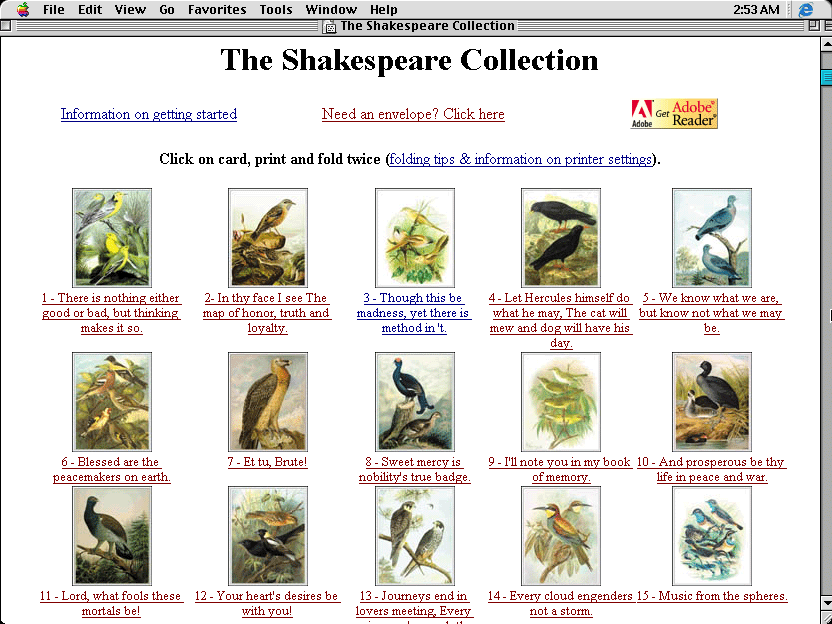 Is your beloved angry as you couldn’t take her out on your wedding anniversary day, due to an important meeting at your office? Well this is really a cardinal sin, and your beloved has all the rights to scrap your dinner for this. If you really want your dinner to be served on your plate and not on your head, then win over her heart by presenting a lovely card to her. Simply express your feelings in the words of the great Shakespeare with The Shakespeare Collection 1.0. The collection comprises of a number of quotes from the great author Shakespeare formed into beautiful cards. It works as a personal library, where you get formatted cards that are ready-to-print and use. Not just anniversary but these cards can be used for various other occasions and personal communication. Is your beloved angry as you couldn’t take her out on your wedding anniversary day, due to an important meeting at your office? Well this is really a cardinal sin, and your beloved has all the rights to scrap your dinner for this. If you really want your dinner to be served on your plate and not on your head, then win over her heart by presenting a lovely card to her. Simply express your feelings in the words of the great Shakespeare with The Shakespeare Collection 1.0. The collection comprises of a number of quotes from the great author Shakespeare formed into beautiful cards. It works as a personal library, where you get formatted cards that are ready-to-print and use. Not just anniversary but these cards can be used for various other occasions and personal communication.
The Shakespeare Collection 1.0 is an impressive library of selected quotes from the marvelous creations of William Shakespeare. The cards collection is suitable for conveying any mood, thought, or sentiment effectively to your loved ones. The cards are also accompanied by printable envelopes, thus providing a complete combination. You’re provided with high quality cards that are already formatted as per end-users requirements. The collection is provided in html file, where you can click the card thumbnail from the shown list, and it would open a new window. You can even preview the selected card in PDF format and directly print it by configuring the print settings for it. Now when the card is printed, you just have to fold the sheet to give a proper appearance. The graphical images used in the cards and formatting of quotes are of good quality.
Shakespeare Collection 1.0 provides you with impressive quote cards for different occasions such as birthdays, anniversary, wedding, etc.
{More info and Download}
Rating:  Loading... No Comments »
Tilgore Kraut - May 14, 2009
 Programs which contain malicious codes or processes, can cause a wide range of troubles, including sudden system crash, personal data theft, application crash, remote code execution, just to name a few. With the rising count in virus intrusion cases, the search rate for good antivirus applications has further raised. Well, if you’ve also encountered virus infection within your system, and looking for a proficient antivirus program, then try out the new Panda Cloud Antivirus 0.9. Programs which contain malicious codes or processes, can cause a wide range of troubles, including sudden system crash, personal data theft, application crash, remote code execution, just to name a few. With the rising count in virus intrusion cases, the search rate for good antivirus applications has further raised. Well, if you’ve also encountered virus infection within your system, and looking for a proficient antivirus program, then try out the new Panda Cloud Antivirus 0.9.
The utility facilitates you in applying effective protection for your PC to prevent viruses, malware, and spyware from entering your system. For performing this task, it utilizes a server architecture and thin-client agent for processing and blocking malicious elements. It would scan your entire system by combining local detection technologies along with real-time cloud-scanning for detecting and neutralizing viruses and malware.
Well, moving towards the functional part of the Panda Cloud Antivirus it places its icon within system tray. Its interface is attractive, which further embeds of different options for scanning and protecting your PC. The first option integrated with program console is Settings, where you can enable automatic management of possible viruses, and further can set Internet Settings relating Proxy, User name, Port, and Password. Well, after configuring the settings, now its time to get your PC checked for the presence of viruses or other malicious content with the Scan option.
This feature lets you scan your entire system or specific files/folders, as required, and opens a separate scan window for the purpose. Though, scanning files and folders is also possible through right click menu, as the program associates its scanning option with explorer context menu. Next is the ‘Report’ option where you can view the number of threats detected in their specific categories. Press ‘Correct’ and the application would ensure safety of your system. An interestingly presented program feature is ‘Recycle Bin’, accessible by turning the program console to other side. This feature lets you recover applications mistakenly neutralized by program.
Panda Cloud Antivirus supports safeguarding your system against various threats by scanning, detecting and neutralizing them.
{More Info and Download}
Rating: Loading... No Comments »
O. James Samson - May 13, 2009
 Sending an email to more than one person is usually referred to as SPAM email which is highly discouraged and illegal. But there are scenarios where sending email to more than one recipient is legal and possible. For example, you want to update your co-workers about a meeting or your clients about the recent changes in your company policy. Sending an email to more than one person is usually referred to as SPAM email which is highly discouraged and illegal. But there are scenarios where sending email to more than one recipient is legal and possible. For example, you want to update your co-workers about a meeting or your clients about the recent changes in your company policy.
That’s where Spryka ePostMailer could help you. This simple tool could help you send email up to 200 contacts (for free version) at once. For small businesses and for personal use, the number of contacts allowed is more than enough. It’s a simple but very helpful marketing tool for small and home based businesses in order to improve their client base.
The interface of Spryka ePostMailer is not your regular Outlook. Instead of emulating the popular email client, Spryka ePostMailer uses an explorer-like interface. This makes it very easy for users to understand the functions even though they will use the application for the first time. Because of its explorer-like interface, customizing messages with additional graphics is a lot easier.
The contacts could be customized as well. Instead of simple tags, you’ll be able to color code your contacts so that you can easily distinguish their role or importance to your business. Even the tools in the application are presented like explorer wherein the functions are presented in tree to know their hierarchy.
The professional version will allow you to send email to an unlimited number of recipients. But as already indicated; 200 contacts should be more than enough for many small businesses and solo professionals.
Check it out at http://www.spryka.com/
Rating: Loading... No Comments »
O. James Samson - May 13, 2009
 As the name suggests, Moo0 SystemMonitor is a small but useful application that could be used to monitor the performance of your computer. The information about your computer will be displayed on your desktop in real time. This will give you a good idea on how fast (or slow) your computer works. As the name suggests, Moo0 SystemMonitor is a small but useful application that could be used to monitor the performance of your computer. The information about your computer will be displayed on your desktop in real time. This will give you a good idea on how fast (or slow) your computer works.
There are other applications that could be likened with Moo0 SystemMonitor. But this application is not just your regular monitor wherein it provides you the CPU usage, memory and temperature. The application could monitor up to 30 hardware functions in your computer. Some of these facts are not even familiar to some computer technicians but they can be actively monitored by the application. Network connections, connection time, HDD (hard disk drive) performance and usage and other hardware functions could be actively monitored by this small application.
On the other hand, the complexity of the application requires a little bit familiarity of your system. Since Moo0 SystemMonitor will provide real time data about your computer, it has to be a little bit intrusive which means it could slow down your gadget. It will show the cause of the error but the additional cause of your computer’s sluggish performance is the application itself. Another shortcoming of the application is the temperature monitor tool. The tool could only monitor Intel and AMD hardware but they are actively working on a new version to adopt other manufacturers as well.
Overall, Moo0 is a very powerful tool that will give you a good idea on how your computer works. By knowing what slows down your gadget, you should be able to provide fixes fast and improve the performance of your computer.
Check it out at moo0.com
Rating: Loading... No Comments »
O. James Samson - May 12, 2009
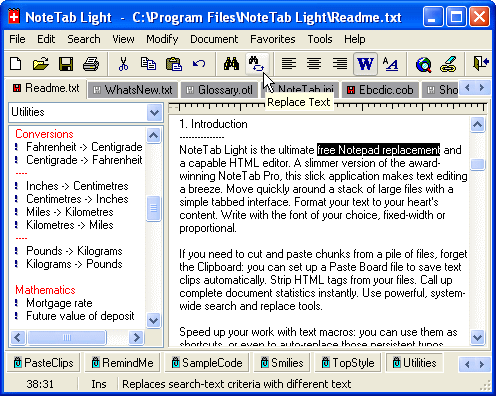 NoteTab Light is a very impressive notepad replacement. The application provides impressive tools and functions not found in regular notepads. Although at first it’s only seen as a notepad alternative, it has grown into a very powerful application that aims to assist not just regular users of notepad application but also web developers. Your notepad will not just be a simple clipboard anymore but a highly interactive application for document editing. NoteTab Light is a very impressive notepad replacement. The application provides impressive tools and functions not found in regular notepads. Although at first it’s only seen as a notepad alternative, it has grown into a very powerful application that aims to assist not just regular users of notepad application but also web developers. Your notepad will not just be a simple clipboard anymore but a highly interactive application for document editing.
The most impressive feature of NoteTab Light is the tabbed feature. It has a browser-like behavior because you can easily launch multiple tabs in a single application so that you can easily navigate through various files with ease. Identifying the tabs is also easy since they will be tagged by their filenames. Like the native Notepad, the application is also compatible to various file formats including HTML files for easy editing.
The controls of the NoteTab Light are another difference maker for the application. The application comes with the standard commands for Notepad but adds functions such as replace, highlight, search and modify the text document. On the left side of the application, you’ll also have a slew of utilities that could be automatically added in the file. The sidebar is considered as the clipping tool wherein you can insert functions with only one click.
Because of the impressive features of NoteTab Light, you can expect that the application would be a little bit heavier compared to other notepad replacements (1.8MB) but launching and navigating through the application is a breeze as the application will not be a resource hog.
Check it out at http://www.fookes.com/notetab/index.php
Rating: Loading... No Comments »
O. James Samson - May 12, 2009
 Although Windows Vista is hailed as the next generation OS after XP, its reception is mostly on the negative. Instead of providing better interaction and security for users, it only increased the hardware requirements without doing anything better than XP. The Vista also constantly connects to Windows Servers which could slow down your connection and expose you to different form of attacks. Although Windows Vista is hailed as the next generation OS after XP, its reception is mostly on the negative. Instead of providing better interaction and security for users, it only increased the hardware requirements without doing anything better than XP. The Vista also constantly connects to Windows Servers which could slow down your connection and expose you to different form of attacks.
These problems could be prevented by a simple tool called Vispa. In gist, this application will help you make some changes in the said OS without having to navigate through complicated processes of the application. The functions that you wanted to disable in Vista are normally hard to find especially for new users and those who are not proficient with computers. Vispa answers these problems by creating a list on the things that you wanted to disable in Vista. After selecting the things you wanted to be disabled, just click apply and the application will do the rest of changing the OS based on your preferences.
Aside from Vista, users could also use Vispa to tweak or customize their Internet Explorer. You’ll be able to disable updates, improve connections as well as preventing pop-ups from showing up while using the said browser.
But take caution on using the application. Vispa could disable some functions without affecting the operating system but you might disable something important the system. Be sure you are familiar with the functions you are disabling so that you don’t have deal with the inconvenience that your OS is not properly running anymore.
Check it out at http://vispa.whyeye.org/
Rating: Loading... No Comments »
O. James Samson - May 12, 2009
 Sucubus is a music and video search tool that also allow users to download the said videos directly from its source. The video search tool of Sucubus automatically searches YouTube and provides an option for users if they want to download the file for future viewing even when they are offline. Sucubus is a music and video search tool that also allow users to download the said videos directly from its source. The video search tool of Sucubus automatically searches YouTube and provides an option for users if they want to download the file for future viewing even when they are offline.
The music search tool connects users to websites that freely shares their music online. Like the video search tool, users can download the said file directly from the source. It’s almost a P2P but without the waiting time for the uploader to “seed” the said file.
Aside from allowing users to download videos online, the application also comes with a video converter. Users can convert the videos into formats that could be read in mobile devices. Videos could be converted to 3gp or Mp4 – formats that could be read by mobile phones and Apple created mobile devices. Users can also rip the audio from the downloaded video and convert them into an Mp3 file. This is especially useful if you wanted live performance as an audio instead of a music video.
The interface of Sucubus is very straight forward. The main page asks to you enter the keywords of the file you want to use and the application will show video results on top and audio on the bottom. You can expand the video and audio results for more choices.
Once you opt to download a file, you’ll be able to see the download progress in real time. The file size of the folder is also displayed so you’ll know how many videos and mp3 files you have downloaded so far.
More info available at http://www.sucub.us/
Rating: Loading... No Comments »
O. James Samson - May 7, 2009
 Cloud computing is a form of online interaction wherein the experience is almost desktop like. Instead of using your regular desktop as the source of your application, you can just use your browser to launch important applications. Because everything is online, you can access the information wherever you go as long as there is a decent internet connection. Cloud computing is a form of online interaction wherein the experience is almost desktop like. Instead of using your regular desktop as the source of your application, you can just use your browser to launch important applications. Because everything is online, you can access the information wherever you go as long as there is a decent internet connection.
Gladinet is an application that lets you experience cloud computing with a twist. Instead of using the online application to edit your files, you can use local software to edit the files and save them online. Although you still can use the application online, using your regular desktop application speeds up the process. You’re practically using your MS Office (or any relative application) and save them directly to your online storage account.
The interface of Gladinet launches as a file explorer. Through this explorer, you can find your files and make the necessary changes on the files or even folders as you wish. There is a task bar that serves as an upload/download tool which also servers as a control panel for software compatibility of your files. The Gladinet works well with Google Docs, Amazon S3 and other file storage servers.
There are two editions of Gladinet but the free edition should be more than enough if you’re only planning to use the application for personal use. The professional edition offers more efficient file transfer tools (for large files) and more settings for better customization. You can try the pro edition for 14 days but it will revert to starter edition (no limitations) if you opted not to purchase the pro license.
Check it out http://www.gladinet.com/
Rating: Loading... No Comments »
O. James Samson - May 7, 2009
 ActiveSolid is a relatively small but very powerful CAD tool for architects and designers. Less than 3MB in size, the application quickly launches to aid users in designing structures in full 3D interpretation. The output of the application could be fully integrated online for IE (but only though ActiveX) and MS Office applications as well. ActiveSolid is a relatively small but very powerful CAD tool for architects and designers. Less than 3MB in size, the application quickly launches to aid users in designing structures in full 3D interpretation. The output of the application could be fully integrated online for IE (but only though ActiveX) and MS Office applications as well.
The application provides the user practically everything they need to create an impressive 3D modeling. Along with standard shapes and sizes that could be automatically added in the application, specific points of the design could be accessed and manipulated easily because they can be targeted through efficient use of X,Y and Z planes.
The application also aid developers in efficiently editing and improving their work. Before the design could be applied, the application will show the outline of the outcome when the design is applied. When the user presses “Apply” the final work is created. But it doesn’t stop there. If the user finds that the new design does not look good, the “Undo” button could still be used – without limitations.
Aside from impressive 3D imaging, the application also helps users who wanted to add a 2D image especially when they want to add simple designs on the final work. Like the 3D counterpart, manipulation is also easy and the under/redo function is virtually unlimited. The application is a very lightweight application but comes with very useful 3D and 2D design functions especially on the variety of designs that could be integrated. Designing a structure has never been easier using this application.
Check it out at http://www.threedify.com/
Rating: Loading... No Comments »
Tilgore Kraut - May 6, 2009
 It might happen that you listen to a soothing song on internet radio and start searching the web to download and add it to your playlist. However, chances of getting the downloadable version of the song mayn’t be as good and purchasing it could actually burn a hole into your pocket. In such case, Easy HiQ Recorder 2.2 is what you need to get your favorite songs stored at your system. The application integrates a variety of handy features that support recording any real-time sound. Its cushy console, which comprises of various effective features, is made easily operable even for both beginners as well as advanced users. The application conveniently record sounds directly in MP3, WAV, WMA 9, or OGG Vorbis audio formats. It records sounds from internet broadcast, video or audio, video games, CDs, and even more. It might happen that you listen to a soothing song on internet radio and start searching the web to download and add it to your playlist. However, chances of getting the downloadable version of the song mayn’t be as good and purchasing it could actually burn a hole into your pocket. In such case, Easy HiQ Recorder 2.2 is what you need to get your favorite songs stored at your system. The application integrates a variety of handy features that support recording any real-time sound. Its cushy console, which comprises of various effective features, is made easily operable even for both beginners as well as advanced users. The application conveniently record sounds directly in MP3, WAV, WMA 9, or OGG Vorbis audio formats. It records sounds from internet broadcast, video or audio, video games, CDs, and even more.
The Easy HiQ Recorder 2.2 utility supports converting and recording various audios and media types such as records, CD’s, tapes, radio, Mini-Disc, DAT, video tape sounds, video games, T.V. sounds, telephone and different other external device. The application executes with a small but pleasing interface with vibrant colors. When you’re ready to begin with sound recording, as your songs is being played on internet radio press the red-colored ‘Record’ button placed on screen. When the broadcasted song finishes, just click on Stop button, after which the recorded file can be stored with desired format. The recorded audio can be listened to by playing it within the program. Further, the Recording Options support altering and scheduling the recording task. The Options window contains options relating output format, input source, sound volume, sound activation, song detection, manual recording length, scheduled recording, automatically split recording, etc features. Along with this, the destination folder is to be specified for output file storage.
Easy HiQ Recorder is hardly complex to use and it supports quality real-time sound recording and then saving the track in the user specified format.
{More Info and Download}
Rating: Loading... No Comments »
|
|
|





