Tilgore Kraut - March 27, 2009
 While sitting alone, we usually find images as our best companions that help us to relive those wonderful moments of our lives once again. But, even slight blemishes and poor image quality can ruin your pleasure of viewing all through. So, why not make your image viewing experience even better by trying out the new CactusView 1.0 software, which facilitates you in viewing as well as editing your images. It’s integrated with wide range of features that enables you to form slideshow, view thumbnail list, and edit your images as per your requirements for giving them attractive and striking appearance. While sitting alone, we usually find images as our best companions that help us to relive those wonderful moments of our lives once again. But, even slight blemishes and poor image quality can ruin your pleasure of viewing all through. So, why not make your image viewing experience even better by trying out the new CactusView 1.0 software, which facilitates you in viewing as well as editing your images. It’s integrated with wide range of features that enables you to form slideshow, view thumbnail list, and edit your images as per your requirements for giving them attractive and striking appearance.
The console of the CactusView 1.0 opens with a dialog box prompting you to select an image for viewing it. The chosen image is then displayed at the mid of main window with various options placed at the top side. You can easily load different format image files like jpg, j2k, jp2, tif, jpe, png, bmp, ppm, along with gif, ico, wmf, psd, jpeg, pdf, emf, and various others. Using the features associated with the program, you can perform various functions. With the options, you can easily scroll through between previous and next image, view image list in the folder, zoom in/out, rotate the image, and make it best fit to the screen. To make your images look attractive by changing it to lighter or darker shades, and editing contrast, brightness, RGB, colors, enhance image, etc. Even, you can crop the desired image area, safeguard it with watermark, apply sketch effect, black and white, emboss, red eye removal, and more. Add beautiful frames to your images with squares, circles, color lines, fade centre, overlay, flowers, magazine, and different other styles. Along with these, the option range includes annotate, crop, copy to clipboard, EXIF information, IPTC information, magnify, and even more to use. Edit the images and finally form them into a slideshow for fantastic viewing experience.
CactusView 1.0 enables you, in addition to viewing images, to perform basic editing of the images to make correction in order to make them more imposing.
{More Info and Download}
Rating:  Loading... No Comments »
O. James Samson - March 26, 2009
 Networx is a lightweight application used to monitor your Internet activity in terms of bandwidth usage. This is very useful for some users who are using the Internet with “data cap” or your ISP is limiting the data downloads per month. It’s also used to monitor the bandwidth of your connection so that you’ll know if the speed you are experiencing is actually what you really pay for. Networx is a lightweight application used to monitor your Internet activity in terms of bandwidth usage. This is very useful for some users who are using the Internet with “data cap” or your ISP is limiting the data downloads per month. It’s also used to monitor the bandwidth of your connection so that you’ll know if the speed you are experiencing is actually what you really pay for.
There are other bandwidth monitoring applications out there just like Networx. But what makes it different from other applications is in its ability to be used even in dial-up connection. In fact, most of the tools that you can use are geared towards specific control of your bandwidth. You can limit each website’s download speed and monitor which website is eating too much of your bandwidth. The application also has an alert feature if a website is automatically downloading data which could be a spyware.
There are versions of Networx – you can download the standard application which is less than 1mb in size or you can use the portable version which is even lighter. You can store the folder with the executable file in your portable storage device and use the application anywhere you go.
One of the biggest concerns with regards to this type of application is on intrusion. Although it will monitor the bandwidth without using it, the application might use a lot of RAM which means it could slow down the device. Networx solves that problem by minimizing the functions and placing the application in system tray (lower right hand side of desktop) to prevent taking up space and resources in your computer.
Check it out at http://www.softperfect.com/products/networx/.
Rating: Loading... No Comments »
O. James Samson - March 26, 2009
 The bookmark is probably one of the most important features in a browser. This tool could help users mark the website by storing the URL in the browser. Although they do not save any data from the webpage, the URL should be more than enough to help the users retrieve the website they want to access. The bookmark is probably one of the most important features in a browser. This tool could help users mark the website by storing the URL in the browser. Although they do not save any data from the webpage, the URL should be more than enough to help the users retrieve the website they want to access.
But bookmarks are only stored per browser. If you have two or more browsers that you actively use, you’ll find it hard going from browser to another just to find the bookmark. Exporting and importing the bookmarks are a practice in syncing this type of data but they are just inconvenient and even confusing for those who are not familiar with this operation.
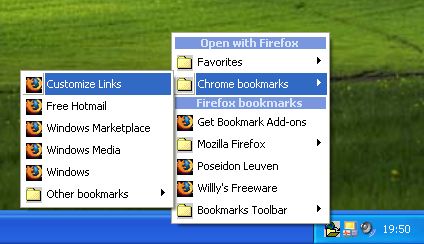
That’s where Links2Tray is handy. Instead of syncing those bookmarks, the application will automatically detect your bookmarks and launch them on your preferred browser. The links to your bookmarks will be placed on the system tray (lower right side of the desktop) so you don’t need the browser to access the bookmarks. Just right click on the application icon and the name of the bookmarks per browser will show up.
The interesting feature of Links2Tray is that you can launch the specific bookmark in any browser you prefer. For example, your bookmark is located in Internet Explorer but even if the bookmark was made by IE, you can still launch it in Firefox.
There’s a little configuration needed to be done at first (for Firefox and IE users) but they are very easy and the instructions are complete in the official website.
Check it out at http://www.wv-be.com/Links2tray.asp
Rating: Loading... No Comments »
O. James Samson - March 26, 2009
 If your ISP (Internet Service Provider) only gives you limited hours in using the internet per month, you are forced to browse as fast as possible. That means there will be times that you can’t use the internet and retrieve the data you need. Of course, you can save the webpages you want to read offline but you can’t save the entire information on that webpage you need. If your ISP (Internet Service Provider) only gives you limited hours in using the internet per month, you are forced to browse as fast as possible. That means there will be times that you can’t use the internet and retrieve the data you need. Of course, you can save the webpages you want to read offline but you can’t save the entire information on that webpage you need.
If you’re in this situation, you need PageNest. In gist, this application let’s you save the webpage for offline access. The data will be stored in your hard disk which could be accessed anytime.
Some would refute the need of this type of application since you can save the data you need online by saving the webpage. But PageNest is not just a way of saving data; it will also save the process on the webpage. This is very important for JavaScript based websites wherein the URL does not change even if the browser has changed its interface.
The uniqueness of PageNest is based on its focus on dial-up users. Dial-up users are usually the ones that needs this application because their time in using the internet is limited and could be cut off. Users can limit the download speed of the application so that the rest of the bandwidth could be used for other purposes.
The webpages saved by PageNest could be accessed either through the built-in browser of PageNest or through your favorite browsers. Even individual files in the webpage could be accessed through PageNest as the files are saved to be available offline.
More info available at http://pagenest.com/
Rating: Loading... No Comments »
O. James Samson - March 25, 2009
 Internet Explorer, Firefox, Opera and other major browsers have something that users like and do not like. For example, users like IE because of its adaptability to practically every website created; Firefox is probably the fastest of the major browsers and; Opera features skin which customizes the look of the browser. Internet Explorer, Firefox, Opera and other major browsers have something that users like and do not like. For example, users like IE because of its adaptability to practically every website created; Firefox is probably the fastest of the major browsers and; Opera features skin which customizes the look of the browser.
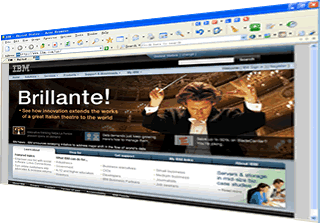
What if all these features could be found in one browser? That is practically the aim of a relatively unknown browser called Acoo. Although the name of the browser may not ring any bells for most users, it’s gaining in popularity everyday because of its features. Acoo is based on IE but doesn’t have the clutter like the popular browser. The browser’s skin could also be customized like Opera and its lightweight (even lighter) compared to Firefox.
But aside from collecting the good things from major browsers, it has developed features that makes it unique compared to other browsers. There are two impressive features of the browser: first, it has the ability to completely wipe out the browsing history. Although other browsers could also clean their records, they are not as easy as Acoo. The second unique feature is the mouse-enabled commands. Instead of clicking, you can command your browser through mouse movements.
Unfortunately, the popularity of the website has not reached to a point wherein different websites could be launched in this browser. Some websites (especially the security-enabled) will require major browsers to be read. Still, this is a great alternative if you’re looking for a lightweight browser that you can use for regular browsing.
Check it out at http://www.acoobrowser.com/
Rating: Loading... No Comments »
Tilgore Kraut - March 25, 2009
 PixPlant 2 utility boasts of user-friendly features that support you in creating impressive 3D textures. With the 3D texturing tool, the formation of high quality specular maps and other variety of textures using the plain images, get quite easier. The application is capable of adding various image based objects to your project. Process of texture creation is even simpler, which helps in deriving high quality output. The PixPlant program supports getting rid of the repetitive tasks like creating of textures, backgrounds, etc over and over again. It allows you to instantly transform your images into employable 3D textures, thus adding value, variety, and realism to your projects. PixPlant 2 utility boasts of user-friendly features that support you in creating impressive 3D textures. With the 3D texturing tool, the formation of high quality specular maps and other variety of textures using the plain images, get quite easier. The application is capable of adding various image based objects to your project. Process of texture creation is even simpler, which helps in deriving high quality output. The PixPlant program supports getting rid of the repetitive tasks like creating of textures, backgrounds, etc over and over again. It allows you to instantly transform your images into employable 3D textures, thus adding value, variety, and realism to your projects.
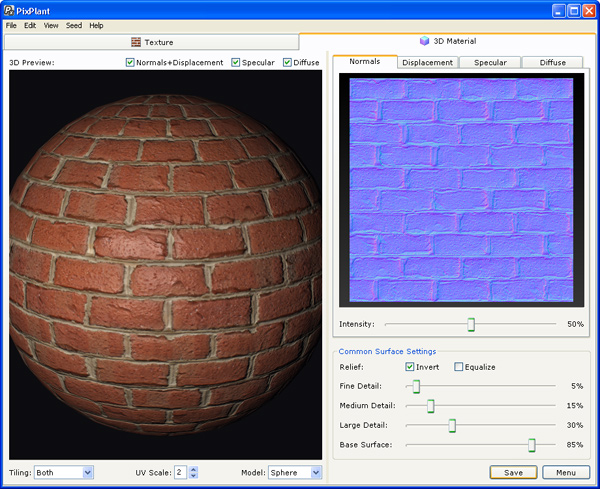
The PixPlant 2 opens with a soothing interface with display area and features placed neatly on it. For creating the all new textures and backgrounds etc, just begin with the selection of seed image files from your system. The selected images are placed with Seed image box at right. Below the Seed Image area are presented the options for modifying different texture and background attributes. The option-set includes Equalize Seed for choosing Light and Color, Straighten Seed to edit the image alignment, and Seed Pattern to alter the pattern for the new texture. Adding to these are Seed Scale for setting the pattern size, and Extra Seed Symmetry that let you choose the horizontal, vertical or 180° pattern. Altering these as per requirement, you can set the Tiling to be applied in horizontal, vertical or both styles. Now press ‘Generate’ and the program forms and shows the texture formed according to the specifications. There’s other tab named ‘3D Material’, where the seed file can be viewed and stored in Normals, Displacement, Specular, and Diffuse forms. In addition, even you can alter the Common Surface Settings for all forms.
Along with these functions, the PixPlant 2 also sports different supporting features and program configurations for deriving the desired output.
{More Info and Download}
Rating: Loading... No Comments »
O. James Samson - March 25, 2009
 Ka Firetask is a software package that is best described as being something that is for intermediate to advanced users of their computers. People that are within these two categories tend to have different tasks that they try to complete on a daily basis and the main thing about these particular tasks is that they can be repetitive and annoying, such as moving different files around. Ka Firetask is a software package that is best described as being something that is for intermediate to advanced users of their computers. People that are within these two categories tend to have different tasks that they try to complete on a daily basis and the main thing about these particular tasks is that they can be repetitive and annoying, such as moving different files around.
This freeware package allows you to install different hotkeys or regular procedures on the computer and define them through scripting. The scripting will then take care of the tasks for you once it has been defined, leaving you free to devote your time to other tasks on your computer.
Many computer users will not have need of such a tool, but if you are a reader of this particular blog, chances are that you have tasks that if automated would save you a lot of time. This software package can help you get that done and the fact that it is available as freeware makes it that much more valuable to the people that have need of its services.
More information about this particular piece of software is available through the publisher’s website at http://www.konradp.com/products/firetask/.
Rating: Loading... No Comments »
O. James Samson - March 24, 2009
 Areca is a program written in the language of java and for that reason it is universally compatible with Windows systems just so long as you have the latest runtime environments installed. It is extraordinarily user-friendly as a result of this and for that reason many people have already downloaded it since its release on March 22, 2009. Areca is a program written in the language of java and for that reason it is universally compatible with Windows systems just so long as you have the latest runtime environments installed. It is extraordinarily user-friendly as a result of this and for that reason many people have already downloaded it since its release on March 22, 2009.
The latest version of the program is the best one yet and has many different features to assist you with your file backup processes. For starters, you can not only backup the data on your drive, you can also compress that data and encrypt it in order to ensure that the data takes up less space and is harder to access for people that do not have the decryption protocols.
Very few software programs have the power to make guarantees, but Areca Backup is one of them because of the inclusion of mechanisms of transaction that check integrity at every step of the compression and encryption processes. If you have worries about how good they work, you can test them out before actually using them in the backup simulator that comes with the software package.
More information about Areca Backup 7.0.8 can be found through the publisher’s website at http://areca.sourceforge.net/
Rating: Loading... No Comments »
O. James Samson - March 24, 2009
 Creating a JPEG image file is a relatively simple process, but something that is not often that simple is finding a way to change the orientation of the image without losing a large amount of information in the process. The main reason for this has to do with how image editors work. The majority of them will work on the process of decoding the image from JPEG to bitmap, rotating the bitmap and then recoding it for JPEG format. While there is nothing inherently wrong with this process, the double conversions from and to JPEG both carry with them minor calculation errors that when combined result in the loss of a little bit of image quality. Creating a JPEG image file is a relatively simple process, but something that is not often that simple is finding a way to change the orientation of the image without losing a large amount of information in the process. The main reason for this has to do with how image editors work. The majority of them will work on the process of decoding the image from JPEG to bitmap, rotating the bitmap and then recoding it for JPEG format. While there is nothing inherently wrong with this process, the double conversions from and to JPEG both carry with them minor calculation errors that when combined result in the loss of a little bit of image quality.
What makes the JPEG Lossless Rotator 6.3 so good as an image editing program is the fact that it does not utilize the conventional method for changing JPEG orientations. Instead, it applies a shell integration transformation to the entire image and as a result does nothing except change the orientation. This keeps the image quality the same and since the program itself is downloadable for free, anyone that wants to maintain the best quality JPEGs possible should certainly grab the latest version of this program which was released on March 22, 2009.
Features:
- Shell integration (this allows you to rotate your JPEG photos by a right-click on the file)
- Command line
- Automatic rotation
- Batch rotation
- EXIF-data display
- Multilingual interface: Catalan, Chinese (simpl), Czech, Danish, Dutch, English, Finnish, French, German, Greek, Hungarian, Italian, Korean, Polish, Portuguese, Romanian, Russian, Slovak, Spanish and Swedish.
More information is available at Annystudio.
Rating: Loading... No Comments »
O. James Samson - March 23, 2009
 Q-Dir is a bit of an oddity when it comes to freeware because of the fact that it is not really something new. The functions of Q-Dir to a large extent are already available in Windows, but the program makes those functions a lot easier to apply and in doing so increase the level of convenience that the average user can experience. Q-Dir is a bit of an oddity when it comes to freeware because of the fact that it is not really something new. The functions of Q-Dir to a large extent are already available in Windows, but the program makes those functions a lot easier to apply and in doing so increase the level of convenience that the average user can experience.
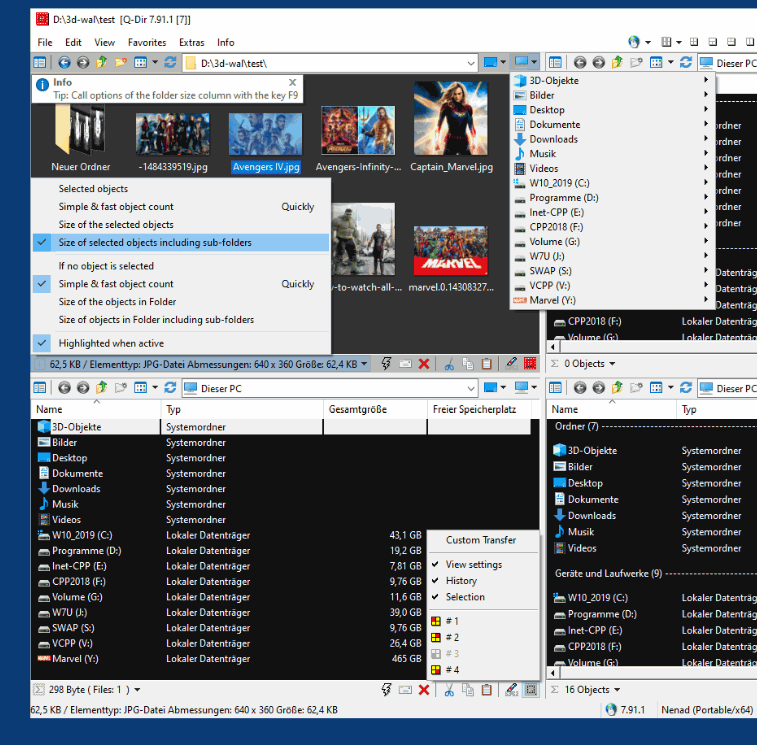
For example, Q-Dir has pioneered a concept known as Quadro-View which allows you to actually utilize quadrants of the screen in order to organize your files into different folders and categories. You can bring up favorites in different parts of the view and of course you can drag and drop from one view to another in order to move different files around. With many different functions in addition to these basic ones, the most recent version of Q-Dir released on March 22, 2009 is definitely loaded for bear.
You could certainly accomplish the functions of Q-Dir with four different explorer Windows, but anyone that has tried to use even two different Windows at the same time knows how difficult and inconvenient it can be. With Q-Dir however, those problems are solved.
More information is available from http://www.softwareok.com/.
Rating: Loading... No Comments »
|
|
|





