O. James Samson - February 12, 2009
 Microblogging (blogging in 140 characters or less) is a fast rising blogging format adopted by most popular bloggers as well as for personal reasons. The format is very simple: just write down small stuff on your account for others to follow you. This type of blogging is useful in live events wherein there’s a play-by-play update. It’s also used by popular bloggers to share small ideas as they remember them. Some of the popular websites for microblogging are Twitter, Pownce, Friendfeed and Jaiku. Microblogging (blogging in 140 characters or less) is a fast rising blogging format adopted by most popular bloggers as well as for personal reasons. The format is very simple: just write down small stuff on your account for others to follow you. This type of blogging is useful in live events wherein there’s a play-by-play update. It’s also used by popular bloggers to share small ideas as they remember them. Some of the popular websites for microblogging are Twitter, Pownce, Friendfeed and Jaiku.
Since it’s a powerful means of communication, a client or software that would enable microblogging has been developed. One of the most popular clients for microblogging is Twhirl which is a free application for posting in different microblogging sites. Through Twirl, users can update their microblogging sites such as Friendfeed and Twitter. Users will also have the ability to post photos in a microblogging specific photo sharing site TwitPic.
But aside from posting your thoughts in two popular microblogging websites, you can also use Twhirl to monitor other accounts. Aside from the Twitter and Friendfeed, accounts from Jaiku and Pownce could be monitored through Twhirl. Advanced controls such as search and filter are also provider in Twhirl.
There is a catch to this application though: Twhirl is a very powerful client that requires no less than the powerful devices. The application requires Adobe AIR client so that it could actively monitor other accounts and properly search data from other accounts. Adobe AIR requires a powerful local gadget. If you’re computer has less than 1G of RAM with the latest processor, the client might drag your computer.
Check it out at http://twhirl.org/docs
Rating:  Loading... No Comments »
O. James Samson - February 11, 2009
 The little folder “My Pictures” in your computer probably stores thousands of photos from different events in your office and your personal life. Each folder has been carefully tagged to tell you what was the event and when did that happen. But even with the neatness in organization, viewing these photos could sometimes be a drag. The feeling of a photo album is just not there. The little folder “My Pictures” in your computer probably stores thousands of photos from different events in your office and your personal life. Each folder has been carefully tagged to tell you what was the event and when did that happen. But even with the neatness in organization, viewing these photos could sometimes be a drag. The feeling of a photo album is just not there.
That longing for a photo album like functionality could be quenched with a free application called FlipAlbum. The standard edition is a free application that will let you create different photo albums. Flip through different photos with page-like interface and like your regular photo album, you can create an atmosphere while browsing through different themes. Inserting photos in the album is also a possibility. Best of all, full-screen functionality is there so your screen is automatically transformed into an electronic photo album.
Aside from photos, other multi-media files such as videos and audio files could be part of the photo album. Although the video and audio format is a little bit limited, the formats available for usage in FlipAlbum Standard are the popular ones so conversion is likely not needed. You can even use the audio to be the background music while you flip through your album.
The FlipAlbum Standard is only available for XP users and below. For Vista and Mac, a fee is required to use the application. The option in online sharing photos in FlipAlbum is also disabled in the Standard version. Other versions are Suite and Pro recommended for business purposes as the version comes with online cart photo software.
Check it out at http://www.flipalbum.com
Rating: Loading... No Comments »
O. James Samson - February 11, 2009
 Most audio transcription applications will require a separate hardware – a pedal to stop, forward, rewind, play and pause the audio. All computers and laptops do not have pedals which means you need to purchase this additional gadget if you want to get serious in your transcription. Most audio transcription applications will require a separate hardware – a pedal to stop, forward, rewind, play and pause the audio. All computers and laptops do not have pedals which means you need to purchase this additional gadget if you want to get serious in your transcription.
But you don’t have to force yourself in purchasing the pedal if you want to slowly start in transcription. An application called EF Talk Scriber will provide you the functions found in pedal right in your keyboard. Instead of using the pedal, the audio controls are in your hands. You don’t have to learn the pedal which will take some time getting used to.
EF Talk Scriber is not just an audio controller. The application is also bundled with a document editor so that can transcribe the audio with the help of a single application. The interface of the document creator and editor is like most document editors. The only difference is the tab for audio controls which is used for controlling the audio files.
The biggest advantage of EF talk Scriber is the customization. The audio controls could be fully customized according to your specifications. Other controls for text editing are still the same but the audio could be configured so that you can easily work with the application. Instead of awkward audio control through your feet, your hands will do all the work.
EF Talk Scriber also providers support for different languages. Most audio formats (even FLAC) are also playable in the software. It’s a highly simplified transcriber that could get you started in minutes.
Chek it out at efsoftware
Rating: Loading... No Comments »
Tilgore Kraut - February 10, 2009
 ShareMixer is one of the best video sharing scripts (YouTube clone), offering a huge variety of features, not seen in any competitor script. ShareMixer is one of the best video sharing scripts (YouTube clone), offering a huge variety of features, not seen in any competitor script.
Features: With ShareMixer, you can efficiently create a complete video-centric community web-site. It is highly scalable and supports just about anything from personal sites to enterprise level communities. From site design to user feature access about everything is customizable. ShareMixer package is a video sharing script that helps you create YouTube like clone. A large variety of features include Multilingual, Video advertisements, unlimited sub-categories, Embedded & embeddable videos. Other features available out-of-the-box include embedded video advertisements and web based subscriptions. You could implement a variety of revenue models. The script lets you customize most features. Community features provided include private messaging, channels forum, user rating and so on. PayPal subscription payment method is integrated. Automatic subscriptions notifications, permissions administration, syndication are all catered for.
The script package provides you with choice of implementations. Hosting a web-site to share personal videos with friends and family is easily done. Creating an organizational media web-site to share video content with stakeholders and the press is a possibility. Establishing a video-driven, for-profit web-site within a specific topic area, such as car racing or music videos is an alternative. Building an enterprise-scale video community/portal, akin to sites such as YouTube could not be easier.
Overall: Complete set of tools for implementing a video sharing site whether you need a family video sharing site or a clone of YouTube.
{More Info and Download} or check the product details at: http://sharemixer.com/product.html
Rating: Loading... 1 Comment »
Tilgore Kraut - February 10, 2009
 Diamond Vision is scanning software that can take care of the workflow in a scanning service bureau or even a scanning department in an organization. The workflow would typically be the same the purpose being getting the paper documents scanned and indexed and then get them into a document management system. The operation is taken care of in an assembly line fashion. The application would manage scanning stations, indexing station, QC points and the export of data to the databases. Diamond Vision is scanning software that can take care of the workflow in a scanning service bureau or even a scanning department in an organization. The workflow would typically be the same the purpose being getting the paper documents scanned and indexed and then get them into a document management system. The operation is taken care of in an assembly line fashion. The application would manage scanning stations, indexing station, QC points and the export of data to the databases.
Some of the modules that help implement the workflow and manage the complete process include batch manager, scan module, QC module, bar code and OCR zoning module, index module, index QC module, export module, OCR full text export, logging module and administrative module etc. The batch manager checks on the progress of a batch of documents. This assisted by the scan module that supports scanning of up to 9,999 documents at a time. OCR and barcodes can be used to index a document while index module defines what fields of a document to be used for indexing.
The corresponding QC station lets you ensure the indexing is getting done properly. The export module will help you export documents to document management systems such as Dokmee, Docuware, Alchemy, LibertyIMS and several others. Keep track of volume and time per user, per batch, per document class to find out employees performances and costs through the logging module. The QC module can help rotate/ replace/ add pages, rearrange their order, combine/split documents and of course delete the rejected pages. The thumbnail facility gives you opportunity to look at several pages at a time to let you QC quickly.
Overall: A nice solution, takes most production issues into account. It is easy to use too.
{More Info and Download}
Rating: Loading... No Comments »
Tilgore Kraut - February 10, 2009
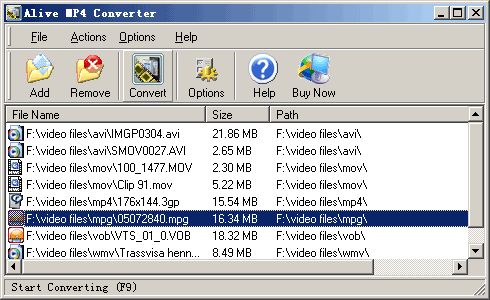 Alive MP4 Converter converts most of the video formats to MPEG4/MP4. The formats supported include DivX, XviD, MPEG, MOV, QickTime, RM, rmvb, 3GP, MOD, VOB, WMV, ASF, AVI to MP4 etc. Since it supports the H.264 codec the video produced is the most efficient in terms of file size and is compatible with most portable media players. These include Archos, iRiver, Creative Zen Vision., Sandisk Sansa and so on. To ensure that compatibility one can adjust video size in terms of height and width in pixels, bit rate, frame rate etc. You can also convert MP4 or other popular video formats to DivX, XviD, or MPEG format with Alive MP4 Converter. Alive MP4 Converter converts most of the video formats to MPEG4/MP4. The formats supported include DivX, XviD, MPEG, MOV, QickTime, RM, rmvb, 3GP, MOD, VOB, WMV, ASF, AVI to MP4 etc. Since it supports the H.264 codec the video produced is the most efficient in terms of file size and is compatible with most portable media players. These include Archos, iRiver, Creative Zen Vision., Sandisk Sansa and so on. To ensure that compatibility one can adjust video size in terms of height and width in pixels, bit rate, frame rate etc. You can also convert MP4 or other popular video formats to DivX, XviD, or MPEG format with Alive MP4 Converter.
The converter is completely integrated with the Windows explorer. You can get conversion done on right click. The user interface is simple and intuitive so that both new and experienced users can get productive quickly. Experienced users can tweak things to get the best possible results. Batch operation is supported where you can drag & drop files for conversion. Scheduled conversion is supported so that you can schedule a load of files for conversion during the night when no one is going to be using the machine. The application can utilize multi core CPUs so that when such processors are in the machine, the conversion works faster.
Overall: Simple converter and is easy to use. With so many formats support there’s always a possibility of some glitches. So one need to check this out for the formats one uses most often.
{More Info and Download}
Rating: Loading... No Comments »
Tilgore Kraut - February 10, 2009
 It’s easier for you to recover deleted files from your system, as they usually get stored into recycle bin. But, this usually is not the case with the flash data drives, and data deleted from these becomes hard to recover. However, like many data recovery application, you also get the software for recovering data from flash drives that are efficient enough in scanning, recovering and restoring the files deleted by mistake, sudden system shutdown, or any other such cause. One of these applications is SoftOrbits Flash Drive Recovery 1.1, which can assist you in recovering the deleted data from different types of storage devices like PC cards, music sticks, flash drives, digital cameras, USB drives, etc. The program is capable of restoring images, documents, music, videos, and other files, even if storage device was formatted. It’s easier for you to recover deleted files from your system, as they usually get stored into recycle bin. But, this usually is not the case with the flash data drives, and data deleted from these becomes hard to recover. However, like many data recovery application, you also get the software for recovering data from flash drives that are efficient enough in scanning, recovering and restoring the files deleted by mistake, sudden system shutdown, or any other such cause. One of these applications is SoftOrbits Flash Drive Recovery 1.1, which can assist you in recovering the deleted data from different types of storage devices like PC cards, music sticks, flash drives, digital cameras, USB drives, etc. The program is capable of restoring images, documents, music, videos, and other files, even if storage device was formatted.
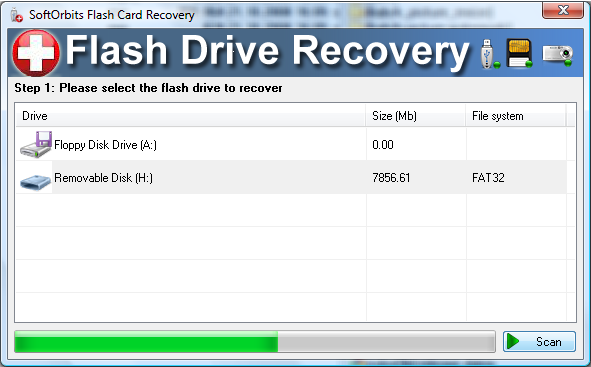
SoftOrbits Flash Drive Recovery 1.1 takes you through a sequential process to perform the recovery and restoration task. When you launch the application, it detects the storage device attached connected with the system, and displays it on the main screen. Selecting the connected device, you need to Press Scan button for the application to begin the recovery process. When the scanning completes, the program shows the recovered folders in expandable menu form, with the containing files. You can even preview the recovered files, and mark the ones you want to restore. For storing the files at the desired location you can select the Destination folder for them. Completing the selections, you just need to click ‘Recover’ option to command the program to save the files at the specified location. The application even does not require you to go through any complex settings.
SoftOrbits Flash Drive Recovery 1.1 is capable of recovering different types of files like images, documents, etc, from various storage devices.
{More Info and Download}
Rating: Loading... No Comments »
Tilgore Kraut - February 10, 2009
 Design developers, such as icon and image developers, are necessitated to work even on the minute aspects. These tasks require detailing various facets of the application to a great extent. Owing to the need, the developers often seek an appropriate magnifier application for the purpose. Even the visually impaired people, who face difficulty in viewing icons and other objects on PC, require such an application. If you’re also looking for such an effective magnifier application then try out the new Desktop Magnifier for Windows 1.7.9. It’s a Desktop Magnifier program valuable for the visually impaired computer users, and also supports in enhancing the working ability of the design professionals. The program provides a variety of zoom levels and filters, accompanied by different magnifier sizes and shapes. Design developers, such as icon and image developers, are necessitated to work even on the minute aspects. These tasks require detailing various facets of the application to a great extent. Owing to the need, the developers often seek an appropriate magnifier application for the purpose. Even the visually impaired people, who face difficulty in viewing icons and other objects on PC, require such an application. If you’re also looking for such an effective magnifier application then try out the new Desktop Magnifier for Windows 1.7.9. It’s a Desktop Magnifier program valuable for the visually impaired computer users, and also supports in enhancing the working ability of the design professionals. The program provides a variety of zoom levels and filters, accompanied by different magnifier sizes and shapes.
After you install the Desktop Magnifier for Windows 1.7.9, it stays at the system tray. One click on the tray icon and the magnifier would be displayed on the PC screen. You can move with the help of mouse to place over the icon or design area to have a zoom view. Either you right-click on the system tray icon or the magnifier, the program presents a menu with different options to select from. Using these features you can choose the Zoom to be 2x, 3x, 4x, along with 8x, and 16x. Further, the size of magnifier view can be selected between 60×60 till 210×210, as provided. If you wish to customize the magnifier shape then you can opt any from Rectangle, Round Rect, followed by Ellipse. Moreover the magnifier view can be changed between Nearest, FastLinear, Spline, Lanczos3 and Mitchell. For using or disabling the application you’re given Show/Hide magnifier option. The software is easy to work with, further supported by simple features.
Desktop Magnifier for Windows 1.7.9 boasts of an easy to use magnifier, attributes of which can be customized through its easily negotiable feature-set.
{More Info and Download}
Rating: Loading... No Comments »
O. James Samson - February 6, 2009
 Soft191 is a software development company that offers a wide variety of applications both licensed and freeware. One of their well known freeware applications is their MP3 player. It’s a tool with a very interactive interface which could help any user play most of the music formats from the local source fast. It also comes with a variety of options after the application has been launched. The application could be maintained playing in the desktop with the entire interface showing or the user could hide the application and play in the background. The application will just reside in the system tray and could be controlled by mouse. Additional controls such as equalizer and control of play list is also available. Soft191 is a software development company that offers a wide variety of applications both licensed and freeware. One of their well known freeware applications is their MP3 player. It’s a tool with a very interactive interface which could help any user play most of the music formats from the local source fast. It also comes with a variety of options after the application has been launched. The application could be maintained playing in the desktop with the entire interface showing or the user could hide the application and play in the background. The application will just reside in the system tray and could be controlled by mouse. Additional controls such as equalizer and control of play list is also available.
But Soft191 MP3 Player has its limitations not on its interface but on its appeal to users. Soft191 requires more than just simple knowledge of the computer to make it work according to expectations. With too many options to consider, the user might not be able to achieve the functionality he or she was looking for. For example, the system tray form of the application has to be configured and source files have to be targeted. The fact that the file explorer is added in the interface could even drag down the computer as it will still scan for media compatible files. File compatibility might not be extensive as well since they only indicate WMA and MP3 compatibility. Other audio formats such as .wav or .m4a may not be supported.
Soft191 MP3 Player is a decent MP3 player that provides a lot of playback options for users. But this software requires advanced familiarity with the software and could lack support to other form of audio files.
For more info and download check out – http://www.soft191.com
Rating: Loading... Comments Off on Soft191 MP3 Player
O. James Samson - February 6, 2009
 Digital Image Tool is a freeware specifically created for amateur and professional photographers. Through this tool, photos could be resized, scaled and even renamed in batches. The tool could automate these functions so that photographers don’t have to go through each photo. In this digital age, it’s not rare to find a photographer having more than a thousand of photos in their computer. Sorting them and editing them one by one is very difficult and will take up a lot of time. Digital Image Tool will ease all the trouble a photographer would have. Digital Image Tool is a freeware specifically created for amateur and professional photographers. Through this tool, photos could be resized, scaled and even renamed in batches. The tool could automate these functions so that photographers don’t have to go through each photo. In this digital age, it’s not rare to find a photographer having more than a thousand of photos in their computer. Sorting them and editing them one by one is very difficult and will take up a lot of time. Digital Image Tool will ease all the trouble a photographer would have.
But there are two distinct functions that made the application stand-out among photo editing applications: the ability to add watermark and a variety of inputs as well as outputs.
Watermarking is the ability to imprint soft yet distinctive marks in your photos to prevent others from stealing your photo without giving you enough credit. This tool could also be applied to your photos in batches so you don’t have to deal with the photos one by one. The variety of inputs and outputs will also help you designate the type of file you need. This means the Digital Image Tool is not just a simple mass photo editor but a converter as well.
The only disadvantage of the application is on its compatibility. Unfortunately, Digital Image Tool is only available for Windows. But given the number of users who use the Windows OS, this limitation might be ignored.
Overall, this freeware is a must download for photographers in any level. The application is simple enough for amateur photographers but powerful enough for professionals.
Check it out at http://www.digitalimagetool.com
Rating: Loading... No Comments »
|
|
|





