O. James Samson - February 6, 2009
 Do you have a favorite line in a movie or video that you want to listen to over and over again in your MP3 player? The usual option is to record the audio of the film with another gadget or have another application record the audio. Although those options are good, the audio quality is often not movie quality. The sound will not be too loud or additional sounds might even be recorded (for external gadgets). Do you have a favorite line in a movie or video that you want to listen to over and over again in your MP3 player? The usual option is to record the audio of the film with another gadget or have another application record the audio. Although those options are good, the audio quality is often not movie quality. The sound will not be too loud or additional sounds might even be recorded (for external gadgets).
That’s where Agogo FLV to MP3 Converter excels. Instead of letting you use a third party application, Agogo FLV will rip the sound off the video and convert it them into MP3 for your listening pleasure.
Don’t be fooled with the title. The application is not only able to rip audio from FLV files but could also rip audio from different formats. Even audios from videos straight from DVDs could be ripped and converted into MP3. Audios from SVCD and VCDs could even be ripped. The audios from 3gp files (usually from mobile devices) could also be ripped.
Like most rippers, this requires a little bit of familiarization especially if you want to work with DVDs. Instead of playing the DVD automatically for selecting the audio source, you need to manually open the files in the disc from your computer to extract the video. But once the file has been loaded in the application, you just point the location of the audio for easy ripping. You could even rip the entire film or in batches of files. Automatic shutdown option is also possible if think your ripping will last for hours.
Check it out at http://www.dvdmp4.net/flv-to-mp3.html
Rating:  Loading... No Comments »
O. James Samson - February 5, 2009
 Notepad is a very handy application for everyone. It’s a lightweight application that could store a lot of data without requiring a lot of memory when stored in the local gadget. But even if it’s lightweight, it’s versatile enough to be launched in different gadgets (mobile devices) and could even be used by software developers to make some changes in their application. But notepad will stay the same which means its features may not be able to adopt to new needs such as article generation or extensive software coding. Notepad is a very handy application for everyone. It’s a lightweight application that could store a lot of data without requiring a lot of memory when stored in the local gadget. But even if it’s lightweight, it’s versatile enough to be launched in different gadgets (mobile devices) and could even be used by software developers to make some changes in their application. But notepad will stay the same which means its features may not be able to adopt to new needs such as article generation or extensive software coding.
That’s where Text Master comes in. Developed by Nontube.com this lightweight application could do the things the notepad could do and more. Aside from simple writing functions, the font could be changed as well as the background.
But aside from simple changes in your document, you could get advanced data from your document. You could know how many times the word occurs in the document, remove unnecessary portions such as blank lines in the notepad or even automate the application to insert certain text. You could insert text at the beginning in the regular notepad but Text Master will help you insert text in the beginning and even after the end of the text.
If you’re into article generation, this should also be your choice of application. Text Master has the ability to randomize lines. All you need to do is to write certain lines with the same messages and the application will randomly mix the lines to build a different article.
Best of all, this application is free to use and the file size is less than 1MB so installing and uninstalling the application is a breeze.
Check it out at http://www.nontube.com/products/text-master
Rating: Loading... No Comments »
O. James Samson - February 5, 2009
 Most of the music players used today come with video playback capabilities. The preference is observed to prevent any additional software installed that could cause cluttering in the system. Applications that have the ability to play music and videos also come in as lightweight to prevent the application from becoming a memory hog. Most of the music players used today come with video playback capabilities. The preference is observed to prevent any additional software installed that could cause cluttering in the system. Applications that have the ability to play music and videos also come in as lightweight to prevent the application from becoming a memory hog.
But that doesn’t mean standalone music players are dead or obsolete. Moo0 (Moo and the Number 0) Audio Player is a great example that a standalone music player could still be useful. This free application from Moo0.com makes everything simple. The interface is only composed of essentials – playlist, audio playback controls, volume, progress bar and a small message to inform the users if the application is ready to play. Customization is only limited to skins wherein you can change the color of the interface. Loading music could be done by dragging the music in the playlist and enabling them to play is fast depending on the activity on the local gadget.
Controls could be done either by the use of mouse or arrows which is automatically activated when the player is on top. The unique control of the application is on its CTRL + Left or Right cursors which are used to forward or back in seconds.
The only downside of the application is its limited availability on OS (Operating System). The current version (v. 1.31) is only available for Windows XP and the developers are strongly cautioning users not to use the player in non-XP Operating Systems.
Want to check it out? Go to http://www.moo0.com/
Rating: Loading... No Comments »
O. James Samson - February 5, 2009
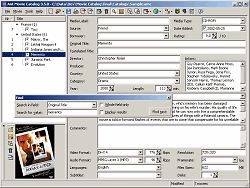 With hundreds of movies in your library or computer, it’s hard to keep track what you have and don’t have. Movie nights could cost you since instead of just looking into your library for a movie; you go out and rent a movie that you have all along. With too many movies in your collection, selecting the right one could be confusing. With hundreds of movies in your library or computer, it’s hard to keep track what you have and don’t have. Movie nights could cost you since instead of just looking into your library for a movie; you go out and rent a movie that you have all along. With too many movies in your collection, selecting the right one could be confusing.
But that problem could be solved with a simple application named Ant Movie Catalog. As the name suggests, the application will effectively catalog your movie collection in any format. Enter the name of the movie in your library and let the application do the rest. The application will download the data you need from the internet on your preferred website. Photos related to the movie such as posters could be downloaded or linked to.
What makes the application special is its ability to add more data aside from simple movie information. You can also configure the application to detect the audio and video formats and related information and list them along with regular movie information.
The ability to export file as XML is also a nice little feature for Ant Movie Catalog. Through XML, you can create some visual charts with regards to movie titles. You can also do that inside the application wherein you will have an idea on how many movies do you have in a specific genre.
For advanced users, the availability of scripts, customization of templates as well as use of Object Pascal makes the experience even more personalized. All these features could be enjoyed by any user without any fee from the developers of this remarkable application.
For more info click here.
Rating: Loading... No Comments »
O. James Samson - February 4, 2009
 Ever have a story or feeling you would like to blurt out but don’t want anyone to know about it? Instead of posting a blog about it where everyone might read it, write in your diary…to your electronic diary. An application suitably named Easy Diary could be your secret holder for many years to come. Ever have a story or feeling you would like to blurt out but don’t want anyone to know about it? Instead of posting a blog about it where everyone might read it, write in your diary…to your electronic diary. An application suitably named Easy Diary could be your secret holder for many years to come.
Easy Diary is a lightweight application for your daily secret entries. Coming only at 488kbs, it can be instantly installed in the local gadget and could be used within a minute or two. The application is developed by nontube.com which is also known for a variety of free applications such as HTML Compressors, Web Coder and Chat Tube (chat client).
The unique feature of Easy Diary is the multi-user support which means more than one person could use the application as a diary. For protection purposes, each user is identified by their password. Each user could customize their interface but they are only limited to changing the colors of the interface.
Aside from support for multiple users, Easy Diary has a built-in search tool in case users want to browse through different entries. The data entered could also be exported in case you wanted the data transferred. This could be used as backup data application since importing data to Easy Diary is also possible.
Although writing a diary is not everyone’s favorite past time, Easy Diary is still a viable application for secured data. If you don’t want to use it for your “secret feelings,” you can still use this for securing data in your computer.
For more info and download, check out Easy Diary web site
Rating: Loading... No Comments »
O. James Samson - February 4, 2009
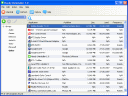 Windows OS has a built-in application that lets users uninstall applications at will. There many applications today that don’t have the uninstall function and the only way to remove them is through the Windows application found in the control panel. Windows OS has a built-in application that lets users uninstall applications at will. There many applications today that don’t have the uninstall function and the only way to remove them is through the Windows application found in the control panel.
If you don’t like to use what the OS offers you, there are many uninstaller applications to choose from. One of those applications is Handy Uninstaller from flexbyte.com. Instead of opening the control panel before finding the uninstall/install option, you could launch the application right from your desktop.
Some refuse the need of this type of application because of the availability of the uninstall/install option in the control panel. This is actually a good reason but consider the additional features Handy Uninstaller provides:
- Search Options – instead of going through the list, users should be able to search for the specific application and uninstall them. The search function is found on top of the application so users won’t miss this functionality.
- User Friendly Interface – probably the best feature of Handy Uninstaller. The left side interface automatically groups the applications according to their functions – from audio, video, games even the Microsoft applications are grouped together.
- Faster Start-up – compared to the built-in application of Windows OS, the Handy Uninstaller is a lot faster. The reason for this increase of speed is its dedication to uninstall function only instead of additional install option which no regular user use in Windows OS.
Handy Uninstaller maybe a similar application built-in the OS but it comes with features that make the additional application worth using.
Chek out http://www.flexbyte.com/handy-uninstaller/ for more info and download
Rating: Loading... No Comments »
Tilgore Kraut - February 3, 2009
 In a bid to increase traffic to any website, SEOs are routinely engaged in submitting links to various web-based directories. The move is crucial in tapping more traffic. Link submission to different web-based directories usually takes a toll over SEOs’ time and efforts, causing myriad troubles for them. Well all such issues can effectively be addressed with an automated utility that can perform the task at its own. You can do this with the apt assistance of SiteSub 1.0, which facilitates you adding your site link to blog directory, website directory, or link list. For submitting your site link you simply require filling some relevant details, and the program would do the rest. In a bid to increase traffic to any website, SEOs are routinely engaged in submitting links to various web-based directories. The move is crucial in tapping more traffic. Link submission to different web-based directories usually takes a toll over SEOs’ time and efforts, causing myriad troubles for them. Well all such issues can effectively be addressed with an automated utility that can perform the task at its own. You can do this with the apt assistance of SiteSub 1.0, which facilitates you adding your site link to blog directory, website directory, or link list. For submitting your site link you simply require filling some relevant details, and the program would do the rest.
Using the SiteSub 1.0 is quite similar to cake walk as the user just need to enter the common details related to the site. When you launch the software for the site link submission it opens with a small main screen. Different fields relating to the required information about the site are shown on the interface. While filling these, first you need to Site name, Site URL, Recip URL, Description, Webmaster name, and Webmaster Email. All these entail you to fill the info about website or blog, which could be easily placed with different directories to attract more visitors. As the application does not include any complex features to tackle with, it makes the site submission done quickly and effectively. Further, you’re provided option to set the program on the top of the window for easy accessibility to site info. Moreover, it can even be copied to memory stick and used anywhere with ease.
SiteSub 1.0 presents a quick, easy, and efficient way of submitting your site to website and blog directories, and link list.
{More Info and Download}
Rating: Loading... No Comments »
Tilgore Kraut - February 3, 2009
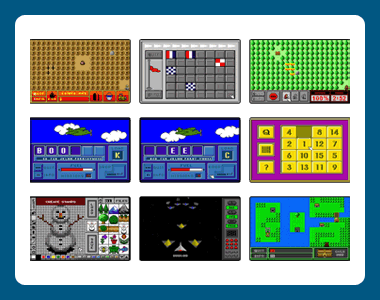 Do your kids prefer playing out this holiday season, causing all sorts of concerns for you? Well, you can stop them from doing so by engaging them into some interesting activity at home. Presenting a whole new bundle of enticing PC games would definitely be a great idea. One such intriguing game combo is Retro Game Pack 1.00.02, which comprises of 9 games that your kids surely would love to play. Games included in this bundle are Ant Attack, Letter Drop, Fire Fighter, Find the Flag, Letter Drop 2, Stamp Pad, Sliding Puzzle, Winged Warrior, and Supernova. All these games are easy to play and would give present challenges to your kids. They need to kill the spreading ants, stop the fire, beat the aliens, create stamps, drop letters to form words, and do more with different games. Do your kids prefer playing out this holiday season, causing all sorts of concerns for you? Well, you can stop them from doing so by engaging them into some interesting activity at home. Presenting a whole new bundle of enticing PC games would definitely be a great idea. One such intriguing game combo is Retro Game Pack 1.00.02, which comprises of 9 games that your kids surely would love to play. Games included in this bundle are Ant Attack, Letter Drop, Fire Fighter, Find the Flag, Letter Drop 2, Stamp Pad, Sliding Puzzle, Winged Warrior, and Supernova. All these games are easy to play and would give present challenges to your kids. They need to kill the spreading ants, stop the fire, beat the aliens, create stamps, drop letters to form words, and do more with different games.
Retro Game Pack 1.00.02 application installs 9 games on your PC and these games are accompanied with easy to follow instructions. You’re required to play the game using keyboard and you can make the equipment selection by clicking on it with the mouse. With the first ‘Ant Attack’ game you need to kill all the ants before they spread all over the place by using the insecticides. Likewise, you have to save the forest from fire that is spreading all over, by selecting the watering and other equipments as required. Further, it will make your kids learn and test new words by spelling them with Letter Drop and Letter Drop 2. Enjoy creating funny stamps and even modify the existing ones with the Stamp Pad. Have a fight against the aliens and enemies with Winged Warrior and Supernova. Make correct moves and solve the puzzles, and after that you can have fun finding the flag. With the collection it’s going to be a fun gaming ride for you and your kids.
The collection of Retro Game Pack 1.00.02 is truly praiseworthy that offer your kids lot of fun and amusement.
{More Info and Download}
Rating: Loading... No Comments »
O. James Samson - February 2, 2009
 Here is a tool you might find useful. It is called Foobar2000. It is a cool audio player for the Windows platform. If you want something different other than the common audio players, you should give this a try. Here is a tool you might find useful. It is called Foobar2000. It is a cool audio player for the Windows platform. If you want something different other than the common audio players, you should give this a try.
Supporting formats like mp3, mp4, aac, cd audio, wma, vorbis, flac and so much more; You should get an idea of how cool this tool is. The easily customizable user interface layout is also a plus for this software.
Other cool features that come with this tool that makes it worth checking out includes:
- Gapless playback.
- Full unicode support.
- Advanced tagging capabilities.
- Support for ripping Audio CDs as well as transcoding all supported audio formats using the Converter component.
- Open component architecture allowing third-party developers to extend functionality of the player.
Etc.
A new version just hit the software market, foobar2000 v0.9.6.2 with some cooler updates like:
- Media Library is now aware of newly installed decoder components and will re-check your folders for files that could not be indexed before
- New options to control tag fields searched by simple search queries, in Advanced Preferences
- Various bug fixes and cosmetic changes
Want to check it out? Go to http://www.foobar2000.com/
Oh! One really cool thing worth mentioning is that this is freeware so you can download it at no cost whatsoever.
Rating: Loading... No Comments »
Tilgore Kraut - February 2, 2009
 Audio Editor Deluxe is a visual multifunctional audio files editor which allows you to perform various operations with audio data such as displaying a waveform image of an audio file, applying more than 20 sound effects and 6 filters. Audio Editor Deluxe is a visual multifunctional audio files editor which allows you to perform various operations with audio data such as displaying a waveform image of an audio file, applying more than 20 sound effects and 6 filters.
Features: Audio Editor Deluxe is a audio processor. It records, lets you mix audio, add effects and filters and then edit too. To help in editing the audio, the recorded clips are presented as waveforms. Selection tools, markers help identify segments on which work needs to be done. Selection tools help select parts of audio file precisely. Markers help you select between different selections. Visual edit functionalities then let you Cut, Copy, Delete, Paste, Paste From File, Mix, Mix From File and Insert or Delete noise or silence in an audio file. The clips are generated by direct recording or using existing files. You could record from the microphone or any other device connecting to the machine. Time markers measure up to 100th of seconds. There are three such displays. One shows the time of a clip being played or a recording being made. The other two show the time duration of selections and view time.
Display functionalities help you view the waveform and mark up areas precisely. There’s a set of effects that you can apply. The set of effects that can be applied include Amplify, Delay, Equalizer, Fade, Flanger, Invert, Normalize, Reverse, Multi Tap Delay, Silence, Stretch, Vibrato, Echo and Chorus. Added to that there’s a set of filters that can be applied to process your recordings. These include Ban Pass Filter, High Pass Filter, High Shelf Filter, Low Pass Filter, Low Shelf Filter and Notch Filter. ID3 tags & media information can be edited/updated for including/changing/updating Album, Artist, Channels, Comments, Copyright, Genre, Title, Year information. Audio formats supported include Waveform audio (WAV), MPEG Audio (MP3 and MP2), Windows Media Audio (WMA), Audio CD Tracks, OGG Vorbis Audio, VOX Dialogic ADPCM
RAW Audio etc. It converts files from one format to the other easily. The application can rip audio CDs and save the audio in MP3, WMA, WMA and OGG.
Overall: A very nice and handy tool for processing audio clips that you may need. The interface is clean and intuitive too.
{More Info and Download}
Rating: Loading... No Comments »
|
|
|





