Tilgore Kraut - October 23, 2008
 A RSS-feed reader for paintings and giclee prints by the artist Murray Hubick. A RSS-feed reader for paintings and giclee prints by the artist Murray Hubick.
Pros: By publisher Modern Paintings this is a RSS-feed reader of the paintings and giclee prints of the artist Murray Hubick. Murray Hubick lives in England and primarily works on paintings based on the female nude but also delves occasionally into Still life. He has enjoyed a successful career in the varied disciplines of illustration, teaching, painting and drawing in a variety of mediums and advanced trompe d’oeil technique. He has a degree in Fine arts from Canada.
The Modern Paintings RSS feed tool is an RSS reader that takes updates from the website and displays the art in high-resolution graphics. The interface looks very good and goes with the quality of the art. The way that the tool is designed makes the art eminently visible by not crowding the interface with too many controls and other unnecessary things. As mentioned before, the way that the graphics are rendered is excellent and it makes the art-work come alive on the user’s screen.
Cons: Limited audience, this tool is for a specific group of art enthusiasts, although it would be good even for others. The quality of the graphics demands that the graphical capabilities of the user’s computer be very good, otherwise the art will not displayed to its fullest merit.
{More Info and Download}
Rating:  Loading... 1 Comment »
Tilgore Kraut - October 23, 2008
 A protocol analyzer and packet sniffer for professional network monitoring and analysis. A protocol analyzer and packet sniffer for professional network monitoring and analysis.
Pros: AirGrab is a professional Network Packet Analyzer. It is billed as a protocol analyzer and packet sniffer and it performs both these functions fairly well. The packet decoding unit performs well and all the packet information is decoded accurately and displayed in a packet analysis window. One of the best features when compared to other Packet Analyzers such as Ethereal/WireShark is the really eye-catching Packet capturing window which displays the number of packets that have been captured (shown as a “Red” received and “Green” sent packets). This is very useful and gives a good sense of how the link is behaving overtime. This is also somehow more accurate than the windows information and differs in the sense that the data can be observed from exactly when you want it. You can easily switch between the number of packers to bytes per second mode, to be able to see throughputs in real-time as well.
It has decryption support for a number of protocols. There is the standard support for a number of protocols: including Ethernet, 802.11, and others. Bluetooth support which is not so common is a real bonus.
Cons: Although the interface is attractive, the problem is that users who are used to using the Ethereal/WireShark interface will have a hard time switching. The fact that things appear in different windows is a blessing as well as a curse. Especially it can get irritating and it does slow down when you have big captures (long term captures) in progress. Decoded packet information is presented poorly by putting the less readable HEX on top and text on the bottom of the screen, forcing you to scroll.
{More Info and Download}
Rating: Loading... 1 Comment »
Tilgore Kraut - October 23, 2008
 While on an excursion with your family or friends many of us simply love to capture the fun memories in form of videos. But, the trouble arises when you try to play these captured video files on your media player, as your device might not supporting the given file format. It becomes irritating, as you’re deprived of viewing all the nature’s beauty or the loving memories you shot. Now, this won’t be a cause of concern for you anymore, as you can easily get your videos converted into the compatible format through the incredible assistance of RER Video Converter 3.2.0.0820 application. It allows inter-conversion into different formats such as 3G2/3GP2, 3GP/3GPP along with the likes of MJPEG, DivX, AVI, MPG, WMV, and many others, without losing the content quality. While on an excursion with your family or friends many of us simply love to capture the fun memories in form of videos. But, the trouble arises when you try to play these captured video files on your media player, as your device might not supporting the given file format. It becomes irritating, as you’re deprived of viewing all the nature’s beauty or the loving memories you shot. Now, this won’t be a cause of concern for you anymore, as you can easily get your videos converted into the compatible format through the incredible assistance of RER Video Converter 3.2.0.0820 application. It allows inter-conversion into different formats such as 3G2/3GP2, 3GP/3GPP along with the likes of MJPEG, DivX, AVI, MPG, WMV, and many others, without losing the content quality.
RER Video Converter 3.2.0.0820 application boasts of a pleasantly designed interface that maintains the user’s interest in performing the tasks. The toolbar displays the options of different formats for video file conversion. Make selection of the format for the output file and then choose the settings. First you need to select the Input File using the ‘Browse’ or ‘+’ buttons. To work with ease you can even convert the video files in batch mode to get high quality video files. Then you need to select the Output File Name and Destination, and make the profile selection to let the conversion be specific to your needs. You can even easily ‘Edit’ the format profile as per your requirements. With the ‘Advanced’ option you can modify properties of the video files like Image, Video, Audio, etc. The application also consists of the feature to extract audio from video file and save them to popular formats like MP3, AC3, WMA, M4A, AAC, OGG. Click on ‘Convert’ and the program starts the conversion process.
RER Video Converter 3.2.0.0820 is an efficient application that assures easy conversion of video file without altering the quality and desired attributes.
{More Info and Download}
Rating: Loading... No Comments »
Tilgore Kraut - October 22, 2008
 Most of us are generally game for playing with images and keep on adding a variety of effects and features to our images. The arrival of mobile phones has further created great space for this creativity. Well, in order to create a large number of funny images with ease, you can try out PhotoFun 1.1 application. The utility offers a variety of templates to for adding desired effects to your images, so as to sway your friends. Moreover, it also supports creating templates, resizing the images and applying various other effects on your images. So, make yourself or anyone an actress, a bride, a clown, superman, etc. The application includes easily negotiable settings that further make the task of image modification a sheer fun. It also lets you start capturing funny images with the preset attributes. The application is compatible with different models of Nokia, LG JoY and Samsung SGH-i520. Most of us are generally game for playing with images and keep on adding a variety of effects and features to our images. The arrival of mobile phones has further created great space for this creativity. Well, in order to create a large number of funny images with ease, you can try out PhotoFun 1.1 application. The utility offers a variety of templates to for adding desired effects to your images, so as to sway your friends. Moreover, it also supports creating templates, resizing the images and applying various other effects on your images. So, make yourself or anyone an actress, a bride, a clown, superman, etc. The application includes easily negotiable settings that further make the task of image modification a sheer fun. It also lets you start capturing funny images with the preset attributes. The application is compatible with different models of Nokia, LG JoY and Samsung SGH-i520.
PhotoFun 1.1 application includes easily operable features to capture the images in desire style. Surf through the menu, launch the application and it’s ready to work with default template. You can change the template from the given selection, and even create a new one. Using the ‘Options’ feature you can select the funny templates like Cartoon_Friends, Circus, Movie_Hero, Strong_Man, etc, which even can be previewed or deleted easily. The Night mode and the Flash mode options can be activated or deactivated as per the necessity. With the Settings feature, it helps you to make set the ‘Image quality’ to be high, normal or basic and enable or disable ‘Show captured image’. Further, you can select the ‘Default image name’, change the ‘Memory in use’ and set the ‘Image resolution’. To help you in operating the features with ease, it also integrates Help manual with it.
PhotoFun 1.1 application facilitates in capturing striking snapshots through its built-in funny templates, and adjustable photo settings.
{More Info and Download}
Rating: Loading... No Comments »
Tilgore Kraut - October 22, 2008
http://www.fotoview.nl/images/UltimateFractal.jpg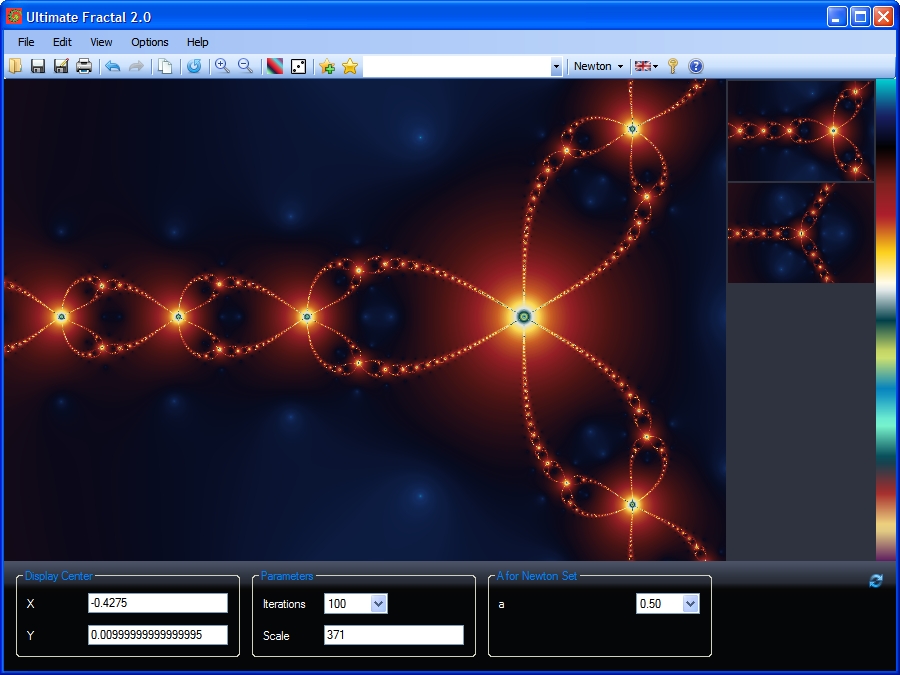 Fractals are intricate and detailed geometric patterns present in almost all things like plants, coast lines, blood veins, clouds, etc. Have you ever thought of modifying or creating new fractal designs suiting your style? If you wish to try designing fascinating fractals for yourself, then you must like trying Ultimate Fractal 1.1 application for the purpose. It comprises of a variety of fractals that you can modify and form new ones. By using the application, you can explore the fantastic world of fractals and generate fractal designs with high quality and resolution. The users even need not know complex math theories for creating new images and enjoy complete fun while using the program. Fractals are intricate and detailed geometric patterns present in almost all things like plants, coast lines, blood veins, clouds, etc. Have you ever thought of modifying or creating new fractal designs suiting your style? If you wish to try designing fascinating fractals for yourself, then you must like trying Ultimate Fractal 1.1 application for the purpose. It comprises of a variety of fractals that you can modify and form new ones. By using the application, you can explore the fantastic world of fractals and generate fractal designs with high quality and resolution. The users even need not know complex math theories for creating new images and enjoy complete fun while using the program.
Ultimate Fractal 1.1 application presents a beautifully designed program interface with the easily usable features. The provides you with a large variety of fractals to explore like eye, bird, elephant, Julia, square, spiral, spider, sunflower, tentacles, and many others. The selected fractal is displayed at the middle screen and you can zoom into any level that also lets you explore new patterns in the existing one. Each closer and new view is recorded by the program and show at the right side of the screen in thumbnail view. The color bar on the extreme right helps you to modify the color pattern of the fractal to give a whole new look. The bottom part of the application consists of ‘Display Center’ that shows the axis position and ‘Parameters’ to set the Iteration and Scale level. You can change Gradient, Randomize Color, Add to Favorites, change the Color Style, etc. Save the fractal as an Image or .fractal file to make further alterations. Further, for the user’s assistance the application includes Help manual.
Ultimate Fractal 1.1 is all fun, and fantastic application to use for creating new fractals or explore the beauty of the existing ones with increasing details.
{More Info and Download}
Rating: Loading... No Comments »
O. James Samson - October 21, 2008
 Screenshot enables you capture your screen picture and edit them with a variety of on-screen text formats which beautifies your screenshots. It really works well for me. There are a couple of features that gives it an edge over HyperSnap & SnagIT. Screenshot enables you capture your screen picture and edit them with a variety of on-screen text formats which beautifies your screenshots. It really works well for me. There are a couple of features that gives it an edge over HyperSnap & SnagIT.
Screenshot Captor is designed for grabbing lots of screenshots with minimal intervention. It has multi monitor support and includes a full image explorer with full shell functionality and unsurpassed integration with external tools like graphic editors, watermarkers, etc. It also supports unique effects not seen in other capture tools including the ability to automatically locate and enhance the active window.
Key features include:
- Optimized for taking lots of screenshots with minimal intervention.
- Smart autonaming of files, and ability to embed textual comments in files.
- Good multi-monitor support.
- Highly configurable to make it work the way you want it to; stays out of your way in the system tray.
- Lots of capture modes: Multimon (multiple monitors), Desktop, Active Window, Region, Windows Object. Each mode has a hotkey for quick access.
- Unique Cool Effects, including automatic active window enhancement (see pictures below).
- Unsurpassed support for 3rd party user configurable tools, including file browsers and image editors; extend the program to do whatever you need by interfacing it with other programs.
- Slimline sidebar file browser provides full shell operations.
- Optional automatic image file versioning.
And much more…
For more info and download check http://www.donationcoder.com/Software/Mouser/screenshotcaptor
Rating: Loading... No Comments »
O. James Samson - October 21, 2008
 I’m sure the first thing that comes to mind when you come across Teen Spirit is maybe some sort of software on youth development or some kind of motivational mumbo jumbo. But to some degree of disappointment, it is one heluva media player. Now this isn’t like most media players where you buy an extra media organizer to organize your files. I’m sure the first thing that comes to mind when you come across Teen Spirit is maybe some sort of software on youth development or some kind of motivational mumbo jumbo. But to some degree of disappointment, it is one heluva media player. Now this isn’t like most media players where you buy an extra media organizer to organize your files.
Teen spirit comes with best-of-its-kind organizer which allows you organize your audio and video files and like with other players, automatically connects to the internet and retrieve info such as biographies, reviews, album covers, and lyrics (can you beat that?). the user interface is so beautiful, you’ll just love looking at it.
Now the best thing about Teen Spirit is that Teen Spirit has been developed in C++ for speed and efficiency so you need not worry about how fast a file is loaded on the media. It automatically creates a playlist of favorite songs depending on how often you play the songs. I can honestly say that this is a make-sensuous player.
Check out more info at http://www.artificialspirit.com
Rating: Loading... No Comments »
O. James Samson - October 21, 2008
 If you’re in the market for an advanced DVD backup software with loads of features and burning options, this is truly a feature-rich product, and certainly one of the best of its kind. If you’re in the market for an advanced DVD backup software with loads of features and burning options, this is truly a feature-rich product, and certainly one of the best of its kind.
I have problem with it though, it is rarely updated. Magic DVD Copier is a DVD copy software, which allows you copy DVD movies to blank DVDs without loss of quality. You can then enjoy it on any PC or home DVD player. And it can also copy DVD movies to your hard drive without loss of quality; you can then enjoy them anytime without DVD discs.
I like the fact that it also does video conversion, but the file formats are limited to M4A, MP4, MPG, AVI, Mp3, WMA, WMV and 3GP. I wish it could do formats like RMVB, VBR, RM and couple others.
Other than the little short comings, it works well for me. Go get yours now.
Key features include:
- Copy DVD movie to blank DVD in 1:1 mode
- Compress a DVD9 movie to a 4.7 GB blank DVD
- Split a DVD9 movie to two 4.7 GB blank DVDs without any loss of quality
- Copy main movie or specified titles only
- Copy DVD movie to hard drive and burn DVD movie from hard drive
- Remove all the restrictions of DVD (CSS, Region, RCE, Sony ARccOS, PuppetLock)
- And lots more
Check it out at Magicdvdripper.com
Rating: Loading... No Comments »
Tilgore Kraut - October 20, 2008
 Track and share your GPS adventures. Record where you have been, add pictures, videos and text and choose to share your adventures online. Track and share your GPS adventures. Record where you have been, add pictures, videos and text and choose to share your adventures online.
Pros: You are back from a vacation/ an adventure trip and you have a load of photographs/videos you have taken on the trip. Now imagine you are bale to show off to friends and family on a 3D map of the world the track of you travel and be able to call up the photographs taken along the way and from the points where they were taken. Important features of this application are it would be possible to directly download tracks from a Garmin or Magellan GPS, edit comments to describe the adventures, drag & drop photos to the track, view adventure on satellite map of the world. These satellite images give the viewer a global perspective. You are able to share video by automatic conversion and upload to YouTube. Track-n-share will automatically position the photos and videos where you have taken them. You can add stories about your adventures. It is up to you to share these with others or keep them private.
The setting up is an easy 1-2-3 process and can be completed easily, quickly. Importing the GPS track, text, media and then sharing is absolutely easy. The community site is supported by ad revenue and thus is free and is to remain so. Recording large adventures with multiple tracks and hundreds of photos is just as easy as preparing a single track and one photo. The track ‘n share solution combines the power of a Windows application and a website to offer you the best of both worlds.
The Windows application allows you to prepare your adventures for uploading and to view your adventures in high-resolution media. The website will offer you the option of sharing adventures with community members, engaging in discussions on the forum and reading about the experiences of other adventurers to get some inspiration for your next destination.
{More Info and Download}
Rating: Loading... No Comments »
Tilgore Kraut - October 20, 2008
 This viewer supports all popular graphic formats, including JPEG, GIF, PNG, BMP, ICO, CUR, ANI, TGA. You can browse images in thumbnail mode, view pictures full screen with zooming features, convert images to JPEG, PNG, BMP formats and manage files. This viewer supports all popular graphic formats, including JPEG, GIF, PNG, BMP, ICO, CUR, ANI, TGA. You can browse images in thumbnail mode, view pictures full screen with zooming features, convert images to JPEG, PNG, BMP formats and manage files.
Pros: This is a image viewer application as well as a image format converter. It displays images in most popular formats. Supported formats are ANI – Animated Cursor, BMP – Windows Bitmap, CUR – Windows Cursor, DCR – Delphi Component Resource, GIF – Compuserve Graphics Interchange Format, ICO – Windows Icon (including Windows XP icons and Windows Vista icons),ICNS – Mac OS (Apple) Icon, JPG – JPEG JFIF Image,,JP2 – JPEG 2000 Image, PCX – PCX Image, PSD – Adobe Photoshop Image, PNG – Portable Network Graphics, PBM – Portable bitmap, RES – Borland resource file, TGA – Targa image, TIF – TIFF image, XBM – X Bitmap, XPM – X Pixmap, WMF – Windows Metafile, WBMP – Wireless Bitmap.
Once you are in the thumbnail mode It lets you quickly browse through your image files. Simply click on the folder you wish to view, and all image files are immediately displayed as thumbnails. Browse through the storage devices to locate the folders you needs. You can display them full size with a double mouse click. Highlighting the image will display a larger image, and double clicking it will show it in the full-screen mode. You can run a slide show to automatically browse all images from folders in the full-screen mode. While input formats for conversion could be any of the above they can be converted to JPEG, PNG, TGA and BMP formats. Create icons from images and attach descriptions to files. You can check image properties in the taskbar and Attach descriptions to files. You can also print, move, copy, duplicate and rename files and copy images to the clipboard. There’re a whole lot of settings that can be made, related to thumbnails, icons, full screen mode and full screen captions and prints. Command line interface is available.
Cons: No particular problems. Some edit facilities would have been nice to have features.
{More Info and Download}
Rating: Loading... No Comments »
|
|
|



 (2 votes, average: 4.50 out of 5)

