O. James Samson - September 16, 2008
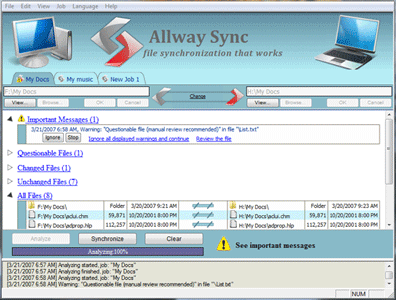 This is a free file and synchronization software for windows. Allway Sync employs innovative synchronization algorithms to synchronize data between laptops, desktop PCs, USB drives and many more. Allway Sync has a fusion of bulletproof reliability and an easy-to-use interface. This is a free file and synchronization software for windows. Allway Sync employs innovative synchronization algorithms to synchronize data between laptops, desktop PCs, USB drives and many more. Allway Sync has a fusion of bulletproof reliability and an easy-to-use interface.
Allway sync has some characteristic features which include:
- Free For Moderate Personal Use
- It does not have any malware, spyware or adware
- It’s free Sync Software (with limitations, check details on vviki.com)
- There is license for business use
- It can be installed on as many computers as you desire
- Easy- To- Use Windows Interface
- Do multiple-folder synchronization routinely with just one click
- Automatic, on-screen, context-sensitive hints
- Simple setup lets you start right away
- Multilingual user interface localized to support more than 30 languages
- Perform Real All-Way File And Folder Synchronization
- File modifications and deletions are tracked in a database
- It supports virtually all file systems
- It Innovative algorithms do not rely on system clock accuracy
- Edition to install on USB drive is available
- True folder synchronization.
The following solutions are proffered by synchronization software
- It synchronizes more than two directories.
- Sync data between your desktop PC and laptop (notebook).
- Updates and back-up files over a local network or the internet.
- Replicate and back-up data between your home and office computers.
- Synchronize removable devices (USB key, flash drive, CDRW) with a local drive and more.
The latest release is Allway Sync version 8.3.1 with major changes of updated language files, bug fixes, Optimized Amazon S3 engine etc.
For more information, check www.vviki.com
Rating:  Loading... No Comments »
Ciaran Moore - September 15, 2008
 Whenever you want to move files across the Net, you usually require FTP. FTP—File Transfer Protocol—is widely used as both the name of how you upload and download files to/from your local computer to/from a remote server, and as the application you utilize to carry out this, known as an FTP Client. (The FTP server is what is at the opposite end of the connection.) Whenever you want to move files across the Net, you usually require FTP. FTP—File Transfer Protocol—is widely used as both the name of how you upload and download files to/from your local computer to/from a remote server, and as the application you utilize to carry out this, known as an FTP Client. (The FTP server is what is at the opposite end of the connection.)
Whenever you upload new pages or files to your website, you’re using FTP to send them there. When you’re downloading files from many places, you’re using FTP to get them to your computer too. There ends our crash course in FTP, but you probably already knew all that, so, on with the show!
Prompt FTP Client is a utility that helps make your FTP file transfers run more easily. It features an easy-to-use connection wizard, which is easy to configure, so you’ll be able to get on with managing your files, instead of being forced to expend a lot of time on figuring out the program. In addition to that, it includes an integrated editor that permits the editing of remote pages without being forced to download them and then upload them again. Worth a go if you’re looking for a plain and simple FTP client.
Download and more info at the homepage
Rating: Loading... 1 Comment »
Ciaran Moore - September 15, 2008
 Are you easily bored? Want some excitement in your life? This program might not offer all that, but it is interesting however, for those of you sick of the usual windows log-in screen and wanting a change. Are you easily bored? Want some excitement in your life? This program might not offer all that, but it is interesting however, for those of you sick of the usual windows log-in screen and wanting a change.
Logon Loader is a small utility that allows you to modify your XP login screen. You can choose to pick a particular screen. Or be random and have Logon Loader select a random screen for you from one of your favorites. Whatever you decide, you won’t have to look at the same old boring screen at login again! You’ll even be able to preview your screens before using them.
If this sounds good to you, head on over to the homepage here to get it, its free!
Rating: Loading... 1 Comment »
Ciaran Moore - September 15, 2008
 Google has always been one to step into unexpected new directions and the new web browser, Google Chrome, is no exception. Google has always been one to step into unexpected new directions and the new web browser, Google Chrome, is no exception.
According to the official Google Chrome site, they’ve aimed to rewrite the typical browser to be faster and a lot more crash proof. This is done by running each tab as a separate process which you can close via a task manager-like interface if that particular page should freeze or have issues. Therefore you can just close that particular page and not have to worry about your entire browser crashing or locking up. You can import data from IE and Firefox such as bookmarks.
The interface is very minimalistic with the address bar/search bar ( they call it the “omnibox”) being an all in one search area. A user can type anything here and instantly get suggestions on where to go, taken from the user’s own browsing history and Google’s rankings of popular sites. Other features include an “Incognito” mode, which lets you surf in a tab without leaving any browser history. This is the first beta of Google Chrome, but i think it’s worth watching as they have some interesting ideas happening that could possibly make this browser very popular in the future.
If you want further info or take it for a test drive yourself, check out the official Google Chrome website.
Rating: Loading... 2 Comments »
O. James Samson - September 11, 2008
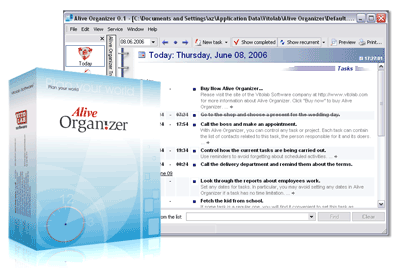 Alive Organizer is a single organizer that serves as a scheduler, reminder maintains an address book, manage personal information, keeps and publish a blog and also forecast weather. Its multipurpose use makes it better than other software. Its simplicity and effectiveness makes it outstanding. Alive Organizer makes it easy to keep personal information, schedule your activities, make notes, creates anniversary and occasion reminders and also helps in blog publishing. Alive Organizer is a single organizer that serves as a scheduler, reminder maintains an address book, manage personal information, keeps and publish a blog and also forecast weather. Its multipurpose use makes it better than other software. Its simplicity and effectiveness makes it outstanding. Alive Organizer makes it easy to keep personal information, schedule your activities, make notes, creates anniversary and occasion reminders and also helps in blog publishing.
Alive Organizer has an uncommon facility that permits you to do several operations it offers and still keep and publish a blog on the internet without having to switch programs.
It gives a timely reminder about events that have been scheduled. It helps in daily, weekly and monthly scheduling of personal tasks and objectives.
Alive Organizer scheduler has been found to save two hours daily if ten minutes is spent on scheduling and looking through previous schedules on each business day. This multipurpose organizer solves the daily problems we encounter in that it saves time as a result of the good time planning it does. It has an in-built task manager that does the scheduling of appointments and other occasions and activities.
Its address book which has over 50 different fields like full name, phone number, photos amongst others saves as many contacts as possible, giving room for easy description of contact as well as easy finding of contact.
Alive Personal blogs give room for the expression of all your emotions in relation to events, meeting on each page of your blog. Pictures and comments could be added to any page of your blog in Alive Organizer. This same organizer permits you to publish a post on popular blog servers and continue the discussion, get replies, meet a lot of users, fans and friends from all over the world.
Alive Organizer is an easy-to-use tool that makes your work easier.
Want to check it out? Visit www.vitolab.com
Rating: Loading... No Comments »
O. James Samson - September 11, 2008
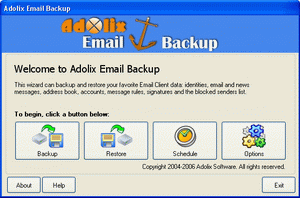 There is an email back up that conveniently backs up email information of top email clients. Data like message rules, emails, accounts, address book, blocked senders lists settings and signatures are backed up by Adolix Email Backup There is an email back up that conveniently backs up email information of top email clients. Data like message rules, emails, accounts, address book, blocked senders lists settings and signatures are backed up by Adolix Email Backup
Adolix Email Backup is beneficial in that it supports Eudora, Incredimail, Outlook express and MS Outlook. Also, all its data is saved to a single, compressed protected file to make it easily restored. It has a special ability to back up Internet Explorer Favorites and Firefox Bookmarks
An internal schedule is present that permits you to back up your email client daily, weekly and as you choose. Another profound advantage it has is that, one back up file can be restored on a different computer or Windows operating system.
Some recent changes in the latest version makes it work on Windows vista, Outlook 2007 and Firefox3.
Want to check it out? Visit http://www.adolix.com/email-backup
Rating: Loading... No Comments »
Ciaran Moore - September 11, 2008
 Fleace is a Flickr-based wallpaper switcher for people who’d like to change their desktop wallpaper on startup, but who dislike letting wallpaper changers linger around in their system tray consuming resources. The stand-alone app may be launched or given a shortcut, which lets the user preview a background before applying it to the desktop and closing Fleace down. Fleace is a Flickr-based wallpaper switcher for people who’d like to change their desktop wallpaper on startup, but who dislike letting wallpaper changers linger around in their system tray consuming resources. The stand-alone app may be launched or given a shortcut, which lets the user preview a background before applying it to the desktop and closing Fleace down.
Alternately, you are able to add Fleace as a run-once app to your startup procedure, It works by pulling images from Fickr based on tags you define.
This little program is a good solution if you are sick of the same old boring background on your desktop and is also ideal for low-memory systems.
Fleace is Freeware. For more information and download check out the homepage.
Rating: Loading... 1 Comment »
admin - September 10, 2008
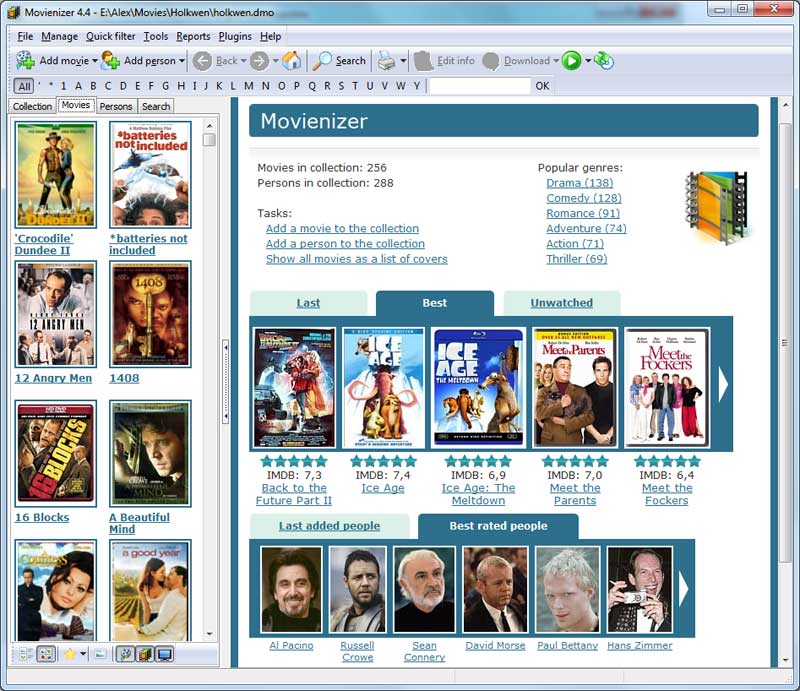 Movienizer 1.8 is a simple and a good movie organizer tool which helps in tracking and researching your personal movie collection. Movienizer 1.8 is a simple and a good movie organizer tool which helps in tracking and researching your personal movie collection.
Pros: If you are a movie buff, Movienizer is a perfect tool to get the movies and the information of the movies well organized. Using the tool you can track and research all the movies that you are interested in. This tool catalogs all your movies, helps you in tracking the movies that you loaned to someone and also helps you in tracking the movies you want to acquire. By just adding a movie name, the tool downloads all the information about that particular movie. If you are not satisfied with the information, you can also edit the info and save it for future reference. You can immediately see what the movie is all about, what others think about it, the movie cast, history of the movie and all the relevant information. If you click on the actor of that movie, the tool displays all other movies of that actor with a brief description of the star.
The tool also lets you download posters and pictures of your favorite actors and movies. With the built-in DVD player you can make your own disc shots and frame snaps. The tool lets you rate movies, download IMDB ratings, and recommend movies according to your taste and preferences. The tool sorts and groups the movies based on any attribute defined. You can group your movies by director or actor. You can sort your movies by titles or by genre. The tool also allows you to customize the grouping or sorting to browse through your collection. The personal movie information’s can also be filtered as Wish Lists, Not Watched, Seen and others. The “loan manager” feature helps keep a track of the movies and who it has been loaned to information. The tool also comes with the facility to build and export the reports in HTML, text, MS Word and MS Excel format.
{More Info and Download}
Rating: Loading... No Comments »
Tilgore Kraut - September 10, 2008
 This is an effective photo manipulation tool with various exciting functions and features. This is an effective photo manipulation tool with various exciting functions and features.
Pros: With BatchPhoto 2.1.3 – photo manipulation tool, you can easily touch-up, annotate, transform, apply effects, and rename hundreds of photos in one go. The tool has a simple wizard driven interface and not only offers batch processing operations but also has a good range of filters and effects that you can add to the pictures. It is an efficient tool that saves your time as well. The tool allows you select a group of pictures, define a series of edits, and apply them. You can annotate the pictures by adding comments, date & time, text watermarks, and image watermarks to the pictures. The application comes in with built in feature to touch-up the pictures by adjusting the brightness, sharpness, contrast, colors, and adjusting noise. Transforming of pictures can be handled by resizing, creating thumbnails, rotating, and cropping.
The tool provides many colorful effects like Sepia, Black & White, Charcoal Sketch, Oil Paint, Shade and Swirl. This tool easily allows you to rename photos with meaningful names and convert pictures from one image format to another in more than 100 image formats. You can also apply profiles on multiple pictures with a right click of the mouse directly from Windows Explorer. The tool also offers a comparative analysis of the snap with all the changes applied and provides advantage of accurate previews for both the original and the enhanced photos. The help provided in the application is useful if you get stuck and is quite interactive.
Overall: This tool has all the functions and features that you would require, if you’re a business user and need to manipulate groups of pictures for a Power Point presentation. Home users who want to organize and rename the family and travel photos or a student who wants to collect and edit images from the Internet can use this. The application is quite user friendly and the speed is good as well.
{More Info and Download}
Rating: Loading... No Comments »
Tilgore Kraut - September 10, 2008
 With Amara Flash Menu Maker you can create professional Flash buttons and menus for your web site fast and easily. Create navigation bars, scrolling menus and sub menus in minutes for your website. With Amara Flash Menu Maker you can create professional Flash buttons and menus for your web site fast and easily. Create navigation bars, scrolling menus and sub menus in minutes for your website.
Pros: Creating the menu and buttons particularly in Flash used to be a specialized job. A job for people with Flash programming capabilities, not any more. This application is able to create these navigation aids easily and quickly for you, even if you do not know a thing about Flash. That includes scrolling menus and submenus too. It is easy to use and lets you make the settings in simple steps and helps create web menus that may have unlimited number of buttons and add submenus to them. Buttons size up automatically based on the text they are required to carry on them. Tools are available to specify the button style, color scheme, spacing between buttons and so on. Set of available buttons are in different styles such as 3D, glossy or a simple flat design.
Choose a color scheme to meet your corporate colors and even the text and font styles that are standardized for all corporate publications. One can have images of his choice as background and even add music/sound effects for mouse over and mouse down events. You could set parameters such as repeat for the background music and volume level for all three cases.
There are some effects available that could be used. These include shadow effects such as shadow shift and shadow transparency, in general transparency effects etc.
{More Info and Download}
Rating: Loading... No Comments »
|
|
|





